Desbloquear PDF em n8n
Desbloquear PDF é um PDF4me ação do nó em n8n que remove a proteção por senha de um PDF Ao fornecer a senha correta, você poderá usá-la para tornar arquivos protegidos legíveis em etapas posteriores do fluxo de trabalho, remover a criptografia de um arquivo compactado de sua propriedade ou desbloquear todos os extratos enviados por um fornecedor sem precisar abri-los um por um.
O que este nó faz
PDF4me: Desbloquear PDF assume um protegido PDF de Dados Binários, um Base64 Stringou um URL, aplica a senha que você fornecer e retorna uma cópia que abre sem aviso. Senha Este campo é obrigatório, portanto, ele desbloqueia documentos que você já está autorizado a abrir, em vez de recuperar uma senha perdida. Sua função usual é ficar no início de um fluxo de trabalho, pois as etapas de extração e conversão não conseguem ler um arquivo criptografado.
Autenticando seu API Solicitar
Todo PDF4me nó em n8n requer um válido Credencial para se conectar comCrie ou selecione um que contenha o seu PDF4me API chave para que o fluxo de trabalho possa autenticar solicitações de desbloqueio com segurança.
Fatos importantes que você não deve perder
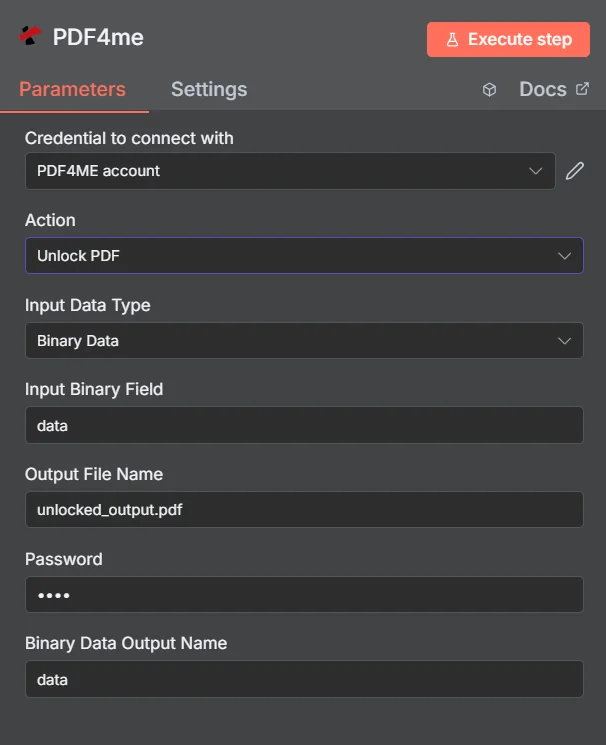
PDF4me Desbloquear PDF painel de parâmetros em n8n
Desbloquear PDF vs Proteger Documento
Essas duas ações são opostas, e os fluxos de trabalho frequentemente usam ambas: desbloquear um arquivo recebido para lê-lo e, em seguida, proteger novamente o resultado antes que ele seja enviado novamente.
| Aspecto | Desbloquear PDF | Proteger documento |
|---|---|---|
| What it does | Removes existing password protection | Applies password protection |
| Password you supply | The current password on the document | The new password you want to set |
| Typical position | First step, so later nodes can read the file | Last step, before the file is sent or stored |
| Prerequisite | You must already know the password | None beyond the source document |
Quais parâmetros o Unlock permite? PDF Precisar?
Obrigatório: Ação, Tipo de Dados de Entrada, o campo correspondente a esse tipo de entrada, Nome do Arquivo de Saída e Senha. O Nome da Saída de Dados Binários e os Perfis Personalizados possuem valores padrão funcionais.
| Parâmetro | Obrigatório | O que faz | Exemplo |
|---|---|---|---|
| Action | Required | Selects the PDF4me node action to run. Choose Unlock PDF. | Unlock PDF |
| Input Data Type | Required | Format of the source PDF input. Choose Binary Data (from a previous node), Base64 String, or URL. | Binary Data |
| Input Binary Field | Conditional | Name of the binary property on the incoming n8n item that holds the protected PDF. Required when Input Data Type is Binary Data. Defaults to data. | data |
| Base64 Document Content | Conditional | Base64-encoded content of the protected PDF. Required when Input Data Type is Base64 String. | JVBERi0xLjQK... |
| File URL | Conditional | Publicly reachable HTTPS URL to the protected PDF. Required when Input Data Type is URL. | https://example.com/statement.pdf |
| Output File Name | Required | Filename for the unlocked PDF returned by the node. Include the .pdf extension. | unlocked_output.pdf |
| Password | Required | The current password on the document. Shown masked in the panel. Reference a credential or environment variable rather than typing the secret into a saved workflow. | {{ $env.PDF_PASSWORD }} |
| Binary Data Output Name | Optional | Name of the binary property the output item exposes. Defaults to data. | data |
| Custom Profiles | Optional | Advanced Options field for extra processing settings, supplied in a JSON-like format. Leave blank unless you have a specific profile to apply. | { "preserveMetadata": true } |
Campos de saída
Uma corrida bem-sucedida retorna um n8n item que carrega o desbloqueado PDF.
| Campo | Tipo | O que contém |
|---|---|---|
Binary (data) | Binary | The unlocked PDF, under Binary Data Output Name (default data). |
fileName | String | Generated filename, matching Output File Name. |
docName | String | Name of the processed document, for reference and tracking. |
mimeType | String | MIME type of the output, always application/pdf. |
fileSize | Number | Size of the returned PDF in bytes. |
isUnlocked | Boolean | Confirms the document was unlocked. A useful assertion before handing the file to an extraction step. |
securityRemoved | Boolean | Confirms password protection and access restrictions were removed. |
success | Boolean | True when the unlock completed, false on failure such as a wrong password. Use it to branch error handling. |
message | String | Human-readable status message, carrying success confirmation or error detail. |
Como faço para configurar o desbloqueio? PDF em n8n?
- Adicionar PDF4me para o seu n8n fluxo de trabalho e escolha o Desbloquear PDF Ação.
- Em Credencial para se conectar com, selecione o seu PDF4me credencial ou clique Criar nova credencial e cole o seu API chave.
- Definir Tipo de dados de entrada para Dados binários (padrão), Base64 String, ou URL e forneça a fonte correspondente. PDF campo.
- Definir Nome do arquivo de saída para o arquivo desbloqueado, terminando em
.pdf. - Insira o documento SenhaIdealmente, como uma expressão que lê uma credencial ou variável de ambiente.
- Deixar Nome da saída de dados binários como
dataa menos que um nó posterior espere uma propriedade diferente. - Execute o nó e direcione o desbloqueado. PDF para a próxima etapa, como extração, conversão ou armazenamento.
Configurações típicas
Exemplos de fluxo de trabalhoCommon n8n workflow patterns using Unlock PDF.
- A fatura chega por e-mail, protegida por uma senha conhecida.
- Desbloquear PDF Remove a proteção usando um segredo armazenado.
- Uma etapa de extração de tabela lê as transações para uma planilha.
- Todos os documentos antigos em uma unidade compartilhada têm a mesma senha antiga.
- Desbloquear PDF Executa o comando em cada arquivo durante um lote de migração.
- As cópias desprotegidas são inseridas no novo sistema de documentos, onde podem ser pesquisadas.
- Desbloquear PDF Abre um documento protegido recebido.
- O fluxo de trabalho carimba, mescla ou edita o arquivo legível.
- O recurso Proteger Documento aplica uma nova senha antes de reenviá-lo.
- Desbloquear PDF tenta a senha armazenada em cada arquivo recebido.
- Um nó IF testa o valor retornado. success e os campos isUnlocked.
- As falhas geram um alerta, para que uma senha alterada seja detectada imediatamente.
Dicas práticas
Folha de dicas
| Campo | Valor |
|---|---|
| Action | Unlock PDF |
| Input Data Type | Binary Data |
| Input Binary Field | data |
| Output File Name | unlocked_output.pdf |
| Password | {{ $env.PDF_PASSWORD }} |
| Binary Data Output Name | data |
| Credentials | PDF4me API credential |