Remover cabeçalho e rodapé de Excel em n8n
Remover cabeçalho/rodapé é um PDF4me Excel operação em n8n que limpa as seções esquerda, central e direita de Excel Crie cabeçalhos e rodapés independentemente, em uma única planilha ou em toda a pasta de trabalho. Use essa ferramenta para remover a identidade visual antiga antes de uma reformulação, limpar modelos para reutilização ou higienizar marcas internas antes de enviar uma pasta de trabalho para um cliente.
O que este nó faz
PDF4me ExcelRemover cabeçalho/rodapé limpa Excel Cabeçalhos e rodapés de página seção por seção. Seis botões independentes controlam as posições esquerda, central e direita do cabeçalho e do rodapé, permitindo remover um logotipo de um canto sem alterar o número da página em outro. O campo "Nome da Planilha de Destino" aplica a remoção a uma única planilha ou a todas as planilhas, se deixado em branco.
Autenticando seu API Solicitar
Todo PDF4me nó em n8n requer um válido Credencial para se conectar comCrie ou selecione um que contenha o seu PDF4me API chave para que o fluxo de trabalho possa autenticar solicitações de limpeza com segurança.
Fatos importantes que você não deve perder
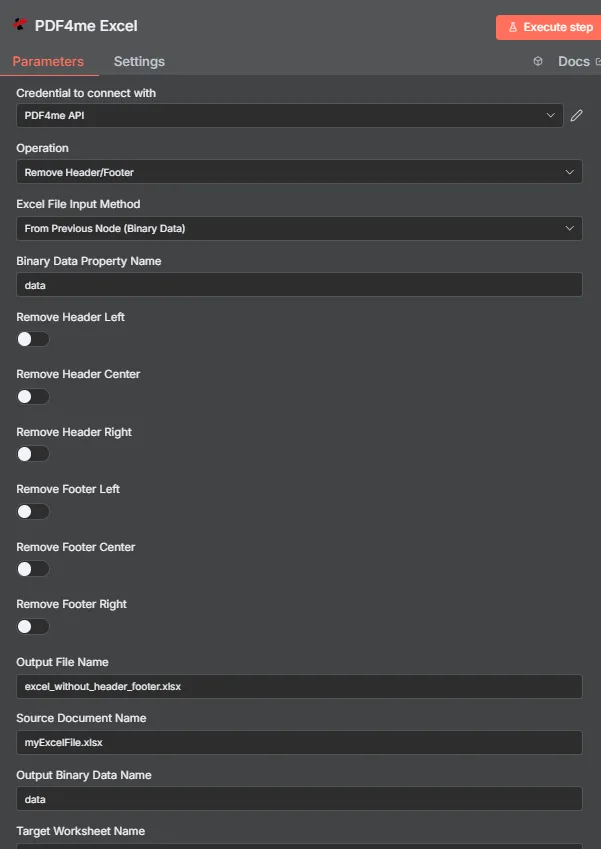
PDF4me Excel Remover o painel de parâmetros de cabeçalho/rodapé em n8n
Quais parâmetros são necessários para remover o cabeçalho/rodapé?
Obrigatório: Operação, Excel Método de entrada de arquivo, o campo de entrada correspondente a esse método e Nome do arquivo de saída. Todas as seis opções de remoção de seção estão desativadas por padrão, e Nome da planilha de destino, Nome da cultura, Nome do documento de origem e Nome dos dados binários de saída são opcionais.
| Parâmetro | Obrigatório | O que faz | Exemplo |
|---|---|---|---|
| Operation | Required | Selects the PDF4me Excel action to run. Choose Remove Header/Footer. | Remove Header/Footer |
| Excel File Input Method | Required | How the workbook reaches the node. From Previous Node (Binary Data) reads it from an upstream item; the dropdown also offers base64 and file URL alternatives. | From Previous Node (Binary Data) |
| Binary Data Property Name | Conditional | Name of the binary property on the incoming n8n item holding the .xlsx workbook. Applies when the input method is binary data. Defaults to data. | data |
| Remove Header Left | Optional | Clears the left section of the page header. Default false. | true |
| Remove Header Center | Optional | Clears the center section of the page header. Default false. | true |
| Remove Header Right | Optional | Clears the right section of the page header. Default false. | false |
| Remove Footer Left | Optional | Clears the left section of the page footer. Default false. | true |
| Remove Footer Center | Optional | Clears the center section of the page footer. Default false. | true |
| Remove Footer Right | Optional | Clears the right section of the page footer. Default false. | false |
| Output File Name | Required | Filename for the cleaned workbook the node returns. Include the .xlsx extension. | excel_without_header_footer.xlsx |
| Source Document Name | Optional | Reference label for the incoming workbook. Echoed back as originalFileName for tracking; it does not change the output. | myExcelFile.xlsx |
| Output Binary Data Name | Optional | Name of the binary property the output item exposes. Defaults to data. | data |
| Target Worksheet Name | Optional | Name of the single worksheet to process. Leave blank to apply the removal to every worksheet. | Sheet1 |
| Culture Name | Optional | Locale used while processing the workbook, relevant when header or footer text includes locale-sensitive placeholders. | en-US |
Campos de saída
Uma corrida bem-sucedida retorna um n8n item carregando JSON metadados mais a planilha limpa como dados binários.
| Campo | Tipo | O que contém |
|---|---|---|
success | Boolean | True when the removal ran successfully. Use it to route error-handling branches. |
fileName | String | Filename of the cleaned workbook, matching Output File Name. |
fileSize | Number | Size of the returned workbook in bytes. |
originalFileName | String | The value supplied in Source Document Name, echoed back for tracking. |
removeHeaderLeft | Boolean | Whether the left header section was removed. |
removeHeaderCenter | Boolean | Whether the center header section was removed. |
removeHeaderRight | Boolean | Whether the right header section was removed. |
removeFooterLeft | Boolean | Whether the left footer section was removed. |
removeFooterCenter | Boolean | Whether the center footer section was removed. |
removeFooterRight | Boolean | Whether the right footer section was removed. |
worksheetName | String | The worksheet the removal targeted, matching Target Worksheet Name. |
applyToAllWorksheets | Boolean | True when the removal applied to every worksheet, false when only the named worksheet was processed. |
message | String | Human-readable result message for the operation. |
Binary (data) | Binary | The cleaned .xlsx under Output Binary Data Name (default data). Pass into Write Binary File, Email, or a cloud-storage upload. |
N8N Resposta à ação
- JSON
- Schema
- Binary
JSON Formato de resposta
[
  {
    "fileName": "excel_without_header_footer.xlsx",
    "fileSize": 212810,
    "success": true,
    "originalFileName": "myExcelFile.xlsx",
    "removeHeaderLeft": false,
    "removeHeaderCenter": false,
    "removeHeaderRight": false,
    "removeFooterLeft": false,
    "removeFooterCenter": false,
    "removeFooterRight": false,
    "worksheetName": "Sheet1",
    "applyToAllWorksheets": false,
    "message": "Header and footer removed from Excel file successfully"
  }
]
Visão do esquema
1 item
fileName: T excel_without_header_footer.xlsx
fileSize: # 212810
success: true
originalFileName: T myExcelFile.xlsx
removeHeaderLeft: false
removeHeaderCenter: false
removeHeaderRight: false
removeFooterLeft: false
removeFooterCenter: false
removeFooterRight: false
worksheetName: T Sheet1
applyToAllWorksheets: false
message: T Header and footer removed from Excel file successfully
Indicadores de tipo: T = String, # = Number.
Visualização de Dados Binários
data
File Name: excel_without_header_footer.xlsx
File Extension: xlsx
Mime Type: application/vnd.openxmlformats-officedocument.spreadsheetml.sheet
File Size: 212.8 kB
Acesso a dados binários: Acesse o livro de exercícios em $binary.data.dataPronto para download, envio por e-mail ou armazenamento.
Como faço para configurar a remoção do cabeçalho/rodapé? n8n?
- Adicione o PDF4me Excel Adicione um nó ao seu fluxo de trabalho e configure-o. Operação para Remover cabeçalho/rodapé.
- Em Credencial para se conectar com, selecione o seu PDF4me API credencial ou crie uma com a sua API chave.
- Definir Excel Método de entrada de arquivo para Do nó anterior (dados binários) e definir Nome da propriedade de dados binários para a propriedade que contém o caderno de exercícios, normalmente
data. - Ative as opções de seção que você precisa: Remover cabeçalho à esquerda, Centro, Certo e Remover rodapé à esquerda, Centro, Certo.
- Definir Nome da planilha alvo Para uma folha específica ou deixe em branco para toda a pasta de trabalho.
- Opcionalmente configurado Nome da cultura para texto de cabeçalho ou rodapé sensível à localização.
- Definir Nome do arquivo de saída terminando em
.xlsx, execute o nó e encaminhe a planilha limpa adiante.
Configurações típicas
Exemplos de fluxo de trabalhoCommon n8n workflow patterns using Remove Header/Footer for Excel.
- Um processo em lote extrai modelos de relatórios legados de uma unidade compartilhada.
- A opção Remover Cabeçalho/Rodapé é executada em conjunto com as opções Remover Centro do Cabeçalho e Remover Centro do Rodapé para apagar o texto do logotipo antigo.
- PDF4me Excel Adicionar cabeçalho e rodapé de texto aplica a nova identidade visual posteriormente.
- Um webhook é acionado quando um relatório é marcado como pronto para entrega externa.
- Remover Cabeçalho/Rodapé limpa a opção Remover Cabeçalho à Esquerda, onde as iniciais do revisor interno estavam localizadas.
- A versão higienizada da apostila é enviada por e-mail ao cliente.
- A planilha do projeto concluída é copiada para uma pasta de modelos.
- Todas as seis opções de alternância de seção são executadas corretamente, apagando todas as seções de cabeçalho e rodapé.
- O modelo de cabeçalho em branco é armazenado para o próximo projeto.
- Uma planilha com várias abas contém abas com dados brutos e uma aba de resumo.
- O nome da planilha de destino está definido como "Resumo", para que as guias de dados brutos mantenham seus cabeçalhos.
- A planilha de resumo limpa é exportada para PDF para distribuição.
Dicas práticas
Folha de dicas
| Campo | Valor |
|---|---|
| Operation | Remove Header/Footer |
| Excel File Input Method | From Previous Node (Binary Data) |
| Binary Data Property Name | data |
| Remove Header Left / Center / Right | true / true / false (example) |
| Remove Footer Left / Center / Right | true / true / false (example) |
| Target Worksheet Name | (blank for all worksheets) |
| Culture Name | en-US |
| Output File Name | excel_without_header_footer.xlsx |
| Source Document Name | myExcelFile.xlsx |
| Output Binary Data Name | data |
| Credentials | PDF4me API credential |