Adicionar linhas a um Excel Folha de exercícios em n8n
Adicionar linhas é um PDF4me ação do nó em n8n que escreve JSON registros em um Excel planilha. Use-a para pressionar API os resultados em um relatório, registre os payloads do webhook em uma pasta de trabalho compartilhada ou anexe-os. CRM Exporta para uma planilha de controle, com números e datas registrados como dados reais. Excel valores em vez de texto.
O que este nó faz
PDF4me ExcelAdicionar linhas pega um existente .xlsx caderno de exercícios mais um JSON matriz em JSON Dados da linhae escreve uma linha por objeto. Possui dois modos de posicionamento: nomeie uma tabela em Alvo Excel Mesa e as chaves são correspondidas aos cabeçalhos, ou deixe em branco e Inserir da linha mais Inserir da coluna Defina a célula inicial exata. Ela edita uma planilha que você fornece, em vez de criar uma do zero.
Autenticando seu API Solicitar
Todo PDF4me nó em n8n requer um válido Credencial para se conectar comCrie ou selecione um que contenha o seu PDF4me API chave para que o fluxo de trabalho possa autenticar solicitações de planilhas com segurança.
Fatos importantes que você não deve perder
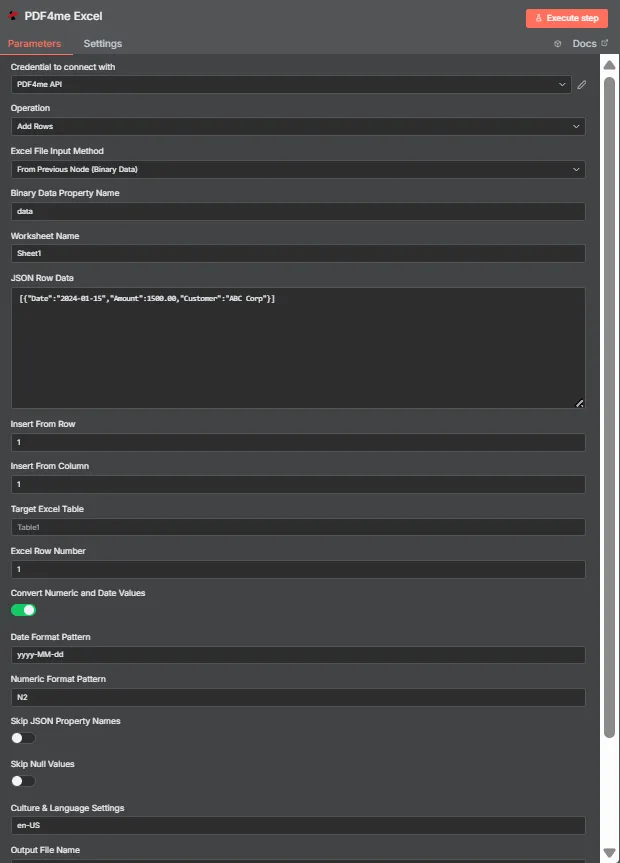
JSON Os dados da linha contêm um JSON Conjunto de objetos planos. Alvo Excel A tabela está vazia aqui, então Inserir da Linha e Inserir da Coluna colocam os dados na célula A1.
Modo de tabela vs. Modo de coordenadas
| Pergunta | Modo de tabela | Modo de coordenadas |
|---|---|---|
| How you switch to it | Name a table in Target Excel Table | Leave Target Excel Table blank |
| How columns are matched | JSON keys matched against table headers | Values written in key order from the start cell |
| Does column order matter | No, headers drive placement | Yes, position drives placement |
| Which fields control it | Target Excel Table and Excel Row Number | Insert From Row and Insert From Column |
| Best for | Structured sheets that already have a table | Blank sheets or a fixed reporting layout |
| Overwrite risk | Lower, rows follow the table structure | Higher, the start cell is written to directly |
Quais parâmetros são necessários para adicionar linhas?
| Parâmetro | Obrigatório | O que faz | Exemplo |
|---|---|---|---|
| Credential to connect with | Required | The PDF4me API credential the node authenticates with. | PDF4me API |
| Operation | Required | The action this node performs. Select Add Rows. | Add Rows |
| Excel File Input Method | Required | How the workbook reaches the node: from the previous node as binary data, as a Base64 string, or from a URL. | From Previous Node (Binary Data) |
| Binary Data Property Name | Conditional | Name of the binary property holding the .xlsx. Appears when the workbook comes from the previous node. | data |
| Worksheet Name | Required | Sheet the rows are written to. Match the sheet tab name exactly. | Sheet1 |
| JSON Row Data | Required | JSON array of flat objects. Each object becomes one row and each key maps to a column. | [{"Date":"2024-01-15","Amount":1500.00}] |
| Insert From Row | Conditional | Row number the data starts at, counting from 1. Used in coordinate mode when no table is named. | 1 |
| Insert From Column | Conditional | Column number the data starts at, counting from 1 for column A. Used in coordinate mode. | 1 |
| Target Excel Table | Optional | Name of an existing table to write into. Filling this in switches the node to header matching instead of coordinates. | Table1 |
| Excel Row Number | Conditional | Row index inside the named table where insertion begins. Used in table mode. | 1 |
| Convert Numeric and Date Values | Optional | Toggle that turns numeric and date strings into real Excel values rather than text. Ships enabled. | enabled |
| Date Format Pattern | Optional | Pattern applied to converted dates. Match it to the shape of the dates in your JSON. | yyyy-MM-dd |
| Numeric Format Pattern | Optional | Format applied to converted numbers, such as two decimal places. | N2 |
| Skip JSON Property Names | Optional | Toggle that omits the JSON keys, writing only values. Ships disabled so headers are included. | disabled |
| Skip Null Values | Optional | Toggle that leaves cells untouched where a JSON value is null instead of clearing them. Ships disabled. | disabled |
| Culture and Language Settings | Optional | Culture code used when parsing numbers and dates, which decides separator handling. | en-US |
| Output File Name | Optional | Filename of the returned workbook. Keep a valid Excel extension. | excel_with_rows.xlsx |
Saída
| Campo | Tipo | O que contém |
|---|---|---|
| fileName | String | Name of the returned workbook after the rows were written. |
| fileSize | Number | Size of the returned workbook in bytes. |
| success | Boolean | Whether the insertion completed. Branch on this so failures surface as alerts. |
| originalFileName | String | Name of the input workbook as supplied to the node. |
| worksheetName | String | The worksheet the rows were written to. |
| rowsAdded | Number | How many rows were inserted. The most useful verification signal the node returns. |
| insertFromRow | Number | Starting row used, echoed back when running in coordinate mode. |
| insertFromColumn | Number | Starting column used, echoed back when running in coordinate mode. |
| tableName | String | The table written into, or null when coordinate mode was used. |
| excelRowNumber | Number | Row index inside the table where insertion began, in table mode. |
| convertNumericAndDate | Boolean | Whether numeric and date conversion was applied. |
| dateFormat | String | The date pattern applied during conversion. |
| numericFormat | String | The numeric format applied during conversion. |
| cultureName | String | The culture code used to parse numbers and dates. |
| message | String | Human-readable summary, including the row count and worksheet name. |
A planilha atualizada é retornada como dados binários, pronta para ser gravada em um dispositivo de armazenamento, anexada a um e-mail ou utilizada em outra aplicação. Excel etapa.
Como faço para configurar a adição de linhas em n8n?
- Adicione o PDF4me Excel Adicione um nó ao seu fluxo de trabalho e configure-o. Operação para Adicionar linhas.
- Selecione o seu PDF4me credencial, ou crie uma e cole a sua API chave.
- Escolha um Excel Método de entrada de arquivo e forneça a planilha através do campo que aparece abaixo dela.
- Definir Nome da folha de exercícios para a aba exata da planilha em que você está escrevendo.
- Coloque um JSON matriz de objetos planos em JSON Dados da linha, um objeto por linha.
- Para usar o modo de tabela, insira o nome da tabela em Alvo Excel Mesa e definir Excel Linha NumberPara usar coordenadas, deixe a tabela em branco e defina Inserir da linha e Inserir da coluna.
- Deixar Converter valores numéricos e de data ativado, em seguida, configure Padrão de formato de data, Padrão de formato numérico, e Contextos culturais e linguísticos para corresponder aos seus dados.
- Definir Nome do arquivo de saída, execute o nó e verifique
rowsAddedna resposta, antes de encaminhar a planilha adiante.
Configurações típicas
Exemplos de fluxo de trabalhoCommon n8n workflow patterns using Add Rows.
- Um webhook recebe um envio de formulário como JSON.
- A opção Adicionar Linhas anexa os dados a uma tabela nomeada em uma pasta de trabalho compartilhada.
- A equipe lê a planilha sem que ninguém precise digitar os dados novamente.
- Um agendado HTTP A solicitação extrai registros de um banco de dados interno. API.
- Um nó de código transforma a resposta em uma matriz simples.
- A opção Adicionar Linhas insere os dados no modelo de relatório em coordenadas fixas.
- Um emprego noturno oferece novas oportunidades, pois JSON.
- O modo de tabela relaciona as chaves aos cabeçalhos existentes.
- Alterações na ordem das colunas na fonte não quebram a planilha.
- A função Adicionar Linhas retorna as linhas adicionadas juntamente com a planilha.
- Um nó IF compara o valor com o comprimento da matriz de entrada.
- Uma incompatibilidade gera um alerta em vez de enviar um relatório resumido.
Dicas práticas
Folha de dicas
| Campo | Valor |
|---|---|
| Operation | Add Rows |
| Excel File Input Method | From Previous Node (Binary Data) |
| Binary Data Property Name | data |
| Worksheet Name | Sheet1 |
| JSON Row Data | [{"Date":"2024-01-15","Amount":1500.00}] |
| Insert From Row / Column | 1 / 1 |
| Target Excel Table | Table1 |
| Excel Row Number | 1 |
| Convert Numeric and Date Values | enabled |
| Date Format Pattern | yyyy-MM-dd |
| Numeric Format Pattern | N2 |
| Culture and Language Settings | en-US |
| Output File Name | excel_with_rows.xlsx |