Sobreposição PDFs em n8n
Sobreposição PDFs é um PDF4me ação do nó em n8n que coloca um PDF em cima de outra, combinando ambas no mesmo. pages Em vez de anexá-las, use-o para imprimir um cabeçalho personalizado sobre o conteúdo gerado, aplicar uma moldura de certificado ou sobrepor um modelo aprovado a um documento recebido sem adicionar uma única página.
O que este nó faz
PDF4me: Sobreposição PDFs leva dois PDFs, um base que serve de pano de fundo e um camada que fica por cima e retorna um único documento onde ambos aparecem no mesmo pagesCada arquivo possui seu próprio tipo de entrada, portanto, a base pode vir de um nó anterior como Dados Binários, enquanto a camada é extraída de um... URLAo contrário da mesclagem, o número de páginas não aumenta, o que a torna a ferramenta ideal para papéis timbrados, molduras e carimbos de modelo.
Autenticando seu API Solicitar
Todo PDF4me nó em n8n requer um válido Credencial para se conectar comCrie ou selecione um que contenha o seu PDF4me API chave para que o fluxo de trabalho possa autenticar solicitações de sobreposição com segurança.
Fatos importantes que você não deve perder
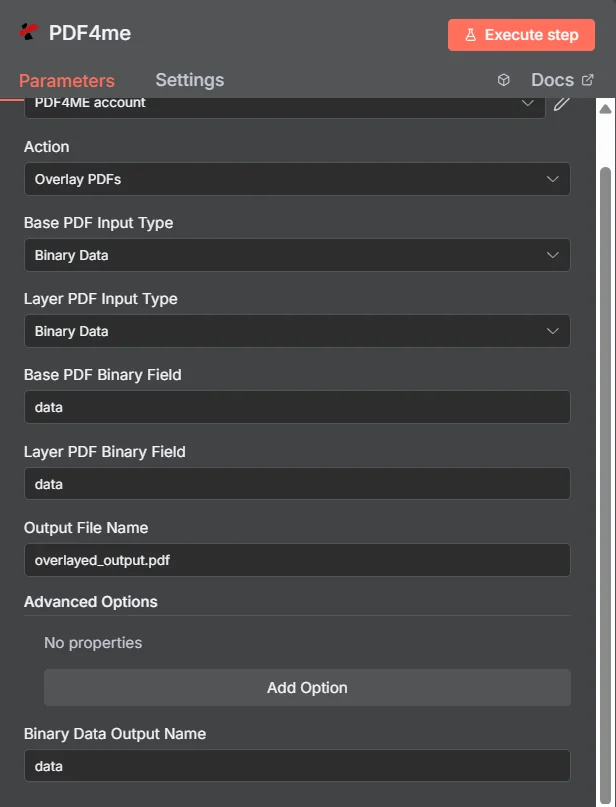
PDF4me Sobreposição PDFs painel de parâmetros em n8n, com ambos os tipos de entrada definidos como Dados Binários
Sobreposição vs. Mesclagem vs. Marca d'água
Três maneiras de adicionar conteúdo extra a um PDF, cada um produzindo um documento diferente.
| Abordagem | Efeito sobre o pages | Melhor ajuste |
|---|---|---|
| Overlay PDFs | Both documents appear on the same pages, page count unchanged | Branding that already exists as a designed PDF, such as a letterhead or certificate frame |
| Merge PDFs | Documents follow one another, page counts add up | Content that genuinely belongs in sequence as one longer document |
| Add watermark | Simple text or a single image drawn onto the existing pages | A short notice such as DRAFT or CONFIDENTIAL, where no designed PDF layer exists |
Quais parâmetros a sobreposição utiliza? PDFs Precisar?
Obrigatório: A ação, ambos os tipos de entrada, o campo de origem correspondente a cada tipo de entrada e o nome do arquivo de saída. O nome de saída de dados binários e qualquer item em Opções avançadas possuem valores padrão funcionais.
| Parâmetro | Obrigatório | O que faz | Exemplo |
|---|---|---|---|
| Action | Required | Selects the PDF4me node action to run. Choose Overlay PDFs. | Overlay PDFs |
| Base PDF Input Type | Required | Format of the background PDF. Choose Binary Data, Base64 String, or URL. Independent of the layer setting. | Binary Data |
| Layer PDF Input Type | Required | Format of the PDF placed on top. Choose Binary Data, Base64 String, or URL. Independent of the base setting. | Binary Data |
| Base PDF Binary Field | Conditional | Name of the binary property holding the base PDF. Required when Base PDF Input Type is Binary Data. | data |
| Layer PDF Binary Field | Conditional | Name of the binary property holding the layer PDF. Required when Layer PDF Input Type is Binary Data. | data |
| Base PDF Base64 Content | Conditional | Base64-encoded content of the base PDF. Required when Base PDF Input Type is Base64 String. | JVBERi0xLjQK... |
| Layer PDF Base64 Content | Conditional | Base64-encoded content of the layer PDF. Required when Layer PDF Input Type is Base64 String. | JVBERi0xLjQK... |
| Base PDF File URL | Conditional | Publicly reachable HTTPS URL to the base PDF. Required when Base PDF Input Type is URL. | https://example.com/base.pdf |
| Layer PDF File URL | Conditional | Publicly reachable HTTPS URL to the layer PDF. Required when Layer PDF Input Type is URL. | https://example.com/letterhead.pdf |
| Output File Name | Required | Filename for the combined PDF. Include the .pdf extension. | overlayed_output.pdf |
| Binary Data Output Name | Optional | Name of the binary property the output item exposes. Defaults to data. | data |
| Advanced Options | Optional | Collection for extra processing settings, added with Add Option. Leave empty unless you have a specific requirement. | No properties |
Campos de saída
Uma corrida bem-sucedida retorna um n8n item que carrega o combinado PDF.
| Campo | Tipo | O que contém |
|---|---|---|
Binary (data) | Binary | The combined PDF with the layer placed over the base, under Binary Data Output Name (default data). |
fileName | String | Generated filename, matching Output File Name. |
mimeType | String | MIME type of the output, always application/pdf. |
fileSize | Number | Size of the combined PDF in bytes. |
docName | String | Document name reference for the processed file, matching fileName. |
overlayCompleted | Boolean | Confirms the overlay operation finished, useful as an explicit check that the layer was applied. |
layersProcessed | Number | Count of PDF layers combined into the final document. |
success | Boolean | True when the operation completed, false on failure. Use it to branch error handling. |
message | String | Human-readable status message, carrying success confirmation or error detail. |
Como configuro a sobreposição? PDFs em n8n?
- Adicionar PDF4me para o seu n8n fluxo de trabalho e escolha o Sobreposição PDFs Ação.
- Em Credencial para se conectar com, selecione o seu PDF4me credencial ou clique Criar nova credencial e cole o seu API chave.
- Definir Base PDF Tipo de entrada e Camada PDF Tipo de entradaEles são independentes, portanto cada arquivo pode chegar de forma diferente.
- Preencha os campos de origem correspondentes, por exemplo. Base PDF Campo Binário e Camada PDF Campo Binário, ambos com o valor padrão de
data. - Definir Nome do arquivo de saída (deve terminar em
.pdf). - Execute o nó e direcione o tráfego combinado. PDF, exposto sob Nome da saída de dados binários, para a próxima etapa.
Configurações típicas
Exemplos de fluxo de trabalhoCommon n8n workflow patterns using Overlay PDFs.
- Um documento é gerado a partir de um modelo sem qualquer marca d'água.
- Sobreposição PDFs Aplica o cabeçalho aprovado. PDF retirado de um URL como a camada.
- O resultado final, com a marca, é enviado sem que um designer o tenha tocado.
- Os dados de conclusão do curso produzem um resultado simples. PDF com o nome do destinatário.
- Sobreposição PDFs Coloca a borda do certificado desenhada sobre ele.
- Cada certificado finalizado é enviado por e-mail ao destinatário.
- Um documento conclui uma etapa de aprovação no fluxo de trabalho.
- Sobreposição PDFs Aplica uma camada de carimbo pré-desenhada e aprovada.
- A cópia autenticada é arquivada no sistema de registros.
- Um nó "Loop Over Items" itera sobre uma pasta de documentos recebidos de fornecedores.
- Sobreposição PDFs aplica a mesma camada PDF de um URL a cada um deles.
- Todos os documentos entram no arquivo com enquadramento consistente.
Dicas práticas
Folha de dicas
| Campo | Valor |
|---|---|
| Action | Overlay PDFs |
| Base PDF Input Type | Binary Data |
| Layer PDF Input Type | Binary Data |
| Base PDF Binary Field | data |
| Layer PDF Binary Field | data |
| Output File Name | overlayed_output.pdf |
| Binary Data Output Name | data |
| Advanced Options | No properties |
| Credentials | PDF4me API credential |