Word の目次を更新するには、 Zapier
目次を更新 は Zapier アクション PDF4me リフレッシュまたは作成する TOC Word 文書内のフィールドで、既存の TOC 見つからない場合は新しいものを生成します。レポートの編集後、手動での公開後、またはドキュメントの組み立て後にこれを実行することで、ファイルを送信する前に見出しレベル、ハイパーリンク、ページ番号の正確性を維持できます。
認証方法 API リクエスト?
アクセスするには PDF4me ウェブ API を通して Zapierすべてのリクエストには適切な認証情報を含める必要があります。認証により安全な通信が保証され、承認されたユーザーとしての身元が検証され、シームレスな統合が可能になります。 Zapier ワークフローと PDF4meの力強い言葉 TOC 経営管理サービス。
見逃してはならない重要な事実
設定概要
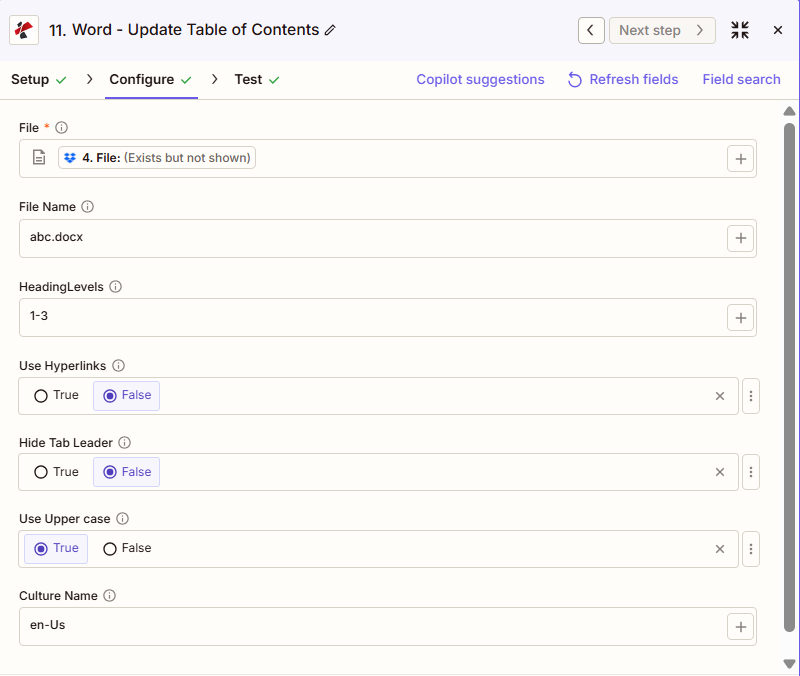
スクリーンショットには、前の手順でマッピングされたファイルが表示されています。ファイル名は「abc.docx」、見出しレベルは「1-3」、ハイパーリンクの使用とタブリーダーの非表示は「False」、大文字の使用は「True」、カルチャ名は「en-Us」に設定されています。
ステップからのマップ
1-3
間違い
間違い
真実
:::ヒント 前の手順のマップファイルを使用します + 隣のボタン ファイル そして ファイル名以前のZapステップ(例:Googleドライブ、Dropbox、またはトリガー)からマッピングします。Wordファイルには完全なコンテンツが含まれている必要があり、「存在するが表示されない」参照は認められません。 :::
:::警告 ファイル: (存在しますが表示されません) ファイルフィールドに「ファイル: (存在しますが表示されません)」と表示され、エラーが発生した場合は、 ファイルの内容全体 代わりに。参照 Zapier & Power Automate ヒント詳細は :::
パラメータ
目次更新アクションのパラメーターの完全なリスト。パラメーター名は、 Zapier 構成 UI。
必須 Zapier UI: ファイルのみ。ファイル名、見出しレベル、ハイパーリンクの使用、タブリーダーの非表示、大文字の使用、カルチャ名はすべてオプションです。
| パラメータ | 必須 | その機能 | 例 |
|---|---|---|---|
| File | Required | Word document content, mapped from a previous step using full file content. | [4. File from Step 4] |
| File Name | Optional | Filename with .docx or .doc extension, used for output naming. | abc.docx |
| HeadingLevels | Optional | Range of heading levels to include in the TOC, from 1 through 6. Defaults to 1-3. | 1-3 |
| Use Hyperlinks | Optional | Boolean toggle for clickable TOC entries that jump to each heading. | False |
| Hide Tab Leader | Optional | Boolean toggle to hide the dot leaders between TOC text and page numbers. | False |
| Use Upper case | Optional | Boolean toggle to render TOC entry text in uppercase. | True |
| Culture Name | Optional | Culture or locale code affecting language and formatting conventions. Defaults to en-Us. | en-Us |
| File Name | Optional | Name of the Word document, including its extension (for example `report.docx`). | |
出力にはどのようなフィールドが含まれますか?
このアクションは、変更された Word 文書と追跡メタデータを返します。この出力形式は、 PDF4me 言葉の動作 Zapier ファイルを返すもの。
| 分野 | タイプ | 内容物 |
|---|---|---|
jobId | Text | ID of the PDF4me job that processed the request. |
traceId | Text | Trace ID of the request, when PDF4me returns one. Give it to PDF4me support when reporting a problem. |
documentId | Text | ID PDF4me gives the resulting document. |
File Name | Text | Name of the resulting file, without extension. |
File Extension | Text | Extension of the resulting file, for example `.pdf`. |
Full File Name | Text | Name of the resulting file, with extension. |
File Url | Text | Download link of the resulting file. Map it into any later step that needs the file, for example an upload to Google Drive, Dropbox or OneDrive. |
Alternate File Url | Text | Alternative download link of the resulting file, with the file name at the end of the URL. |
File Size | Number | Size of the resulting file, as reported by PDF4me. |
典型的な構成
ワークフローの例Common Zapier workflow patterns using Update Table of Contents.
- 生成されたレポート文書がGoogleドライブまたはDropboxフォルダに保存されると、トリガーが作動します。
- 目次の更新は、見出しレベルが「1-3」に設定され、ハイパーリンクの使用がTrueに設定されている状態で実行されるため、 TOC ページ番号とリンクは最終的なコンテンツを反映しています。
- 更新されたレポートは、配布のために共有レポートフォルダにアップロードされます。
- 技術マニュアルが出版準備完了とマークされ、ザップが作動する。
- 目次を更新するには、見出しレベルを「1-4」に設定して詳細なナビゲーションを行い、大文字を使用する設定を「True」にして正式な印刷物のような外観にします。
- 出版準備が整ったマニュアルは、出版チームにメールで送信されます。
- 複数の Word 文書は、Zap の早い段階で結合されます。 PDF4me マージアクション。
- 目次更新機能は、結合されたファイルに対して実行され、見出しレベルが「1-2」に設定されているため、結合されたセクションの概要を大まかに把握できます。
- 正確な統合文書 TOC ストレージフォルダにアーカイブされます。
実践的なヒント
チートシート
| 分野 | 価値 |
|---|---|
| Action | Update Table of Contents |
| File | [mapped from previous step, full content] |
| File Name | abc.docx |
| HeadingLevels | 1-3 |
| Use Hyperlinks | False |
| Hide Tab Leader | False |
| Use Upper case | True |
| Culture Name | en-Us |
よくある質問
関連アクション
他のプラットフォームでの同じタスク
業界におけるユースケースとアプリケーション
- Publishing & Documentation
- Legal & Professional
- Corporate & Business
- Human Resources
- 技術マニュアル出版: アップデート TOC 出版前に4段階ナビゲーションを備えた技術マニュアルにおいて
- 書籍出版更新 TOC 最終編集後の原稿にはハイパーリンクが含まれる
- ユーザーガイドの更新: アップデート TOC コンテンツ改訂後のユーザーガイドにおいて
- カタログ制作更新 TOC 更新後のタブリーダー付き製品カタログ
- レポートの公開: アップデート TOC 配布前の年次報告書において
- 最終確認の概要: アップデート TOC 提出前に大文字で記載された法的文書
- 契約 TOC: 複雑な複数セクション契約書の目次を更新する
- 法的意見 TOC: アップデート TOC 法的分析の修正後の意見書において
- 覚書更新情報更新 TOC 議論の精緻化後の法的メモにおいて
- ポリシーマニュアル TOC: アップデート TOC 規制変更後のコンプライアンスポリシーマニュアルにおいて
- 事業計画 TOC: アップデート TOC 計画セクションの変更と改良後
- 提案 TOC更新 TOC RFPへの回答において、提出前にハイパーリンクを含める
- 戦略計画の更新: アップデート TOC 改訂後の戦略計画文書において
- ボードパッケージ TOC更新 TOC 配布前の取締役会資料
- レポートの最終化: アップデート TOC 企業報告書において正確なページ番号を確保する
- 従業員ハンドブック TOC: アップデート TOC 政策変更および追加後
- 特典ガイド TOC更新 TOC プラン更新後の福利厚生に関する文書
- トレーニングマニュアルの更新: アップデート TOC 研修モジュールの改訂後
- ポリシーマニュアル TOC更新 TOC 人事規定マニュアルにおける規定変更後
- オンボーディングパック TOC: アップデート TOC 新入社員向け資料で正確なナビゲーションを確保する