分割する Word ドキュメント Zapier
ドキュメントを分割 は Zapier アクション PDF4me それは分割する Word ページ、セクション区切り、見出しスタイル、または定義したカスタムページ範囲に基づいて、ファイルを複数の小さなドキュメントに分割します。この機能をトリガーして、レビュー担当者に章を配布したり、レポートのセクションを各部署に送信したり、提出済みの契約書から添付資料を抽出したりできます。分割された各ファイルは、生成されたファイル名を持つ個別のファイルとして返されます。
認証方法 API リクエスト?
アクセスするには PDF4me ウェブ API を通して Zapierすべてのリクエストには適切な認証情報を含める必要があります。認証により安全な通信が保証され、承認されたユーザーとしての身元が検証され、シームレスな統合が可能になります。 Zapier ワークフローと PDF4meの強力な Word 文書分割サービス。
見逃してはならない重要な事実
設定概要
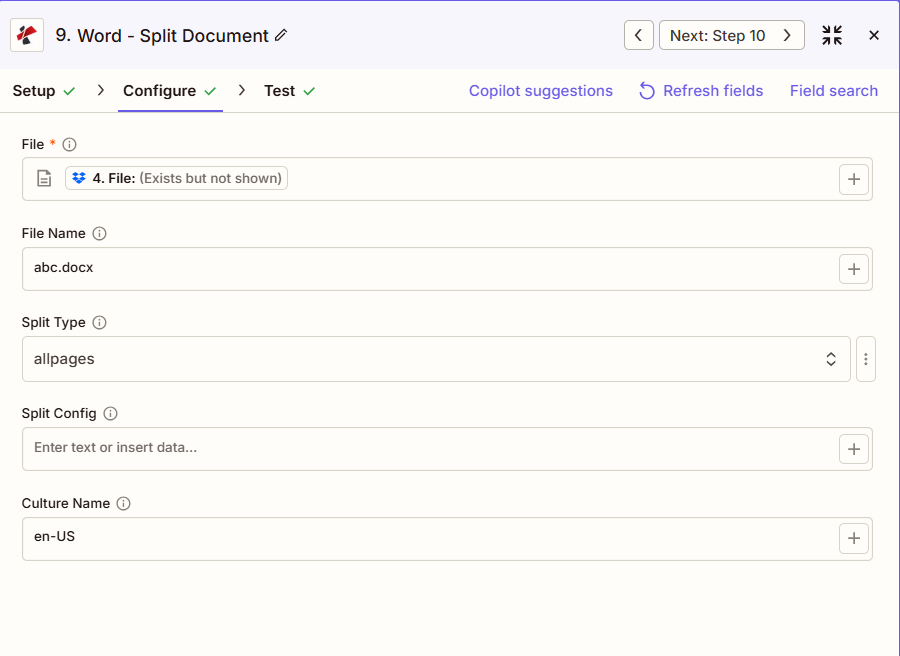
スクリーンショットには、前の手順でマッピングされたファイルが表示されています。ファイル名は「abc.docx」、分割タイプは「allpages」(1ページにつき1ファイル)、分割設定はallpagesでは設定が不要なため空欄、カルチャ名は「en-US」となっています。
ステップからのマップ
全ページ
1-3、5、7または見出し1
en-US
:::ヒント 前の手順のマップファイルを使用します + 地図ボタン ファイル そして ファイル名 以前のザップ手順から。 Wordファイルには完全な内容が含まれている必要があり、「存在するが表示されない」という記述は認められません。 :::
:::警告 ファイル: (存在しますが表示されません) 「ファイル: (存在しますが表示されません)」が表示され、エラーが発生した場合は、 ファイルの内容全体。 見る Zapier & Power Automate ヒント詳細は :::
パラメータ
ドキュメント分割アクションのパラメータ一覧。パラメータ名は、 Zapier 構成 UI。
必須 Zapier UI: ファイルのみ。ファイル名、分割タイプ、分割設定、およびカルチャ名はすべてオプションです。分割タイプは、空白のままにした場合、デフォルトで全ページになります。
| パラメータ | 必須 | その機能 | 例 |
|---|---|---|---|
| File | Required | Word document content, mapped from a previous step using full file content. | [4. File from Step 4] |
| File Name | Optional | Filename with .docx or .doc extension, used for output naming. | abc.docx |
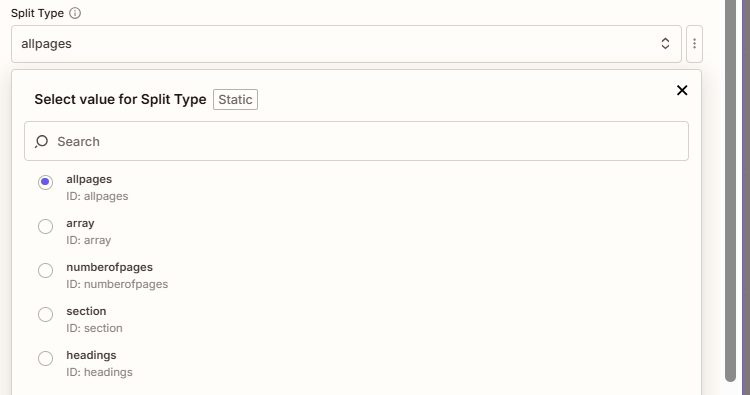
| Split Type | Optional | How to divide the document: allpages (one page per file, default), array or numberofpages (custom page ranges), section (at Word section breaks), or headings (at a heading style). Defaults to allpages. | allpages |
| Split Config | Optional | Page range such as "1-3,4,5-7" when Split Type is array or numberofpages, or a heading style such as "Heading 1" when Split Type is headings. Not needed for allpages or section. | 1-3,4,5-7 |
| Culture Name | Optional | Culture or locale code affecting language and formatting conventions during processing. Defaults to en-US. | en-US |
| File Name | Optional | Name of the Word document, including its extension (for example `report.docx`). | |
分割タイプ値
| 価値 | 行動 |
|---|---|
allpages | Splits into individual pages, one page per output file. This is the default. |
array | Splits based on the page ranges set in Split Config, such as "1-3,4,5-7". |
numberofpages | Same page-range behavior as array, a second accepted value for the same split. |
section | Splits at each Word section break, no Split Config value needed. |
headings | Splits at each occurrence of the heading style set in Split Config, such as "Heading 1", matched case-insensitively. |
出力にはどのようなフィールドが含まれますか?
このアクションは、他のほとんどのアクションのように単一のファイル URL を返すのではなく、分割されたファイルごとに 1 つのエントリを持つドキュメント配列を返します。 PDF4me Word 行動。
| 分野 | タイプ | 内容物 |
|---|---|---|
jobId | Text | ID of the PDF4me job that processed the request. |
traceId | Text | Trace ID of the request, when PDF4me returns one. Give it to PDF4me support when reporting a problem. |
documentId | Text | Not filled by this step: the split documents are returned as a list in `documents`, one entry per document, each with fileName, fileExtension, fullFileName, documentId, fileUrl, fileAlternateUrl and fileSize. |
File Name | Text | Not filled by this step: the split documents are returned as a list in `documents`, one entry per document, each with fileName, fileExtension, fullFileName, documentId, fileUrl, fileAlternateUrl and fileSize. |
File Extension | Text | Not filled by this step: the split documents are returned as a list in `documents`, one entry per document, each with fileName, fileExtension, fullFileName, documentId, fileUrl, fileAlternateUrl and fileSize. |
Full File Name | Text | Not filled by this step: the split documents are returned as a list in `documents`, one entry per document, each with fileName, fileExtension, fullFileName, documentId, fileUrl, fileAlternateUrl and fileSize. |
File Url | Text | Not filled by this step: the split documents are returned as a list in `documents`, one entry per document, each with fileName, fileExtension, fullFileName, documentId, fileUrl, fileAlternateUrl and fileSize. |
Alternate File Url | Text | Not filled by this step: the split documents are returned as a list in `documents`, one entry per document, each with fileName, fileExtension, fullFileName, documentId, fileUrl, fileAlternateUrl and fileSize. |
File Size | Number | Not filled by this step: the split documents are returned as a list in `documents`, one entry per document, each with fileName, fileExtension, fullFileName, documentId, fileUrl, fileAlternateUrl and fileSize. |
典型的な構成
ワークフローの例Common Zapier workflow patterns using Split Document.
- Driveで統合された複数セクションのレポートが確定されると、トリガーが作動します。
- ドキュメント分割は、分割タイプを「セクション」に設定して実行され、レポートを既存の場所で分割します。 Word セクション区切り。
- ループ処理では、文書配列を反復処理し、各セクションをそれぞれの部門長にメールで送信します。
- 原稿が査読準備完了とマークされ、ザップが作動する。
- ドキュメント分割機能は、分割タイプを「見出し」、分割設定を「見出し1」に設定して実行され、章ごとに1つのファイルが生成されます。
- ループ処理によって、各章が担当の主題レビュー担当者に電子メールで送られる。
- 署名済みの契約書と添付書類が提出準備完了となり、Zapが作動します。
- ドキュメント分割は、分割タイプを「配列」、分割設定を「1-10,11,12-15」に設定して実行され、メイン契約書、表紙、および添付資料を分離します。
- 各コンポーネントは、文書管理システム内のそれぞれ専用のフォルダにアップロードされます。
実践的なヒント
チートシート
| 分野 | 価値 |
|---|---|
| Action | Split Document |
| File | [mapped from previous step, full content] |
| File Name | abc.docx |
| Split Type | allpages |
| Split Config | 1-3,5,7 or Heading 1 (when needed) |
| Culture Name | en-US |
よくある質問
関連アクション
他のプラットフォームでの同じタスク
業界におけるユースケースとアプリケーション
- Legal & Professional
- Publishing & Documentation
- Corporate & Business
- Education
- 証拠品の抽出ページ範囲を使用して証拠資料をブリーフから分離し、個別の証拠資料として保管する
- ディスカバリーディストリビューションセクションを使用して、保管者または発行者ごとに文書作成を分割します。
- 契約構成要素の分離ページ範囲を使用して、署名ページ、スケジュール、証拠資料を抽出する。
- 訴訟部: 統合された訴状を個別の文書に分割して、訴訟記録に保管する
- 条項ライブラリの作成見出し分割を使用してマスター文書から標準条項を抽出する
- 章の配分査読者への配布のため、見出し1を使用して原稿を章に分割する
- 記事の抽出セクションを使用してジャーナル編集物から個々の記事を抽出する
- モジュール分離: 見出しベースの分割を使用して、トレーニングマニュアルをモジュールに分割する
- サンプル章作成マーケティングサンプル用にページ範囲を使用して特定の章を抽出する
- コンテンツライセンス個別のライセンス供与のための、ライセンス可能なコンテンツセクションを分けて設ける。
- レポートセクションの配布部門ごとにセクションを使用して統合レポートを分割します。
- 提案モジュールの配布ページ範囲を使用して、チームコラボレーション用の提案書セクションを抽出します。
- 手動分割ユーザーマニュアルを、見出しを使ってトピック別のガイドに分割する
- 政策の分布見出し1を使用して、ポリシーマニュアルから個々のポリシーを抽出する
- 訓練資材課コースパックをセクションを使用して個々のレッスンに分割します
- コース教材の配布コースパックをページ範囲を使用して課題に分割する
- 試験セクションの配分試験を複数のセクションに分け、それぞれの試験監督者に割り当てます。
- シラバス構成要素の抽出包括的なシラバスを、見出しを使ってトピック別の文書に分割する。
- 学生ポートフォリオの作成結合ファイルから個々の学生の提出物を抽出する
- 読書課題課ページ範囲またはセクションを使用して、読書パックを分割します。