ドキュメントの結合 - ドキュメントアセンブリ Zapier
PDF4me ドキュメントを結合する は Zapier 複数のアクションを組み合わせる Word ファイルを単一のドキュメントに結合します。ソート位置を使用して結合順序を制御し、フォーマットモードでスタイルの組み合わせ方を選択し、コンプライアンス レベルでドキュメントの標準への準拠を選択します。結合された 1 つのファイルを返します。 Word 次の Zap ステップのファイル、手動でのコピー ペーストは不要 Word。
このアクションが何をするか
2個以上必要 Word 前の Zap ステップのドキュメントを、ソート位置で設定した順序で 1 つのファイルに結合します。フォーマットモードで各ドキュメントの書式設定の引き継ぎ方法を選択し、必要に応じて結合出力のコンプライアンス レベルとタイム ゾーンを設定します。複数の部門のレポートの作成、提案書のセクションのコンパイル、契約条項を開かずに結合する場合などに便利です。 Word。
認証 API リクエスト
アクセスするには PDF4me ウェブ API を通して Zapierすべてのリクエストには適切な認証情報を含める必要があります。認証により安全な通信が保証され、承認されたユーザーとしての身元が検証され、シームレスな統合が可能になります。 Zapier ワークフローと PDF4meの Word 文書結合サービス。
見逃してはならない重要な事実
:::ヒント 前の手順でファイル1、ファイル2などをマップします + 地図ボタン ファイル1、 ファイル2 (および以前の Zap ステップからのファイル名 1、ファイル名 2)を設定します。 ファイル数 まずファイルフィールドを表示します。 Wordファイルには完全なコンテンツを提供する必要があり、「存在するが表示されない」参照は認められません。 :::
:::警告 ファイル: (存在しますが表示されません) 「ファイル: (存在しますが表示されません)」が表示され、エラーが発生した場合は、 ファイルの内容全体。 見る Zapier & Power Automate ヒント詳細は :::
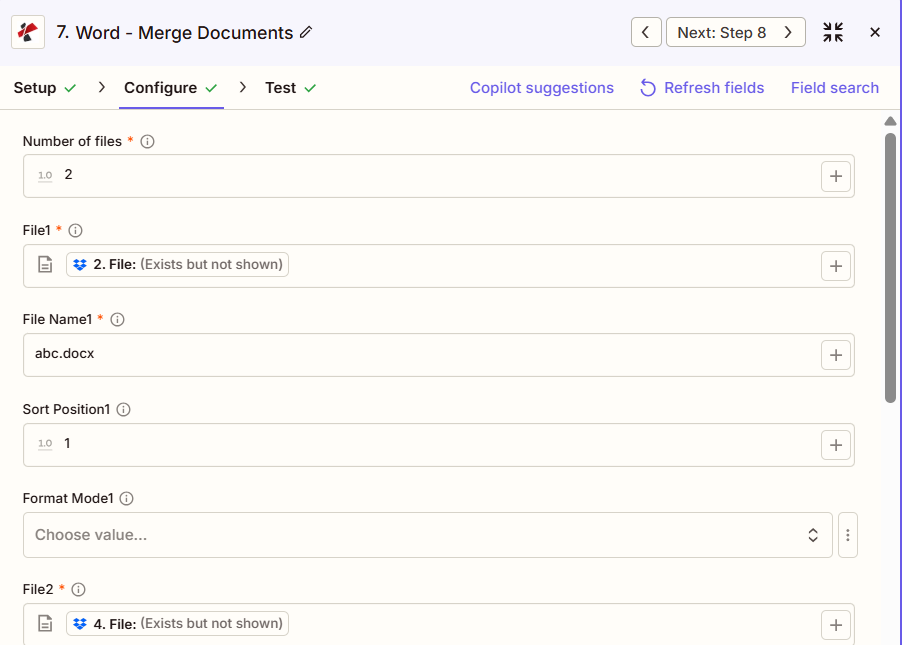
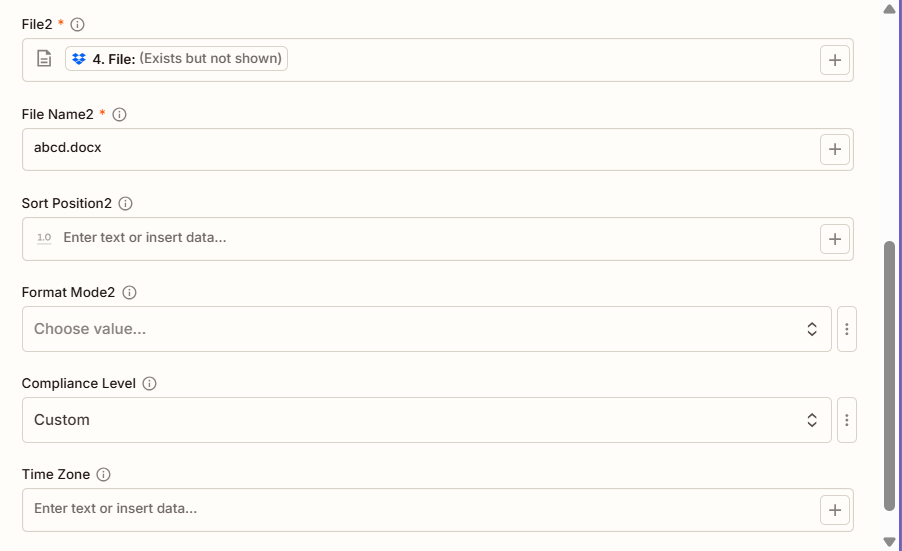
マージ文書の主な機能は何ですか?
- 複数ドキュメントのサポート: 任意の数の Word 文書を1つに
- 柔軟な注文方法: 文書ごとのソート位置値を使用してマージ順序を制御します
- 書式設定オプション: 3つのフォーマットモードオプションで、スタイルの引き継ぎ方法を選択します
- コンプライアンス設定ECMA、移行、または厳格なコンプライアンスレベルを適用する
- タイムゾーンメタデータ: 文書追跡のためにタイムゾーン情報を任意で追加します
パラメータ
ドキュメントのマージ アクションのパラメーターの完全なリスト。パラメーター名と順序は、 Zapier 構成 UI 上記のスクリーンショットに示されています。
- セット ファイル数 (2、3など)ファイルフィールドを表示する
- 地図 ファイル1、 ファイル名1、 ファイル2、 ファイル名2 (そしてそれ以上)以前のステップから
- オプションで設定可能 ソート位置 文書ごとのマージ順序、下位のマージを先に実行
- オプションで設定可能 フォーマットモード 文書ごとおよび全体 コンプライアンスレベル/タイムゾーン
| パラメータ | 必須 | その機能 | 例 |
|---|---|---|---|
| Number of files | Required | How many documents to merge. Determines how many File/File Name/Sort Position/Format Mode field sets appear. Defaults to 1. | 2 |
| File1 | Required | First document. Map from a previous step. Must provide full file content. | [2. File from Step 2] |
| File Name1 | Required | Filename for the first document, with .docx or .doc extension. | abc.docx |
| Sort Position1 | Conditional | Merge order for the first document. Lower values merge earlier. | 1 |
| Format Mode1 | Conditional | Formatting for the first document: KeepSourceFormatting, KeepDifferentStyles, or UseDestinationStyles. | KeepSourceFormatting |
| File2 | Required | Second document. Map from a previous step. | [4. File from Step 4] |
| File Name2 | Required | Filename for the second document. | abcd.docx |
| Sort Position2, Format Mode2 | Conditional | Same pattern as document 1. Repeats for File3, File4, and so on if Number of files is greater than 2. | 2 |
| Compliance Level | Optional | Document standard for the merged output: ECMA, Transitional, or Strict. | Custom |
| Time Zone | Optional | Timezone applied to document metadata in the merged file. | UTC |
重要: ファイル数、 そして ファイル/ファイル名 各文書について、必要です。 ソート位置、 フォーマットモード、 コンプライアンスレベル、 そして タイムゾーン すべて任意です。
ドキュメントの結合では何が返されますか?
の PDF4me ドキュメントを結合する アクションはマージされた Word 後続の Zap ステップで使用するためのファイル。出力形式はすべて共通です。 PDF4me Word ファイルを返すアクション Zapier。
主要な出力フィールド(次のステップに対応付けてください)
API マージされたエンドポイントをダウンロードします Word ファイル。これを次のステップのファイル入力にマッピングします。
api.pdf4me.com/Zapier/GetDocument?d=...代替ダウンロード URL パスにファイル名が含まれている。
api.pdf4me.com/Zapier/GetAltDocument/.../merged.docx| 分野 | タイプ | 内容物 |
|---|---|---|
jobId | Text | ID of the PDF4me job that processed the request. |
traceId | Text | Trace ID of the request, when PDF4me returns one. Give it to PDF4me support when reporting a problem. |
documentId | Text | ID PDF4me gives the resulting document. |
File Name | Text | Name of the resulting file, without extension. |
File Extension | Text | Extension of the resulting file, for example `.pdf`. |
Full File Name | Text | Name of the resulting file, with extension. |
File Url | Text | Download link of the resulting file. Map it into any later step that needs the file, for example an upload to Google Drive, Dropbox or OneDrive. |
Alternate File Url | Text | Alternative download link of the resulting file, with the file name at the end of the URL. |
File Size | Number | Size of the resulting file, as reported by PDF4me. |
- JSON
- Zap Integration
例 JSON 出力 (URL(表示形式のみ、リンクは機能しません):
{
"Job Id": "...",
"File Url": "api.pdf4me.com/Zapier/GetDocument?d=...",
"Alternate File Url": "api.pdf4me.com/Zapier/GetAltDocument/.../merged.docx",
"File Name": "merged",
"Full File Name": "merged.docx",
"File Extension": ".docx"
}
使用 + 地図を作成する ファイルURL または 代替ファイルURL 次のステップへ、ドライブ、Dropbox、メール、または別の PDF4me Word アクション。
典型的な構成
ワークフローの例Common Zapier workflow patterns using Merge Documents.
- すべての部門報告書セクションが提出されると、トリガーが作動します。
- PDF4me 「文書の結合」機能は、表紙、要約、および各部門のセクションを結合し、「並べ替え位置」を使用して最終的な順序を制御し、「書式モード」を「ソース書式を保持」に設定することで、各セクション独自のスタイルを保持します。
- 統合レポートは、役員向けレポートフォルダにアップロードされます。
- 提案書のすべての項目が承認済みとマークされると、トリガーが作動します。
- PDF4me ドキュメント結合機能は、カバーレター、技術的なアプローチ、価格設定、チーム紹介文を結合し、フォーマットモードをUseDestinationStylesに設定することで、異なるチームが作成したセクション間で一貫した外観を実現します。
- 完成した提案書は、営業責任者が確認できるよう提出物フォルダにアップロードされます。
- 交渉済みの契約条件が確定すると、トリガーが作動する。
- PDF4me 文書結合機能は、標準条項、カスタム条項、スケジュール、および署名ページを結合し、書式モードを「異なるスタイルを保持」に設定することで、各条項の元の書式バリエーションを保持します。
- 作成された契約書は、最終確認のため法務チームに送られる。
実践的なヒント
チートシート
| 分野 | 価値 |
|---|---|
| Action | Merge Documents |
| Number of files | 2 |
| File1 / File Name1 | [Mapped] / abc.docx |
| Sort Position1 | 1 |
| File2 / File Name2 | [Mapped] / abcd.docx |
| Sort Position2 | 2 |
| Format Mode | KeepSourceFormatting (optional) |
| Compliance Level | Transitional (optional) |
よくある質問
関連アクション
他のプラットフォームでの同じタスク
業界におけるユースケースとアプリケーション
- Legal & Professional
- Corporate & Business
- Human Resources
- Publishing & Documentation
- 契約組立標準条項とカスタム条項を組み合わせて、完全な契約書を作成する
- 法律概要集議論部分、証拠資料、判例を最終的な要約書にまとめる。
- ディスカバリー文書アセンブリ: 権限ログを本番環境向けの関連ドキュメントと統合する
- 案件ファイルの統合事件メモ、訴状、書簡をまとめて事件概要を作成する
- 意見書作成調査メモと意見定型文を統合して顧客向けレターを作成する
- 提案書の作成カバーレター、技術的アプローチ、価格設定、経歴をRFPへの回答に統合する
- レポートアセンブリエグゼクティブサマリーと部門別セクションを組み合わせて統合レポートを作成する
- 事業計画の統合計画の各セクション(市場、事業運営、財務)を統合して完全な計画を作成する
- ボードパッケージアセンブリ議題、報告書、決議事項をまとめて取締役会資料を作成する
- 戦略計画の策定ビジョン、目標、イニシアチブを統合して包括的な戦略計画を作成する
- 従業員ハンドブックの組み立てポリシーセクションを統合して、完全な従業員ハンドブックを作成する
- オンボーディングパッケージの作成歓迎状、各種フォーム、社内規定などを新入社員向け資料にまとめる。
- 特典ガイド集福利厚生制度の説明を包括的な福利厚生ガイドに統合する
- 業績評価会議評価フォームと開発計画を組み合わせてレビュー文書を作成する
- トレーニングマニュアルの統合トレーニングモジュールを統合して、完全なトレーニングマニュアルを作成する
- 書籍原稿の組み立て章ごとの文書を統合して、出版用の完全な原稿を作成する
- 技術マニュアルの編集技術的なセクションを統合して、包括的なユーザーマニュアルを作成する
- コース教材の組み立てレッスンモジュールを統合して完全なコース教材を作成する
- 文書統合APIドキュメント、ガイド、チュートリアルを統合ドキュメントにまとめる
- レポートの公開レポートコンポーネントを統合して、公開可能なドキュメントを作成します。