メタデータを抽出する Word で Zapier
PDF4me メタデータの抽出 は Zapier タイトル、著者、件名、キーワード、作成日と更新日、ページ数、単語数、およびカスタムプロパティを読み取るアクション Word ファイルを開くことなく、ドキュメントを取得します。ドキュメントのカタログ作成、コンプライアンス追跡、CMSへのデータ入力、メタデータに基づくルーティングなどに使用できます。ファイルではなく、構造化されたメタデータオブジェクトを返します。
認証 API リクエスト
アクセスするには PDF4me ウェブ API を通して Zapierすべてのリクエストには適切な認証情報を含める必要があります。認証により安全な通信が保証され、承認されたユーザーとしての身元が検証され、シームレスな統合が可能になります。 Zapier ワークフローと PDF4meの Word メタデータ抽出サービス。
見逃してはならない重要な事実
:::ヒント 前の手順のマップファイルを使用します + 隣のボタン ファイル そして ファイル名 以前の Zap ステップからマッピングします (例: Google Drive、Dropbox、またはトリガー)。 Wordファイルには完全なコンテンツを提供する必要があり、「存在するが表示されない」参照は認められません。 :::
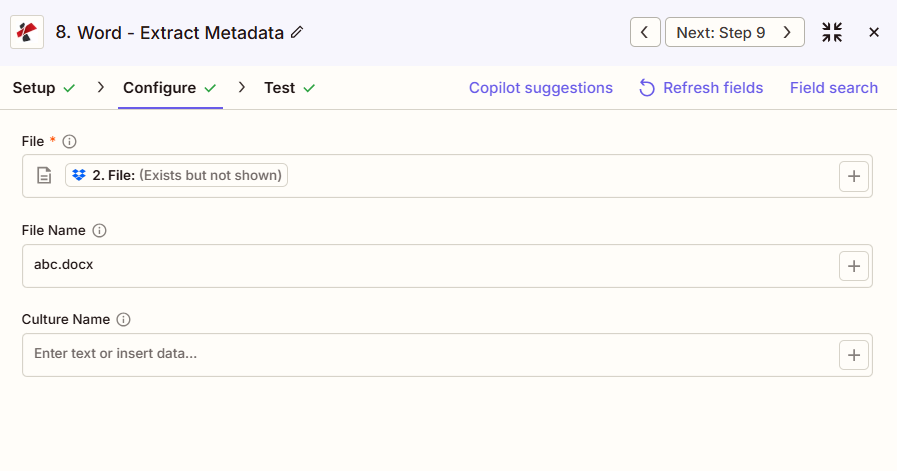
:::警告 ファイル: (存在しますが表示されません) ファイルフィールドに「ファイル: (存在しますが表示されません)」と表示され、エラーが発生した場合は、 ファイルの内容全体 代わりに。参照 Zapier & Power Automate ヒント詳細は :::
メタデータ抽出の主な機能は何ですか?
- 組み込みプロパティタイトル、著者、主題、キーワード、会社
- 日付情報作成日、更新日、最終印刷日
- 文書統計ページ数、単語数、文字数
- カスタムプロパティユーザー定義のカスタムドキュメントプロパティを抽出する
- JSON 出力: 構造化された JSON 簡単に統合できるフォーマット
パラメータ
メタデータ抽出アクションのパラメーターの完全なリスト。パラメーター名は、 Zapier 構成 UI 上記のスクリーンショットに示されています。
- 地図 ファイル そして ファイル名 前のステップから
- オプションで設定可能 文化名 地域ごとの日付形式が重要な場合
| パラメータ | 必須 | その機能 | 例 |
|---|---|---|---|
| File | Required | Word document to read metadata from. Map from a previous step. Must provide full file content. | [4. File from Step 4] |
| File Name | Optional | Word filename with .docx or .doc extension. | document.docx |
| Culture Name | Optional | Locale used when interpreting region-specific values in the metadata. | en-US |
重要: のみ ファイル 必須です。地図 ファイル名 前のステップで出力されたファイル名が利用可能な場合は、そこから取得します。
メタデータの抽出では何が返されますか?
の PDF4me メタデータの抽出 アクションは メタデータ ドキュメントのプロパティを含むオブジェクト(ファイルではありません)。個々のメタデータフィールドを、カタログ作成、コンプライアンス、またはCMS統合のための次のZapステップにマッピングします。
JSON タイトル、著者、件名、キーワード、作成日、更新日、ページ数、単語数、および任意のカスタムプロパティを含むオブジェクト。メタデータ.タイトルやメタデータ.著者などのネストされたフィールドを次のステップにマッピングします。
| 分野 | タイプ | 内容物 |
|---|---|---|
Image Format | Text | Listed by the app, apparently carried over from an image step; a Word document's metadata may not contain it. Check the fields shown after a test run. |
File Size | Number | Size of the document, if the PDF4me response contains it. |
- JSON
- Zap Integration
例 JSON 出力:
{
"Job Id": "...",
"Metadata": {
"Title": "Q4 Financial Report",
"Author": "John Doe",
"Subject": "Financial Analysis",
"Keywords": "finance, Q4, report",
"CreatedDate": "2024-01-15T10:30:00Z",
"ModifiedDate": "2024-01-20T15:45:00Z",
"PageCount": 25,
"WordCount": 5280
}
}
使用 + 地図を作成する メタデータ.タイトル、 メタデータ.著者、 メタデータ.更新日または、次のステップ、データベース、CMS、Google スプレッドシート、またはフィルタリング ロジックへの他のネストされたフィールド。
典型的な構成
ワークフローの例Common Zapier workflow patterns using Extract Metadata.
- 共有ライブラリに新しいドキュメントがアップロードされると、トリガーが作動します。
- PDF4me メタデータ抽出機能は、ファイルからタイトル、著者、キーワードを読み取ります。
- 抽出されたフィールドは、後で検索できるようにカタログデータベースまたは検索インデックスに挿入されます。
- スケジュールされたトリガーは、コンプライアンスフォルダから管理対象文書を一覧表示します。
- PDF4me Extract Metadataは、ループ内で各ファイルのModifiedDateとAuthorを読み取ります。
- フィルターは、更新日時または作成者がポリシーの範囲外である文書を、手動レビューの対象としてフラグ付けします。
- 文書は公開前に準備フォルダに格納される。
- PDF4me メタデータ抽出機能は、ファイルからタイトル、著者、キーワードを読み取ります。
- フィールドはCMSに投稿されます API 編集者が内容を確認する前に、コンテンツレコードを事前に入力しておく。
実践的なヒント
チートシート
| 分野 | 価値 |
|---|---|
| Action | Extract Metadata |
| File | [Mapped from previous step] |
| File Name | document.docx |
| Culture Name | en-US (optional) |
| Core output | Metadata.Title, Metadata.Author, Metadata.CreatedDate, Metadata.WordCount, and more |
よくある質問
関連アクション
他のプラットフォームでの同じタスク
業界におけるユースケースとアプリケーション
- Compliance & Audit
- Content Management
- Legal & Professional
- Publishing & Documentation
- 文書監査証跡コンプライアンス監査の証拠として、変更日と変更者を抽出する
- バージョン管理追跡作成日時と変更日時を使用して文書のバージョンを監視する
- 著者認証: 文書作成者が承認された担当者リストと一致することを検証する
- 保持ポリシーの実施: 保存決定のために、作成日を保存スケジュールと照合する
- 文書管理ISOまたは品質管理への準拠のために文書のプロパティを追跡する
- CMS統合: コンテンツ管理システムに文書のタイトル、著者、キーワードを入力する
- 検索インデックス作成全文検索エンジンのインデックス作成のためにキーワードと主題を抽出する
- 文書分類: 主題とキーワードのメタデータに基づいて文書を分類する
- 図書館目録作成抽出したプロパティを使用して企業文書ライブラリをインデックス化する
- 世代キーワードと件名フィールドからドキュメントタグを生成する
- 案件文書追跡: 法務関連文書管理システムのメタデータを抽出する
- 発見文書のインデックス作成: 発見文書を著者、日付、主題別に一覧表示してレビューする
- 契約管理契約データベースへのデータ入力のため、契約当事者、日付、契約内容を抽出する。
- 特権ログ生成: ドキュメントメタデータを使用して権限ログエントリをサポートする
- 文書作成訴訟データベースシステム向けに、制作文書のメタデータを追跡する
- 原稿追跡原稿管理システム向けに著者、タイトル、単語数を抽出します。
- 公開ワークフロー: 作成者と更新日のメタデータに基づいてドキュメントをルーティングします
- スタイルガイドへの準拠: 文書のプロパティが出版スタイルガイドの要件と一致しているか確認する
- コンテンツ分析コンテンツプランニングのために文書統計(単語数、ページ数)を分析する
- 複数著者による調整共同プロジェクトにおける文書作成者と更新日を追跡する