ページを削除する Word 使用 Zapier
ページを削除する は Zapier アクション PDF4me 特定のページまたはページ範囲を Word ドキュメントに対して、連続した範囲を指定する場合は開始ページと終了ページを、連続しないページを指定する場合は「2,4,6」のようなページ番号を使用します。クライアントへの納品前に機密ページを削除したり、表紙を削除したり、配布前にテンプレートを整理したりするために、この機能をトリガーします。
認証方法 API リクエスト?
アクセスするには PDF4me ウェブ API を通して Zapierすべてのリクエストには適切な認証情報を含める必要があります。認証により安全な通信が保証され、承認されたユーザーとしての身元が検証され、シームレスな統合が可能になります。 Zapier ワークフローと PDF4meの強力な Word ページ削除サービス。
見逃してはならない重要な事実
設定概要
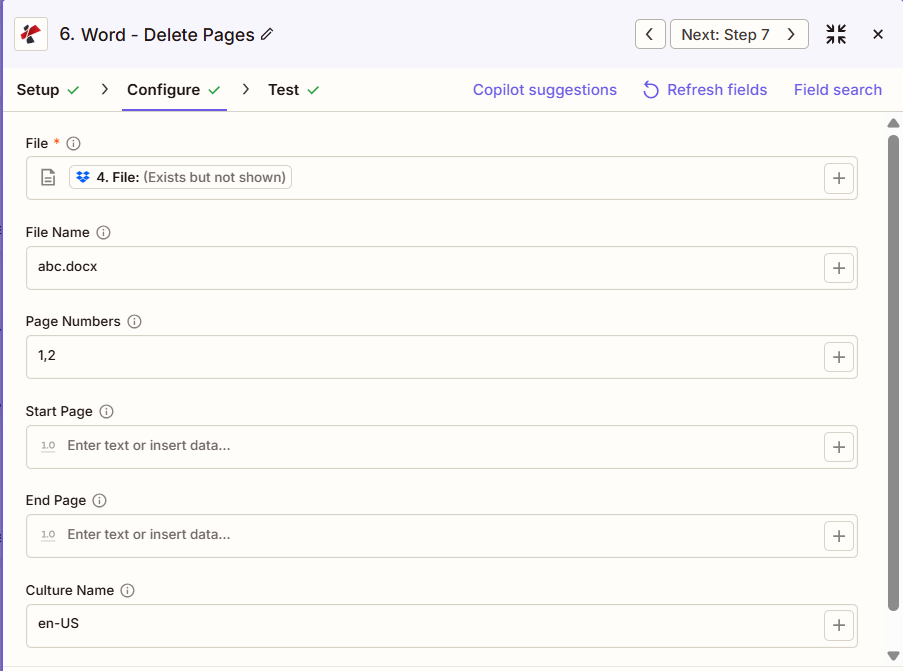
スクリーンショットには、前の手順でマッピングされたファイルが表示されています。ファイル名は「abc.docx」、ページ番号は「1,2」に設定され、1ページ目と2ページ目が削除され、開始ページと終了ページは空欄のまま、カルチャ名は「en-US」となっています。
ステップからのマップ
1,2
範囲、例:2~5
en-US
:::ヒント 前の手順のマップファイルを使用します + 隣のボタン ファイル そして ファイル名 以前の Zap ステップからマッピングします (例: Google Drive、Dropbox、またはトリガー)。 Wordファイルには完全なコンテンツを提供する必要があり、「存在するが表示されない」参照は認められません。 :::
:::警告 ファイル: (存在しますが表示されません) ファイルフィールドに「ファイル: (存在しますが表示されません)」と表示され、エラーが発生した場合は、 ファイルの内容全体 代わりに。参照 Zapier & Power Automate ヒント詳細は :::
パラメータ
ページ削除アクションのパラメーターの完全なリスト。パラメーター名は、 Zapier 構成 UI。
必須 Zapier UI: ファイルのみ。削除を実行するには、開始ページ、終了ページ、またはページ番号のいずれか少なくとも1つが設定されている必要があります。ページ番号は1から始まります。
| パラメータ | 必須 | その機能 | 例 |
|---|---|---|---|
| File | Required | Word document content, mapped from a previous step using full file content. | [4. File from Step 4] |
| File Name | Optional | Filename with .docx or .doc extension, used for output naming. | abc.docx |
| Page Numbers | Optional | Comma-separated list of specific pages to delete, 1-based. Can be combined with Start Page and End Page. | 2,4,6 |
| Start Page | Optional | 1-based page number to begin deleting from. Must not exceed End Page or the document page count. | 2 |
| End Page | Optional | 1-based page number to stop deleting at, inclusive. Used together with Start Page to define a range. | 5 |
| Culture Name | Optional | Culture or locale code affecting language and formatting conventions during processing. Defaults to en-US. | en-US |
| File Name | Optional | Name of the Word document, including its extension (for example `report.docx`). | |
出力にはどのようなフィールドが含まれますか?
このアクションは変更された Word ドキュメントとトラッキングメタデータ。この出力形状は、 PDF4me Word アクション Zapier ファイルを返すもの。
| 分野 | タイプ | 内容物 |
|---|---|---|
jobId | Text | ID of the PDF4me job that processed the request. |
traceId | Text | Trace ID of the request, when PDF4me returns one. Give it to PDF4me support when reporting a problem. |
documentId | Text | ID PDF4me gives the resulting document. |
File Name | Text | Name of the resulting file, without extension. |
File Extension | Text | Extension of the resulting file, for example `.pdf`. |
Full File Name | Text | Name of the resulting file, with extension. |
File Url | Text | Download link of the resulting file. Map it into any later step that needs the file, for example an upload to Google Drive, Dropbox or OneDrive. |
Alternate File Url | Text | Alternative download link of the resulting file, with the file name at the end of the URL. |
File Size | Number | Size of the resulting file, as reported by PDF4me. |
典型的な構成
ワークフローの例Common Zapier workflow patterns using Delete Pages.
- 内部文書が顧客への配布準備完了とマークされた時点で、トリガーが作動します。
- ページ削除機能は、開始ページと終了ページを内部分析のみを含む範囲に設定して実行されます。
- 修正済みの文書は顧客向けフォルダにアップロードされ、原本は内部アーカイブに保管されます。
- サンプルコンテンツを含むマスターテンプレートは、共有テンプレートライブラリに公開される前に取得されます。
- ページ削除機能は、サンプルコンテンツを含む特定のページ(例:「3、7、10」)にページ番号を設定した状態で実行されます。
- クリーニング済みのテンプレートは、チームが使用できるようテンプレートライブラリにアップロードされます。
- 報告書の最終化トリガーは、草稿が出版承認された時点で発動します。
- 「ページの削除」機能は、表紙ページを削除する「開始ページ」と「終了ページ」機能と、散在する内部メモページを削除する「ページ番号」機能を組み合わせて動作します。
- 出版準備が整った報告書は、関係者に電子メールで送付されます。
実践的なヒント
チートシート
| 分野 | 価値 |
|---|---|
| Action | Delete Pages |
| File | [mapped from previous step, full content] |
| File Name | abc.docx |
| Page Numbers | 1,2 |
| Start Page / End Page | 2 / 5 (for a range instead) |
| Culture Name | en-US |
よくある質問
関連アクション
他のプラットフォームでの同じタスク
業界におけるユースケースとアプリケーション
- Legal & Professional
- Corporate & Business
- Finance & Accounting
- Human Resources
- 特権ログの削除特権のない文書作成物から特権ログページを削除する
- 機密ページの編集公開前に、機密扱いの和解条件が記載されたページを削除してください。
- 下書きページの整理: クライアントへの納品物から弁護士のメモと作業ページを削除する
- 展示準備裁判所に提出する前に、証拠書類から表紙と仕切りページを取り外してください。
- 発見時のサニタイズ: 証拠開示文書から内部分析ページを削除する
- 提案書の整理: 顧客提案書の最終版から内部価格分析ページを削除する
- レポートの最終化: 詳細なアナリストレポートからエグゼクティブサマリーの表紙ページを削除する
- プレゼンテーション資料の準備プレゼンテーション配布資料からスピーカーノートのページを削除する
- クライアントへの成果物のサニタイズクライアントへの文書納品前に内部レビューページを削除する
- アーカイブ準備: 常時利用可能なライブラリ文書から、期限付きのページを削除する
- クライアントレポートのクリーンアップ: 顧客財務報告書から内部仮定ページを削除する
- 監査ファイルの準備最終監査成果物から作業文書ページを削除する
- 取締役会資料の最終決定最終取締役会資料から下書きメモのページを削除する
- 規制関連書類の整理規制当局への提出書類最終版から内部審査ページを削除する
- 予算文書の整理: 配布予算から感度分析ページを削除する
- 政策の分布従業員ハンドブックの最終版から開発ノートのページを削除する
- 福利厚生の登録従業員福利厚生文書から内部コスト分析ページを削除する
- 業績評価の最終決定配布されたレビューからキャリブレーションページを削除する
- 従業員マニュアルの整理: 標準従業員マニュアルから人事プロセスに関するページを削除する
- オンボーディングパケットの準備従業員オンボーディング資料から人事管理ページを削除する