テキストのハイライト表示(Zapier)
このアクションが何をするか
テキストのハイライト表示 スキャン PDF 指定した単語やフレーズごとに、選択した色で塗りつぶします。 Zapier ステップ、手動マーキングなし。 テキストハイライトリスト テキストと16進数カラーのペアのステップで、新しい注釈付き PDF ドライブ、Dropbox、メール、Slack、データベースなど、あらゆる下流アプリにルーティングする準備ができています。
接続する PDF4me
毎 PDF4me アクション Zapier 認証が必要です。 API キーを一度押すと、すべてのものに適用されます PDF4me アカウントにログインしてください。
使用 ファイル 前の Zap ステップで PDF 添付ファイルオブジェクト(例: 「2.ファイル」)。 使用 ファイルURL 直接ダウンロードリンクしかない場合。どちらを選んでも ファイル名 そのため、実行状況はログに記録され、追跡可能です。
ステップを設定する
開く 設定する タブ。マップ ファイル 生成されたステップから PDF、そして構築する ファイル名 名前と拡張トークンから。 テキストハイライトリスト、 クリック 追加 各テキストと色のペアを挿入します。
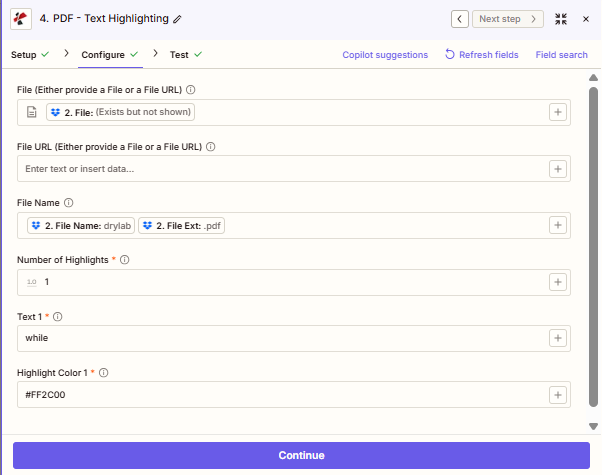
地図 ファイル あなたの PDF。 建てる ファイル名 トリガーからの名前と拡張フィールドから。各単語と色のペアを テキストハイライトリスト。
重要な事実
テキストハイライトは、 PDF実際のテキストレイヤーを含む画像。スキャン画像 PDFs は OCR ハイライトを適用する前に、まず検索可能なレイヤーを作成する手順を踏んでください。
アイテムをいくつでも追加 テキストハイライトリスト 必要に応じて。各アイテムには独自の 文章 そして ハイライトカラーキーワードは黄色、日付は緑、リスクは赤で表示され、すべて1つのステップで処理されます。
ハイライトカラー 標準的な6桁の16進数コードを受け付けます。 #FFFF00 (黄色)、 #90EE90 (緑)、 #FF2C00 (赤色)。ハッシュ接頭辞は必須です。
フィールド参照
| パラメータ | 必須 | 目的 | 例の地図 |
|---|---|---|---|
| File | Optional | Binary PDF from a prior Zap step when you have a file attachment object. | `2. File` |
| File URL | Optional | Public or signed URL to the PDF when you do not have a file attachment object. | n/a |
| File Name | Optional | Filename with extension for logging. Combine name and extension tokens when your trigger splits them. | `2. File Name` + `2. File Ext` |
| TextHighlightList › Text | Required per item | The exact word or phrase to find and highlight inside the PDF. | `invoice`, `URGENT` |
| TextHighlightList › HighlightColor | Required per item | Six-digit hex color to paint matched text. Include the # prefix. | `#FFFF00`, `#FF2C00` |
| Number of Highlights | Required | Number of texts to highlight. For each one, a Text and a Highlight Color field appear. Defaults to 1. | 1 |
テキストを強調表示する方法 PDF と Zapier
出力
テストまたは本番実行が成功すると、ステップは次のようになります。
| 分野 | タイプ | 内容物 |
|---|---|---|
jobId | Text | ID of the PDF4me job that processed the request. |
traceId | Text | Trace ID of the request, when PDF4me returns one. Give it to PDF4me support when reporting a problem. |
documentId | Text | ID PDF4me gives the resulting document. |
File Name | Text | Name of the resulting file, without extension. |
File Extension | Text | Extension of the resulting file, for example .pdf. |
Full File Name | Text | Name of the resulting file, with extension. |
File Url | Text | Download link of the resulting file. Map it into any later step that needs the file, for example an upload to Google Drive, Dropbox or OneDrive. |
Alternate File Url | Text | Alternative download link of the resulting file, with the file name at the end of the URL. |
File Size | Number | Size of the resulting file, as reported by PDF4me. |
ワークフローパターン
ワークフローパターンReal-world Zap patterns using Text Highlighting: swap apps to match your stack.
- 新しい PDF 契約書をGoogleドライブにアップロードしました。
- テキスト強調表示では、「責任」、「契約解除」、「補償」が赤色で表示されます。
- アップロードがハイライト表示されました PDF ドライブ内のレビューフォルダに戻る。
- ファイルリンクを添えてSlackに通知を送信してください。
- 新しい請求書メールの添付ファイルがZapをトリガーします。
- 「延滞」「期限超過」「最終通知」を黄色で強調表示してください。
- マーク済みの請求書を財務チームに自動的にメールで送信する。
- ポリシー PDF Dropboxフォルダに保存されます。
- 規制用語は青色、対応項目は緑色で強調表示しています。
- 注釈付きで保存 PDF に SharePoint コンプライアンス記録用。