修理 PDF - ファイル復元 Zapier
PDF4me 修理 PDF は Zapier 破損または構造的に損傷した部分を修復しようとする行為 PDF そして、その読み取り可能なコンテンツを復元します。破損したファイルまたはその URLその他の必須項目はなく、修復された PDF 次のステップへ。復旧は損傷の程度によって異なり、完全に修復されるファイルもあれば、部分的にしか修復されないファイルもあります。
このアクションが何をするか
取る PDF 構造的破損により開けない、またはエラーが表示される場合、内部構造を再構築し、可能な限り多くの読み取り可能なテキスト、画像、およびページコンテンツを復元しようとします。送信によって破損した添付ファイル、古いアーカイブ ファイル、またはあらゆるファイルに対する最初の対応として使用します。 PDF 前のワークフロー手順を処理できませんでした。結果として新しいファイルが作成され、その場で編集されるわけではないため、再試行や調査が必要な場合でも元のファイルは変更されません。
APIリクエストの認証
アクセスするには PDF4me ウェブ API を通して Zapierすべてのリクエストには適切な認証情報を含める必要があります。認証により安全な通信が保証され、承認されたユーザーとしての身元が検証され、シームレスな統合が可能になります。 Zapier ワークフローと PDF4meの PDF 復旧サービス。
見逃してはならない重要な事実
Repair PDFの主な特徴は何ですか?
- 汚職からの回復: 破損したデータからコンテンツを復元しようと試みる PDFs
- 構造修復: 修理 PDF 内部構造エラー
- コンテンツサルベージ破損したファイルから読み取り可能なコンテンツを抽出します。
- 自動復旧: 修復をフォールバックステップとして文書処理ワークフローに統合する
- URLまたはファイル入力: 前のステップからファイルをマッピングするか、直接渡す URL
注記: 回復の成功は、 PDF 損傷。深刻な破損の場合、復元可能なコンテンツが制限される可能性があります。
パラメータ
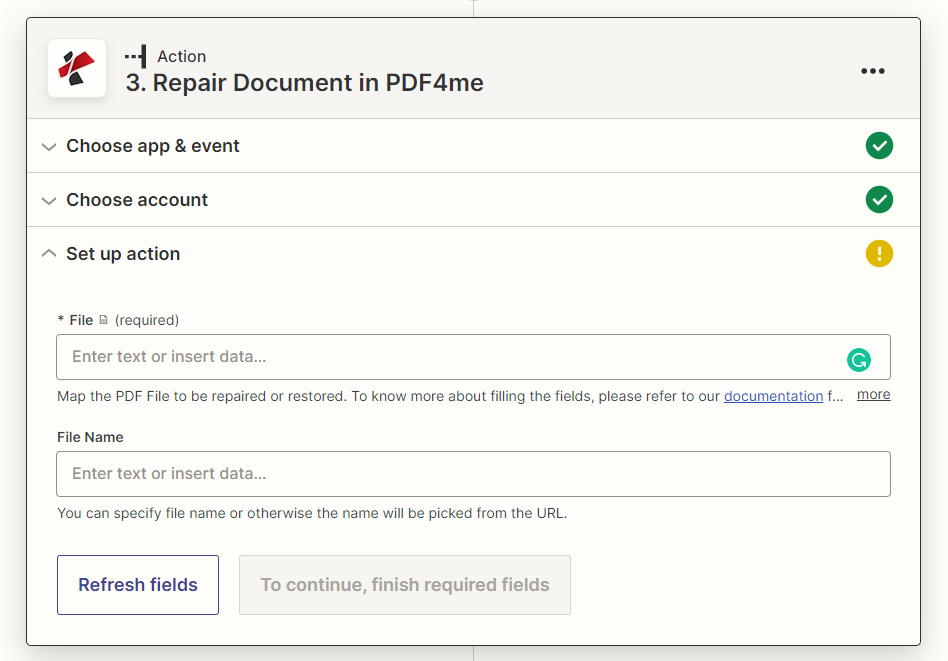
修理のパラメータ一覧 PDF アクション。パラメータ名は、 Zapier 構成 UI 上記のスクリーンショットに示されています。
- 地図 ファイル (損傷した) PDFトリガーまたは前のステップから、または直接貼り付けます URL
- オプションで設定可能 ファイル名 修復された出力について
| パラメータ | 必須 | その機能 | 例 |
|---|---|---|---|
| File | Required | The damaged or corrupted PDF to repair. Map from a previous step, or pass a direct URL to a publicly reachable PDF. | [Corrupted PDF from Step 2] |
| File Name | Optional | Output filename for the repaired PDF. If not provided, the name is picked from the File field or URL. | repaired_document.pdf |
重要: のみ ファイル が必要です。 + 前のステップからマッピングするボタン、または直接貼り付ける URL 一般にアクセス可能な PDF。
PDF修復では何が返されるのか?
の PDF4me 修理 PDF このアクションは、修復されたファイルと、次のZapステップで使用するための識別メタデータを返します。
| 分野 | タイプ | 内容物 |
|---|---|---|
documentId | Text | ID PDF4me gives the resulting document. |
errorMessage | Text | Error message when PDF4me could not process the file; empty otherwise. |
fileExtension | Text | Extension of the resulting file, for example `.pdf`. |
fileName | Text | Name of the resulting file, without extension. |
fileUrl | Text | Download link of the resulting file. Map it into any later step that needs the file, for example an upload to Google Drive, Dropbox or OneDrive. |
fullFileName | Text | Name of the resulting file, with extension. |
jobId | Text | ID of the PDF4me job that processed the request. |
traceId | Text | Trace ID of the request, when PDF4me returns one. Give it to PDF4me support when reporting a problem. |
- JSON
- Zap Integration
例 JSON 応答:
{
"fileUrl": "https://...",
"fileName": "repaired_document",
"fullFileName": "repaired_document.pdf",
"fileExtension": ".pdf",
"errorMessage": "",
"documentId": "...",
"jobId": "...",
"traceId": "..."
}
使用 + 地図を作成する ファイルURL 次のステップ、アップロード、メール添付ファイル、または別の PDF4me アクションを実行し、それを確認します エラーメッセージ 下流で復元されたコンテンツを信頼する前に、空である必要があります。
典型的な構成
ワークフローの例Common Zapier workflow patterns using Repair PDF.
- トリガーは、メールが届いたときに作動します。 PDF 後の手順で開けない添付ファイル。
- PDF4me 修理 PDF 添付ファイルをファイルとしてマッピングし、コンテンツの復元を試みます。
- フィルタ処理は、errorMessageが空の場合にのみ続行されます。修復に失敗した場合、ワークフローは送信者にファイルの再送信を通知します。
- レガシーがアーカイブされたときに、一括移行中にトリガーが発火します。 PDF 読み込みに失敗しました。
- PDF4me 修理 PDF 移行ステップが再試行される前に、ファイルの構造を修正しようと試みます。
- 修復されたファイルは最新の文書管理システムに取り込まれ、修復に失敗したファイルは手動レビューの対象としてフラグが立てられます。
- 既存のザップ PDF 処理ステップ(テキスト抽出や変換など)で、特定のファイルに対してエラーが発生します。
- エラー処理ブランチはファイルをルーティングします PDF4me 修理 PDF 元の手順を再度試みる前に。
- 再試行が成功した場合は、ワークフローは通常どおり続行されます。失敗した場合は、管理者にアラートが送信されます。
実践的なヒント
チートシート
| 分野 | 価値 |
|---|---|
| Action | Repair PDF |
| File | [Mapped from previous step or a direct URL] |
| File Name | repaired_document.pdf (optional) |
| Output field to check | errorMessage (empty on success) |
よくある質問
関連アクション
他のプラットフォームでの同じタスク
業界におけるユースケースとアプリケーション
- Document Management & Archives
- File Transfer & Integration
- Workflow Automation
- Business Continuity
- レガシーリカバリ: 破損したアーカイブ文書を修復する
- 移行サポートシステム移行中にPDFを修正する
- 記録保存: 古くなったデジタル文書を復元する
- バックアップ復元: 破損したバックアップファイルを修復する
- 転送エラー回復: 送信時に破損した PDF を修正する
- FTPエラー処理: FTP中に破損したファイルを修復する
- API転送API転送中に破損したPDFを復元する
- メール添付ファイル: 破損したメール添付ファイルを修正する
- エラー処理: 修復をワークフローのフォールバックとして実装する
- 処理の回復力ワークフローの継続性を維持する
- 品質管理: 障害発生前に自動的に修復を試みる
- システム統合自動化されたパイプラインにおける破損の処理
- 重要文書: 重要なビジネス文書を復元する
- 災害復旧破損したバックアップからドキュメントを復元する
- データ保存: 障害が発生したストレージからコンテンツを復旧する
- 緊急アクセス緊急文書を迅速に復元する