複数のものを結合する PDFs で Zapier
複数のPDFを結合する は Zapier アクション PDF4me 複数の要素を組み合わせたもの PDF ファイルを、提供された順序で、Zap内で1つのドキュメントにまとめます。これを使用すると、新しいファイルが到着するたびに、契約書パッケージ、月次報告書、ローン申請パッケージなどを自動的に作成でき、手動のWebツールに何もアップロードする必要がありません。
このアクションが何をするか
PDF4me 複数のPDFを結合する 数個必要 PDF ファイルと結合された 1 つのドキュメントを Zap 内に返します。マップ ファイル 任意のトリガーまたは前のステップから、マージしたい順序で、オプションで設定します。 出力ファイル名契約書パッケージの組み立て、月次報告書の作成、ローン申請書のパッケージング、請求書のバッチ処理など、個別の書類をまとめて処理するのに最適です。 PDFs そうなる必要がある。
認証 API リクエスト
アクセスするには PDF4me ウェブ APIすべてのリクエストには、適切な認証情報を含める必要があります。
見逃してはならない重要な事実
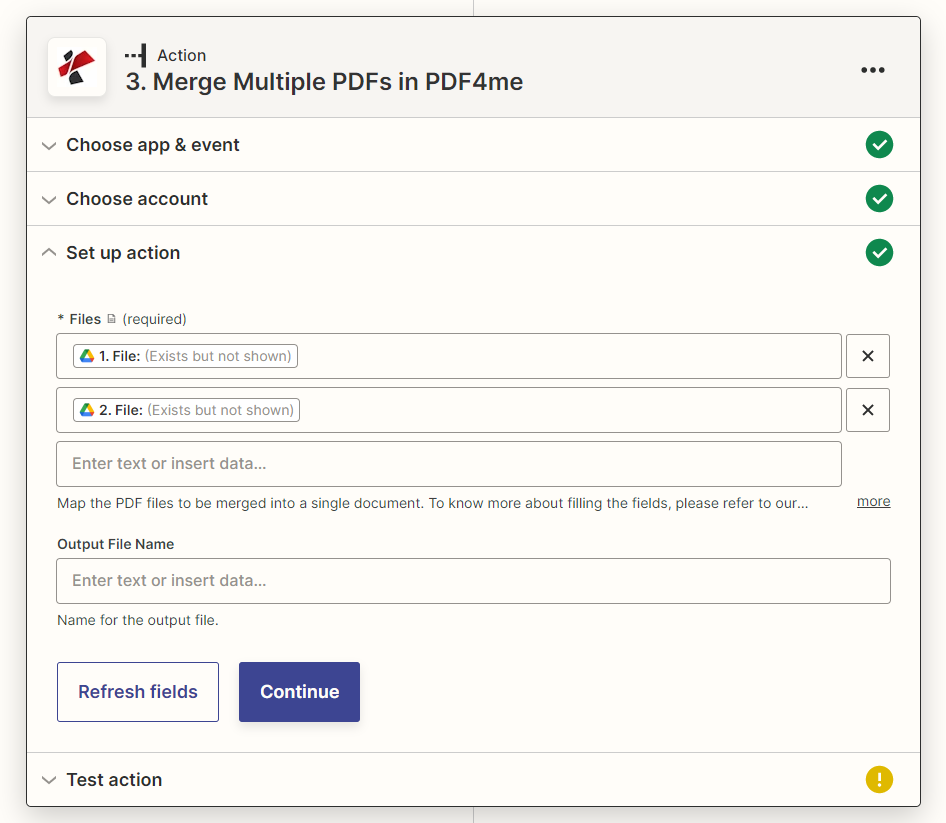
アクションパネルの設定:ファイルは必須項目、出力ファイル名はオプションです
パラメータ
必須 Zapier UI: ファイル。出力ファイル名は省略可能です。
| パラメータ | 必須 | その機能 | 例 |
|---|---|---|---|
| Files | Optional | List of PDF files to merge, added one entry at a time. Map from a trigger or previous steps, a URL to a file also works. Merges in the order listed. | 1. File, 2. File |
| Output File Name | Optional | Name for the merged output file, include the .pdf extension. If left blank, a default name is assigned. | merged_document.pdf |
| File URLs (Either provide Files or File URLs) | Optional | Links to the PDF files to merge, as an alternative to Files, in the order they should appear. If filled, Files is ignored. | |
出力
| 分野 | タイプ | 内容物 |
|---|---|---|
documentId | Text | ID PDF4me gives the resulting document. |
errorMessage | Text | Error message when PDF4me could not process the file; empty otherwise. |
fileExtension | Text | Extension of the resulting file, for example `.pdf`. |
fileName | Text | Name of the resulting file, without extension. |
fileUrl | Text | Download link of the resulting file. Map it into any later step that needs the file, for example an upload to Google Drive, Dropbox or OneDrive. |
fullFileName | Text | Name of the resulting file, with extension. |
jobId | Text | ID of the PDF4me job that processed the request. |
traceId | Text | Trace ID of the request, when PDF4me returns one. Give it to PDF4me support when reporting a problem. |
Zapierで複数のPDFを結合する設定方法を教えてください。
- 追加 PDF4me Zap のアクション アプリとして選択し、 複数のPDFを結合する。
- 接続 PDF4me アカウントを作成するか、既存の接続を選択してください。
- 地図 ファイル 1 つのエントリを追加 PDFトリガーまたは以前の手順から、マージしたい順序で指定します。
- オプションで設定可能 出力ファイル名 と共に
.pdf拡大。 - ステップをテストし、返された値を確認します。 ファイル URL 結合されたドキュメントを指します。
- 地図 ファイル に ファイルのアップロードマージされたデータを配信するためのメールまたはストレージアクション PDF。
違いは何ですか Zapier 自動化とワンファイルWebツール?
Adobe Acrobat、iLovePDF、およびSmallPDFは、単一の手動セッションでの結合を解決します。ブラウザを開き、ファイルをアップロードし、結果を一度ダウンロードします。複数のPDFを結合するには Zapier ワークフロー内の繰り返しステップとしてマージを解決します。トリガーが発火するたび(フォルダ内の新しいファイル、フォームの送信、月末スケジュールなど)、アクションが自動的に実行され、マージされたファイルが渡されます。 PDF ブラウザも手動アップロードも不要で、次のステップに進むことができます。
典型的な構成
ワークフローの例Common Zapier patterns using Merge Multiple PDFs.
- 契約が承認され、その構成要素(主契約書、添付書類、付録)が個別の書類として準備できたときにトリガーが作動します。 PDFs。
- 複数の PDF を結合すると、注文メイン契約書、別紙 A、別紙 B に記載されているファイルと結合されます。
- ファイルアップロードまたはメール送信の手順により、署名当事者に完全なパッケージが送信されます。
- すべての部門報告書が提出された時点で、月末に予定されたトリガーが作動します。
- 複数のPDFを結合すると、表紙、要約、各部門の報告書が順番に結合されます。
- Gmailの手順により、統合された月次報告書が経営陣にメールで送信されます。
- ローン申請書とその添付書類(身分証明書、収入証明書、信用情報報告書)がすべて揃った時点で、トリガーが作動します。
- 複数のPDFを結合する機能は、まず申請書を結合し、次に添付書類を結合します。
- ストレージまたはデータベースのステップでは、統合されたパッケージを引受審査のためにアーカイブします。
- 支払い実行の期日が近づくと、スケジュールされたトリガーが作動します。
- 個別請求書 PDFs Zap内で以前に生成されたデータは、支払い実行のために1つのバッチファイルに統合されます。
- 統合されたバッチはアーカイブされるか、承認ワークフローに送られます。
実践的なヒント
チートシート
| 分野 | 価値 |
|---|---|
| Action | Merge Multiple PDFs |
| Files | Required, list built one entry at a time, merge order = list order |
| Output File Name | Optional, include .pdf extension |
| Output | File (URL), File Name, Full File Name, File Extension |
| Counterpart action | Split PDF (breaks one file into parts instead of combining several) |
よくある質問
関連アクション
他のプラットフォームでの同じタスク
業界におけるユースケースとアプリケーション
- Legal & Professional Services
- Finance & Banking
- Human Resources
- Education & Publishing
- 契約パッケージ契約書と添付資料およびスケジュールを統合する
- 事件ファイル訴状、証拠、および展示物を組み合わせる
- 最終書類不動産取引完了書類一式を準備する
- 適当な注意レビュー文書を統合する
- ローン申請ローン関連書類と関連資料をまとめて提出する
- 財務報告書財務諸表とスケジュールを組み合わせる
- 監査パッケージ監査文書とレポートを統合する
- 法令遵守に関する届出規制当局への提出書類一式を作成する
- 従業員ファイルオンボーディング関連書類を統合する
- 福利厚生パッケージ: 加入のための福利厚生関連書類を統合する
- 業績評価レビュー文書とフィードバックを組み合わせる
- 退出パッケージ退職および離職に関する書類を作成する
- コース教材複数の講義用PDFをコースパックにまとめる
- 学生記録成績証明書、証明書、記録を統合する
- 出版アセンブリ章を組み合わせて完全な原稿にする
- 成績表学生の評価とレポートをパッケージ化する