複数のドキュメントを生成する - バッチクリエーター Zapier
PDF4me 複数のドキュメントを生成する は Zapier 1 つのテンプレートをマージするアクション JSON または XML 配列を1つの実行で、配列の要素ごとに1つのパーソナライズされたドキュメントを生成します。契約書、請求書、証明書、手紙などの一括処理に使用できます。次のZapステップまたはループで使用するドキュメントの配列を返します。
このアクションが何をするか
1つの単語を取ります。 HTML、 PDFメールマージ、または Google Docs テンプレートと、各オブジェクトが 1 つのドキュメントのフィールド値を表すデータ配列を用意し、配列の各項目ごとに同じマージを 1 回実行します。結果として、同じテンプレートと出力形式を共有する生成済みドキュメントの配列が作成され、ループ処理の準備が整います。 Zapier メール送信やアーカイブなどの文書ごとの操作用。
認証 API リクエスト
アクセスするには PDF4me ウェブ API を通して Zapierすべてのリクエストには適切な認証情報を含める必要があります。認証により安全な通信が保証され、承認されたユーザーとしての身元が検証され、シームレスな統合が可能になります。 Zapier ワークフローと PDF4meのバッチ文書生成サービス。
見逃してはならない重要な事実
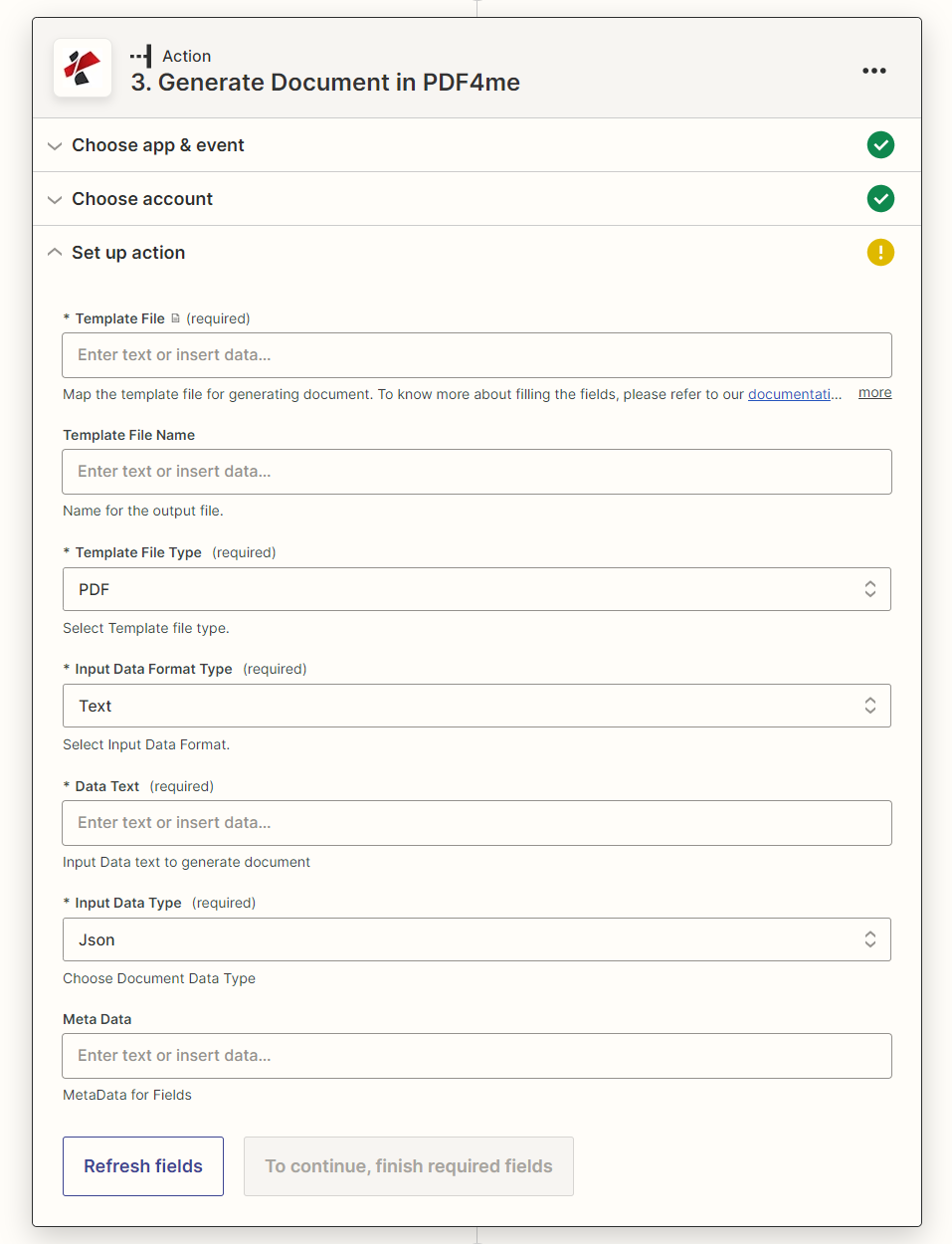
複数文書生成の主な機能は何ですか?
- バッチ文書生成配列項目ごとに1つのドキュメントを単一のテンプレートから1つの操作で作成します。
- 複数フォーマットのテンプレートをサポート: 言葉、 HTML、 PDFメールマージ、Googleドキュメントのテンプレート
- 配列データ入力: JSON または XML 配列、インラインテキストまたはマップファイルとして指定
- 設定可能な出力バッチ全体の出力ドキュメントタイプを選択します(PDF、Docx、およびその他のサポートされている形式)。
パラメータ
ドキュメント生成複数アクションのパラメーターの完全なリスト。パラメーター名は、 Zapier 上記のスクリーンショットに、設定画面のユーザーインターフェースが表示されています。
- 地図 テンプレートファイル そして設定する テンプレートファイルの種類 それに合わせて
- セット 入力データ形式タイプ テキストまたはファイルに保存してから、 データテキスト または データファイル と共に JSON/XML 配列(ドキュメントごとに1つのオブジェクト)
- セット 入力データタイプ 配列形式に合わせ、必要に応じて設定します 出力ドキュメントタイプ
| パラメータ | 必須 | その機能 | 例 |
|---|---|---|---|
| Template File | Required | Template file for generating documents. Supports Word (.docx), HTML, PDF, Mail Merge, or GoogleDocs templates. | contract_template.docx |
| Template File Name | Optional | Name for the output files. If not provided, the name is picked from Template File. | contract_template |
| Template File Type | Required | Format of the template: Word, HTML, PDF, Mail Merge, or GoogleDocs. Defaults to PDF. | Word |
| Input Data Format Type | Required | Whether the data array is supplied as inline text or a file. Text reveals Data Text. File reveals Data File. Defaults to Text. | Text |
| Data Text | Required | Inline JSON or XML array, one object per document to generate. Required when Input Data Format Type is Text. | [{"firstname":"John"},{"firstname":"Jane"}] |
| Data File | Required | Array data file (JSON or XML) mapped from a previous step. Required when Input Data Format Type is File. | customers_data.json |
| Input Data Type | Required | Structure of the supplied array, must match Data Text or Data File exactly. Defaults to Json. | Json |
| Output Document Type | Required | Format applied to every generated document in the batch: Pdf, Docx, and other supported formats. Defaults to Word. | Pdf |
| Meta Data | Optional | Metadata to attach to template fields during generation. | - |
| Keep Pdf Editable | Optional | Make the output PDF editable. Defaults to No. | No |
重要: 必須 Zapier UI: テンプレートファイル、 テンプレートファイルの種類、 入力データ形式タイプ、 入力データタイプ、そして(入力データ形式タイプに応じて) データテキスト または データファイルテンプレートファイル名、出力ドキュメントタイプ、メタデータはオプションです。
複数の返品書類を生成するとはどういうことですか?
の PDF4me 複数のドキュメントを生成する このアクションは、入力データ配列の項目ごとに1つのエントリを含む、生成されたドキュメントの配列を返します。
| 分野 | タイプ | 内容物 |
|---|---|---|
jobId | Text | ID of the PDF4me job that processed the request. |
traceId | Text | Trace ID of the request, when PDF4me returns one. Give it to PDF4me support when reporting a problem. |
documents[]documentId | Text | ID PDF4me gives the generated document. |
documents[]fileName | Text | Name of the generated document, without extension. |
documents[]fileExtension | Text | Extension of the generated document, for example `.pdf`. |
documents[]fullFileName | Text | Name of the generated document, with extension. |
documents[]fileUrl | Text | Download link of the generated document. Map it into any later step that needs the file. |
documents[]fileAlternateUrl | Text | Alternative download link of the generated document, with the file name at the end of the URL. |
documents[]fileSize | Number | Size of the generated document, as reported by PDF4me (0 when PDF4me reports no size). |
注記: 出力は 文書の配列入力配列の項目ごとに 1 つ追加します。 ループする Zapier このステップの後、生成された各ドキュメントを反復処理します。
- JSON
- Zap Integration
例 JSON レスポンス(ドキュメントの配列):
[
{
"File Name": "document_001",
"File Extension": ".pdf",
"Full File Name": "document_001.pdf",
"File URL": "https://...",
"File Size": 125440
},
{
"File Name": "document_002",
"File Extension": ".pdf",
"Full File Name": "document_002.pdf",
"File URL": "https://...",
"File Size": 127680
}
]
追加 ループする Zapier このステップの後、マップ ファイルURL ループ内でファイルのアップロード、メール送信、またはストレージのアクションを実行し、生成された各ドキュメントを個別に処理します。
典型的な構成
ワークフローの例Common Zapier workflow patterns using Generate Documents Multiple.
- 顧客レコードのバッチが契約書作成の準備が整った時点で、トリガーが作動します。
- フォーマッターステップは、 JSON クライアントの契約変数ごとに1つのオブジェクトを含む配列。
- PDF4me ドキュメント生成マルチマップは、契約テンプレートと配列をデータテキストにマッピングし、出力ドキュメントタイプをPdfに設定します。
- ループする Zapier 返された配列を反復処理し、各クライアントにそれぞれの契約書をメールで送信します。
- 請求サイクルのトリガーは、期間の終わりに作動します。
- 会計処理または電子商取引処理では、各顧客の請求書データが1つの配列項目としてエクスポートされます。
- PDF4me ドキュメント生成 複数は配列に対して請求書テンプレートを実行し、1つのドキュメントを生成します PDF 顧客一人当たり。
- ループする Zapier 各請求書を、その顧客宛てのメールステップに添付します。
- トレーニングプログラムが受講者グループを完了したと判断すると、トリガーが作動する。
- この配列は、各参加者の名前と完了日を基に作成されます。
- PDF4me ドキュメント生成では、テンプレートファイルタイプメールマージを使用して、証明書テンプレートを配列に対して複数回実行します。
- ループする Zapier 各証明書は、学習管理またはアーカイブのステップで保存されます。
実践的なヒント
チートシート
| 分野 | 価値 |
|---|---|
| Action | Generate Documents Multiple |
| Template File | [Mapped from previous step] |
| Template File Type | Word / HTML / PDF / Mail Merge / GoogleDocs |
| Input Data Format Type | Text (or File) |
| Data Text | [{"firstname":"John"},{"firstname":"Jane"}] |
| Input Data Type | Json |
| Output Document Type | Pdf |
よくある質問
関連アクション
他のプラットフォームでの同じタスク
業界におけるユースケースとアプリケーション
- Legal & Professional Services
- Finance & Accounting
- Human Resources
- Education & Training
- 一括契約書作成: 顧客オンボーディング用の複数の個別契約を作成する
- 法的通知の配布複数の受信者向けにカスタマイズされた法的通知を生成する
- 契約処理顧客固有の条件に基づいて一括契約書の作成を自動化する
- 文書自動化バッチ処理で法律文書のワークフローを効率化する
- 一括請求書生成請求サイクル内のすべての顧客に対して請求書を作成する
- ステートメント生成顧客全体に対する口座明細書を作成する
- 財務報告書複数の関係者向けに部門別レポートを作成する
- 請求書関連書類: 一括請求書作成の自動化
- オファーレターの配布複数の候補者向けにパーソナライズされたオファーレターを作成する
- 従業員文書の更新: 全従業員向けに最新のポリシー文書を作成する
- 証明書の配布: 全受講者グループに対して研修修了証を発行する
- オンボーディングパッケージ新入社員グループ向けにパーソナライズされたオンボーディング資料を作成する
- 一括証明書発行卒業生向けの証明書を発行する
- 成績表の配布: すべての生徒に個別の成績表を作成する
- コース教材学生グループ向けにカスタマイズされた教材を作成する
- 評価文書: 対象グループごとに個別の評価資料を作成する