ExcelのワークシートをZapierで個別に管理する
Excel - 別々のワークシート これは、VBAやマクロを使用せずに、1つの.xlsxファイルをシートごとに個別のワークブックに分割するZapierアクションです。このアクションは、ソースワークブックを読み込み、すべてのタブを走査し、各項目が個別のファイルとしてパッケージ化された1つのワークシートである配列を返します。ループユーティリティと組み合わせることで、シートごとに1つのファイルをDropbox、Googleドライブ、またはOneDriveに自動的に保存できます。
APIリクエストの認証
ZapierのすべてのPDF4meモジュールには、有効な接続が必要です。PDF4me APIキーを保持する接続を作成または選択してください。
見逃してはならない重要な事実
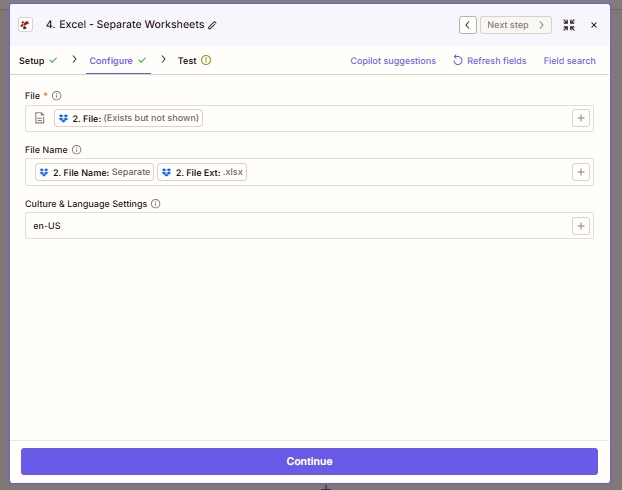
設定するフィールドは3つあります。ファイルにはソースワークブックのバイトデータが格納されます。ファイル名はログ記録と後続処理での命名に使用されます。カルチャと言語設定は、数値セルと日付セルを内部処理のためにどのように解析するかを制御します。
ExcelのワークシートをZapierで個別に管理するとはどういうことですか?
Excel - Separate Worksheets は、複数シートの .xlsx ファイルをタブごとに 1 つのワークブックに分割する Zapier の PDF4me アクションです。単一のファイルを受け取り、ソースワークシートごとに 1 つのファイルからなる配列を返します。Excel で対話的に実行されるデスクトップの「シートの移動またはコピー」マクロとは異なり、このアクションは Zapier のトリガーに応じてクラウド上で実行されるため、午前 3 時に Dropbox にドロップされたワークブックは、午前 3 時 15 分には既に分割されています。
パラメータ
| パラメータ | 必須 | その機能 | 例 |
|---|---|---|---|
| File | Required | The source .xlsx file. Map from a Dropbox / Drive / OneDrive Get File step (or any step that emits a file). | 2. File |
| File Name | Optional | Filename with extension. Passed through for logging and downstream mapping. Typically built by concatenating File Name and File Ext from the prior step. | Separate.xlsx |
| Culture & Language Settings | Optional | Locale used to parse date and numeric cells for internal processing. Does not modify stored values in the output workbooks. Defaults to en-US. | en-US |
出力
| 分野 | タイプ | 内容物 |
|---|---|---|
| jobId | Text | ID of the PDF4me job that processed the request. |
| traceId | Text | Trace ID of the request, when PDF4me returns one. Give it to PDF4me support when reporting a problem. |
| documentId | Text | Not filled by this step: the files are returned in a `documents` list, one entry per worksheet, each with fileName, fileExtension, fullFileName, fileUrl, fileAlternateUrl, fileSize and documentId. |
| File Name | Text | Not filled by this step: the files are returned in a `documents` list, one entry per worksheet, each with fileName, fileExtension, fullFileName, fileUrl, fileAlternateUrl, fileSize and documentId. |
| File Extension | Text | Not filled by this step: the files are returned in a `documents` list, one entry per worksheet, each with fileName, fileExtension, fullFileName, fileUrl, fileAlternateUrl, fileSize and documentId. |
| Full File Name | Text | Not filled by this step: the files are returned in a `documents` list, one entry per worksheet, each with fileName, fileExtension, fullFileName, fileUrl, fileAlternateUrl, fileSize and documentId. |
| File Url | Text | Not filled by this step: the files are returned in a `documents` list, one entry per worksheet, each with fileName, fileExtension, fullFileName, fileUrl, fileAlternateUrl, fileSize and documentId. |
| Alternate File Url | Text | Not filled by this step: the files are returned in a `documents` list, one entry per worksheet, each with fileName, fileExtension, fullFileName, fileUrl, fileAlternateUrl, fileSize and documentId. |
| File Size | Number | Not filled by this step: the files are returned in a `documents` list, one entry per worksheet, each with fileName, fileExtension, fullFileName, fileUrl, fileAlternateUrl, fileSize and documentId. |
Excelの「別々のワークシート」はZapierでどのように機能しますか?
Zapierはソースの.xlsxバイトをPDF4meに渡します /api/v2/SplitWorksheet エンドポイント。PDF4me は Aspose Cells でワークブックを開き、すべてのシートを反復処理し、各シートをスタンドアロンの .xlsx ファイルとしてパッケージ化し (ヘッダー、スタイル、数式を保持)、シートごとに 1 つのエントリを返します。Zapier はコレクションを次の形式で表示します。 documents 配列の各エントリには、ファイル名、ファイル拡張子、完全なファイル名、およびファイルURLが含まれます。 Zapierのループに関するドキュメント次に、その配列をZapierのループユーティリティにパイプすることで、後続のアクションが要素ごとに一度ずつ実行されるようにします。