Excel を Zapier に取り込む
Excel - 入力 これは、.xlsx テンプレートに JSON データを入力し、セル スタイル、数式、結合領域をすべて保持した状態で入力済みのワークブックを返す Zapier アクションです。既にブランド化された Excel レイアウトがあり、そこに新しいデータを自動的に挿入したい場合に使用します。このアクションは、テンプレート ファイルと JSON ペイロードを受け取り、入力済みのワークブックを返します。 .xlsxそのため、手動で貼り付けることなく、メール送信、アップロード、アーカイブが可能です。
APIリクエストの認証
ZapierのすべてのPDF4meモジュールには、有効な接続が必要です。PDF4me APIキーを保持する接続を作成または選択してください。
見逃してはならない重要な事実
&=Items.ItemName または、列ヘッダーがJSONフィールド名と一致するExcelテーブル内に配置してください。空白のシートでは、出力は空になります。2. ファイル Dropbox / Google Drive / OneDrive の「ファイルの取得」ステップから取得します。テンプレート URL は、公開されている HTTPS 配信テンプレートでのみ使用でき、マッピングされたファイルを渡す場合は空白のままになります。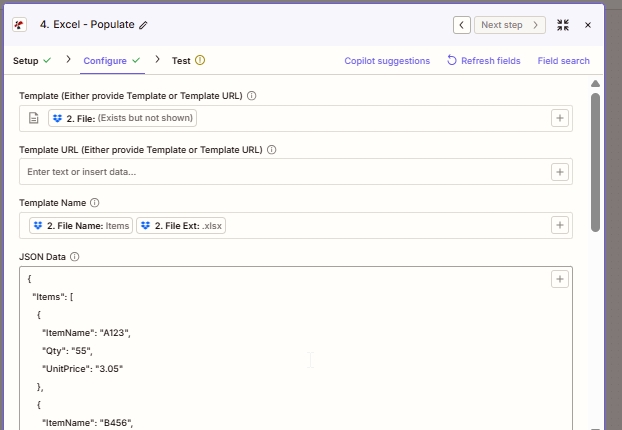
設定の先頭。前のステップのファイル出力からテンプレートをマッピングし、ファイル名とファイル拡張子を連結してテンプレート名を作成します。JSONデータは、PDF4meがテンプレートに書き込むペイロードです。
ZapierにおけるExcelデータ入力とは何ですか?
Excel - Populateは、JSONペイロードから取得したデータを使用して、あらかじめデザインされた.xlsxテンプレートにデータを入力するZapierのPDF4meアクションです。テンプレートファイルとJSONオブジェクトを受け取り、データが入力された後のワークブックファイルを返します。すべてを生のグリッドにフラット化するオンラインのJSON-to-Excelコンバーターとは異なり、Populateはテンプレートのレイアウトを保持するため、ブランド化されたレポート、請求書、ダッシュボードを、フォーマットのずれなく、トリガーごとに再生成できます。
パラメータ
| パラメータ | 必須 | その機能 | 例 |
|---|---|---|---|
| Template | Conditional | The .xlsx template file. Map from a Dropbox / Drive / OneDrive Get File step. Required unless Template URL is set. | 2. File |
| Template URL | Conditional | Public HTTPS URL to fetch the template. Used only when Template is blank. | https://example.com/tpl.xlsx |
| Template Name | Required | Filename with extension. Used for output naming and downstream mapping. Typically built by concatenating File Name and File Ext from the prior step. | Items.xlsx |
| JSON Data | Required | Data payload to write into the template. Object keys must match Smart Markers or table column headers. | {"Items":[{"ItemName":"A123","Qty":"55","UnitPrice":"3.05"}]} |
| Strict JSON Strings | Optional | When True, quoted numbers stay as strings in the output cells. When False, they auto-convert to numeric cells. | True |
| Culture & Language Settings | Optional | Locale used to parse date and numeric cells. Does not modify stored values. | en-US |
| Calculate Formulas | Optional | When True, formulas in the template are evaluated after population so totals open pre-computed. | True |
| Worksheet Indexes | Optional | 1-based index of the worksheet(s) to populate. Comma-separated for multiple sheets in one call. | 1 (or 1,3) |
| Quote Prefix To Style | Optional | When True, cells beginning with a single quote are styled as text rather than treated as a prefix character. | False |
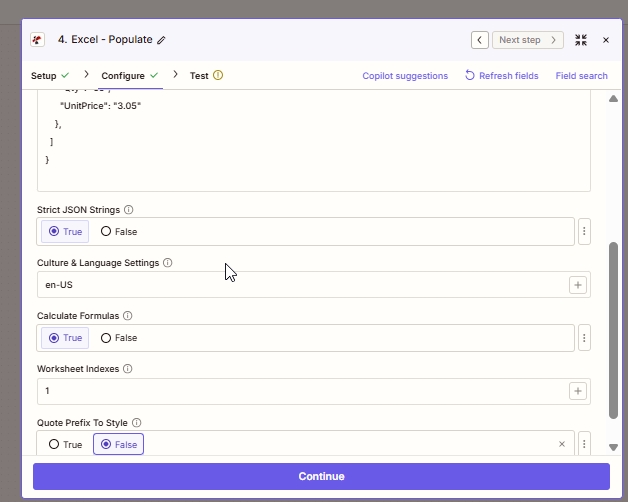
詳細オプション。「厳密な JSON を有効にする」と「数式を計算する」は、ほとんどの場合変更する必要のないデフォルト設定です。テンプレートのデータ領域が最初のシート以外のシートにある場合にのみ、「ワークシート インデックスを調整する」を有効にしてください。
出力
| 分野 | タイプ | 内容物 |
|---|---|---|
| File | Binary | The populated .xlsx workbook. Map into a Dropbox / Drive / OneDrive Upload File step, or attach it in Gmail / Outlook Send Email. |
| File Name | String | The Template Name you provided in the Configure tab. Useful when the upload step needs both file bytes and a filename separately. |
ZapierでExcelのデータ入力機能はどのように動作しますか?
Zapierはテンプレートファイルのバイト列とJSONペイロードをPDF4meに渡します。 /api/v2/PopulateExcelTemplate エンドポイント。PDF4me は Aspose Cells を使用してテンプレートを開き、JSON に対してすべてのスマートマーカーまたはテーブルバインディングを解決し、依存する数式を評価し、Zapier がエンドポイントとして表示する Base64 エンコードされたバイトストリームとして入力済みの .xlsx を返します。 File 出力。 ファイルフィールドに関するZapierのドキュメントつまり、ファイル出力は、手動でエンコードまたはデコードする手順なしに、ファイル入力を受け入れる後続のアクションにそのまま渡すことができる。