重複行をマージする Excel 使用 Zapier
行を結合する は Zapier アクション PDF4me 重複を統合する Excel 選択したキー列に基づいて行をグループ化します。顧客ごとに複数の注文行を結合したり、製品バリエーションを集計したり、カテゴリデータを自動的にロールアップしたりできます。キー以外の値はセミコロンで区切られて結合され、内部の重複は削除されます。その結果、手作業によるスプレッドシート作業なしで、クリーンで統合されたデータが得られます。
認証方法 API リクエスト?
アクセスするには PDF4me ウェブ API を通して Zapierすべてのリクエストには適切な認証情報を含める必要があります。認証により安全な通信が保証され、承認されたユーザーとしての身元が検証され、シームレスな統合が可能になります。 Zapier ワークフローと PDF4meの強力な Excel 行結合サービス。
見逃してはならない重要な事実
設定概要
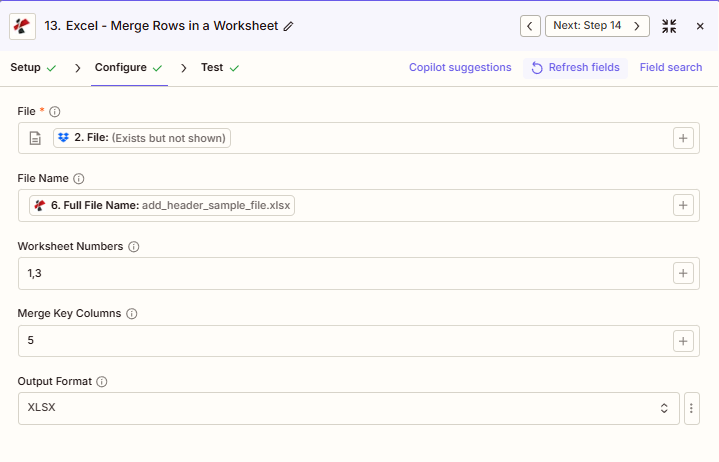
このスクリーンショットは、ワークシート1とワークシート3の行を結合する様子を示しています。結合キーとして列5を使用し、ファイルとファイル名は前の手順でマッピングされ、出力形式はXLSXに設定されています。
add_header_sample_file.xlsx
1,3
5
XLSX
パラメータ
行の結合アクションのパラメーターの完全なリスト。パラメーター名は、 Zapier 構成 UI。
必須 Zapier UI: ファイルのみ。ファイル名、ワークシート番号、差し込みキー列、出力形式はすべてオプションです。ワークシート番号と列番号はどちらも1から始まるインデックスを使用します(1 = 最初のワークシート、1 = A列)。
| パラメータ | 必須 | その機能 | 例 |
|---|---|---|---|
| File | Required | Excel file content, mapped from a previous step using full file content. | [2. File from Step 2] |
| File Name | Optional | Filename with .xlsx or .xls extension, used for output naming. | add_header_sample_file.xlsx |
| Worksheet Numbers | Optional | Comma-separated, 1-based worksheet numbers to process. 1 is the first worksheet. | 1,3 |
| Merge Key Columns | Optional | Comma-separated, 1-based column numbers used to identify duplicate rows. Empty merges only exact duplicates across every column. | 5 |
| Output Format | Optional | Output file format: XLSX, XLS, XLSB, or CSV. | XLSX |
出力にはどのようなフィールドが含まれますか?
このアクションは統合された Excel ファイルとトラッキングメタデータ。この出力形状は、行のマージ、行の追加、行の削除、およびその他の操作で共有されます。 PDF4me Excel ファイルを返すアクション。
| 分野 | タイプ | 内容物 |
|---|---|---|
jobId | Text | ID of the PDF4me job that processed the request. |
traceId | Text | Trace ID of the request, when PDF4me returns one. Give it to PDF4me support when reporting a problem. |
documentId | Text | ID PDF4me gives the resulting document. |
File Name | Text | Name of the resulting file, without extension. |
File Extension | Text | Extension of the resulting file, for example `.pdf`. |
Full File Name | Text | Name of the resulting file, with extension. |
File Url | Text | Download link of the resulting file. Map it into any later step that needs the file, for example an upload to Google Drive, Dropbox or OneDrive. |
Alternate File Url | Text | Alternative download link of the resulting file, with the file name at the end of the URL. |
File Size | Number | Size of the resulting file, as reported by PDF4me. |
典型的な構成
ワークフローの例Common Zapier workflow patterns using Merge Rows.
- スケジュールされたトリガーによって、eコマースシステムからその日の注文データがエクスポートされます。
- 行の結合は、ワークシート番号を1、結合キー列をCustomerID列に設定して実行されるため、同じ顧客に対するすべての注文が、セミコロンで結合された注文詳細を含む1つの行になります。
- 統合されたファイルは、レビューのためにカスタマーサービス用のGoogleドライブフォルダにアップロードされます。
- 新しいデータファイルがDropboxのインポートフォルダに届くと、Zapがトリガーされます。
- 「行の結合」は「結合キー列」を空欄のまま実行するため、すべての列で同一の行のみが結合され、標準的な重複削除と同等の結果となります。
- クリーンアップされたファイルは、下流システムで使用されるDropboxフォルダにアップロードされます。
- 週次トリガーは、以下の製品販売データを取得します。 SharePoint。
- 行の結合は、結合キー列がカテゴリ列とサブカテゴリ列に設定され、出力形式が設定されている状態で実行されます。 CSV各カテゴリ内のすべての製品を1行にまとめて、データベースにインポートします。
- 集計結果は、カテゴリー別の業績概要としてマーケティングチームにメールで送信されます。
実践的なヒント
チートシート
| 分野 | 価値 |
|---|---|
| Action | Merge Rows |
| File | [mapped from previous step, full content] |
| File Name | add_header_sample_file.xlsx |
| Worksheet Numbers | 1,3 |
| Merge Key Columns | 5 |
| Output Format | XLSX |
よくある質問
関連アクション
他のプラットフォームでの同じタスク
業界におけるユースケースとアプリケーション
- Sales & E‑Commerce
- Finance & Accounting
- Human Resources
- Operations
- 顧客注文の統合顧客ごとに複数の注文行を結合して、すべての注文を表示する単一のレコードを作成します。
- 製品SKUの集約: 親SKUごとに製品バリエーションを統合し、すべてのバリエーションをまとめてグループ化します。
- アカウントロールアップアカウントIDごとにアカウントアクティビティ行をマージし、すべてのトランザクションを結合します。
- 領土統合地域別のグループ販売データ(地域ごとの営業担当者の活動をすべて統合)
- チャネル集約チャネル別(直販、パートナー、オンライン)に売上を集計し、チャネルごとの全製品を表示します。
- GL勘定の統合: GL勘定ごとに取引行をマージし、すべてのエントリを結合します
- ベンダー一覧ベンダーIDごとに請求書行を統合し、ベンダーごとのすべての請求書を表示します。
- コストセンター集約: コストセンターごとに費用をグループ化し、すべての費用タイプを統合します
- プロジェクト統合プロジェクトIDごとにプロジェクトコストの行をマージし、労務費、材料費、経費を組み合わせます。
- 部門別集計部門別に予算/実績の行を統合し、すべてのアカウントを表示します。
- 従業員のタイムシート統合従業員IDに基づいてタイムシートの行を結合し、すべてのタイムエントリを結合します。
- トレーニング記録の集約従業員ごとのグループ研修記録(完了したすべてのコースを表示)
- 部門別人員数集計: 従業員行を部門ごとに統合し、すべての従業員をまとめる
- 福利厚生登録の統合従業員ごとに福利厚生選択行を結合し、すべての選択をまとめる
- パフォーマンス記録の集計従業員によるグループレビューデータ(すべての評価カテゴリを統合)
- 在庫保管場所の統合SKUごとに在庫行をマージし、複数の拠点の数量を統合する
- 機器メンテナンス一覧: 資産IDごとに保守記録をグループ化し、すべてのサービスイベントを表示します。
- 品質検査集約バッチ番号ごとにQC行を統合し、すべての検査結果を組み合わせます。
- 生産実行の統合: 作業指示書に基づいて生産行をマージし、すべての作業を結合します
- サプライヤーパフォーマンス集計サプライヤーIDごとにサプライヤーデータをグループ化し、配送と品質の指標を統合します。