マージ Excel ファイル Zapier
PDF4me ファイルの結合 は Zapier 2つ以上の要素を組み合わせたアクション Excel 複数のワークブックを1つのファイルに統合し、重複するワークシート名を自動的に変更することで、データの上書きを防ぎます。月次の部門別レポートの統合、地域データの集計、複数ファイルからなるデータセットの組み立てなどに活用できます。各ファイルから含めるシートを選択し、XLSX、XLS、PDF、またはCSV形式で出力できます。
このアクションが何をするか
2個以上必要 Excel 前の Zap ステップで作成したワークブックを結合し、単一の出力ファイルを作成します。結合するワークブックの数に合わせて「ファイル数」を設定し、各ファイルとファイル名のペアをマッピングします。「結合するワークシート」では、ファイルごとに特定のシートのみを含めることができ、「並べ替え位置」では、各ファイルがマッピングされているファイルスロットに関係なく、ファイルが結合される順序を制御します。出力形式は XLSX、XLS、PDF、または CSV です。
認証 API リクエスト
アクセスするには PDF4me ウェブ API を通して Zapierすべてのリクエストには適切な認証情報を含める必要があります。認証により安全な通信が保証され、承認されたユーザーとしての身元が検証され、シームレスな統合が可能になります。 Zapier ワークフローと PDF4meの Excel ファイル結合サービス。
見逃してはならない重要な事実
:::ヒント 前の手順でファイル1、ファイル2などをマップします + 隣のボタン ファイル1、 ファイル2および対応する ファイル名1、 ファイル名2 以前のZapステップからマッピングするフィールドを設定します。 ファイル数結合するファイルの数に合わせてください。各ファイルには完全なコンテンツが含まれている必要があります。 :::
:::警告 ファイル: (存在しますが表示されません) 「ファイル: (存在しますが表示されません)」が表示され、エラーが発生した場合は、 ファイルの内容全体 代わりに。参照 Zapier & Power Automate ヒント詳細は :::
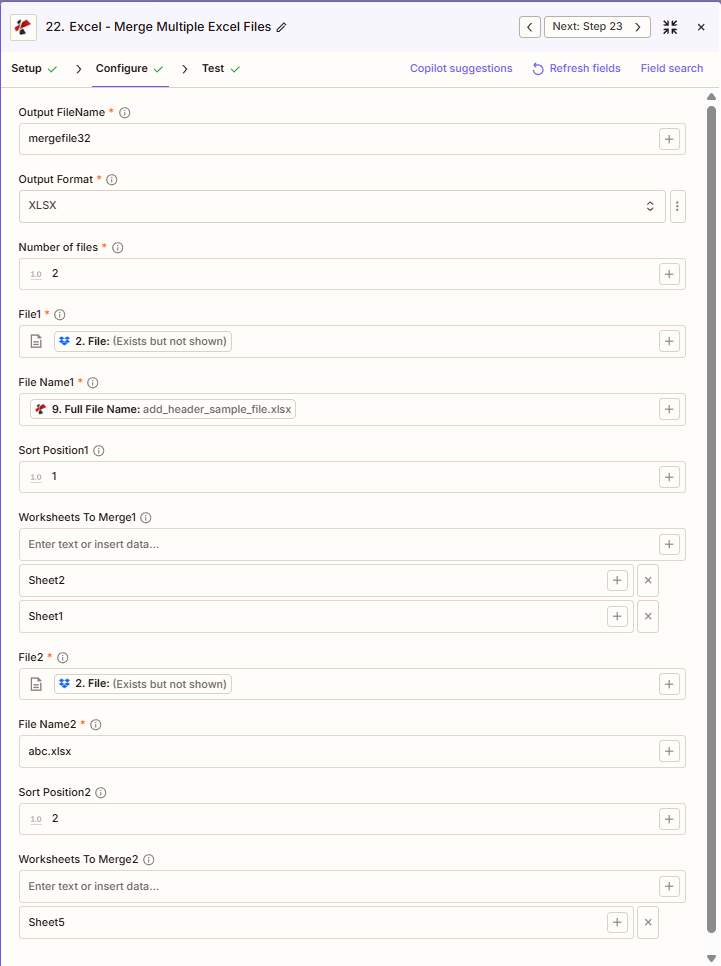
マージファイルの主な機能は何ですか?
- 複数ファイルの結合2つ以上を組み合わせる Excel 複数のファイルを1つのワークブックにまとめる(ファイル数)
- 選択式ワークシート: 結合するワークシート1、結合するワークシート2、ファイルごとにシートを選択するか、すべて空欄のままにします
- ソートコントロール: ソート位置1、ソート位置2、小さい番号が最初にマージされます
- 出力形式: XLSX、XLS、PDF、またはCSV
- 重複名の処理重複するワークシート名は自動的に接尾辞付きで名前が変更されます
パラメータ
ファイルのマージ アクションのパラメーターの完全なリスト。パラメーター名は、 Zapier 構成 UI 上記のスクリーンショットに示されている。 UI ファイル数に基づいて、ファイル1、ファイル2など、ファイルごとに1セットずつ表示されます。
- セット 出力ファイル名 (延長なし) 出力形式 (XLSX、XLS、PDF、またはCSV形式)
- セット ファイル数 (例:ファイル1+ファイル2の場合は2)
- 地図 ファイル1、 ファイル名1; ファイル2、 ファイル名2など。
- オプションで設定可能 結合するワークシート1、 結合するワークシート2 (または、すべてのシートを空欄のままにしてください)
- セット ソート位置1、 ソート位置2 マージ順序(1、2、3...)
| パラメータ | 必須 | その機能 | 例 |
|---|---|---|---|
| Output FileName | Required | Merged output filename, no extension. The extension is added based on Output Format. | mergefile32 |
| Output Format | Required | Output format for the merged file: XLSX, XLS, PDF, or CSV. Defaults to XLSX. | XLSX |
| Number of files | Required | Count of files to merge. Determines how many File, File Name, Sort Position, and Worksheets To Merge slots appear. Defaults to 1. | 2 |
| File1 | Required | First Excel file to merge, mapped from a previous step. Must provide full file content. | [2. File from Step 2] |
| File Name1 | Required | First file's filename, mapped from a previous step. | add_header_sample_file.xlsx |
| Sort Position1 | Conditional | Merge order for the first file. Lower numbers are merged earlier. | 1 |
| Worksheets To Merge1 | Conditional | Comma-separated sheet names to include from File1. Empty includes all sheets. | Sheet1, Sheet2 |
| File2 | Required | Second Excel file to merge, mapped from a previous step. | [2. File from Step 2] |
| File Name2 | Required | Second file's filename. | abc.xlsx |
| Sort Position2 | Conditional | Merge order for the second file. | 2 |
| Worksheets To Merge2 | Conditional | Comma-separated sheet names to include from File2. Empty includes all sheets. | Sheet5 |
2つ以上のファイルを結合する
セット ファイル数 3、4など Zapier ファイル3、ファイル名3、並べ替え位置3、結合するワークシート3などが表示されます。各ファイルをマッピングし、結合順序の並べ替え位置を設定してください。
重要: のみ ファイル そして ファイル名 ファイルごとに、さらに 出力ファイル名、 出力形式、 そして ファイル数は必須です。重複するワークシート名は自動的に変更されます(例:Summary_1、Summary_2)。
ファイルのマージを実行すると、何が返されますか?
の PDF4me ファイルの結合 アクションはマージされた Excel 後続の Zap ステップで使用するためのファイル。出力形式はすべて共通です。 PDF4me Excel アクション Zapier。
API 結合されたファイルをダウンロードするためのエンドポイント。これを次のステップのファイル入力にマッピングします。
api.pdf4me.com/Zapier/GetDocument?d=...代替ダウンロード URL パスにファイル名を含めて。
api.pdf4me.com/Zapier/GetAltDocument/.../mergefile32.xlsx| 分野 | タイプ | 内容物 |
|---|---|---|
jobId | Text | ID of the PDF4me job that processed the request. |
traceId | Text | Trace ID of the request, when PDF4me returns one. Give it to PDF4me support when reporting a problem. |
documentId | Text | ID PDF4me gives the resulting document. |
File Name | Text | Name of the resulting file, without extension. |
File Extension | Text | Extension of the resulting file, for example `.pdf`. |
Full File Name | Text | Name of the resulting file, with extension. |
File Url | Text | Download link of the resulting file. Map it into any later step that needs the file, for example an upload to Google Drive, Dropbox or OneDrive. |
Alternate File Url | Text | Alternative download link of the resulting file, with the file name at the end of the URL. |
File Size | Number | Size of the resulting file, as reported by PDF4me. |
- JSON
- Zap Integration
例 JSON 出力 (URL(表示形式のみ、リンクは機能しません):
{
"Job Id": "969f2da3-f10a-49bf-b084-6fc4759991ec",
"File Url": "api.pdf4me.com/Zapier/GetDocument?d=...",
"Alternate File Url": "api.pdf4me.com/Zapier/GetAltDocument/.../mergefile32.xlsx",
"File Name": "mergefile32",
"File Extension": ".xlsx",
"Full File Name": "mergefile32.xlsx",
"Document Id": "07386627-184a-44b2-a040-5ea2712a4bc5",
"File Size": 212764,
"Doc Text": ""
}
使用 + 地図を作成する ファイルURL または 代替ファイルURL 次のステップへ、ドライブ、Dropbox、メール、または別の PDF4me Excel アクション。
この出力構造は、以下の間で共有されます。 ファイルの結合、 行を追加する、 行を削除するその他 PDF4me Excel アクション Zapier. URLこれらは一時的なものです。期限が切れる前に次のステップで使用してください。
典型的な構成
ワークフローの例Common Zapier workflow patterns using Merge Files.
- 毎月1日に、スケジュールされたトリガーが作動します。
- PDF4me ファイル結合機能は、各部門のレポートをファイル1からファイル10にマッピングし、それぞれの並べ替え位置を設定することで、一貫した順序で結合されるようにします。
- 統合されたワークブックは、経営陣向けの共有ドライブフォルダにアップロードされます。
- 毎週実行されるトリガーによって、地域別のDropboxフォルダから売上レポートが取得されます。
- PDF4me 「ファイルの結合」機能では、各ファイルの「結合するワークシート」に「概要」シートと「詳細」シートのみが含まれるように設定し、その他のタブは統合ファイルに含めないようにします。
- 統合されたレポートは営業担当副社長にメールで送信されます。
- 四半期ごとのトリガーは、各月のデータを取得します。 Excel ファイルから SharePoint。
- PDF4me ファイル結合機能は、出力形式をPDF、並べ替え位置を時系列順に設定して、3か月分のデータを結合します。
- 変更不可能なPDFアーカイブは、コンプライアンス保管場所にアップロードされます。
実践的なヒント
チートシート
| 分野 | 価値 |
|---|---|
| Action | Merge Files |
| Output FileName | mergefile32 |
| Output Format | XLSX |
| Number of files | 2 |
| File1 / File2 | [Mapped from previous steps] |
| Sort Position1 / 2 | 1 / 2 |
| Worksheets To Merge1 | Sheet1, Sheet2 (or empty for all) |
よくある質問
関連アクション
他のプラットフォームでの同じタスク
業界におけるユースケースとアプリケーション
- Finance & Accounting
- Sales & Marketing
- Human Resources
- Operations & Supply Chain
- 期間統合月次の損益計算書、貸借対照表、キャッシュフロー計算書を四半期ごとのワークブックに統合する
- エンティティロールアップ子会社の財務諸表を統合報告ワークブックにまとめる
- 予算集計部門別予算ファイルを会社のマスター予算ワークブックに統合する
- 監査ファイルアセンブリ複数の監査領域からの作業書類ファイルを監査ファイルに統合する
- 差異報告実績結果を予算ファイルまたは予測ファイルとマージして差異分析ワークブックを作成する
- 地域別売上統合地域別売上レポートを地域別タブ付きの全国売上ワークブックに統合する
- チャネルパフォーマンス直接販売、パートナー販売、オンライン販売のレポートを統合してオムニチャネルワークブックを作成する
- キャンペーン集約個々のキャンペーン結果を統合して、包括的なマーケティングパフォーマンスワークブックを作成する
- 地域別報告地域担当マネージャーのレポートを地域担当副社長のレポートワークブックに統合する
- 四半期ビジネスレビュー月次売上ファイルを四半期レビューワークブックに統合し、QBR会議に活用する。
- 給与計算の統合場所または部門の給与ファイルをマスター給与ワークブックに統合する
- 福利厚生の登録複数の期間の給付選択ファイルを年間登録ワークブックに統合する
- 人員数報告部門別人員数ファイルを統合して、全社的な人員数レポートを作成する
- トレーニング記録部門ごとの研修完了ファイルを統合して、マスター研修ログを作成する
- 業績評価: 個々のレビューファイルを会社全体の業績管理ワークブックに統合する
- 複数拠点での事業運営: サイトの運用レポートを企業運用ワークブックに統合する
- 在庫統合: 倉庫在庫ファイルをマスター在庫ワークブックに統合する
- 生産集約工場生産レポートを製造実績ワークブックに統合する
- 品質報告複数のラインからの品質管理検査ファイルを品質ダッシュボードワークブックに統合する
- 物流統合: 運送業者のパフォーマンスファイルを統合された物流レポートワークブックにマージする