ワークシートを削除する Excel 使用 Zapier
ワークシートを削除する は Zapier アクション PDF4me 不要なシートを取り除く Excel ワークシート名、ワークシートインデックス、またはその両方を結合ロジックと組み合わせてワークブックを作成します。組み込みの安全機能により、常に少なくとも1つのワークシートが保持されるため、誤った選択によってワークブックが空になることはありません。この機能をトリガーして、配布前にテンプレートからサンプルシートを削除したり、内部計算タブを削除したりできます。
認証方法 API リクエスト?
アクセスするには PDF4me ウェブ API を通して Zapierすべてのリクエストには適切な認証情報を含める必要があります。認証により安全な通信が保証され、承認されたユーザーとしての身元が検証され、シームレスな統合が可能になります。 Zapier ワークフローと PDF4meの Excel ワークシート管理サービス。
見逃してはならない重要な事実
設定概要
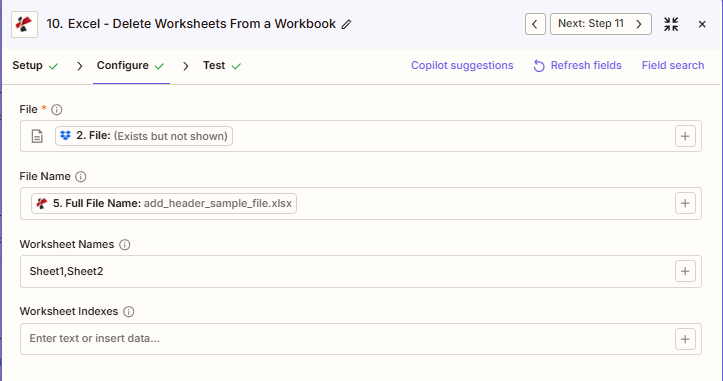
スクリーンショットには、前の手順でマッピングされたファイルが表示されています。ファイル名は「add_header_sample_file.xlsx」、ワークシート名は「Sheet1,Sheet2」に設定され、ワークシートインデックスは空欄になっています。
add_header_sample_file.xlsx
シート1、シート2
オプション(1ベース)
:::ヒント:前の手順でマップファイルとファイル名を取得してください + 隣のボタン ファイル そして ファイル名 以前の Zap ステップからマッピングするには、たとえば、 ファイル名全体 以前の PDF4me Excel 行動。 Excelファイルには完全なコンテンツを提供する必要があり、「存在するが表示されない」参照は認められません。 :::
:::警告 ファイル: (存在しますが表示されません) ファイルフィールドに「ファイル: (存在しますが表示されません)」と表示され、「ファイルが空です」エラーが発生する場合は、 ファイルの内容全体 代わりに。参照 Zapier & Power Automate ヒント詳細は :::
パラメータ
ワークシート削除アクションのパラメーターの完全なリスト。パラメーター名は、 Zapier 構成 UI。
必須 Zapier UI: ファイルのみ。ファイル名、ワークシート名、ワークシートインデックスはすべてオプションですが、何かを削除するには、ワークシート名またはワークシートインデックスのいずれか少なくとも1つが必要です。
| パラメータ | 必須 | その機能 | 例 |
|---|---|---|---|
| File | Optional | Excel file content, mapped from a previous step using full file content. | [2. File from Step 2] |
| File Name | Optional | Filename with .xlsx or .xls extension, used for output naming. | add_header_sample_file.xlsx |
| Worksheet Names | Optional | Comma-separated, case-sensitive list of worksheet names to delete. Combines with Worksheet Indexes via union logic. | Sheet1,Sheet2 |
| Worksheet Indexes | Optional | Comma-separated, 1-based list of worksheet positions to delete. Combines with Worksheet Names via union logic. | 1,3 |
| File URL (Either provide File or File URL) | Optional | Link to the Excel workbook to delete the worksheets from, as an alternative to File. Map a file URL from a previous step. | |
| File Name | Optional | Name of the Excel file, including its extension (for example `report.xlsx`). | |
名前とインデックスの両方を使用する場合のユニオンロジック
両方を指定する場合 ワークシート名 そして ワークシート索引この操作では、両方のセットの和集合が削除されます。たとえば、「Sheet1,Sheet2」と「3」を選択すると、Sheet1、Sheet2、および3番目のワークシートが削除されます。重複した選択(名前とインデックスの両方で識別される同じシート)も適切に処理されます。
出力にはどのようなフィールドが含まれますか?
このアクションは変更された Excel ファイルとトラッキングメタデータ。この出力形状は、 PDF4me Excel アクション Zapier ファイルを返すもの。
| 分野 | タイプ | 内容物 |
|---|---|---|
jobId | Text | ID of the PDF4me job that processed the request. |
traceId | Text | Trace ID of the request, when PDF4me returns one. Give it to PDF4me support when reporting a problem. |
documentId | Text | ID PDF4me gives the resulting document. |
File Name | Text | Name of the resulting file, without extension. |
File Extension | Text | Extension of the resulting file, for example `.pdf`. |
Full File Name | Text | Name of the resulting file, with extension. |
File Url | Text | Download link of the resulting file. Map it into any later step that needs the file, for example an upload to Google Drive, Dropbox or OneDrive. |
Alternate File Url | Text | Alternative download link of the resulting file, with the file name at the end of the URL. |
File Size | Number | Size of the resulting file, as reported by PDF4me. |
典型的な構成
ワークフローの例Common Zapier workflow patterns using Delete Worksheets.
- マスターテンプレートがコンテンツライブラリ内で配布準備完了とマークされると、トリガーが作動します。
- 「ワークシートの削除」コマンドは、ワークシート名をサンプルシート名と手順シート名に設定して実行され、作業中のシートはそのまま残ります。
- クリーニング済みのテンプレートは、共有テンプレートライブラリにアップロードされます。
- 週次経営報告書が複数の計算シートとともに生成され、Zapがトリガーされる。
- 「ワークシートの削除」コマンドは、内部計算シートの位置にワークシートインデックスを設定した状態で実行され、プレゼンテーションシートは保持されます。
- 最終報告書は経営陣にメールで送信されます。
- 月次メンテナンス トリガーが起動し、次の場所から取得したローリング 12 か月 レポートを削除します。 SharePoint。
- 「ワークシートの削除」処理は、保持期間を過ぎた月のシートを一覧表示するために動的に構築されたワークシート名を使用して実行されます。
- トリミングされたローリングレポートは、 SharePoint。
実践的なヒント
チートシート
| 分野 | 価値 |
|---|---|
| Action | Delete Worksheets |
| File | [mapped from previous step, full content] |
| File Name | add_header_sample_file.xlsx |
| Worksheet Names | Sheet1,Sheet2 |
| Worksheet Indexes | 1,3 (alternative or combined) |
よくある質問
関連アクション
他のプラットフォームでの同じタスク
業界におけるユースケースとアプリケーション
- Finance & Accounting
- Sales & Marketing
- Human Resources
- Operations & IT
- クライアントレポートの最終化: 顧客の財務報告書から内部計算および仮定ワークシートを削除する
- 予算テンプレートの整理: 新しい会計年度の予算テンプレートから前年度のワークシートを削除します
- 監査ファイルの準備監査ファイルのアーカイブ前に、下書きと作業用紙のワークシートを削除してください。
- ローリング予測メンテナンス: 12か月ローリング予測ワークブックから不要になった月のワークシートを削除します
- 統合クリーンアップ統合シート作成後、個々のエンティティのワークシートを削除します。
- 提案の最終決定顧客提案書から価格計算および利益率分析ワークシートを削除する
- テンプレート配布マーケティングテンプレートからサンプルキャンペーンとサンプルデータワークシートを削除します。
- 領土報告の整理: 地域パフォーマンスレポートから非アクティブなテリトリーワークシートを削除します
- キャンペーンアーカイブアーカイブされたキャンペーンワークブックからテストおよびドラフトキャンペーンワークシートを削除します。
- CRMエクスポートのクリーンアップCRMデータのエクスポートからメタデータとマッピングワークシートを削除します。
- 特典テンプレートのクリーンアップ: 前年度のプランワークシートを福利厚生登録テンプレートから削除する
- 給与報告書の最終化: 配布済み給与レポートから計算ワークシートと検証ワークシートを削除します
- 業績評価の整理最終レビューワークブックからキャリブレーションおよびスコアリングワークシートを削除します。
- 人員数レポートのメンテナンス: 18か月以上の保存期間を超えた過去の月別ワークシートを削除する
- トレーニングログの整理: マスター研修記録から、不要になった研修セッションワークシートを削除する
- ダッシュボードの最終調整公開されたダッシュボードからデータソースとETLワークシートを削除します。
- 在庫テンプレートのクリーンアップ: 複数拠点在庫テンプレートからサンプル倉庫ワークシートを削除します
- 制作レポートの整理週次生産概要からシフト詳細ワークシートを削除する
- ファイルサイズ最適化: 使用されていないワークシートや非表示のワークシートを削除して、ワークブックのパフォーマンスを向上させます
- システムエクスポートのクリーンアップシステムデータのエクスポートから技術メタデータワークシートを削除する