行を削除する Excel 使用 Zapier
行を削除する は Zapier アクション PDF4me 指定されたリストから単一の行、範囲、またはそれらの組み合わせを削除します Excel ワークシートでは、「1-5,10,15-20」のような範囲構文が使用されます。行は自動的に下から上に処理されるため、行が誤った順序で削除された場合に発生するインデックスシフトエラーによって数式が壊れるのを防ぎます。
関連ブログ記事
この機能に関するブログ記事はまだありません。近日公開予定です。
その間、PDF4me ブログを閲覧して、あらゆるプラットフォームのチュートリアルやワークフローをご覧ください。
ブログをご覧ください →
認証方法 API リクエスト?
アクセスするには PDF4me ウェブ API を通して Zapierすべてのリクエストには適切な認証情報を含める必要があります。認証により安全な通信が保証され、承認されたユーザーとしての身元が検証され、シームレスな統合が可能になります。 Zapier ワークフローと PDF4meの Excel 行削除サービス。
見逃してはならない重要な事実
ファイル名は任意であり、必須ではありません。
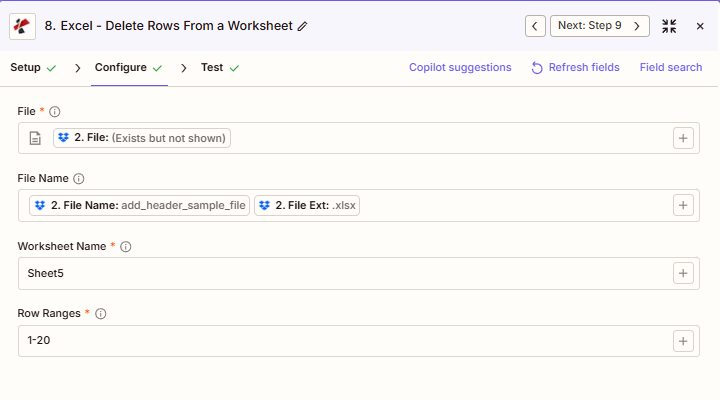
スクリーンショットは、ファイル、ワークシート名、行範囲にアスタリスクが付いていることを確認できます。 Zapier UIしかし、ファイル名はそうではありません。ファイル名は出力の命名に使用されるものであり、ファイルの場所を特定するために使用されるものではありません。
行は1から始まり、下から上に処理されます。
1行目は最初の行で、 Excel削除は範囲の下部から自動的に上部に向かって実行されるため、行を任意の順序で指定してもインデックスシフトエラーは発生しません。
実行ごとにワークシート名が1つ
各アクション呼び出しは、大文字小文字を区別する正確な名前で一致する、1つのワークシートのみを対象とします。複数のシートをクリーンアップするには、追加の「行の削除」ステップを連結してください。
パラメータ
行削除アクションのパラメーターの完全なリスト。パラメーター名は、 Zapier 構成 UI。
必須 Zapier UI: ファイル名、ワークシート名、および行範囲。ファイル名は省略可能です。
| パラメータ | 必須 | その機能 | 例 |
|---|---|---|---|
| File | Optional | Excel file content, mapped from a previous step using full file content. | [2. File from Step 2] |
| File Name | Optional | Filename with .xlsx or .xls extension, used for output naming. | add_header_sample_file.xlsx |
| Worksheet Name | Required | Exact, case-sensitive name of the worksheet to delete rows from. | Sheet5 |
| Row Ranges | Required | Comma-separated row numbers and ranges. 1-based indexing, processed bottom-to-top automatically. | 1-20 |
| File URL (Either provide File or File URL) | Optional | Link to the Excel workbook to delete the rows from, as an alternative to File. Map a file URL from a previous step. | |
行範囲構文の例
単一行: 「5,10,15」は、5行目、10行目、15行目を削除します。
範囲: 「1-20」は1行目から20行目までを削除します。
混合: 「1-3,25」は、例えば内部メモと計算行など、1行目から3行目と25行目を削除します。
出力にはどのようなフィールドが含まれますか?
このアクションは変更された Excel ファイルとトラッキングメタデータ。この出力形状は、行の削除、行の追加、行の更新、およびその他の操作で共有されます。 PDF4me Excel アクション Zapier。
| 分野 | タイプ | 内容物 |
|---|---|---|
jobId | Text | ID of the PDF4me job that processed the request. |
traceId | Text | Trace ID of the request, when PDF4me returns one. Give it to PDF4me support when reporting a problem. |
documentId | Text | ID PDF4me gives the resulting document. |
File Name | Text | Name of the resulting file, without extension. |
File Extension | Text | Extension of the resulting file, for example `.pdf`. |
Full File Name | Text | Name of the resulting file, with extension. |
File Url | Text | Download link of the resulting file. Map it into any later step that needs the file, for example an upload to Google Drive, Dropbox or OneDrive. |
Alternate File Url | Text | Alternative download link of the resulting file, with the file name at the end of the URL. |
File Size | Number | Size of the resulting file, as reported by PDF4me. |
典型的な構成
ワークフローの例Common Zapier workflow patterns using Delete Rows.
顧客向けレポートを送付する前に、内部メモを削除する
- 週次レポート生成ステップが完了し、Googleドライブから完全な内部レポートが取得されます。
- 「行の削除」は、ワークシート名を「レポート」、行範囲を「1-3,25」に設定して実行され、タイトル/内部メモ行と計算行を削除します。
- 修正済みのレポートは顧客向けのGoogleドライブフォルダにアップロードされ、元のレポートは社内アーカイブに保管されます。
トランザクションログにデータ保持ポリシーを適用する
- スケジュールされた月次トリガーは、トランザクションログを取得します。 SharePoint。
- 前のステップでは、保持期間を過ぎたデータを含む行番号を特定し、ワークシート名を「トランザクション」に設定し、その範囲から動的に構築された行範囲を使用して「行の削除」を実行します。
- 更新されたログは、 SharePoint そして、コンプライアンス概要が保持責任者にメールで送信されます。
配布テンプレートからサンプル行を削除する
- テンプレートはコンテンツ管理ツールで配布準備完了としてマークされ、そのマスターバージョンが取得される。
- 「行の削除」は、ワークシート名を「Sheet1」、行範囲を「2~10」に設定して実行され、サンプルデータを削除しますが、ヘッダー行と数式はそのまま残します。
- クリーニング済みのテンプレートは、共有テンプレートライブラリにアップロードされます。
実践的なヒント
Map full file content, not a reference
If File shows "Exists but not shown", pick the mapping option that provides full file content, or the action returns a File Is Empty error.
Row Ranges order does not matter
Because deletion happens bottom-to-top internally, you can list ranges in any order, such as 15-20,1-5, without causing index-shifting mistakes.
Worksheet Name is case-sensitive
A typo or wrong case, like "sheet5" instead of "Sheet5", will not match and the action errors instead of silently doing nothing.
One worksheet per action call
To delete rows from multiple sheets, chain a second Delete Rows step and feed the first step's output file into it.
Preserve the header row deliberately
Since row 1 is included in 1-based numbering, double-check your Row Ranges does not accidentally include row 1 when you want to keep column headers.
チートシート
| 分野 | 価値 |
|---|---|
| Action | Delete Rows |
| File | [mapped from previous step, full content] |
| File Name | add_header_sample_file.xlsx |
| Worksheet Name | Sheet5 |
| Row Ranges | 1-20 |
よくある質問
関連アクション
行を追加する Excel
逆の操作として、古いデータ行を削除した後、新しいデータ行を追加する場合に使用します。
行を更新 Excel
行を完全に削除するのではなく、既存の行の値をその場で変更します。
行を結合する
別々のソースからの行を1つのワークシートに結合する。これは、クリーンアップの前後によく行われる手順である。
他のプラットフォームでの同じタスク
行を削除する Make
と同じ操作 Make モジュール、クラウドストレージをトリガーとするビジュアルシナリオ。
行を削除する n8n
自己ホスト型またはクラウド型のノードとして、同じ行削除を設定します。 n8n ワークフロー。
行を削除する Power Automate
Microsoft 365 流れ SharePoint、 Outlook、およびTeamsトリガー。
行を削除する REST API
生 PDF4me エンドポイント。カスタムバックエンドコードやPostmanテスト用。
業界におけるユースケースとアプリケーション
- Finance & Accounting
- Sales & Marketing
- Human Resources
- Operations
- クライアントレポートのクリーンアップ外部配布前に、内部メモ行(1~3行目)と計算行を削除してください。
- データ保持コンプライアンス: 保持ポリシーに従って、7年以上前のトランザクション行を削除します。
- 監査証跡のトリミングアーカイブ前に監査ログからテスト/サンプルエントリを削除します
- 予算テンプレートの作成: 新しい予算サイクルの予算テンプレートから前年度のデータ行を削除します
- 調整後のクリーンアップ月次照合ワークブックから解決済みの不一致行を削除します。
- キャンペーン結果のクリーンアップ最終パフォーマンスレポートの前にテストキャンペーンの行を削除します。
- CRMエクスポートのトリミングCRMエクスポートから非アクティブ/削除済みのリード行を削除する
- 価格表の更新: 顧客向け価格表から古い製品行を削除する
- 売上報告書の最終化: 管理配信前に内部計算行を削除
- 予報清掃: 12ヶ月移動ウィンドウを超える過去の予測行を削除します
- テンプレートサンプル削除配布前に人事テンプレートからサンプル従業員行を削除してください。
- 解雇された従業員の清掃: アクティブな従業員名簿スプレッドシートから、分離された従業員行を削除します。
- トレーニングログのトリミング: 3年以上前の完了済みトレーニングセッションの行を削除します。
- 給与記録の準備四半期給与明細のアーカイブ前にテスト給与明細行を削除してください。
- 福利厚生登録の整理: 新規登録テンプレートから前年度の登録行を削除します
- 生産ログの保持: 保持期間より古い本番実行行を削除します
- 機器の丸太剪定: 機器ログから古いメンテナンスイベント行を削除します。
- 品質管理の清掃: QC検査ログからテスト/校正行を削除する
- 在庫履歴のトリミング在庫ログから24か月以上前の取引行を削除します。
- シフトレポートの最終化: 運用レビュー配布前に内部監督者メモ行を削除します