ハイパーリンクを削除 PDF で Zapier
PDF - ハイパーリンクを削除 は Zapier アクション PDF4me クリック可能なリンクを PDF特定のページ範囲または文書全体に対して実行します。契約書を外部に共有したり、記録をアーカイブしたり、印刷用に文書を準備したりする前に実行します。内部または古い URLs 決してファイルを持ち運ばないでください。
関連ブログ記事
この機能に関するブログ記事はまだありません。近日公開予定です。
その間、PDF4me ブログを閲覧して、あらゆるプラットフォームのチュートリアルやワークフローをご覧ください。
ブログをご覧ください →
このアクションが何をするか
PDF - ハイパーリンクを削除 クリック可能なリンク注釈を削除します PDF特定のページ範囲またはドキュメント全体を対象に、ページを削除します。内部ドラフト、契約書、レポートには、内部Wiki、ケースシステム、ダッシュボードへのリンクが含まれていることがよくありますが、この操作では、外部への配信、長期アーカイブ、印刷配布の前に、表示されるページコンテンツ自体には影響を与えずに、これらのリンクを削除します。
認証 API リクエスト
毎 PDF4me アクション Zapier 接続済みのアカウントが必要です。 PDF4me API アクションを初めて追加する際に使用するキーです。
見逃してはならない重要な事実
リンクのみ、テキストは表示されない
この操作は、クリック可能な注釈を削除するだけで、基となるテキストは削除しません。 URL 印刷されたテキストは、書かれたとおりにページ上に残ります。ただ、クリック可能なリンクではなくなるだけです。
ページシーケンスは、選択したページを正確にターゲットにします。
1ページ(1)、範囲(1~5)、またはカンマ区切りのリストを使用できます。空白のままにすると、すべてのページからリンクが削除されます。これは、カバーレターや紹介文のみを整理する必要がある場合に便利です。
PDF ファイルとファイル名は両方とも必須です。
トリガーのファイル名と拡張子トークンからファイル名をマッピングして元の名前を保持するか、サニタイズされた出力にカスタム名を設定します。
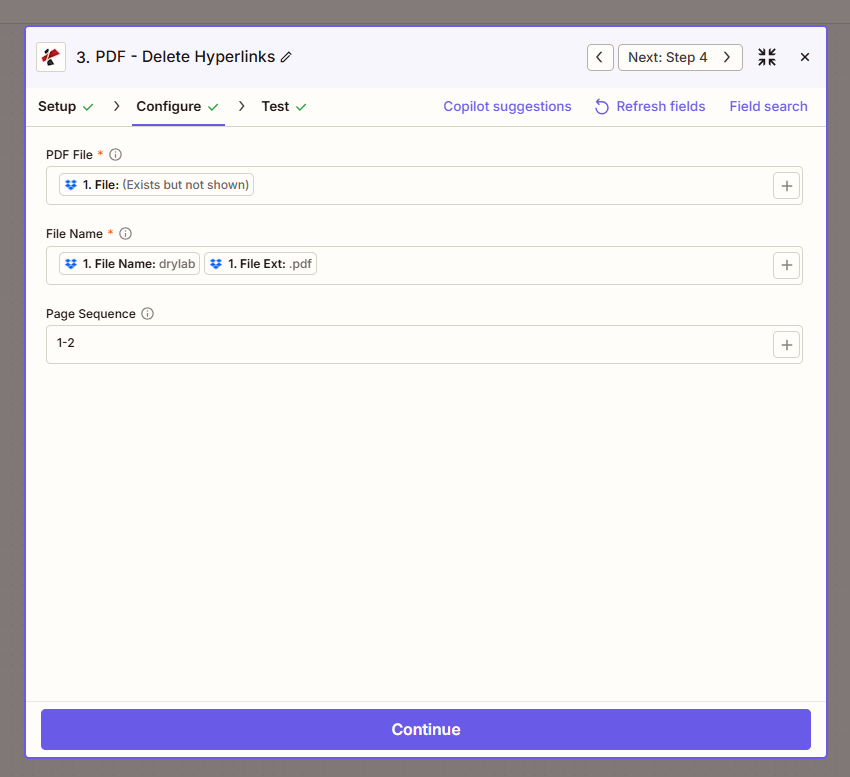
地図 PDF ファイルとファイル名を指定し、必要に応じてページ順序を設定して、サニタイズされるページを制限します。
パラメータ
必須: PDF ファイル そして ファイル名ページ順序は任意です。
| パラメータ | 必須 | その機能 | 例 |
|---|---|---|---|
| File | Optional | The input PDF to sanitize. Map the binary file output from a previous trigger or action step. | (binary PDF from trigger) |
| File Name | Optional | Output filename. Map the File Name and File Ext tokens from the trigger to preserve the original name, or set a custom value. | drylab.pdf |
| Page Sequence | Optional | Pages to remove hyperlinks from: a single page, a range, or a comma-separated list. Leave blank to process every page. | 1-2 |
| File URL (Either provide a File or a File URL) | Optional | Link to the PDF to delete hyperlinks from, as an alternative to File. Map a file URL from a previous step. | |
出力にはどのようなフィールドが含まれますか?
| 分野 | タイプ | 内容物 |
|---|---|---|
documentId | Text | ID PDF4me gives the resulting document. |
Error Message | Text | Error message when PDF4me could not process the file; empty otherwise. |
fileAlternateUrl | Text | Alternative download link of the resulting file, with the file name at the end of the URL. |
fileExtension | Text | Extension of the resulting file, for example `.pdf`. |
fileName | Text | Name of the resulting file, without extension. |
fileUrl | Text | Download link of the resulting file. Map it into any later step that needs the file, for example an upload to Google Drive, Dropbox or OneDrive. |
fullFileName | Text | Name of the resulting file, with extension. |
jobId | Text | ID of the PDF4me job that processed the request. |
TraceId | Text | Trace ID of the request, when PDF4me returns one. Give it to PDF4me support when reporting a problem. |
ハイパーリンクを削除するにはどうすればいいですか? PDF で Zapier?
- Zapで、クリックします + 新しいアクションを追加して検索する PDF4me。
- 選択 PDF - ハイパーリンクを削除 イベントとして。
- 接続 PDF4me アカウントを使用して API 鍵。
- 地図 PDF ファイル 前のトリガーまたはアクションステップからのバイナリ出力に。
- 地図 ファイル名 トリガーのファイル名と拡張子トークンから取得するか、カスタム名を設定します。
- オプションで設定可能 ページシーケンス (例えば。
1-2特定のページのみを削除する場合は、この項目を空欄にしてください。すべてのページを削除する場合は、この項目を空欄のままにしてください。 - クリック テストアクション サニタイズされた出力を確認してから、Zap を公開します。
典型的な構成
ワークフローの例Common Zapier patterns using Delete Hyperlinks from PDF.
内部リンクのないクライアント配信
- 契約書または報告書は、顧客への納品準備が整いました。
- PDF - ハイパーリンクを削除 ページシーケンスを空白のまま実行すると、すべてのページからリンクが削除されます。
- サニタイズされたバージョンはクライアントにアップロードまたはメールで送信され、内部には送信されません URLs 露出。
資料保存準備
- 文書は長期保存のために承認されました。
- PDF - ハイパーリンクを削除 すべてのリンクを削除して、外部リンクを削除した後でもアーカイブされたコピーが安定した状態を保つようにします URLs 壊す、または変える。
- リンクなしバージョンは以下に保存されます SharePoint または法的拘束システム。
表紙の選択的サニタイズ
- 複数ページにわたる文書は、表紙に続いて技術的な付録が添付されている。
- ページシーケンスは次のように設定されています
1つまり、表紙ページだけがリンクを失い、付録は参照情報を保持する。 URLs。 - 文書は、きめ細かなリンク制御によって統合または配布されます。
実践的なヒント
Text stays, only the click goes away
If a page shows a URL as visible text, that text remains after processing. Only the clickable annotation layer is removed.
Use a page range for partial sanitization
Set Page Sequence to just the pages that need it (e.g. 1 for a cover letter) instead of stripping links from the entire document by default.
Map File Name tokens to preserve naming
Combine the trigger’s File Name and File Ext tokens so the sanitized output keeps a predictable filename pattern for downstream steps.
Run Extract Hyperlinks first to audit
Before deleting, use Extract Hyperlinks from PDF to see exactly which links exist and on which pages, useful for deciding your Page Sequence value.
Test on a real document before production use
Confirm the sanitized file looks correct in a PDF viewer before wiring this into a live client-delivery or archival Zap.
チートシート
| 分野 | 価値 |
|---|---|
| Action event | PDF - Delete Hyperlinks |
| PDF File | Binary PDF mapped from a previous step |
| File Name | drylab.pdf (from File Name + File Ext tokens) |
| Page Sequence | 1-2 (optional, blank = all pages) |
| Output | fileUrl, fileName, fullFileName, fileExtension |
| Connection | PDF4me API key |
よくある質問
業界におけるユースケースとアプリケーション
- Legal
- Healthcare
- Government
- Finance
- Education
- クライアントへの提供: 契約書をクライアントまたは相手方弁護士に送信する前に、内部ケースシステムリンクを削除してください。
- 特権保護外部に公開する前に、特権的な内部リソースへのリンクを削除する
- 選択的消毒カバーレター内のリンクのみを削除し、付録内の参照リンクは残してください。
- 証拠開示準備証拠開示文書作成用にリンクなしバージョンを作成する
- 患者とのコミュニケーション患者の要約と紹介状を外部に共有する前に、内容を浄化してください。
- プライバシー保護: 内部電子カルテシステムまたは職員名簿へのリンクを削除する
- コンプライアンス共有医療情報における外部リンクを制限するポリシーを満たす
- プロバイダー間の引き継ぎ外部プロバイダーおよび保険会社向けに、リンクを含まないレポートを作成する
- 情報公開法に基づく回答: 公文書開示請求用のリンクなし文書を作成する
- アーカイブコンプライアンス: 安定したリンクのないコピーを必要とする記録保存基準を満たす
- 公開リリース外部URLに依存しないレポートを作成し、公開する。
- 歴史的参考資料: 長期アーカイブにおけるリンク切れメンテナンスの負担を軽減する
- 顧客明細書: 顧客に明細書を送信する前に、内部ダッシュボードのリンクを削除します。
- 規制当局への提出書類規制当局への開示を行う前に、非公開リンクを削除してください。
- アドバイザーレポート顧客への配布前にレポートをサニタイズする
- 選択的除去: 表紙の参照箇所を削除しつつ、技術付録へのリンクは残す。
- 印刷物の配布配布資料を印刷する前に、印刷時にクリックできないLMSリンクを削除してください。
- オフライン資料キャンパスポータルにアクセスできない学生向けに、クリーンなバージョンを作成する。
- シラバス作成繰り返し使用する教材から、壊れたリンクや古いリンクを削除する
- 選択的清掃要約ページからリンクを削除し、付録の引用は保持する。
関連アクション
PDFにハイパーリンクを作成する
クリック可能なリンクを追加する PDFリンクを削除するのではなく、リンクを作成するための対応するアクション。
PDFからハイパーリンクを抽出する
どのページをサニタイズするかを決定する前に、すべてのリンクとそのページ上の位置を監査してください。
ハイパーリンク注釈の更新
リンクを完全に削除するのではなく、リンク先を変更します。 URL 更新が必要なだけです。