ドキュメントを解析 Zapier
PDF4me ドキュメントを解析する 保存した解析テンプレートを PDF 内部 Zapier Zapを実行すると、次のステップにマッピングできる抽出フィールドが返されます。6,000以上のトリガーから選択できます。 Zapier アプリ(Gmail、Dropbox、Slack、Google Drive、OneDrive、Webhook)では、テンプレートを参照します。 テンプレート名(TemplateId)解析された値をGoogleスプレッドシート、Airtable、HubSpot、Pipedrive、QuickBooks、またはその他の下流アプリに直接ルーティングします。
この操作を実行する前に: 解析テンプレートを作成する PDF4me ダッシュボード。キャプチャキーを定義して選択します。 正規表現 安定したパターンまたは JavaScript 表現 条件付きロジックの場合。 Zapier アクションは、そのテンプレートを参照します。 テンプレートID。 見る ドキュメントの解析情報を準備する 完全なセットアップについては、正規表現の例(INV-\d{6,10}、 \d{2}/\d{2}/\d{4})、そして2人の作業員 JavaScript 表現分類器のサンプル。
認証 API リクエスト
の PDF4me アクション Zapier 必要とする PDF4me アカウント接続一度ログインしてください API キーをすべての場所で再利用します PDF4me Zap でのアクション。
見逃してはならない重要な事実
文章 分類ルールとフォールバックルールのための変数。各キャプチャキーは、アクションの出力フィールドになります。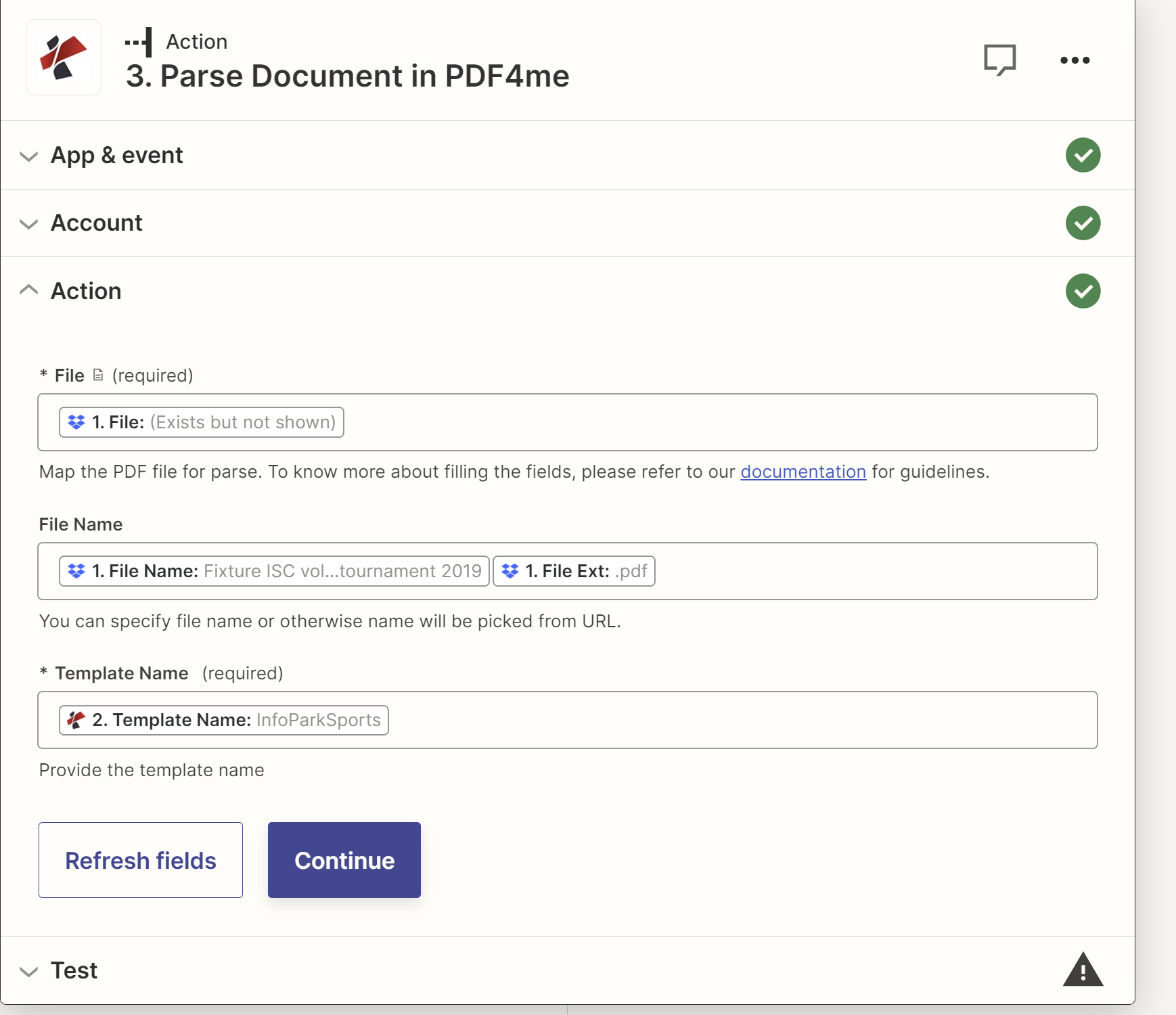
パラメータ
| パラメータ | 必須 | その機能 | 例 |
|---|---|---|---|
| File | Optional | Binary PDF from any upstream Zapier step: Gmail New Attachment, Dropbox New File in Folder, Google Drive New File in Folder, OneDrive New File, Slack New File, webhook with file payload. Pick from the prior step output. | Attachment from Gmail |
| File Name | Optional | Source filename including .pdf extension. Usually mapped from the same upstream step Filename output. | invoice.pdf |
| Template Name | Required | TemplateId GUID from the PDF4me dashboard. Identifies which parse template (capture keys + extraction rules) the action should apply. | 12345678-1234-1234-1234-123456789abc |
| File URL (Either provide File or File URL) | Optional | Link to the document to parse, as an alternative to File. Map a file URL from a previous step. | |
| File Name | Optional | Name of the file, including its extension (for example `invoice.pdf`). If empty, the name is taken from the file or URL. | |
解析テンプレート内の式タイプ
正規表現安定したパターンINV-\d{6,10})、日付(\d{2}/\d{2}/\d{4})、量($?\d{1,3}(?:,\d{3})*(?:.\d{2})?) 生産キャプチャキーの約80%。JavaScript式条件論理と分類器文章; 文字列を返します。マルチマーカー分類、フォールバックルール、日付正規化。参照 ドキュメントの解析情報を準備する 2つの作業サンプルについて。出力
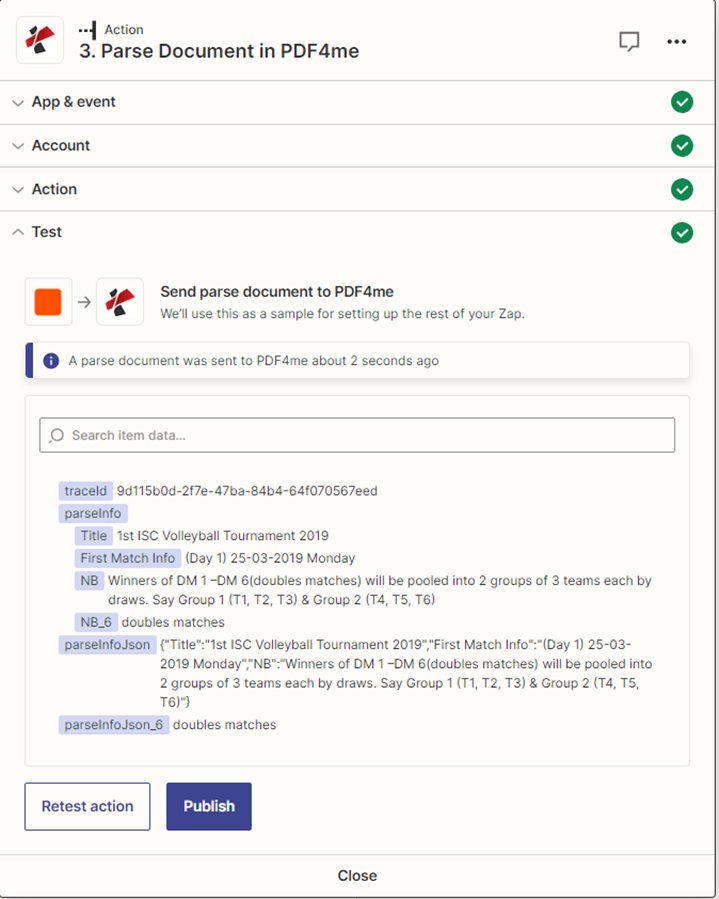
このアクションは解析されたフィールドデータを次のように返します。 Zapier テンプレート内のキャプチャキーごとに1つのフィールドを持つ出力値を作成します。これらのフィールドは、後続のステップで動的フィールドピッカーから選択できます。
| 分野 | タイプ | 内容物 |
|---|---|---|
| parseInfo | 文章 | テンプレートを使用して抽出されたデータは、キーと値のペアとして表されます。 |
| parseInfoJson | 文章 | 同じ抽出データとして、 JSON 弦。 |
| トレースID | 文章 | リクエストのトレースID、 PDF4me 1を返します。 PDF4me 問題を報告する際のサポート。 |
ザップの例
一般的なZapierのパターンTypical ways to chain Parse Document into a Zap.
- Gmailの新規添付ファイル機能は、「仕入先請求書」などのラベルに基づいてトリガーされます。
- このフィルターは、拡張子が.pdfのファイルのみを通過させます。
- Parse Documentは、添付ファイルに対して請求書テンプレートを実行します。
- Google スプレッドシートの行を作成すると、invoiceNumber、totalAmount、invoiceDate が AP トラッカーに書き込まれます。
- Dropbox の「フォルダ内の新しいファイル」は /receipts でトリガーされます。
- Parse Documentは領収書テンプレートを実行します。
- Airtableの「レコードの作成」機能は、ベンダー、日付、合計、項目を経費ベースに書き込みます。
- Slackの「チャンネルメッセージを送信」機能は、#financeチャンネルに要約を投稿します。
- Webhooksによる Zapier キャッチフック社が新規契約を獲得 PDF。
- ドキュメント解析では、当事者、契約金額、開始日、終了日を抽出します。
- HubSpotの「取引の作成」または「取引の更新」機能は、契約データを取引レコードに書き込みます。
- 送信ウェブフックは取引の所有者に通知します。