SwissQRコードを読み取る Zapier
SwissQRコードを読み取る は Zapier アクション PDF4me スイスの暗号を解読する QR-法案は PDF 債権者、債務者に返還し、 IBAN量、および参照データとして JSONこれを使用すると、請求書の自動名前変更、支払いと会計記録の照合、金額や参照番号による文書のルーティングなどを、手動でのデータ入力なしで行うことができます。
このアクションが何をするか
PDF4me SwissQRコードを読み取る 1つ取る PDF を含む スイス QR-請求書 (QR-請求書) そして、Zap 内に構造化された支払いデータを返します。 ファイルアクションが戻ります ドキュメントテキスト、 JSON 文字列 IBAN、債権者、最終債権者、債務者、金額、通貨、および参照フィールド。コードを使用して解析します。 Zapier 請求書の名称変更、支払いの照合、または会計の自動化を推進するためのステップ。
認証 API リクエスト
アクセスするには PDF4me ウェブ API を通して Zapierすべてのリクエストには、適切な認証情報を含める必要があります。
見逃してはならない重要な事実
ドキュメントテキスト復号化されたペイロード全体を JSON 文字列。コードが必要です。 Zapier (JavaScript を実行) ステップ JSON.parse 個々の値をマッピングする前に、 IBAN または ud_Name。cr_ 債権者は、 ucr_ 最終債権者(多くの場合空白)であり、 外_ スイス支払基準に準拠した最終債務者(SPC)フィールド名。 cr_Name そして ud_Name これらは、ほとんどのワークフローで使用される2つのフィールドです。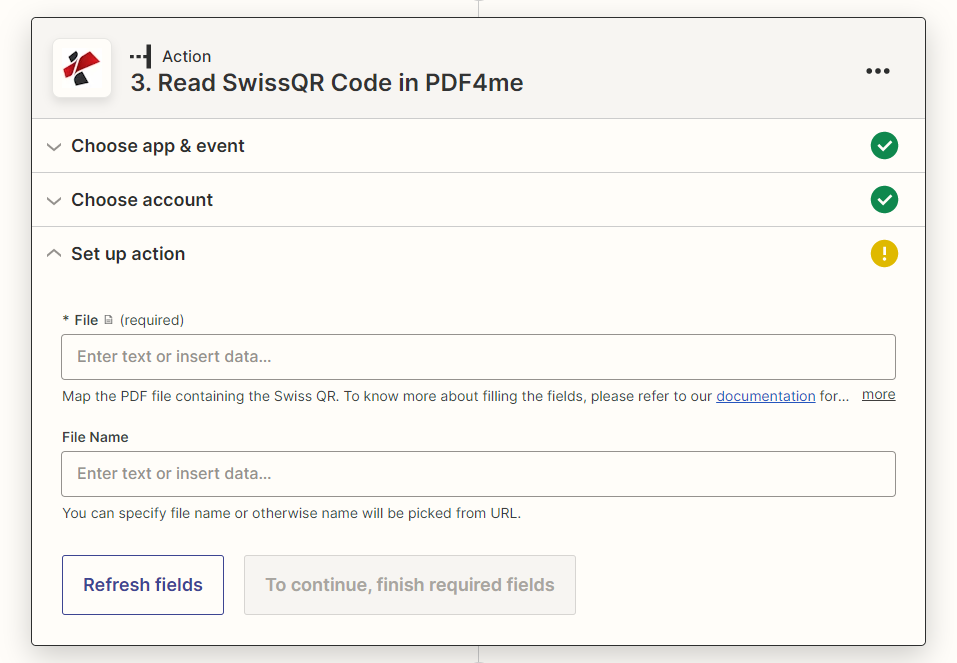
アクションパネルの設定:ファイルのみ必須、ファイル名は任意
パラメータ
必須 Zapier UI: ファイル。ファイル名は省略可能です。
| パラメータ | 必須 | その機能 | 例 |
|---|---|---|---|
| File | Optional | The PDF containing the Swiss QR-bill to decode. Map from your trigger or a previous step. | 1. File |
| File Name | Optional | Name for the response file. If left blank, the name is picked from the source URL. | invoice.pdf |
| File URL (Either provide File or File URL) | Optional | Link to the PDF containing the Swiss QR-bill, as an alternative to File. Map a file URL from a previous step. | |
出力
このアクションはファイルメタデータと1つのペイロードフィールドを返します。 ドキュメントテキスト、 JSON 文字列。それを解析して個々のスイス人にアクセスします。 QR請求書の項目は、以下の表に記載されています。
| 分野 | タイプ | 内容物 |
|---|---|---|
documentId | Text | ID PDF4me gives the resulting document. |
errorMessage | Text | Error message when PDF4me could not process the file; empty otherwise. |
fileAlternateUrl | Text | Alternative download link of the resulting file, with the file name at the end of the URL. |
fileExtension | Text | Extension of the resulting file, for example `.pdf`. |
fileName | Text | Name of the resulting file, without extension. |
fileUrl | Text | Download link of the resulting file. Map it into any later step that needs the file, for example an upload to Google Drive, Dropbox or OneDrive. |
fullFileName | Text | Name of the resulting file, with extension. |
jobId | Text | ID of the PDF4me job that processed the request. |
traceId | Text | Trace ID of the request, when PDF4me returns one. Give it to PDF4me support when reporting a problem. |
docText | Text | Billing data read from the Swiss QR code, as text returned by PDF4me. |
ドキュメントテキストフィールド(後) JSON.parse)
| 分野 | 内容物 |
|---|---|
QRType, Version, CodingType | Swiss Payment Standards header data identifying this as an SPC QR payload and its version. |
IBAN | Creditor IBAN the payment settles to. |
cr_Name, cr_StreetOrAddressLine1, cr_PostalCode, cr_City, cr_Country | Creditor (biller) name and address. |
ucr_Name, ucr_StreetOrAddressLine1, ucr_PostalCode, ucr_City, ucr_Country | Ultimate creditor fields, populated only when the creditor differs from the ultimate payee. |
Amount, Currency | Payment amount and currency (CHF or EUR). |
ud_Name, ud_StreetOrAddressLine1, ud_PostalCode, ud_City, ud_Country | Ultimate debtor (payer) name and address. |
ReferenceType, Reference | Reference type (QRR, SCOR, or NON) and the reference number itself. |
UnstructuredMessage, BillingInfo | Free-text payment message and structured billing information, when present on the bill. |
SwissQRコードを読み取る設定方法 Zapier?
- 追加 PDF4me Zap のアクション アプリとして選択し、 SwissQRコードを読み取る。
- 接続 PDF4me アカウントを作成するか、既存の接続を選択してください。
- 地図 ファイル スイスへ QR-請求書 PDF トリガーまたは前のステップから。必要に応じてマッピングします。 ファイル名。
- ステップをテストして検査します ドキュメントテキスト データ出力パネルでは、 JSON 弦。
- 追加する コード作成者 Zapier (JavaScriptを実行) ドキュメントテキストを受け取るステップを実行する
JSON.parse、そして必要な特定のフィールドを返します(ud_Name、cr_Name、IBAN、参照(またはその他)。 - 解析された値をマップして ファイルのアップロード (改名のため) フィルター または パス ステップ(ルーティング用)、またはスプレッドシート/会計処理。
スイスとは何ですか QR-ビル、そしてなぜ特別な読者が必要なのか?
スイス人 QR-請求書 (QR-Rechnung) は、2022 年 9 月 30 日に唯一の有効なスイスの支払伝票となり、古いオレンジ色と赤色の支払伝票に取って代わったスイス支払標準フォーマットです。債権者、債務者、 IBAN、量、および内部の参照データ QR 使用するコード SPC (スイス決済コード)構造、一般的なバーコードまたは固定フィールドの順序 QR スキャナーは生のテキストとして読み取りますが、名前付きフィールドにマッピングできません。SwissQRコードを読み取ると、 SPC 構造体として返し、名前付きで返します。 JSON 分野。
典型的な構成
ワークフローの例Common Zapier patterns using Read SwissQR Code.
- フォルダー内の新しいファイル トリガー (Dropbox、Google Drive、 SharePoint)スイスの新国で発砲 QR-請求書 PDF。
- SwissQRコードの読み取りは、トリガーからマッピングされたファイルとファイル名を使用して実行され、ドキュメントテキストを返します。
- コード Zapier このステップはドキュメントテキストを解析し、ud_Name(債務者)を返します。
- ファイルのアップロードは同じものを保存します PDF 解析された名前でコンテンツを構成することで、支払者ごとにファイルを検索できるようにします。
- メールまたはフォルダのトリガーによりスイスが配信されます QR-請求書 PDF。
- SwissQRコードから抽出したドキュメントテキストを読み取って、 Zapier ステップ解析 IBAN、金額、および参照番号。
- 会計システム(QuickBooks、Xero、またはカスタムデータベース)の検索ステップでは、参照番号を未払いの請求書と照合します。
- 次のステップとして、請求書が支払い済みとしてマークされ、取引が記録されます。
- スイスQRコード読み取り機能は、受信した請求書に対して実行され、ドキュメントテキストを返します。
- コード Zapier ステップは、AmountとReferenceTypeを解析します。
- パスステップでは、高額支払いを手動承認キューに分岐し、 QRR- 自動記帳への参照支払い。
実践的なヒント
チートシート
| 分野 | 価値 |
|---|---|
| Action | Read SwissQR Code |
| File | Required, Swiss QR-bill PDF |
| File Name | Optional |
| Output payload | Doc Text (JSON string) |
| Common parsed fields | IBAN, cr_Name, ud_Name, Amount, Currency, Reference |
| Parse step needed | Code by Zapier, JSON.parse(Doc Text) |
| Counterpart action | Create SwissQR Bill (generates the QR-bill instead of reading it) |
よくある質問
関連アクション
業界におけるユースケースとアプリケーション
- Swiss Banking & Financial Services
- Swiss Business & Professional Services
- Swiss E-commerce & Retail
- Swiss Government & Public Sector
- 支払い処理SwissQRコードを読み取ることで、自動決済処理と取引処理が可能になります。
- 取引管理: 包括的な取引処理と照合のために支払いデータを抽出します
- コンプライアンス報告: デコードされた参照データと金額データを内部監査証跡レコードにフィードする
- 顧客サービス: 自動SwissQRコード認識により、顧客の支払いと問い合わせを処理します。
- 請求書処理請求書からSwissQRコードを読み取り、自動決済処理と会計処理を行います。
- クライアント管理顧客への請求および支払い追跡のために支払い情報を抽出します。
- 財務管理: 包括的な財務管理のためのSwissQRコード読み取りの自動化
- 文書自動化SwissQRコード読み取り機能を統合し、ビジネス文書処理を効率化します。
- 注文処理SwissQRコードを読み取ることで、注文処理と支払いの自動回収が可能になります。
- 支払い追跡: 注文と支払いの包括的な追跡のために支払いデータを抽出します
- 顧客体験: 自動化されたSwissQRコード処理により、顧客の決済体験を向上させます。
- 在庫管理支払いデータを在庫管理および注文処理と連携させる
- 公共サービス政府サービスおよび公共部門の支払い処理のためのSwissQRコードを読み取る
- 税務行政税金支払いおよび政府手数料処理のための支払いデータを抽出します。
- 記録管理: 復号化された支払いデータを公共部門の会計のための内部記録管理システムに入力する
- デジタルサービスSwissQRコードの自動化により、公共部門の決済処理を近代化する