スイスを創造する QR ビル Zapier
このアクションが何をするか
PDF4me SwissQR紙幣を作成する スイス決済基準を生成します(SPS準拠 スイス QR-法案(QR-請求書) あなたの Zapier ワークフロー。Bexio、Sage、Abacus、QuickBooks、Xero、Microsoft Dynamics、またはその他のシステムから請求書データを変換します。 Zapier-接続されたソースを印刷準備済みのスイス製プリンターに QR-請求書付き IBAN構造化された債権者および最終債務者の詳細、 QR 参照 (QRR)または債権者参照(SCOR)、金額、通貨、および多言語ラベル。出力形式 PDF、 PNG、 JPEG、 または TIFFスイスのすべての銀行で受け入れられています。 PostFinance、そしてスイスの銀行アプリは QR-billは、2022年9月30日にスイスで唯一有効な支払い書類となった。
認証 API リクエスト
アクセスするには PDF4me ウェブ API を通して Zapierすべてのアクションは認証される必要があります。クリック 新しいアカウントを接続する 初めて貼り付けて PDF4me API キー。以降のZapでは、接続が自動的に再利用されます。
見逃してはならない重要な事実
設定 Zapier
オン 設定する ステップごとに、フィールドは以下の順序で表示されます。 フォーマットタイプ、 IBAN、 債権者住所の種類、 そして 債権者名 必須(*印が付いている) Zapier);その他の項目はオプションまたは条件付きです。
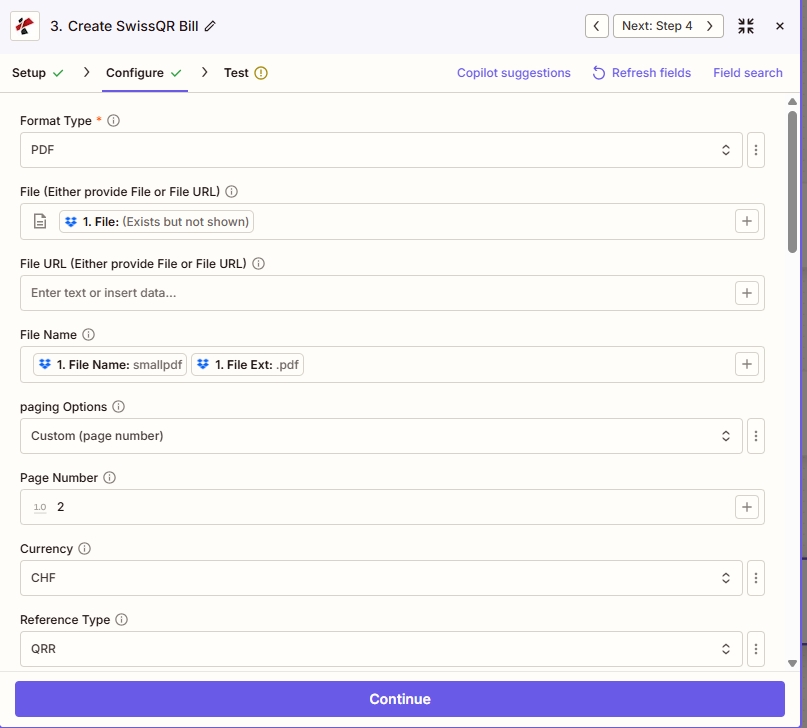
出力と PDF 配置: セット フォーマットタイプ (PDF/PNG/JPEG/TIFFマップはオプションです。 ファイル または ファイル URL そして ファイル名、 選ぶ ページングオプション (ここ カスタム(ページ番号) と ページ番号 2)、 それから 通貨 そして 参照タイプ (例: CHF そして QRR)
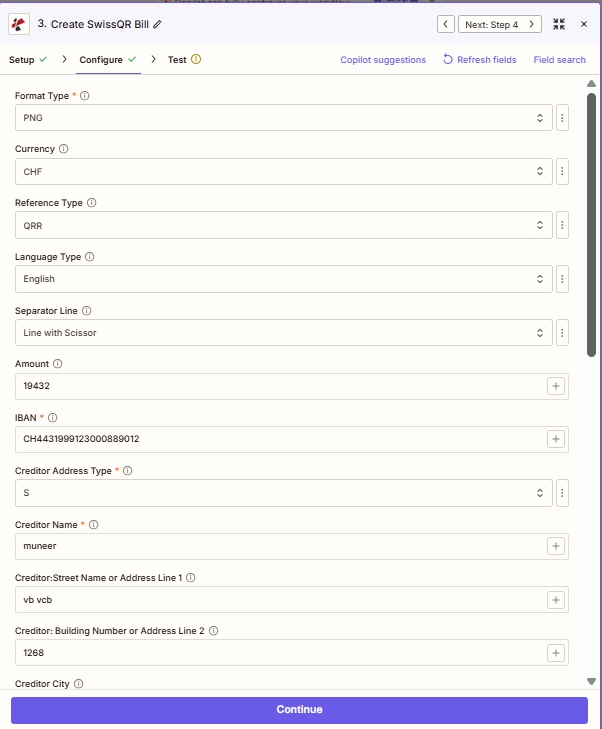
支払いと債権者: 通貨、 参照タイプ、 額、 IBAN構造化された 債権者 住所欄(S =構造化されている)。
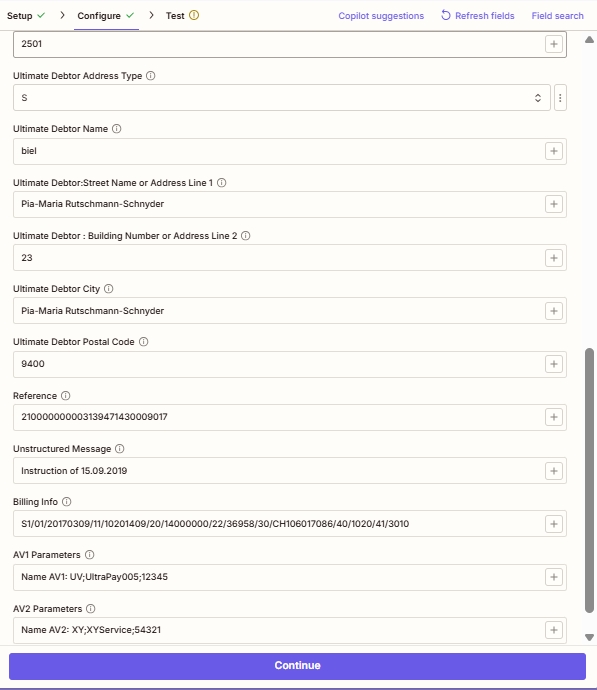
債務者、照会先、および高度なフィールド: オプション 最終債務者 詳細、 参照 (のために QRR/SCOR) 非構造化メッセージ、 請求情報 (スウィコ) AV1 / AV2 パラメータ。
パラメータ
「Create SwissQR Bill」アクションでは、26個のフィールドが表示されます。 Zapier UI 5つのスクロール可能なブロックとして表示されます。以下のスクリーンショットは、実際のフィールド順序を正確に反映しており、実際の実行から検証済みのサンプル値をキャプチャしたものです。
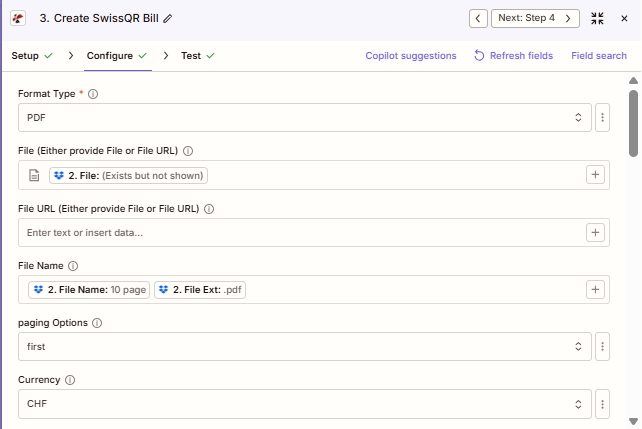
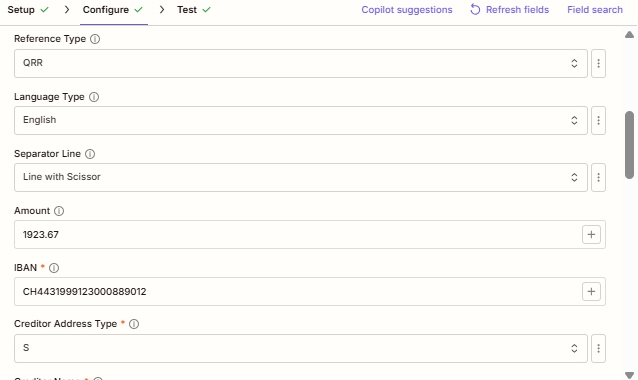
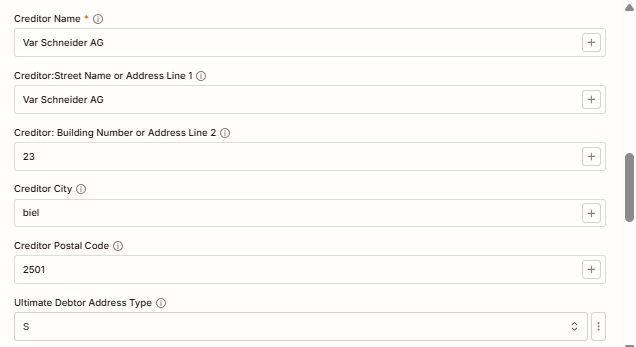
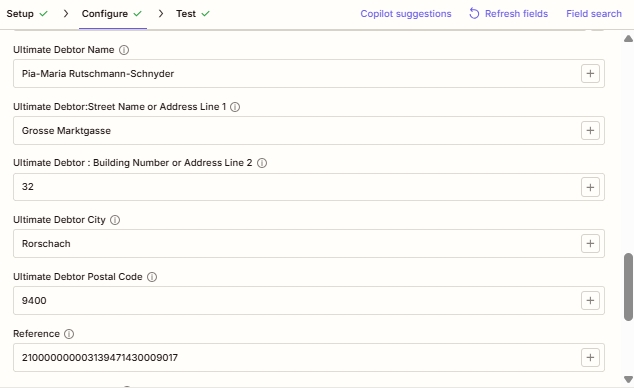
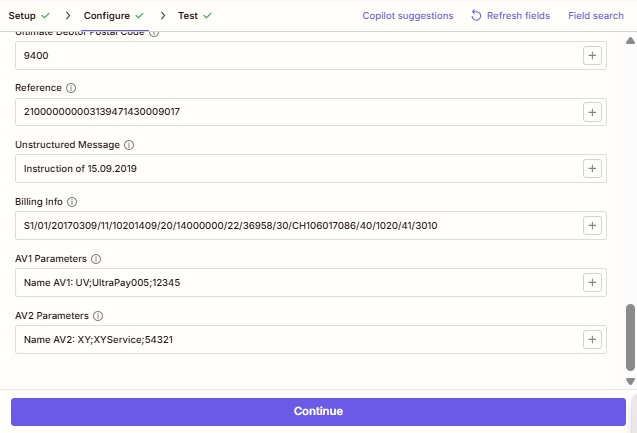
必須 Zapier UI (アスタリスク付き): フォーマットタイプ、 IBAN、債権者住所の種類、債権者名。 条件付き: ファイルまたはファイル URL (どちらか一方、埋め込み時に使用) QR既存の法案 PDFページ番号(ページングオプションがカスタムの場合)。 有効なスイスのビザに強く推奨します QR-法案: すべての債権者住所フィールドと最終債務者フィールド。スイス支払基準仕様では、完全な住所データが必要ですが、 Zapier UI アスタリスクは付けません。
| パラメータ | 必須 | その機能 | 例 |
|---|---|---|---|
| Format Type | Required | Output file format. PDF for print-ready Swiss QR-bills (default), PNG/JPEG for digital web or email embedding, TIFF for archival quality, Empty/null for raw data. Asterisked in the Zapier UI. Defaults to {'PDF'}. | PDF |
| File | Conditional | Base PDF where the Swiss QR-bill will be embedded. Either provide File or File URL, not both. Map binary content from a previous step (Dropbox, Google Drive, HTTP). Hint: "Either provide File or File URL". | Input sample (sample.pdf)1. File |
| File URL | Conditional | Public URL to the base PDF. Either provide File or File URL. PDF4me downloads the file and embeds the QR-bill onto it. | Input sample (sample.pdf)1. File |
| File Name | Conditional | Output filename for the generated Swiss QR-bill document. Include the extension matching Format Type (.pdf, .png, .jpg, .tiff). | Output sample (sample.swissqr.pdf) |
| paging Options | Conditional | Controls where the QR-bill is placed in the output PDF. First (top of doc), Last (final page), Add Page At End (appends a new dedicated QR-bill page), Custom (specific page index; requires Page Number below). Defaults to first. | Custom (page number) |
| Page Number | Conditional | Specific page index for the QR-bill placement. Required when paging Options is Custom. Page index starts at 1. | 3 |
| Currency | Optional | Currency for the QR-bill payment amount. Only CHF (Swiss Franc, default for Swiss domestic) and EUR (cross-border) are valid per SPS specification. Defaults to CHF. | CHF |
| Reference Type | Optional | Sent as code: NON (No Reference, for simple payments), QRR (27-digit QR Reference for QR-IBAN auto-reconciliation), or SCOR (ISO 11649 Creditor Reference for SEPA-compatible cross-border). Defaults to QRR. | QRR |
| Language Type | Optional | Display language for printed QR-bill labels. Options: English, German, French, Italian. Match the recipient's Swiss region. Defaults to German. | English |
| Separator Line | Optional | Visual separator between invoice body and QR-bill tear-off section. Options: "Line with Scissor" (Swiss standard for printed bills), Simple Line, No Line. Defaults to Line with Scissor. | Line with Scissor |
| Amount | Optional | Payment amount in the chosen Currency. Enter as a number with up to two decimal places. Leave blank if the customer fills in the amount themselves. | 19432 |
| IBAN | Required | Creditor's Swiss IBAN. Must start with CH and have 19 digits total. For QRR reference type, use a QR-IBAN (with QR-IID 30000-31999). Asterisked in the Zapier UI. | CH4431999123000889012 |
| Creditor Address Type | Required | Address format for creditor information. Sent as code S (Structured, recommended for Swiss banking) or K (Combined, two free-form lines). Asterisked. Defaults to S. | S |
| Creditor Name | Required | Full name of the creditor (company or individual) as registered with the bank. Printed on the generated QR-bill. Asterisked. | muneer |
| Creditor: Street Name or Address Line 1 | Optional | Street name for the creditor (Structured) OR first free-form address line (Combined). Strongly recommended for valid SPS output. | vb vcb |
| Creditor: Building Number or Address Line 2 | Optional | House/building number (Structured) OR second free-form address line (Combined). | 1268 |
| Creditor City | Optional | Swiss city for the creditor. Must correspond to the Postal Code. | Zurich |
| Creditor Postal Code | Optional | Valid 4-digit Swiss postal code for the creditor. | 2501 |
| Ultimate Debtor Address Type | Optional | Address format for the party who will pay the bill. S (Structured) or K (Combined). Use S for automated processing. Defaults to S. | S |
| Ultimate Debtor Name | Optional | Full name of the party who will pay. Appears in the payment section of the printed QR-bill. | Pia-Maria Rutschmann-Schnyder |
| Ultimate Debtor: Street Name or Address Line 1 | Optional | Debtor street name (Structured) or first free-form line (Combined). | Grosse Marktgasse |
| Ultimate Debtor: Building Number or Address Line 2 | Optional | Debtor house/building number or secondary address line. | 23 |
| Ultimate Debtor City | Optional | Swiss city of the debtor. | Rorschach |
| Ultimate Debtor Postal Code | Optional | Valid 4-digit Swiss postal code for the debtor. | 9400 |
| Reference | Optional | The actual reference value embedded in the QR code. Required content when Reference Type is QRR (27-digit numeric) or SCOR (ISO 11649 starting with RF). Empty when Reference Type is NON. | 210000000003139471430009017 |
| Unstructured Message | Optional | Free-form payment note printed on the QR-bill. Combined with Billing Info, max 140 characters total. Useful for invoice references when Reference Type is NON. | Instruction of 15.09.2019 |
| Billing Info | Optional | Structured billing information per Swiss QR-bill specification (Swico syntax). Encodes invoice number, date, VAT details. Combined with Unstructured Message, max 140 characters total. | S1/01/20170309/11/10201409/20/14000000/22/36958/30/CH106071086/40/1020/41/3010 |
| AV1 Parameters | Optional | Alternative procedure parameter 1 (AV1). Reserved for future Swiss payment alternative procedures and bilateral agreements between sender and receiver. | Name AV1: UV;UltraPay005;12345 |
| AV2 Parameters | Optional | Alternative procedure parameter 2 (AV2). Reserved for future Swiss payment alternative procedures. | Name AV2: XY;XYService;54321 |
フォーマットタイプのオプション
生成されるスイス文書の出力ファイル形式を制御します QR-請求書。
PDFデフォルト(印刷準備完了)PNGウェブとデジタル埋め込みJPEGメール送信に適した圧縮画像TIFFアーカイブ品質空(null)生データ出力参照タイプオプション
どの支払い参照標準が組み込まれるかを制御します QR このコードは、受取人の銀行取引明細書における支払の照合方法に直接影響します。
非紹介状不要(簡易決済)QRRQR 参照(27桁のスイス式調整表)スコア債権者参照番号(ISO 11649 SEPA)住所タイプのオプション
両方に適用されます 債権者住所の種類 そして 最終債務者住所の種類。
S体系的(推奨)K組み合わせ(自由形式の線2本)ページングオプション
制御する場所 QR-請求書は出力に配置されます PDF フォーマットタイプが PDF。
初め最後ページを最後に追加カスタム(ページ番号)サンプルファイル
これらのファイルを使用してテストしてください SwissQR紙幣を作成する ライブザップを配線する前に。 sample.pdf は 入力平野 PDF あなたが地図に載せる ファイル (またはホスト) ファイル URL) sample.swissqr.pdf は 出力: 同じ文書の後 PDF4me スイス人は付け加える QR-設定済みの請求書支払いセクション IBAN債権者、および参照フィールド。
sample.pdfsample.swissqr.pdf出力フィールド
| 分野 | タイプ | 内容物 |
|---|---|---|
documentId | Text | ID PDF4me gives the resulting document. |
errorMessage | Text | Error message when PDF4me could not process the file; empty otherwise. |
fileExtension | Text | Extension of the resulting file, for example `.pdf`. |
fileName | Text | Name of the resulting file, without extension. |
fileUrl | Text | Download link of the resulting file. Map it into any later step that needs the file, for example an upload to Google Drive, Dropbox or OneDrive. |
fullFileName | Text | Name of the resulting file, with extension. |
jobId | Text | ID of the PDF4me job that processed the request. |
traceId | Text | Trace ID of the request, when PDF4me returns one. Give it to PDF4me support when reporting a problem. |
クイックセットアップ
- で Zapier、 クリック + 新しいアクションを追加して選択する PDF4me。
- 選ぶ SwissQR紙幣を作成する アクションイベントとして。
- 接続 PDF4me アカウントまたは貼り付け API 指示されたらキーを押します。
- セット フォーマットタイプ: PDF 印刷された請求書の場合、 PNG/JPEG ウェブ/メール用、 TIFF 記録保存用。
- 埋め込む場合 QR既存の法案 PDF地図 ファイル または ファイル URL (両方ではなく) ページングオプション (カスタム要件 ページ番号)
- 入力 通貨 (
CHFスイス国内向け、EUR国境を越える場合)、 額、 参照タイプ (QRR/SCOR/NON) 言語タイプ、 そして 分離ライン。 - 入力 IBAN (有効なスイスのCH) IBAN; のために QRR 参照タイプは QR-IBAN と QR-IID 30000: 31999)。
- すべて記入 債権者 項目: 氏名、住所の種類 (S を推奨)、通り名、建物番号、市区町村、郵便番号。
- 埋める 最終債務者 支払者の詳細を含むフィールド(構造化/結合パターンは同じ)。
- 高度なケースでは、 参照 (27桁) QRR またはRF... SCOR) 非構造化メッセージ、 請求情報 (Swico構文) AV1、 AV2。
- サンプルデータを使って動作をテストし、出力結果を確認してから、Zapをオンにしてください。
ワークフローの例
ワークフローの例Common Zapier workflow patterns using Create SwissQR Bill.
- スイスの顧客向けに新しいB2B請求書が確定されると、Bexio、Sage、またはAbacusのWebhookが起動します。
- PDF4me SwissQR請求書の作成実行: フォーマットタイプ = PDF通貨 = CHF参照タイプ = QRR (と QR-IBAN)、言語タイプ = ドイツ語、金額と IBAN ウェブフックペイロードからマッピングされました。
- 債権者フィールドは貴社の会社レコードから、最終債務者フィールドはソースシステムの顧客レコードからマッピングされます。
- Gmailまたは Outlook ステップは QR-請求書 PDF 顧客の請求メールに添付ファイルとして送信されます。ファイルは完全に SPSスイスのあらゆる銀行アプリからの即時決済に対応し、規格に準拠しています。
- Google Sheets または Airtable のログには、請求書 ID、顧客、金額、 QR 売掛金照合のための参照情報およびタイムスタンプ。
- Shopify、WooCommerce、またはStripeのチェックアウトWebhookは、スイスの顧客がカードではなく「銀行振込で支払う」を選択した場合に起動します。
- PDF4me SwissQR請求書の作成実行: フォーマットタイプ = PNG (画像埋め込み)、通貨 = CHF参照タイプ = QRR注文合計金額からの金額、顧客の地域に合わせた言語タイプ。
- の PNG 画像はインラインで埋め込まれています HTML 注文確認メールを顧客が銀行アプリで直接スキャンして支払いができるように。
- 入金受領 → 銀行照合結果と一致する QR 元の注文を自動的に参照します。
- Shopifyの注文は「支払い済み」とマークされ、手動での照合や請求書番号の推測なしに、発送処理が開始されます。
- スケジュール Zapier 毎月1日にトリガーが作動し、月額購読料が請求されます。 CHF。
- Google スプレッドシートまたは Airtable の検索では、すべてのアクティブな購読者とその IBAN住所、金額、 QR 参考テンプレート。
- ループ Zapier 各購読者に対して反復処理を行います。 PDF4me SwissQR請求書を作成すると、1つが生成されます。 QR-行ごとの請求書 QRR 参照および末尾にページを追加するページング。
- それぞれ QR-請求書 PDF Gmail経由で購読者にメールで送信され、Microsoftにアーカイブされます。 SharePoint ファイル名のパターンは次のようになります。
qrbill_{customerId}_{YYYY-MM}.pdf。 - 財務チームへの月次サマリーメールには、請求総額、加入者数、例外件数などが報告され、初日から明確なキャッシュフローの可視性を確保できます。