EPC QR Code ジェネレーター Zapier
作成する EPC QR Code は Zapier アクション PDF4me 欧州決済評議会を生み出す QR コード SEPA クレジット振込支払い。受取人マップ BIC、 IBAN請求書からの金額および参照番号または CRM 記録され、顧客はヨーロッパの銀行アプリでコードをスキャンして即座に支払い、手動は不要です IBAN エントリー。
関連ブログ記事
この機能に関するブログ記事はまだありません。近日公開予定です。
その間、PDF4me ブログを閲覧して、あらゆるプラットフォームのチュートリアルやワークフローをご覧ください。
ブログをご覧ください →
このアクションが何をするか
作成する EPC QR Code スキャン可能な QR エンコードするコード SEPA クレジット送金支払いデータ、受取人 BIC、 IBAN欧州決済評議会の仕様に従って、金額、ビジネスコード、および参照番号を埋め込みます。 QR 請求書に PDFsユーロ圏の顧客が、入力する代わりにモバイルバンキングアプリでスキャンして支払えるように、メールや支払いリマインダーが送信されます。 IBAN。
認証 API リクエスト
毎 PDF4me アクション Zapier 接続済みのアカウントが必要です。 PDF4me API アクションを初めて追加する際に使用するキーです。
見逃してはならない重要な事実
10項目のうち2項目のみ必須です
受益者の BIC 受取人の氏名のみが必須項目です。 IBAN金額、ビジネスコード、参照、送金情報、ヒントテキストはオプションですが、使用可能な支払い QR 通常必要とする IBAN そして金額も。
V2は現在推奨されているバージョンです
特定 EPC パネル上ではデフォルトでV1が選択されていますが、欧州決済協議会(EPC)が新規実装に推奨しているのはV2です。V1は、古い銀行アプリとの互換性のために引き続き利用可能です。
アクセント付き文字を含む名前にはUTF8を使用してください
特定 EPC 受取人名または送金テキストにアクセント付き文字やラテン文字以外の文字が含まれる場合は、コードのスキャン時にエンコードエラーが発生しないように、文字セットをUTF8に設定する必要があります。
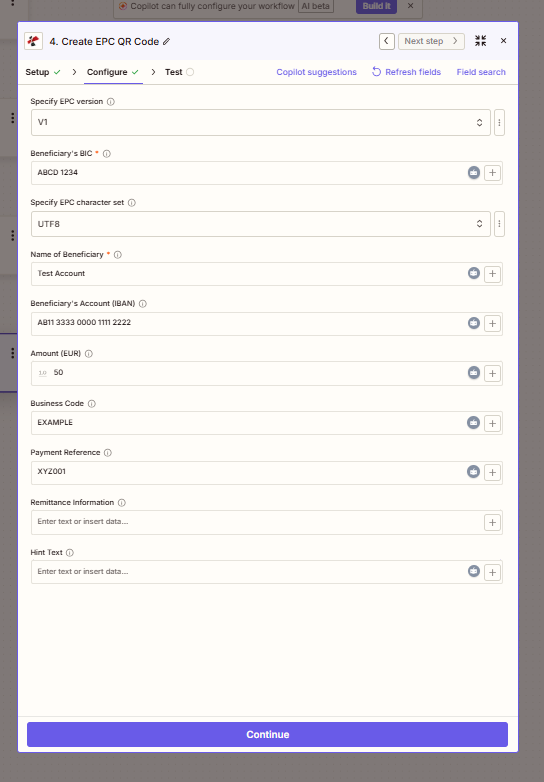
必要な2つの受益者フィールドをマッピングし、次に追加します。 IBAN支払い完了に必要な金額と参照番号 QR コード。
パラメータ
必須: 受益者の BIC そして 受益者の氏名その他の項目はすべて任意です。
| パラメータ | 必須 | その機能 | 例 |
|---|---|---|---|
| Specify EPC version | Optional | EPC QR specification version. V2 is recommended for new implementations; V1 remains for compatibility. Defaults to V1. | V1 |
| Beneficiary's BIC | Required | Bank Identifier Code (SWIFT) of the beneficiary's bank. | ABCD 1234 |
| Specify EPC character set | Optional | Character encoding for the QR payload. Use UTF8 for international names and accented characters. Defaults to UTF8. | UTF8 |
| Name of Beneficiary | Required | Recipient or company name for the payment. | Test Account |
| Beneficiary's Account (IBAN) | Optional | International Bank Account Number the payment settles into. | AB11 3333 0000 1111 2222 |
| Amount (EUR) | Optional | Payment amount in euros. | 10.50 |
| Business Code | Optional | SEPA purpose code for the payment. | EXAMPLE |
| Payment Reference | Optional | Invoice or reference number shown to the payer. | XYZ001 |
| Remittance Information | Optional | Free-text payment description, maximum 140 characters. | Invoice #4521 - March services |
| Hint Text | Optional | Additional instructions displayed to the payer in supporting apps. | Scan to pay your invoice |
| Beneficiary's BIC | Required | Shown when Specify EPC version is V1. BIC of the beneficiary's bank. Required for EPC version V1. | |
| Beneficiary's Account (IBAN) | Optional | Account (IBAN) of the beneficiary. | |
出力にはどのようなフィールドが含まれますか?
| 分野 | タイプ | 内容物 |
|---|---|---|
documentId | Text | ID PDF4me gives the resulting document. |
Error Message | Text | Error message when PDF4me could not process the file; empty otherwise. |
fileAlternateUrl | Text | Alternative download link of the resulting file, with the file name at the end of the URL. |
fileExtension | Text | Extension of the resulting file, for example `.pdf`. |
fileName | Text | Name of the resulting file, without extension. |
fileUrl | Text | Download link of the resulting file. Map it into any later step that needs the file, for example an upload to Google Drive, Dropbox or OneDrive. |
fullFileName | Text | Name of the resulting file, with extension. |
jobId | Text | ID of the PDF4me job that processed the request. |
traceId | Text | Trace ID of the request, when PDF4me returns one. Give it to PDF4me support when reporting a problem. |
作成の設定方法 EPC QR Code で Zapier?
- Zapで、クリックします + 新しいアクションを追加して検索する PDF4me。
- 選択 作成する EPC QR Code イベントとして。
- 接続 PDF4me アカウントを使用して API 鍵。
- 地図 受益者の BIC そして 受益者の氏名必須項目2つ。
- 追加 受益者の口座(IBAN)、 額 (EUR)、 そして 支払い参照番号 請求書または請求データから。
- セット 特定 EPC バージョン 新規ビルドの場合はV2に、 特定 EPC 文字セット 国際名にはUTF8を使用します。
- クリック テストアクション 生成されたものを確認する QR コードを作成し、Zap を公開します。
典型的な構成
ワークフローの例Common Zapier patterns using Create EPC QR Code.
スキャン可能な支払い情報が記載された欧州の請求書 QR
- XeroやQuickBooksなどの会計システムで新しい請求書が作成されます。
- 作成する EPC QR Code 請求金額、受取人をマッピングします IBAN、および参照番号。
- の QR コードは請求書に埋め込まれています PDF またはメールに添付されている。
- 顧客は銀行アプリでそれをスキャンするだけで、数秒で支払いが完了します。
定期購読更新料金のお支払いリマインダー
- 課金システムにおいて、購読更新または定期課金イベントが発生します。
- 顧客名、 IBAN、および金額が取得され、マッピングされます。 作成する EPC QR Code。
- 生成された QR コードは、電子メールまたはセルフサービスポータルを通じて顧客に送信されます。
- 顧客がスキャンして支払うことで、手動での支払い入力と更新手続きの中断を減らすことができます。
寄付 QR 資金調達キャンペーン用のコード
- 新規寄付者またはキャンペーン登録者が登録されると、Zapが作動します。
- 作成する EPC QR Code 生成する QR 寄付金額は固定または変動制です。
- の QR お礼メールに、銀行振込が簡単にできる情報が記載されています。
- の CRM ログ QR ドナーへのフォローアップのためにコードが送信されました。
実践的なヒント
Check BIC and IBAN formatting
BIC should be 8 or 11 characters. IBAN must be valid for the SEPA zone; watch for grouped-format spacing some banks use, e.g. AB11 3333 0000 1111 2222.
Map dynamic data from earlier steps
Use the field-mapping button next to any parameter to insert values from a trigger or earlier action, invoice amount from a form, beneficiary details from a CRM record.
Prefer V2 for new automations
V2 is the current European Payments Council recommendation. Only use V1 if a specific downstream banking app requires it.
Keep Remittance Information under 140 characters
The EPC QR spec caps remittance text at 140 characters; longer text may be truncated by the receiving bank app.
Test scans with your customers’ typical banking apps
EPC QR support varies by bank and app version. Confirm the generated code scans correctly on the apps your actual customer base uses before rolling out broadly.
チートシート
| 分野 | 価値 |
|---|---|
| Action event | Create EPC QR Code |
| Beneficiary's BIC | ABCD 1234 (required) |
| Name of Beneficiary | Test Account (required) |
| IBAN / Amount / Reference | Optional but typical for a usable payment QR |
| EPC version | V2 recommended |
| Character set | UTF8 for international names |
| Output | fileUrl, fileName, fullFileName, fileExtension |
| Connection | PDF4me API key |
よくある質問
業界におけるユースケースとアプリケーション
- Invoicing & Accounting
- E-commerce
- Subscription Services
- Professional Services
- Nonprofits
- 即時決済請求書にEPC QRコードを埋め込み、ワンタッチでSEPA決済を可能にする
- エラー削減支払い時のIBAN入力ミスをなくす
- より迅速な決済スキャンして支払う請求書でキャッシュフローを加速
- B2B請求専門サービスおよび卸売請求書の効率化
- 納品時請求書手動銀行振込決済フロー用の決済QRコードを生成する
- 注文確認確認メールにスキャン可能な決済用QRコードを含める
- マーケットプレイスの支払い銀行振込を希望する購入者をサポートする
- 梱包明細書QRコード配送時請求のために、梱包明細書に支払い用QRコードを追加する
- 更新のお知らせ購読更新メールにスキャン可能なQRコードを添付する
- 解約率の低下支払いの手間を減らし、更新完了率を向上させる
- 請求システム統合Stripe Billing、Chargebee、またはRecurlyのデータと連携する
- 会費QRコードを使って定期的な会員費の徴収を自動化する
- ブランドロゴ入り請求書EPCのQRコードをブランドロゴ入りのPDF請求書に埋め込む
- 顧問料請求固定料金制プロジェクトおよび顧問料の回収を迅速化する
- ワンクリック決済: 顧客がIBANや参照番号を手動でコピーする必要をなくします
- 診療管理統合CRMベースの請求書作成ツールと連携する
- 寄付用QRコード募金活動メールにスキャン可能な寄付用QRコードを含める
- 会員更新会員費支払いリマインダーを自動化する
- 放棄率の低下: 未完了の銀行振込に対する事務的なフォローアップの軽減
- イベント登録: 送金によるイベント参加費徴収をサポート
関連アクション
SwissQR紙幣を作成する
スイス相当額の支払いを生成する QR スイスのSIXグループSPCフォーマットで決済される請求書のコード SEPA。
バーコードを追加するか、 QR Code に PDF
生成されたものを埋め込む EPC QR コード画像を請求書に直接挿入する PDF ページ。
ドキュメントを生成 シングル
データソースから請求書テンプレート自体を作成し、次に EPC QR フォローアップ手順としてコードを作成します。