AI-Taxドキュメントパーサー Power Automate
AI税務文書解析ツール は Power Automate アクション PDF4me AIで税務書類を読み取り、フォームの種類、課税年度、構造化フィールド辞書を返します。W2、1099、1040、1098、1095、またはW-4フォームで使用して、データを直接移動します。 SharePoint、 Excel、 Dynamics 365、または手動入力なしのPower BI。
このアクションが何をするか
PDF4me AI-税務文書パーサー 税務書類を読む(PDF、 PNG、 JPG、 または JPEG)そして返します フォームタイプ、 課税年度、そして フィールド 抽出値の辞書。W2、1099、1099-SSA、1040、1040-SR、1040-NR、1098、1098-E、1098-T、1095A、1095C、W-4、およびUnifiedTaxUSに対応。オプションで設定可能。 ボディ/税務モデル 既知のフォームでより高い精度を得るため、または 本文/カスタムフィールドキー 標準セット以外の追加フィールドを取得する。
関連ブログ記事(1)
認証方法 Power Automate 流れ?
毎 PDF4me アクション Power Automate 有効な接続が必要です。 PDF4me API フローがAI税務文書処理リクエストを安全に認証できるようにするためのキー。
見逃してはならない重要な事実
必須項目は2つのみです
ファイルコンテンツ(ドキュメントのバイト列)と本文/ドキュメント/名前(拡張子付きのファイル名)。その他の項目はすべて「詳細設定」にあり、オプションです。
Body/TaxModelはヒントであり、フィルターではありません。
空欄のままにしておくと、パーサーがフォームの種類を自動的に検出し、formType に返します。フィールド認識の精度を高めるためだけに、既知のコード(W2、1040、1099 など)を設定してください。
警告とフォールバックを確認する(出力を信頼する前に使用)
警告配列が空でない場合、または fallbackUsed: true は、AI が信頼度の低いフィールドまたは通常とは異なるレイアウトに遭遇したことを示します。コンプライアンスに配慮したフローでは、これらのケースを手動レビューに回してください。
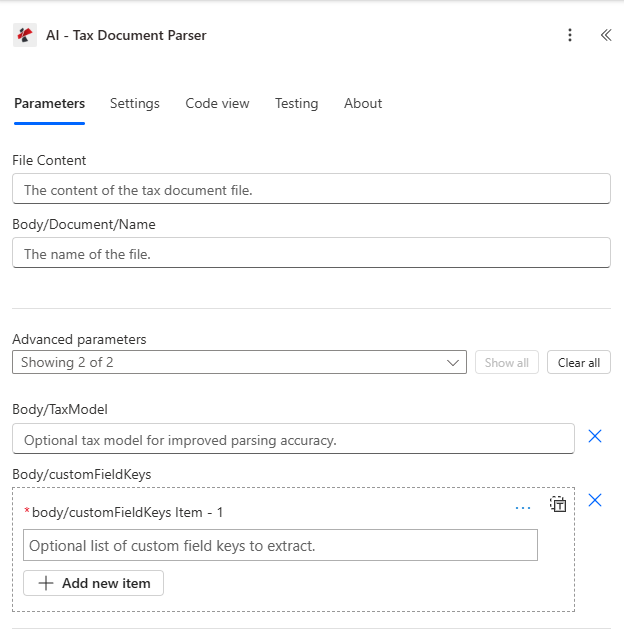
ファイルコンテンツと本文/ドキュメント/名前をマッピングし、次に本文/税務モデルと本文/カスタムフィールドキーの詳細パラメーターを展開します。
パラメータ
必須: ファイルコンテンツと本文/ドキュメント名は常に指定する必要があります。本文/税務モデルと本文/カスタムフィールドキーはオプションの高度なパラメータです。
| パラメータ | 必須 | その機能 | 例 |
|---|---|---|---|
| File Content | Optional | Content of the tax document file to process. Map it from the file content returned by a previous action, such as SharePoint or OneDrive Get file content. | @{body('Get_file_content')?['$content']} |
| File Name | Optional | Name of the tax document file, including its extension (for example `w2.pdf`). Map it from the file name returned by a previous action. | w2.pdf |
| TaxModel | Optional | Optional tax form type for improved parsing accuracy. Supported values: W2, 1099, 1099-SSA, 1040, 1040-SR, 1040-NR, 1098, 1098-E, 1098-T, 1095A, 1095C, W-4, UnifiedTaxUS. | your value |
| customFieldKeys | Optional | Optional list of custom field keys to extract. | your value |
| Customisation Note | Optional | Optional customisation note for the extraction. | your value |
対応している税務申告書
| フォームグループ | ボディ/税務モデルコード | 代表的な分野 |
|---|---|---|
| Wage statement | W2 | Wages, federal/state tax withheld, Social Security wages, Medicare wages. |
| Information returns | 1099, 1099-SSA | Income amounts, payer information, tax withheld, recipient information. |
| Individual return | 1040, 1040-SR, 1040-NR | Adjusted gross income, taxable income, tax owed, refund amount, filing status. |
| Interest and education | 1098, 1098-E, 1098-T | Mortgage interest paid, student loan interest, tuition payments. |
| Health coverage | 1095A, 1095C | Health insurance coverage information, employer information. |
| Withholding | W-4 | Withholding allowances, additional withholding, filing status. |
出力フィールド
| 分野 | タイプ | 内容物 |
|---|---|---|
Tax Form Type | Text | Type of tax form (W2, 1099, 1040, etc.) |
Tax Year | Text | Tax year of the document |
Employer Name | Text | Employer name from W2 |
Employer EIN | Text | Employer Identification Number |
Employer Address | Text | Employer address |
Employee Name | Text | Employee name |
Employee SSN | Text | Employee Social Security Number |
Employee Address | Text | Employee address |
Wages & Tips | Text | Wages, tips, and other compensation |
Social Security Wages | Text | Social Security wages |
SS Tax Withheld | Text | Social Security tax withheld |
Medicare Wages | Text | Medicare wages and tips |
Medicare Tax Withheld | Text | Medicare tax withheld |
State | Text | State |
State Wages | Text | State wages, tips, etc. |
State Income Tax | Text | State income tax withheld |
Local Income Tax | Text | Local income tax withheld |
Box 12 Codes | Text | Box 12 codes and amounts |
Payer Name | Text | Payer name |
Payer TIN | Text | Payer TIN |
Payer Address | Text | Payer address |
Recipient Name | Text | Recipient name |
Recipient TIN | Text | Recipient TIN |
Recipient Address | Text | Recipient address |
Recipient SSN | Text | Recipient SSN |
Nonemployee Compensation | Text | Nonemployee compensation amount |
Other Income | Text | Other income |
Account Number | Text | Account number |
State Tax Withheld | Text | State tax withheld |
Benefits Paid | Text | Social Security benefits paid |
Tax Withheld | Text | Federal tax withheld |
Box 7 Voluntary Tax Withheld | Text | Box 7 - Voluntary federal income tax withheld |
Box 8 State Tax Withheld | Text | Box 8 - State tax withheld |
Filing Status | Text | Filing status |
Taxpayer Name | Text | Taxpayer name |
Taxpayer SSN | Text | Taxpayer SSN |
Spouse Name | Text | Spouse name |
Spouse SSN | Text | Spouse SSN |
Address | Text | Address |
Wages | Text | Total wages |
Taxable Interest | Text | Taxable interest |
Tax Exempt Interest | Text | Tax-exempt interest |
Dividends | Text | Ordinary dividends |
IRA Distributions | Text | IRA distributions |
Social Security Benefits | Text | Social Security benefits |
Total Income | Text | Total income |
Adjusted Gross Income | Text | Adjusted gross income |
Standard Deduction | Text | Standard deduction |
Taxable Income | Text | Taxable income |
Total Tax | Text | Total tax |
Federal Income Tax Withheld | Text | Federal income tax withheld |
Refund Amount | Text | Refund amount |
Amount Owed | Text | Amount owed |
Dependents | Text | Dependents information (JSON string) |
Virtual Currency | Text | Virtual currency transactions |
Additional Income | Text | Additional income |
Adjustments To Income | Text | Adjustments to income |
Lender Name | Text | Lender name |
Lender TIN | Text | Lender TIN |
Mortgage Interest | Text | Mortgage interest received |
Points Paid | Text | Points paid on purchase |
Refund Overpaid Interest | Text | Refund of overpaid interest |
Mortgage Insurance Premiums | Text | Mortgage insurance premiums |
Property Address | Text | Property address |
Mortgage Acquisition Date | Text | Mortgage acquisition date |
Outstanding Mortgage Principal | Text | Outstanding mortgage principal |
Borrower Name | Text | Borrower name |
Borrower TIN | Text | Borrower TIN |
Student Loan Interest Received | Text | Student loan interest received |
Student Name | Text | Student name |
Student TIN | Text | Student TIN |
School Name | Text | School/institution name |
School TIN | Text | School TIN |
Qualified Tuition Expenses | Text | Qualified tuition and related expenses |
Scholarships Or Grants | Text | Scholarships or grants |
Service Provider TIN | Text | Service provider TIN |
Refunds | Text | Refunds or adjustments |
Policy Number | Text | Policy number |
Start Date | Text | Coverage start date |
End Date | Text | Coverage end date |
Monthly Premium | Text | Monthly premium amount |
Advance Payment | Text | Advance payment of premium tax credit |
Issuer Name | Text | Issuer name |
Coverage Months | Text | Months of coverage |
Offer Of Coverage | Text | Offer of coverage |
Safe Harbor | Text | Safe harbor code |
Offer Of Coverage Code | Text | Offer of coverage code |
Employee Share Lowest Cost Premium | Text | Employee share of lowest cost monthly premium |
Multiple Jobs Or Spouse Works | Text | Multiple jobs or spouse works indicator |
Claim Dependents | Text | Claim dependents amount |
Deductions | Text | Deductions |
Extra Withholding | Text | Extra withholding amount |
Step 3 Dependents Total | Text | Step 3 dependents total |
Step 4a Other Income | Text | Step 4a other income |
Step 4b Deductions | Text | Step 4b deductions |
Income | Text | Total income |
Credits | Text | Tax credits |
Total Assets | Text | Total assets |
Liabilities | Text | Liabilities |
Investments | Text | Investments |
Raw OCR Text | Text | Raw OCR text extracted from document |
CustomFieldsData | Array | Custom fields returned for the tax document, as key and value pairs. |
CustomFieldsData[].key | Text | Key of the custom field. |
CustomFieldsData[].value | Text | Value of the custom field. |
AI-Tax ドキュメント パーサーの設定方法 Power Automate?
- 追加 PDF4me → AI税務文書解析ツール あなたの Power Automate 流れ。
- 地図 ファイルの内容 以前のアクションから(SharePoint、 OneDrive(またはメール添付ファイル)。
- セット 本文/文書/名前 ファイル拡張子(.pdf、.png、.jpg、または.jpeg)付き。
- 必要に応じて展開 詳細パラメータ そして設定する ボディ/税務モデル 精度を高めるため、既知のフォームコードを使用します。
- オプションで設定可能 本文/カスタムフィールドキー 標準セットを超えるフィールドについては、フローを実行すると、解析結果が返されます。 フォームタイプ、 課税年度、 そして フィールド。
典型的な構成
ワークフローの例Common Power Automate flow patterns using AI-Tax Document Parser.
W2を人事システムに取り込む
- 従業員がW2をアップロードするとフローがトリガーされます SharePoint 受付フォルダ。
- AI-Taxドキュメントパーサーは、精度を高めるために、Body/TaxModelをW2に設定して実行されます。
- 抽出された賃金と源泉徴収フィールドは、 SharePoint リスト。
- 条件式は警告配列をチェックし、信頼性の低い行を手動レビューに振り分けます。
1099バッチ照合
- フローは、受信した各1099添付ファイルに対してトリガーされます。 Outlook。
- AI-Tax Document Parserは、支払者情報と所得金額をフィールド辞書に抽出します。
- データは Excel 会計照合のためのワークブック。
1040 返却アーカイブ
- 提出された1040申告書が記録ライブラリに登録されると、処理フローが開始されます。
- AI税務文書解析ツールは、申告状況、調整後総所得、および還付金額を抽出します。
- A Dynamics 監査検索のために、抽出された課税年度と概要フィールドを含む365レコードが作成されます。
実践的なヒント
Set Body/TaxModel when you already know the form
Leaving it blank still works via auto-detection, but a known code sharpens field recognition, especially on scanned or lower-quality images.
Always branch on success and warnings
Check success before writing extracted data downstream, and inspect warnings for any fields the AI flagged as uncertain before treating the output as final.
Custom fields extend, they do not replace
Body/customFieldKeys adds extra entries to the fields dictionary alongside the standard form fields, it does not narrow or filter the standard set.
rawOcrText is useful for debugging
When a field looks wrong, compare it against rawOcrText to see whether the source scan quality, not the parser, is the root cause.
Match the file extension to the real format
Body/Document/Name must carry the true extension (.pdf, .png, .jpg, .jpeg) of the mapped File Content, a mismatched extension can affect processing.
チートシート
| 分野 | 価値 |
|---|---|
| Action | AI-Tax Document Parser |
| Required fields | File Content, Body/Document/Name |
| Optional advanced fields | Body/TaxModel, Body/customFieldKeys |
| Supported form codes | W2, 1099, 1099-SSA, 1040, 1040-SR, 1040-NR, 1098, 1098-E, 1098-T, 1095A, 1095C, W-4, UnifiedTaxUS |
| Supported file types | .pdf, .png, .jpg, .jpeg |
| Output | formType, taxYear, fields, warnings, fallbackUsed, rawOcrText, jobId, success, message |
よくある質問
業界におけるユースケースとアプリケーション
- Accounting & Tax Services
- Human Resources & Payroll
- Finance & Banking
- Government & Public Sector
- Healthcare & Insurance
- 税務申告処理抽出した税務書類データを使用して、税務申告処理を自動化する。
- 税務申告抽出した税務申告書の情報を使用して、税務申告書の準備を自動化する。
- 税務コンプライアンス抽出した税務書類データを使用して税務コンプライアンスを確保する
- 税務申告抽出した税務書類情報から税務報告書を作成する
- 監査準備抽出した税務書類データを使用して監査を準備する
- 従業員の税務処理従業員の税務書類(W2、1099)を自動的に処理する
- 税務書類管理抽出した税務データを使用して従業員の税務書類を管理する
- 税務申告抽出した税務情報から従業員の税務レポートを作成する
- コンプライアンス追跡抽出した税務書類データを使用して税務コンプライアンスを追跡する
- 税務書類抽出した税務データを使用して従業員の税務関連書類を管理する
- 税務書類の処理抽出した税務データを使用して金融サービスの税務書類を処理する
- 税務コンプライアンス抽出した税務情報を使用して、金融取引の税務コンプライアンスを確保する。
- 税務申告抽出した税務書類データから税務報告書を作成する
- 税務分析抽出した税務書類情報を使用して税務データを分析する
- 財務報告税務情報を含む財務報告書を作成する
- 税務処理: 抽出した税務データを使用して、政府サービスの税務書類を処理する。
- 税務コンプライアンス: 抽出した税務情報を使用して、政府プログラムの税務コンプライアンスを確保する。
- 税務申告抽出した税務書類データから政府機関向けの税務報告書を作成する
- 公文書抽出した税務情報を使用して、公的税務記録を管理する。
- 監査証跡政府税務処理の監査証跡を維持する
- 医療費税務処理抽出した税務データを使用して、医療費関連の税務書類(1095A、1095C)を処理する。
- 保険税コンプライアンス抽出した税務情報を使用して、保険税のコンプライアンスを確保する。
- 税務申告抽出した税務書類データから医療費税務報告書を作成する
- コンプライアンス追跡抽出した税務情報を使用して、医療費の税務コンプライアンスを追跡します。
- 税務書類抽出した税務データを使用して医療税務関連書類を管理する
関連アクション
AI銀行明細書解析ツール
税務・財務監査においてよく用いられる付随文書である銀行取引明細書から、構造化データを抽出します。
AI請求書解析ツール
経費や控除の追跡、および税務書類の処理のために、請求書から構造化データを抽出します。
AI給与明細解析ツール
W2の賃金および源泉徴収額の項目と一致する給与データを抽出します。
他のプラットフォームでの同じタスク
MakeAI処理による税務書類
同じAIによる税務書類抽出 Make モジュール(このプラットフォームでは「AI-Process Tax Document」という名称)。
n8nAI処理による税務書類
同じAI税務文書抽出ノード n8n ワークフローは、自社ホスト型またはクラウド型で利用可能です。
Zapier: AI税務文書解析ツール
同じAI税務書類抽出ステップ Zapier接続済みのアプリからどれでも起動できます。