AIレシートパーサー Power Automate
AIレシートパーサー は Power Automate アクション PDF4me レシートを読む PDF または画像と、加盟店の詳細、明細項目、財務合計、および支払い方法を構造化データとして返します。これを使用して経費の記録を自動化し、フィードします。 Excel または Power BI 経費追跡、またはトランザクションを直接投稿 Dynamics 手動入力なしで365日間。
このアクションが何をするか
PDF4me AIレシートパーサー レシートを読む(PDF、 PNG、 JPG、 または JPEG)そして返します 販売者情報、 明細項目、 財務総額、 そして 支払方法 構造化された JSONまた、専門分野も認識しています。 ホテル、 燃料とエネルギー、 健康管理、 そして トレーニング 領収書、さらに追加情報を抽出できます カスタムフィールド 標準的なスキーマを超えている。
認証方法 Power Automate 流れ?
電話するには PDF4me を通して Power Automateフローには有効な PDF4me API 鍵となるのは PDF4me 接続する コネクタ。認証により安全な通信が保証され、正規ユーザーとしての身元が確認されます。
見逃してはならない重要な事実
ファイルの内容 そして 本文/文書/名前「領収書ファイルの内容」や「領収書名」ではありません。領収書のバイトをマッピングします。 ファイルの内容。本文/レシートタイプ、 本文/項目分析、 本文/販売者情報抽出、 本文/合計を計算、 そして 本文/カスタムフィールドキー これらはすべて「詳細設定」の下にあり、スクリーンショットで「5件中5件を表示」と表示されていることが確認できます。成功: true 人口の多い 警告 配列または fallbackUsed: trueこれらの項目は、自動転記合計ではなく、手動レビューに振り分けます。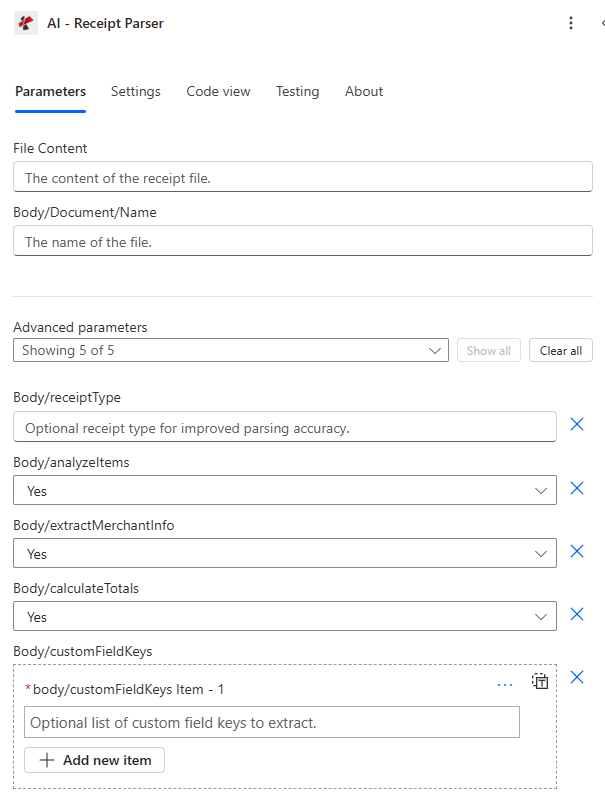
メインパネルには、 ファイルの内容 そして 本文/文書/名前抽出の切り替えはすべて詳細設定パラメータです。
パラメータ
アクションに必要な要件: ファイルの内容 そして 本文/文書/名前その他のフィールドはすべて、デフォルト値が設定されているオプションの詳細パラメータです。
| パラメータ | 必須 | その機能 | 例 |
|---|---|---|---|
| File Content | Optional | Content of the receipt file to process. Map it from the file content returned by a previous action, such as SharePoint or OneDrive Get file content. | @{body('Get_file_content')?['$content']} |
| File Name | Optional | Name of the receipt file, including its extension (for example `receipt.jpg`). Map it from the file name returned by a previous action. | receipt.jpg |
| ReceiptType | Optional | Optional receipt type for improved parsing accuracy. Supported values: meal, supplies, hotel, fuel and energy, transportation, communication, subscriptions, entertainment, training, healthcare, generic. | your value |
| analyzeItems | Optional | Whether to analyze individual items on the receipt. Defaults to `Yes`. | Yes |
| extractMerchantInfo | Optional | Whether to extract merchant information. Defaults to `Yes`. | Yes |
| calculateTotals | Optional | Whether to calculate totals and subtotals. Defaults to `Yes`. | Yes |
| customFieldKeys | Optional | Optional list of custom field keys to extract. | your value |
| Customisation Note | Optional | Optional customisation note for the extraction. | your value |
AIレシートパーサーの設定方法 Power Automate?
- 追加 AIレシートパーサー あなたの流れに新たな一歩を。
- サインイン PDF4me 接続する あなたの API 鍵。
- 地図 ファイルの内容 前のアクションから (ファイルの内容を取得 SharePoint、 OneDrive(Dropbox、またはメール添付ファイル)。
- セット 本文/文書/名前 一致する拡張子付き(
.pdf、.png、.jpg、 または.jpeg) - 下 詳細パラメータ、 セット 本文/レシートタイプ カテゴリがわかっている場合は、 本文/項目分析、 本文/販売者情報抽出、 本文/合計を計算 必要に応じて。
- フローを実行します。チェック 成功 抽出したフィールドを後続の処理で使用する前に。
- ルート 販売者名、 アイテムを分析する、 合計金額および関連分野 Excel、 SharePoint、 Dynamics 365、またはPower BI。
出力
レスポンスには、コアトランザクションフィールド、アイテム/販売者/財務情報のためのネストされた配列、レシートタイプごとの特殊フィールド、および処理メタデータが含まれます。
| 分野 | タイプ | 説明 |
|---|---|---|
| Receipt Type | Text | Receipt Type as read from the receipt. |
| Transaction Date | Text | Transaction date as string |
| Transaction Time | Text | Transaction Time as read from the receipt. |
| Receipt Number | Text | Receipt Number as read from the receipt. |
| Analyze Items | Array | Analyze Items found in the receipt, one item per entry. Use Apply to each to go through the items. |
| Analyze Items[].Name | Text | Name as read from the receipt. |
| Analyze Items[].Quantity | Number | Quantity as read from the receipt. |
| Analyze Items[].Unit Price | Number | Unit Price as read from the receipt. |
| Analyze Items[].Total Price | Number | Total Price as read from the receipt. |
| Analyze Items[].Category | Text | Category as read from the receipt. |
| Analyze Items[].Description | Text | Description as read from the receipt. |
| Analyze Items[].Item Code | Text | Item Code as read from the receipt. |
| Analyze Items[].Brand | Text | Brand as read from the receipt. |
| Analyze Items[].Size | Text | Size as read from the receipt. |
| Analyze Items[].Color | Text | Color as read from the receipt. |
| Analyze Items[].SKU | Text | SKU as read from the receipt. |
| Merchant Info List | Array | Merchant Info List found in the receipt, one item per entry. Use Apply to each to go through the items. |
| Merchant Info List[].Merchant Name | Text | Merchant Name as read from the receipt. |
| Merchant Info List[].Merchant Address | Text | Merchant Address as read from the receipt. |
| Merchant Info List[].Merchant Phone | Text | Merchant Phone as read from the receipt. |
| Merchant Info List[].Merchant Website | Text | Merchant Website as read from the receipt. |
| Merchant Info List[].Cashier Name | Text | Cashier Name as read from the receipt. |
| Merchant Info List[].Store Number | Text | Store Number as read from the receipt. |
| Financial Info List | Array | Financial Info List found in the receipt, one item per entry. Use Apply to each to go through the items. |
| Financial Info List[].Subtotal | Number | Subtotal as read from the receipt. |
| Financial Info List[].Tax Amount | Number | Tax Amount as read from the receipt. |
| Financial Info List[].Total Amount | Number | Total Amount as read from the receipt. |
| Financial Info List[].Payment Method | Text | Payment Method as read from the receipt. |
| Financial Info List[].Card Last Four | Text | Card Last Four as read from the receipt. |
| Merchant Name | Text | Merchant Name as read from the receipt. |
| Merchant Address | Text | Merchant Address as read from the receipt. |
| Merchant Phone | Text | Merchant Phone as read from the receipt. |
| Merchant Website | Text | Merchant Website as read from the receipt. |
| Store Number | Text | Store Number as read from the receipt. |
| Cashier Name | Text | Cashier Name as read from the receipt. |
| Subtotal | Number | Subtotal as read from the receipt. |
| Tax Amount | Number | Tax Amount as read from the receipt. |
| Total Amount | Number | Total Amount as read from the receipt. |
| Payment Method | Text | Payment Method as read from the receipt. |
| Card Last Four | Text | Card Last Four as read from the receipt. |
| Room Number | Text | Room Number as read from the receipt. |
| Check In Date | Text | Check In Date as read from the receipt. |
| Check Out Date | Text | Check Out Date as read from the receipt. |
| Fuel Type | Text | Fuel Type as read from the receipt. |
| Fuel Quantity | Number | Fuel Quantity as read from the receipt. |
| Fuel Unit | Text | Fuel Unit as read from the receipt. |
| Vehicle Number | Text | Vehicle Number as read from the receipt. |
| Service Type | Text | Service Type as read from the receipt. |
| Subscription Period | Text | Subscription Period as read from the receipt. |
| Training Provider | Text | Training Provider as read from the receipt. |
| Course Name | Text | Course Name as read from the receipt. |
| Healthcare Provider | Text | Healthcare Provider as read from the receipt. |
| Patient Name | Text | Patient Name as read from the receipt. |
| Insurance Info | Text | Insurance Info as read from the receipt. |
| Additional Info | Object | Additional information from the receipt, as an object. The connector defines no fields for it; use expressions to read its values. |
| Raw OCR Text | Text | Raw OCR text extracted from document |
| CustomFieldsData | Array | Custom fields returned for the receipt, as key and value pairs. |
| CustomFieldsData[].key | Text | Key of the custom field. |
| CustomFieldsData[].value | Text | Value of the custom field. |
典型的な構成
- 領収書がメール送信またはアップロードされたときにトリガーします SharePoint。
- extractMerchantInfoとcalculateTotalsを有効にして、AI-Receipt Parserを実行します。
- merchantName、totalAmount、transactionDateStr を新しいものとして追加します Excel 行。
- 抽出したデータと関連付けた元の領収書をアーカイブしてください。
- analyzeItemsを有効にした状態で、領収書のアップロード時にトリガーを実行します。
- analyzeItems内の各項目に適用し、返されたカテゴリフィールドに基づいて分類します。
- 規定のしきい値を超える項目は、管理者の承認を待つようにルーティングする。
- 承認されたアイテムを投稿する Dynamics 365ファイナンス。
- レシートのアップロード時にトリガーし、カテゴリが既知の場合は Body/receiptType を設定します。
- 返送された領収書の種類と、ホテル、燃料・エネルギー、またはヘルスケアのいずれかの部門を確認してください。
- 部屋番号/チェックイン日、燃料の種類/車両番号、または患者名を対応するシステムに送信します。
- 警告はすべてログに記録し、手動で確認してください。
実践的なヒント
警告配列にデータが入力されている場合、またはfallbackUsed: trueが設定されている場合は、抽出の信頼性が低いことを意味します。これらのデータは、経費システムや会計システムに自動的に転記するのではなく、手動で確認する必要があります。
設定しなくても汎用的な抽出は機能しますが、一致するreceiptTypeを指定すると、roomNumberやfuelTypeなどのカテゴリ固有のフィールドの精度が向上します。
合計金額のみが必要な場合は、レスポンスを小さくして処理を効率化するために、analyzeItemsとextractMerchantInfoをNoに設定してください。
不一致の拡張子(たとえば、名前を付ける) JPG ファイル receipt.pdf は、フォーマットの検出と抽出の精度に影響を与える可能性があります。
レシートに印刷されているロイヤルティ番号、プロモーションコード、または内部参照番号は、スキーマの更新を待つことなく、Body/customFieldKeys を介して取得できます。
チートシート
| ゴール | レシートタイプ | 主要出力フィールド |
|---|---|---|
| General expense capture | generic | merchantName, totalAmount, transactionDateStr |
| Line-item expense report | supplies or retail | analyzeItems (name, category, price) |
| Travel expense reconciliation | hotel | roomNumber, checkInDate, checkOutDate, totalAmount |
| Fleet fuel tracking | fuel and energy | fuelType, fuelQuantity, vehicleNumber |
| Healthcare expense/insurance | healthcare | healthcareProvider, patientName, insuranceInfo |