AI請求書パーサー Power Automate
PDF4me AI請求書パーサー AIを活用した機械学習を用いて請求書から構造化データを抽出する Power Automate フロー。請求書の処理 PDFs または画像 Power Automate トリガー、バイナリデータ、Base64文字列、または公開URLを使用して、ベンダーの詳細、請求書番号、明細項目、金額、日付、支払条件、税務情報、その他の請求書フィールドを高精度かつインテリジェントなフィールド認識で自動的に抽出します。このソリューションは、構造化された出力とシームレスなAIによる抽出を必要とする、買掛金自動化、請求書のデジタル化、財務データ抽出、会計システム統合、自動データ入力、および請求書処理ワークフローに最適です。 Microsoft 365 統合。
認証 API リクエスト
アクセスするには PDF4me ウェブ API を通して Power Automateすべてのリクエストには適切な認証情報を含める必要があります。認証により安全な通信が保証され、承認されたユーザーとしての身元が検証され、シームレスな統合が可能になります。 Power Automate フローとPDF4meの強力なAI搭載請求書処理サービス。
主な機能
- AIを活用した抽出: 請求書データの正確な抽出のための高度な機械学習技術
- マルチフォーマット対応: 請求書を処理する PDF、 PNG、 JPG、 そして JPEG フォーマット
- 包括的な分野認識ベンダーの詳細、明細項目、金額、日付、税金、支払条件を抽出します。
- インテリジェントな日付解析請求書と支払期日の自動認識とフォーマット
- 税額計算抽出CGST、SGST、およびその他の税構成要素とその税率を特定する
- 明細項目の詳細: 説明、数量、価格、HSNコードを含む詳細な明細項目を抽出します。
- 信頼度スコア抽出されたフィールドの信頼度指標を受け取り、データ品質を評価します。
- Microsoft 365 統合: 抽出したデータをシームレスに統合します SharePoint、 Excel、 そして Dynamics 365
パラメータ
AI請求書解析アクションのパラメータ一覧です。これらのパラメータを設定することで、請求書の処理とデータ抽出を制御できます。
ドキュメントソースパラメータ
| パラメータ | 必須 | その機能 | 例 |
|---|---|---|---|
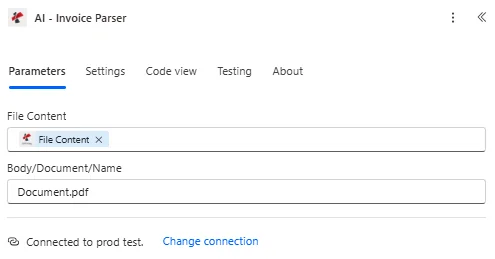
| File Content | Optional | Content of the invoice file to process. Map it from the file content returned by a previous action, such as SharePoint or OneDrive Get file content. | @{body('Get_file_content')?['$content']} |
| File Name | Optional | Name of the invoice file, including its extension (for example `invoice.pdf`). Map it from the file name returned by a previous action. | invoice.pdf |
| customFieldKeys | Optional | Optional list of custom field keys to extract. | your value |
| Customisation Note | Optional | Optional customisation note for the extraction. | your value |
出力
の PDF4me AI請求書パーサー アクションは、シームレスな包括的な出力データを返します Power Automate フロー統合:
- Table
- JSON
- Flow Integration
テーブルビュー
構造化された表形式の応答データ:
| 分野 | タイプ | 内容物 |
|---|---|---|
| Invoice Number | Text | Invoice Number as read from the invoice. |
| Invoice Date | Date-time | Invoice Date as read from the invoice. |
| Order ID | Text | Order ID as read from the invoice. |
| Vendor Name | Text | Vendor Name as read from the invoice. |
| Vendor Address | Text | Vendor Address as read from the invoice. |
| Vendor Phone | Text | Vendor Phone as read from the invoice. |
| Vendor E-mail | Text | Vendor E-mail as read from the invoice. |
| Vendor GSTN Number | Text | Vendor GSTN Number as read from the invoice. |
| Vendor PAN Number | Text | Vendor PAN Number as read from the invoice. |
| Vendor CIN Number | Text | Vendor CIN Number as read from the invoice. |
| Vendor Vat or Uid Number | Text | Vendor Vat or Uid Number as read from the invoice. |
| Bill To | Text | Bill To as read from the invoice. |
| Bill To Address | Text | Bill To Address as read from the invoice. |
| Bill To Phone | Text | Bill To Phone as read from the invoice. |
| Bill To E-mail | Text | Bill To E-mail as read from the invoice. |
| Bill To State | Text | Bill To State as read from the invoice. |
| Bill To Pincode | Text | Bill To Pincode as read from the invoice. |
| lineItems | Array | Line items found in the invoice, one item per entry. Use Apply to each to go through the items. |
| lineItems[].HSN Code | Text | HSN (Harmonized System of Nomenclature) code |
| lineItems[].Description | Text | Item description |
| lineItems[].Unit Price | Number | Unit price of the item |
| lineItems[].Discount | Number | Discount amount |
| lineItems[].Quantity | Number | Quantity of items |
| lineItems[].Taxable Value | Number | Taxable value of the line item |
| lineItems[].CGST Amount | Number | CGST amount for this line item |
| lineItems[].SGST Amount | Number | SGST amount for this line item |
| lineItems[].Total | Number | Total amount for this line item |
| lineItems[].Order Number | Text | Order Number as read from the invoice. |
| lineItems[].Unit Of Measure | Text | Unit Of Measure as read from the invoice. |
| lineItems[].Item Number | Text | Item Number as read from the invoice. |
| lineItems[].Line Position | Text | Line Position as read from the invoice. |
| lineItems[].Customs Tariff Code | Text | Customs Tariff Code as read from the invoice. |
| lineItems[].Line Amount | Number | Line Amount as read from the invoice. |
| Sub Total | Number | Sub Total as read from the invoice. |
| CGST Amount | Number | CGST Amount as read from the invoice. |
| SGST Amount | Number | SGST Amount as read from the invoice. |
| CGST Rate | Number | CGST Rate as read from the invoice. |
| SGST Rate | Number | SGST Rate as read from the invoice. |
| Total Amount | Number | Total Amount as read from the invoice. |
| Store Number | Text | Store Number as read from the invoice. |
| Delivery Date | Text | Delivery Date as read from the invoice. |
| Financial Charges | Number | Financial Charges as read from the invoice. |
| Line Total | Number | Line Total as read from the invoice. |
| Purchase Order Ref No | Text | Purchase Order Ref No as read from the invoice. |
| Customer Reference No | Text | Customer Reference No as read from the invoice. |
| Department Code | Text | Department Code as read from the invoice. |
| Vat or Uid Number | Text | Vat or Uid Number as read from the invoice. |
| Payment Deadline | Date-time | Payment Deadline as read from the invoice. |
| IBAN | Text | IBAN as read from the invoice. |
| External Invoice Number | Text | External Invoice Number as read from the invoice. |
| Total Tax Amount | Number | Total Tax Amount as read from the invoice. |
| CustomFieldsData | Array | Custom fields returned for the invoice, as key and value pairs. |
| CustomFieldsData[].key | Text | Key of the custom field. |
| CustomFieldsData[].value | Text | Value of the custom field. |
JSON 回答形式
アクションが返すフィールドは、動的コンテンツに表示されるとおりです。
{
"Invoice Number": "INV-2024-001",
"Vendor Name": "Sample Corporation Ltd.",
"Vendor Address": "123 Business Street, New York, NY 10001",
"Vendor Phone": "+1-555-123-4567",
"billToName": "Customer Company Inc.",
"Bill To Address": "456 Customer Avenue, Los Angeles, CA 90210",
"Bill To State": "California",
"Bill To Pincode": "90210",
"Invoice Date": "2024-01-15",
"dueDate": "2024-02-14",
"Sub Total": 1250.00,
"CGST Amount": 125.00,
"SGST Amount": 125.00,
"CGST Rate": 10,
"SGST Rate": 10,
"Total Amount": 1500.00,
"currency": "USD",
"paymentTerms": "Net 30",
"lineItems": [
{
"hsnCode": "12345678",
"description": "Software License - Premium Package",
"unitPrice": 1000.00,
"discount": 50.00,
"quantity": 1,
"taxableValue": 950.00,
"cgstAmount": 95.00,
"sgstAmount": 95.00,
"total": 1140.00
},
{
"hsnCode": "87654321",
"description": "Support Services - Annual",
"unitPrice": 300.00,
"discount": 0.00,
"quantity": 1,
"taxableValue": 300.00,
"cgstAmount": 30.00,
"sgstAmount": 30.00,
"total": 360.00
}
],
"confidence": {
"invoiceNumber": 0.95,
"vendorName": 0.98,
"total": 0.92
}
}
Power Automate フロー使用状況
抽出された請求書データは、マイクロソフトのエコシステム全体で強力な自動化を可能にします。
- SharePoint リスト: 抽出した請求書データを保存する SharePoint チームコラボレーションのためのリスト
- Excel 統合: 請求書明細項目をエクスポート Excel 分析用ワークブック
- Dynamics 365仕入先請求書と買掛金記録を自動的に作成する
- SQLデータベース抽出した請求書データをSQL Serverデータベースに挿入する
- Power BI請求書データをPower BIダッシュボードに取り込んで支出分析を行う
- メール通知: 抽出した請求書の概要を以下の方法で送信します Outlook
- 承認ワークフロー: 抽出した金額に基づいて請求書をルーティングします Power Automate 承認
- 文書保管: 抽出したデータを元の請求書にリンクする SharePoint ドキュメントライブラリ
ワークフローの例
の PDF4me AI請求書パーサー アクション Power Automate 実際のビジネスシナリオに合わせて設計された包括的なワークフローテンプレートを提供します。
- Accounts Payable Automation
- Expense Tracking & Analysis
- Vendor Invoice Management
自動化された買掛金処理ワークフロー
AIを活用した請求書データ抽出で、買掛金業務を変革しましょう。
ワークフローの手順を完了する:
- トリガー: 新しい請求書メールを受信しました Outlook 郵便受け
- 添付ファイルを取得請求書を取得する PDF メールの添付ファイル
- AI請求書パーサー: 請求書から構造化データを抽出します PDF4me AI
- データの検証: 抽出量と日付を確認するには、 Power Automate 条件
- レコードを作成する請求書データを挿入する Dynamics 365ファイナンスまたは ERP システム
- SharePoint を更新する: 抽出した請求書データを保存する SharePoint メタデータ付きリスト
- 承認申請請求書の合計金額に基づいて承認リクエストを送信します
- メール通知: 抽出した請求書の概要を支払担当チームに通知する
- アーカイブ: 処理済み請求書を移動 SharePoint アーカイブフォルダ
ビジネス上のメリット:
- 毎月1000件以上の請求書のデータ入力を自動化します。
- 手作業によるデータ入力時間を90%削減します
- 請求書処理における人的ミスを排除します
- 請求書の承認サイクルを短縮します
- 抽出データの完全な監査証跡を保持する
経費追跡ワークフローの自動化
インテリジェントな請求書データ抽出で経費管理を効率化:
ワークフローの手順を完了する:
- トリガー請求書がアップロードされました SharePoint ドキュメントライブラリ
- AI請求書パーサー請求書から仕入先、金額、日付、明細項目を抽出する
- Excel アップデート: 抽出したデータを追記する Excel ワークブック OneDrive
- カテゴリマッチング: ベンダー名を経費カテゴリに一致させる Power Automate
- 予算チェック請求書の合計金額を部門予算の上限と比較する
- Power BI のアップデート抽出したデータをPower BIデータセットに送信して、リアルタイムダッシュボードを作成する
- 承認ルートしきい値を超える請求書は、承認のためにマネージャーに送付する。
- 通知経費概要メールを財務チームに送信する
- アーカイブ: 抽出したメタデータを含む請求書を処理済みフォルダに移動します
ビジネス上のメリット:
- リアルタイムの経費追跡と予算監視
- ベンダーデータに基づく経費の自動分類
- Power BI を通じて支出パターンを即座に可視化
- 予算超過前に警告を発する積極的な予算アラート
- 経費規定への自動準拠
自動化された仕入先請求書管理ワークフロー
AIを活用した抽出機能で、仕入先請求書を一元管理・整理する:
ワークフローの手順を完了する:
- トリガーベンダーからメールで請求書を受け取りました
- AI請求書パーサーベンダーの詳細、請求書番号、金額を抽出します。
- ベンダー検索: 抽出したベンダー名をベンダーマスターリストに一致させる SharePoint
- 重複チェック請求書番号がシステムに既に存在するかどうかを確認してください。
- レコードを作成する請求書レコードを追加する SharePoint 抽出されたすべてのフィールドを含むリスト
- リンクドキュメント: 元の請求書を関連付ける PDF 抽出されたデータレコードと共に
- 出産予定日アラート期日までの日数を計算し、リマインダーを設定する
- ベンダーポータルベンダーポータルに請求書のステータスと支払い情報を更新する
- 報告抽出した請求書データから仕入先支出レポートを生成する
ビジネス上のメリット:
- 検索可能な抽出データを備えた、ベンダー請求書の一元管理リポジトリ
- 自動重複検出により重複支払いを防止します
- 抽出された支払期日に基づいた、積極的な支払いリマインダー
- ベンダー支出に関する包括的な分析とレポート
- ベンダー関係管理の改善
業界におけるユースケースとアプリケーション
- Finance & Accounting
- Procurement & Supply Chain
- Healthcare & Medical
- Real Estate & Construction
財務・会計におけるユースケース
- 請求書処理: 買掛金ワークフローのための請求書データ抽出を自動化する
- 経費管理ベンダー請求書から経費の詳細を自動的に抽出する
- 財務報告抽出した請求書データを財務報告システムに取り込む
- 監査コンプライアンス監査証跡のために構造化された請求書データを維持する
調達・サプライチェーンにおけるユースケース
- 発注書の照合抽出した請求書データを発注書と照合する
- ベンダーのパフォーマンスベンダー請求書の正確性と支払い条件を追跡する
- 支出分析抽出した請求書データから購買パターンを分析する
- 契約遵守請求書の条件をベンダー契約と照合する
ヘルスケアおよび医療分野における活用事例
- 医療費請求医療機器および消耗品の請求書から請求書データを抽出する
- 保険処理医療提供者からの請求書を自動的に処理する
- 経費追跡抽出した請求書データから医療用品の費用を追跡する
- コンプライアンス報告構造化された請求書データからコンプライアンスレポートを生成する
不動産・建設分野における活用事例
- 請負業者の請求書請負業者およびサプライヤーの請求書からデータを抽出する
- プロジェクトコスト抽出した請求書明細項目からプロジェクト費用を追跡する
- 予算管理抽出した請求書金額を使用してプロジェクト予算を監視する
- 支払い処理抽出した請求書データに基づいて支払いワークフローを自動化する