AIヘルスカードパーサー Power Automate
AIヘルスカードパーサー は Power Automate アクション PDF4me AIで健康保険証を読み取り、会員ID、グループ番号、プランの種類、補償期間、処方箋給付データを構造化された形式で返します。 JSONこれを使えば、手動でのデータ入力なしに、患者登録、保険資格確認、または薬局の給付金確認を自動化できます。
このアクションが何をするか
PDF4me AIヘルスカードパーサー 健康保険証を読む(PDF、 PNG、 JPG、 または JPEG)そして返します メンバーID、 グループ番号、 プランタイプ、 保険会社、 メンバー名、補償期間、および処方箋給付フィールド内 健康データ オブジェクト、フィールドごと 自信 スコア。オプションで設定可能 本文/カスタムフィールドキー 標準セット以外の追加フィールドを取得する。
関連ブログ記事(1)
認証方法 Power Automate 流れ?
毎 PDF4me アクション Power Automate 有効な接続が必要です。 PDF4me API フローがAIヘルスカード処理リクエストを安全に認証できるようにするためのキー。
見逃してはならない重要な事実
必須項目は2つのみです
ヘルスカードファイルの内容(ドキュメントのバイト列)とヘルスカード名(拡張子付きのファイル名)。Body/customFieldKeysは詳細設定の下にあり、オプションです。
healthDataの下に出力がネストされます
メンバー、プラン、処方箋の各フィールドはすべて processedData.healthData 内に格納されています。後続のフローアクションにフィールドをマッピングする際は、ネストされたパスを参照してください。
出力結果を信頼する前に、信頼度スコアを確認してください。
信頼度オブジェクトは、主要フィールドを0から1の範囲でスコアリングします。信頼度の低い抽出結果は、保険確認または請求フローにおいて手動レビューに回されます。
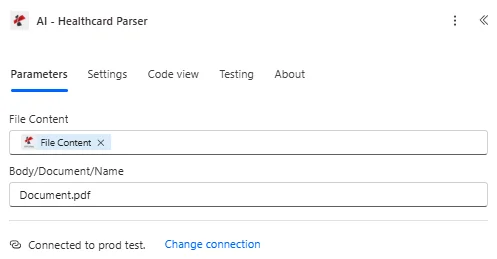
ファイルの内容と本文/ドキュメント/名前をマッピングし、本文/customFieldKeys の詳細パラメーターを展開します。
パラメータ
必須: 健康カードファイルの内容と健康カード名は必ず指定する必要があります。Body/customFieldKeys はオプションの高度なパラメータです。
| パラメータ | 必須 | その機能 | 例 |
|---|---|---|---|
| File Content | Optional | Content of the health card file to process. Map it from the file content returned by a previous action, such as SharePoint or OneDrive Get file content. | @{body('Get_file_content')?['$content']} |
| File Name | Optional | Name of the health card file, including its extension (for example `healthcard.jpg`). Map it from the file name returned by a previous action. | healthcard.jpg |
| customFieldKeys | Optional | Optional list of custom field keys to extract. | your value |
| Customisation Note | Optional | Optional customisation note for the extraction. | your value |
出力フィールド
| 分野 | タイプ | 内容物 |
|---|---|---|
Member ID No | Text | Member ID No as read from the health card. |
Group Number | Text | Group Number as read from the health card. |
Plan Type | Text | Plan Type as read from the health card. |
Insurance Provider Name | Text | Insurance Provider Name as read from the health card. |
Member Name | Text | Member Name as read from the health card. |
Date Of Birth | Text | Date of birth as string |
Effective Date | Text | Effective date as string |
RxBin | Text | RxBin as read from the health card. |
RxPcn | Text | RxPcn as read from the health card. |
RxGroup | Text | RxGroup as read from the health card. |
Copay Info | Array | Copay Info found in the health card, as a list of text values. |
CustomFieldsData | Array | Custom fields returned for the health card, as key and value pairs. |
CustomFieldsData[].key | Text | Key of the custom field. |
CustomFieldsData[].value | Text | Value of the custom field. |
- Sample JSON Response
- Flow Integration
{
  "processedData": {
    "healthData": {
      "memberId": "M123456789",
      "groupNumber": "GRP001234",
      "planType": "PPO",
      "insuranceProvider": "Blue Cross Blue Shield",
      "memberName": "John Michael Smith",
      "dateOfBirthStr": "1985-03-15",
      "effectiveDateStr": "2024-01-01",
      "rxBin": "123456",
      "rxPcn": "ABC123",
      "rxGroup": "RXGRP001",
      "copayInfo": [
        { "service": "Primary Care", "copay": "$25" },
        { "service": "Specialist", "copay": "$50" },
        { "service": "Emergency Room", "copay": "$200" }
      ],
      "confidence": {
        "memberId": 0.95,
        "memberName": 0.98,
        "insuranceProvider": 0.92
      }
    },
    "status": "Success",
    "errors": [],
    "jobId": "11111111-2222-3333-4444-555555555555"
  },
  "processingTimestamp": "2024-01-15T10:30:45.123Z"
}
抽出したルート healthData オブジェクトを Microsoft 365 そして医療制度:
- 患者記録: memberId、memberName、planType を SharePoint リストまたは患者管理システム。
- 保険確認: memberIdとgroupNumberを保険会社のマスターリストと照合します。
- 薬局での調剤rxBin、rxPcn、およびrxGroupを薬局給付チェックに入力します。
- 請求する: 医療費請求記録に保険提供者情報と自己負担額情報を添付します。
AI-Health Card Parser をどのように設定しますか? Power Automate?
- 追加 PDF4me → AIヘルスカードパーサー あなたの Power Automate 流れ。
- 地図 健康カードファイルの内容 以前のアクションから(SharePoint、 OneDrive(Dropbox、またはメール添付ファイル)。
- セット 健康保険証名 ファイル拡張子(.pdf、.png、.jpg、または.jpeg)付き。
- 必要に応じて展開 詳細パラメータ そして設定する 本文/カスタムフィールドキー 標準セット以外のフィールドについて。
- フローを実行します。解析された結果は、 健康データ オブジェクトがネストされている 処理済みデータ会員、プラン、補償範囲、処方箋のフィールドに加えて 自信 スコア。
典型的な構成
ワークフローの例Common Power Automate flow patterns using AI-Health Card Parser.
患者登録受付
- 患者がポータルまたは電子メールを通じて健康保険証の画像をアップロードすると、フローが開始されます。
- AI-Health Card Parserは、memberId、memberName、dateOfBirthStr、およびinsuranceProviderを抽出します。
- 抽出されたフィールドは SharePoint リストまたは患者管理システム。
- 条件は信頼度オブジェクトをチェックし、信頼度の低い行を手動レビューに振り分けます。
保険確認
- 電子メールで健康保険証が受信されたとき、または SharePoint アップロード。
- AI-Health Card Parserは、groupNumber、planType、およびeffectiveDateStrを抽出します。
- 確認記録が作成され、患者の保険情報にリンクされます。
薬局の給付内容検索
- 患者は薬局の受付フローに健康保険証をアップロードする。
- AI-Health Card Parserは、rxBin、rxPcn、およびrxGroupを抽出します。
- 処方箋識別子は薬局の給付金確認ステップに利用され、copayInfoは患者の自己負担額の見積もりに使用されます。
実践的なヒント
Reference the nested healthData path
Extracted fields live under processedData.healthData, not at the top level of the response. Map the full path in downstream actions.
Always branch on success and confidence
Check success before writing extracted data downstream, and inspect the confidence object for any fields scored below your review threshold.
Custom fields extend, they do not replace
Body/customFieldKeys adds extra entries alongside the standard healthData fields, it does not narrow or filter the standard set.
copayInfo is an array, not a flat field
Loop over copayInfo with Apply to each when writing copay amounts to a table, since a card can list several services.
Match the file extension to the real format
Health Card Name must carry the true extension (.pdf, .png, .jpg, .jpeg) of the mapped File Content, a mismatched extension can affect processing.
チートシート
| 分野 | 価値 |
|---|---|
| Action | AI-Health Card Parser |
| Required fields | Health Card File Content, Health Card Name |
| Optional advanced field | Body/customFieldKeys |
| Supported file types | .pdf, .png, .jpg, .jpeg |
| Output root | processedData.healthData |
| Key output fields | memberId, groupNumber, planType, insuranceProvider, memberName, dateOfBirthStr, effectiveDateStr, rxBin, rxPcn, rxGroup, copayInfo, confidence |
よくある質問
業界におけるユースケースとアプリケーション
- Healthcare Providers
- Medical Billing & Revenue Cycle
- Pharmacy & Prescription Services
- Telemedicine & Virtual Care
- 患者登録健康保険証データ抽出による患者登録の自動化
- 保険確認患者の保険適用範囲を自動的に確認する
- 給付金確認患者の給付内容と保険適用資格を確認する
- 予約スケジューリング保険情報を予約記録にリンクする
- 請求処理医療費請求のための保険情報を抽出します。
- 事前承認抽出した保険データを事前承認申請に利用する
- 資格確認抽出した会員IDを使用して患者の適格性を確認する
- 請求システムとの連携保険データを請求および収益サイクルシステムに取り込む
- 処方箋処理薬局業務のための処方箋給付金の抽出
- 自己負担額の計算抽出した自己負担情報を使用して処方箋の自己負担額を決定する
- 保険申請抽出した保険データを使用して処方箋請求を提出する
- 患者プロフィール抽出した健康保険証データを使用して、患者の薬局プロファイルを作成する
- バーチャル登録: 健康保険証のアップロードによる遠隔患者登録を有効にする
- 遠隔保険資格確認遠隔医療の予約について保険適用状況を確認してください。
- デジタル健康記録抽出した健康保険証データを電子カルテに統合する
- モバイルヘルスアプリモバイルアプリ経由でアップロードされた健康保険証を処理する
関連アクション
AI税務文書解析ツール
税務申告書から構造化データを抽出します。これには、保険確認と関連付けられる1095A/1095C健康保険証書も含まれます。
AI給与明細解析ツール
雇用主が提供する健康保険の控除額と一致する給与データを抽出します。
AI結婚証明書解析ツール
被扶養者向け保険加入手続きにおいて一般的に用いられる添付書類である婚姻証明書から、構造化データを抽出する。
他のプラットフォームでの同じタスク
Make: AIプロセスヘルスカード
同じAIヘルスカード抽出 Make モジュール(このプラットフォームでは「AIプロセスヘルスカード」という名称)。
n8n: AIプロセスヘルスカード
同じAIヘルスカード抽出ノード n8n ワークフローは、自社ホスト型またはクラウド型で利用可能です。
Zapier: AIヘルスカードパーサー
AIヘルスカード抽出手順は同じです Zapier接続済みのアプリからどれでも起動できます。