AIクレジットカードパーサー Power Automate
AIクレジットカード解析ツール は Power Automate アクション PDF4me クレジットカードの画像、スキャン、または PDF AIを搭載し、カード番号、有効期限、カード名義人名、カードブランドを構造化フィールド辞書として返します。これを利用して、手動でのデータ入力なしに、経費追跡、カード記録管理、照合を自動化できます。
このアクションが何をするか
PDF4me AIクレジットカード解析ツール クレジットカードの書類または画像を読み取ります(PDF、 PNG、 JPG、 または JPEG)そして、 フィールド 辞書には以下を含めることができます カード番号、 有効期限、 クレジットカード名義人氏名、 カードタイプ、 カードブランド、 発行銀行、および有効開始日/有効終了日。オプションで設定 本文/カスタムフィールドキー 標準セット以外の追加フィールドを取得する。
認証方法 Power Automate 流れ?
毎 PDF4me アクション Power Automate 有効な接続が必要です。 PDF4me API フローがAIによるクレジットカード処理リクエストを安全に認証できるようにするためのキー。
見逃してはならない重要な事実
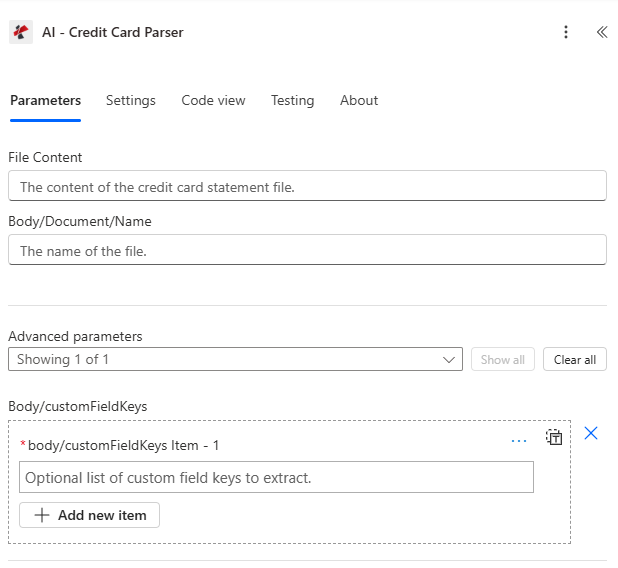
ファイルの内容と本文/ドキュメント/名前をマッピングし、本文/customFieldKeys の詳細パラメーターを展開します。
パラメータ
必須: ファイルコンテンツと本文/ドキュメント名は常に指定する必要があります。本文/customFieldKeysはオプションの高度なパラメータです。
| パラメータ | 必須 | その機能 | 例 |
|---|---|---|---|
| File Content | Optional | Content of the credit card file to process. Map it from the file content returned by a previous action, such as SharePoint or OneDrive Get file content. | @{body('Get_file_content')?['$content']} |
| File Name | Optional | Name of the credit card file, including its extension (for example `card.jpg`). Map it from the file name returned by a previous action. | card.jpg |
| customFieldKeys | Optional | Optional list of custom field keys to extract. | your value |
| Customisation Note | Optional | Optional customisation note for the extraction. | your value |
出力フィールド
| 分野 | タイプ | 内容物 |
|---|---|---|
Bank Name | Text | Name of the bank |
Card Number | Text | Credit card number |
Expiry Date | Text | Card expiry date |
Cardholder Name | Text | Name of the cardholder |
CVV | Text | Card verification value (CVV) |
Card Type | Text | Type of credit card (Debit/Credit) |
Issuing Bank | Text | Bank that issued the card |
Card Brand | Text | Card brand (Visa, Mastercard, etc.) |
Account Number | Text | Associated account number |
Valid From | Text | Card valid from date |
Valid Thru | Text | Card valid through date |
CustomFieldsData | Array | Custom fields returned for the credit card, as key and value pairs. |
CustomFieldsData[].key | Text | Key of the custom field. |
CustomFieldsData[].value | Text | Value of the custom field. |
- Sample JSON Response
- Flow Integration
{
  "fields": {
    "bankName": { "value": "Chase Bank" },
    "cardNumber": { "value": "XXXX-XXXX-XXXX-1234" },
    "expiryDate": { "value": "12/25" },
    "cardholderName": { "value": "JOHN MICHAEL SMITH" },
    "cardType": { "value": "Visa" },
    "issuingBank": { "value": "Chase Bank" },
    "cardBrand": { "value": "Visa" },
    "accountNumber": { "value": "1234567890" },
    "validFrom": { "value": "01/22" },
    "validThru": { "value": "12/25" },
    "customField1": { "value": "Value for Custom Field 1" }
  }
}
抽出したルート fields 辞書を Microsoft 365 そして金融システム:
- 経費追跡カード所有者名、カードブランド、有効期限を SharePoint リストまたは経費管理システム。
- カード記録管理カード番号(マスク済み)と発行銀行をカードマスターリストと照合します。
- 和解: accountNumber と cardNumber を Excel または、SQL調整ワークブック。
- 有効期限追跡有効期限までの日数を計算し、更新リマインダーをトリガーします。
AI-クレジットカードパーサーの設定方法 Power Automate?
- 追加 PDF4me → AIクレジットカード解析ツール あなたの Power Automate 流れ。
- 地図 ファイルの内容 以前のアクションから(SharePoint、 OneDrive(Dropbox、またはメール添付ファイル)。
- セット 本文/文書/名前 ファイル拡張子(.pdf、.png、.jpg、または.jpeg)付き。
- 必要に応じて展開 詳細パラメータ そして設定する 本文/カスタムフィールドキー 標準セット以外のフィールドについて。
- フローを実行します。解析された結果は、 フィールド カード、カード所有者、銀行の詳細を含む辞書、さらに 警告 そして フォールバック使用済み 旗。
典型的な構成
ワークフローの例Common Power Automate flow patterns using AI-Credit Card Parser.
- カード明細書または領収書がアップロードされるとフローがトリガーされます SharePoint または電子メールで受信。
- AIクレジットカードパーサーは、カード所有者名、カードブランド、有効期限を抽出します。
- 抽出されたフィールドは SharePoint リストまたは経費管理システム。
- 条件によって、承認前に手動で確認する必要のある警告を含む行が特定されます。
- 新しいカード文書が電子メールで受信されたときにフローがトリガーされます。 SharePoint アップロード。
- AIクレジットカードパーサーは、カード番号、発行銀行、および有効なスルーを抽出します。
- カードレコードは、 SharePoint 有効期限のリマインダーが設定されたリスト。
- カード明細書が照合フォルダにアップロードされると、フローがトリガーされます。
- AIクレジットカードパーサーは、口座番号とカード所有者名を抽出します。
- 抽出されたフィールドは Excel または、会計記録との照合に使用するSQL照合ワークシート。
実践的なヒント
チートシート
| 分野 | 価値 |
|---|---|
| Action | AI-Credit Card Parser |
| Required fields | File Content, Body/Document/Name |
| Optional advanced field | Body/customFieldKeys |
| Supported file types | .pdf, .png, .jpg, .jpeg |
| Output root | fields (dictionary) |
| Key output fields | cardNumber, expiryDate, cardholderName, cardType, cardBrand, issuingBank, accountNumber, validFrom, validThru, warnings, fallbackUsed |
よくある質問
業界におけるユースケースとアプリケーション
- Finance & Accounting
- Banking & Financial Services
- Retail & E-commerce
- Corporate Finance
- Compliance & Security
財務・会計におけるユースケース
- 経費処理クレジットカードからの経費データ抽出を自動化する
- 財務調整クレジットカード取引と会計記録を照合する
- 経費報告抽出したクレジットカードデータから経費報告書を作成する
- 監査コンプライアンス監査証跡のために構造化されたクレジットカードデータを維持する
- 予算管理抽出したクレジットカード情報を使用して支出を追跡する
銀行・金融サービスにおけるユースケース
- カード決済クレジットカード処理とデジタル化の自動化
- カード認証抽出したカード情報を使用してクレジットカード情報を確認します。
- アカウント管理抽出したカードデータを使用してクレジットカード口座を管理する
- 不正検出抽出したカードパターンを使用して不正行為を検出する
- 顧客サービス自動カードデータ抽出により、より迅速な顧客サービスを提供します。
小売業およびEコマースの活用事例
- 支払い処理抽出したクレジットカード情報を使用して支払いを処理する
- 経費追跡抽出したクレジットカードデータを使用してビジネス経費を追跡する
- ベンダーへの支払い: 抽出したカード情報を使用してベンダーへの支払いを処理する
- 財務分析抽出したクレジットカードデータから支出パターンを分析する
- 在庫管理経費追跡と在庫管理システムを連携させる
企業財務における活用事例
- 法人カード管理抽出したカードデータを使用して法人クレジットカードを管理する
- 従業員の経費追跡抽出したクレジットカード情報を使用して従業員の経費を追跡する
- 出張経費管理抽出したカード情報を使用して出張経費を管理する
- 経費承認ワークフロー: 抽出したカードデータを使用して承認のための経費をルーティングします。
- 財務報告抽出したクレジットカード取引から財務レポートを生成する
コンプライアンスとセキュリティのユースケース
- PCI DSS準拠クレジットカードデータの取り扱いに関するPCI DSS準拠の取り組みを支援する
- データセキュリティクレジットカードデータの安全な抽出と保存
- 監査証跡クレジットカードデータのアクセスと処理に関する監査証跡を維持する
- アクセス制御抽出したクレジットカード情報へのアクセス制御を実装する
- コンプライアンス報告抽出したカードデータからコンプライアンスレポートを生成する