AI契約パーサー Power Automate
PDF4me AI契約パーサー AIを活用した機械学習を用いて契約から構造化データを抽出する Power Automate フロー。プロセス契約 PDFs または画像 Power Automate トリガー、バイナリデータ、Base64文字列、または公開URLから、当事者、法的条件、実行日、管轄区域の詳細、契約上の義務、条項、および主要な契約情報を高精度かつインテリジェントなフィールド認識で自動的に抽出します。このソリューションは、構造化された出力とシームレスなAIによる抽出を必要とする契約管理、法的文書の自動化、コンプライアンス監視、契約分析、デューデリジェンス、および自動契約処理ワークフローに最適です。 Microsoft 365 統合。
認証 API リクエスト
アクセスするには PDF4me ウェブ API を通して Power Automateすべてのリクエストには適切な認証情報を含める必要があります。認証により安全な通信が保証され、承認されたユーザーとしての身元が検証され、シームレスな統合が可能になります。 Power Automate 流れと PDF4meの強力なAI搭載契約処理サービス。
主な機能
- AIを活用した抽出: 契約データの正確な抽出のための高度な機械学習技術
- マルチフォーマット対応: 契約を処理する PDF、 PNG、 JPG、 そして JPEG フォーマット
- 政党の承認: 契約当事者全員の法的名称と住所を自動的に識別して抽出します。
- データインテリジェンス実行日、有効日、有効期限を自動解析で抽出します。
- 管轄区域分析適用される法律、裁判所の所在地、および法管轄区域を特定する
- 契約期間契約期間と契約条件情報を自動的に抽出します。
- 法曹分野の認知主要な法的分野と条項をインテリジェントに識別します。
- Microsoft 365 統合: 抽出した契約データをシームレスに統合します SharePointチーム、そして Dynamics 365
パラメータ
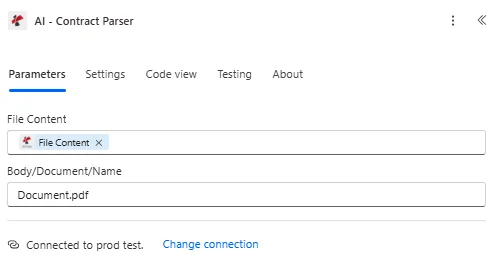
AI契約解析アクションのパラメータ一覧です。これらのパラメータを設定することで、契約処理とデータ抽出を制御できます。
ドキュメントソースパラメータ
| パラメータ | 必須 | その機能 | 例 |
|---|---|---|---|
| File Content | Optional | Content of the contract file to process. Map it from the file content returned by a previous action, such as SharePoint or OneDrive Get file content. | @{body('Get_file_content')?['$content']} |
| File Name | Optional | Name of the contract file, including its extension (for example `contract.pdf`). Map it from the file name returned by a previous action. | contract.pdf |
| customFieldKeys | Optional | Optional list of custom field keys to extract. | your value |
| Customisation Note | Optional | Optional customisation note for the extraction. | your value |
出力
の PDF4me AI契約パーサー アクションは、シームレスな包括的な出力データを返します Power Automate フロー統合:
- Table
- JSON
- Flow Integration
テーブルビュー
構造化された表形式の応答データ:
| 分野 | タイプ | 内容物 |
|---|---|---|
| Title | Text | Title as read from the contract. |
| Contract ID | Text | Contract ID as read from the contract. |
| Industry | Text | Industry as read from the contract. |
| Decision Maker | Text | Decision Maker as read from the contract. |
| Application Reference | Text | Application Reference as read from the contract. |
| Print Reference | Text | Print Reference as read from the contract. |
| parties | Array | Parties found in the contract, one item per entry. Use Apply to each to go through the items. |
| parties[].Legal Party Type | Text | Legal Party Type as read from the contract. |
| parties[].Party Name | Text | Party Name as read from the contract. |
| parties[].Address | Text | Address as read from the contract. |
| parties[].Reference Name | Text | Reference Name as read from the contract. |
| parties[].Full Description | Text | Full Description as read from the contract. |
| Execution Date | Text | Execution date as string. |
| Effective Date | Text | Effective date as string. |
| Expiration Date | Text | Expiration date as string. |
| Contract Duration | Text | Contract Duration as read from the contract. |
| Jurisdictions | Array | Jurisdictions found in the contract, as a list of text values. |
| Court Location | Text | Court Location as read from the contract. |
| Full Description | Text | Full Description as read from the contract. |
| Region | Text | Region as read from the contract. |
| Custom Fields | Array | Custom fields returned for the contract, as key and value pairs. |
| Custom Fields[].key | Text | Key of the custom field. |
| Custom Fields[].value | Text | Value of the custom field. |
JSON 回答形式
アクションが返すフィールドは、動的コンテンツに表示されるとおりです。
{
  "parties": [
    {
      "legalParty": "ABC Technology Solutions Inc.",
      "name": "ABC Technology Solutions Inc.",
      "address": "123 Innovation Drive, San Francisco, CA 94105",
      "referenceName": "COMPANY",
      "fullDescription": "ABC TECHNOLOGY SOLUTIONS INC., a Delaware corporation, referred to as COMPANY, with principal office at 123 Innovation Drive, San Francisco, CA 94105."
    },
    {
      "legalParty": "XYZ Consulting Services LLC",
      "name": "XYZ Consulting Services LLC",
      "address": "456 Business Park, Austin, TX 78701",
      "referenceName": "CONSULTANT",
      "fullDescription": "XYZ CONSULTING SERVICES LLC, a Texas limited liability company, referred to as CONSULTANT, with principal office at 456 Business Park, Austin, TX 78701."
    }
  ],
  "Execution Date": "2024-01-15",
  "Effective Date": "2024-02-01",
  "Expiration Date": "2025-01-31",
  "Contract Duration": "12 months",
  "jurisdiction": {
    "jurisdictions": [
      "State of California",
      "United States"
    ],
    "courtLocation": "San Francisco County Superior Court",
    "fullDescription": "This Agreement shall be construed under the laws of the State of California and the United States.",
    "region": "California"
  }
}
Power Automate フロー使用状況
抽出された契約データにより、マイクロソフトのエコシステム全体で強力な自動化が可能になります。
- SharePoint リスト: 抽出した契約データを SharePoint 政党情報と重要な日程を記載したリスト
- チームコラボレーション契約概要と重要な日付をTeamsチャネルで共有する
- Dynamics 365: 契約記録を作成する Dynamics 抽出されたパーティと日付情報を含む365
- Excel ワークブック: 契約データをエクスポート Excel 分析および報告のため
- カレンダー連携契約満了日のカレンダーリマインダーを作成する
- 承認ワークフロー: 抽出された管轄区域または契約金額に基づいて契約をルーティングする
- 文書管理: 抽出した契約メタデータを元の契約文書にリンクします SharePoint
- コンプライアンス追跡抽出した有効期限と管轄区域を使用して契約遵守状況を追跡する
ワークフローの例
の PDF4me AI契約パーサー アクション Power Automate 実際のビジネスシナリオに合わせて設計された包括的なワークフローテンプレートを提供します。
- Contract Lifecycle Management
- Contract Renewal Management
- Legal Compliance Tracking
自動化された契約ライフサイクル管理ワークフロー
AIを活用した契約データ抽出で、契約管理プロセスを効率化しましょう。
ワークフローの手順を完了する:
- トリガー: 新しい契約書がアップロードされました SharePoint ドキュメントライブラリ
- AI契約パーサー: 契約書から当事者、日付、管轄区域を抽出する PDF4me AI
- レコードを作成する: 契約データを挿入します SharePoint リストまたは Dynamics 365
- パーティ検証抽出したパーティ名をベンダー/パートナーマスターリストと照合する
- 日付計算有効期限までの日数を計算し、更新リマインダーを設定します。
- カレンダーイベント: 有効期限のカレンダーリマインダーを作成する Outlook
- チーム通知契約概要と主要日程を関連するTeamsチャネルに投稿する
- コンプライアンスチェック管轄区域および法的要件が会社のポリシーと一致していることを確認する
- アーカイブ抽出した契約メタデータを元の契約書とともに保存する
ビジネス上のメリット:
- 新規契約すべての契約データ入力を自動化します。
- 契約の有効期限を絶対に逃さないようにします
- 契約情報を検索可能な形式で一元管理します。
- 契約の可視性と追跡性を向上させる
- 手作業による契約管理時間を85%削減します
契約更新管理ワークフローの自動化
インテリジェントな契約日追跡機能で、契約更新を見逃すことはありません。
ワークフローの手順を完了する:
- トリガー: 契約書がアップロードまたは更新されました SharePoint
- AI契約パーサー実行日、有効日、有効期限を抽出します。
- 期間計算抽出した日付から契約期間を計算する
- 更新スケジュール更新日を決定する(通常は有効期限の90日前)
- 更新のお知らせ: 作成する Outlook 更新日のカレンダーリマインダー
- 関係者への通知契約所有者に更新スケジュールをメールで通知する
- チームアラート: 契約の詳細を記載した更新リマインダーをTeamsチャネルに投稿
- ダッシュボードの更新Power BIダッシュボードに契約更新指標を追加更新する
- ドキュメントリンク更新リマインダーを元の契約書にリンクする
ビジネス上のメリット:
- 積極的な契約更新管理により、契約の失効を防ぐことができます。
- 自動通知により関係者への情報伝達が確実に行われる
- 重要な契約更新の機会を逃すリスクを軽減します
- ベンダーおよびパートナーとの関係管理を改善する
- 戦略的な契約計画と交渉を可能にする
自動化された法的コンプライアンス追跡ワークフロー
抽出した契約管轄区域データを使用して、法的要件への準拠を確保する:
ワークフローの手順を完了する:
- トリガー: 電子メールで受信した新しい契約書、またはアップロードされた新しい契約書 SharePoint
- AI契約パーサー管轄区域、当事者、および主要な法的用語を抽出する
- 管轄区域チェック抽出した管轄区域を承認済みの管轄区域リストと比較する
- コンプライアンス検証契約が会社の法的要件を満たしていることを確認する
- 法律レビュー管轄区域によっては契約書を法務チームに送付する必要がある。
- 承認ワークフロー: 抽出した契約概要を添付して承認依頼を送信します
- データベースの更新: コンプライアンス報告のために契約メタデータをSQLデータベースに保存する
- コンプライアンスレポート抽出した契約データから月次コンプライアンスレポートを生成する
- アラート管理非標準的な法域における契約に関するアラートを作成する
ビジネス上のメリット:
- すべての契約が法的および規制上の要件に準拠していることを保証する
- 非標準的な法域の場合、法務チームへの自動ルーティングが行われます。
- 包括的なコンプライアンス報告と監査証跡
- 契約書の事前審査により法的リスクを軽減する
- 規制当局による検査のための契約データベースを整理して維持する。
業界におけるユースケースとアプリケーション
- Legal & Compliance
- Procurement & Vendor Management
- Real Estate & Property Management
- Technology & Software
法務・コンプライアンス関連のユースケース
- 契約リポジトリ抽出したメタデータを用いて検索可能な契約データベースを構築する
- 適当な注意契約分析の自動化により、デューデリジェンスプロセスを加速します。
- 規制遵守契約管轄区域と法的要件を追跡する
- リスク管理抽出した契約条件と日付に基づいて契約リスクを特定する
調達およびベンダー管理のユースケース
- ベンダー契約ベンダー管理のためにベンダー契約からデータを抽出する
- サービス契約サービス契約を処理し、サービス条件を追跡する
- 購入契約購入契約書から条項を自動的に抽出する
- パートナーシップ契約: 抽出したパーティデータを使用してパートナーシップ契約を管理する
不動産および物件管理における活用事例
- 賃貸借契約リース契約条件、当事者、および有効期限を抽出します。
- 不動産契約不動産の売買契約書の処理
- テナント管理リース契約の満了日と更新要件を追跡する
- コンプライアンス追跡: 抽出した契約データを使用してリース契約の遵守状況を監視する
テクノロジーとソフトウェアの活用事例
- ソフトウェアライセンスライセンス条項、当事者、有効期限を抽出する
- サービスレベル契約SLA契約を処理し、約束事項を追跡する
- パートナーシップ契約技術提携契約の管理
- NDA管理抽出した関係者との秘密保持契約とその日付を追跡する