AI銀行明細書パーサー Power Automate
PDF4me AI銀行明細書解析ツール AIを活用した機械学習を用いて銀行取引明細書から構造化データを抽出する Power Automate フロー。銀行取引明細書の処理 PDFs または画像 Power Automate トリガー、バイナリデータ、Base64文字列、または公開URLを使用して、アカウント情報、取引の詳細、残高、手数料、利息、定期的な支払いパターン、異常な取引、支出分析、および包括的な財務分析を高精度かつインテリジェントなフィールド認識で自動的に抽出します。このソリューションは、銀行取引明細書の処理自動化、財務諸表のデジタル化、取引分析、銀行照合、キャッシュフロー管理、支出分析、自動会計、および構造化された出力とシームレスなAIによる抽出を必要とする財務データ抽出ワークフローに最適です。 Microsoft 365 統合。
認証 API リクエスト
アクセスするには PDF4me ウェブ API を通して Power Automateすべてのリクエストには適切な認証情報を含める必要があります。認証により安全な通信が保証され、承認されたユーザーとしての身元が検証され、シームレスな統合が可能になります。 Power Automate 流れと PDF4meの強力なAI搭載型銀行取引明細書処理サービス。
主な機能
- AIを活用した抽出: 銀行取引明細書データの正確な抽出のための高度な機械学習技術
- マルチフォーマット対応: 銀行取引明細書を処理する PDF、 PNG、 JPG、 そして JPEG フォーマット
- 包括的な取引分析日付、金額、説明、種類、カテゴリなどの詳細な取引情報を抽出します。
- 残高追跡開始残高、終了残高、総預金額、総出金額を抽出する
- パターン認識定期支払いと異常な取引を自動的に識別します
- 小切手処理小切手番号、金額、受取人、日付などの支払済み小切手情報を抽出します。
- 財務分析支出概要、カテゴリ別内訳、取引分析結果を生成する
- 銀行情報抽出銀行名、口座名義人、口座番号、口座種別、支店情報を抽出します。
- 計算期間認識: 明細書の開始日と終了日を自動的に識別します
- Microsoft 365 統合: 抽出したデータをシームレスに統合します SharePoint、 Excel、 Dynamics 365、およびPower BI
パラメータ
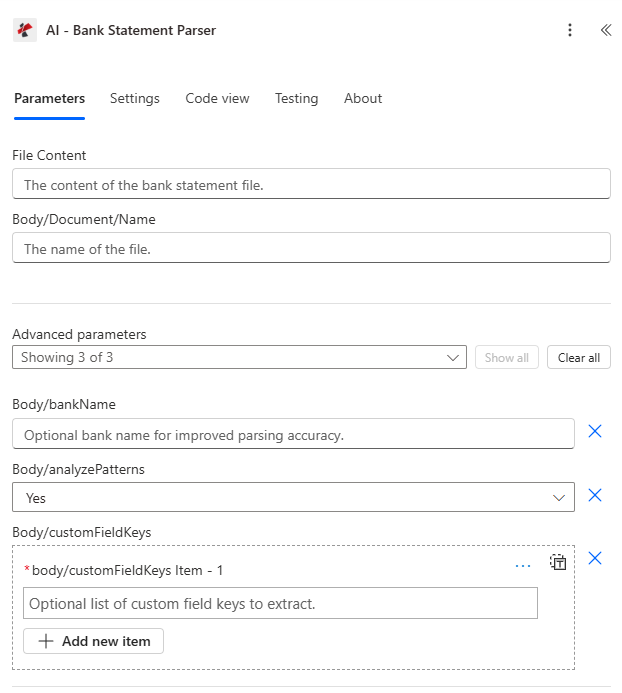
AI-Bank Statement Parserアクションのパラメータ一覧です。これらのパラメータを設定することで、銀行取引明細書の処理とデータ抽出を制御できます。
ドキュメントソースパラメータ
| パラメータ | 必須 | その機能 | 例 |
|---|---|---|---|
| File Content | Optional | Content of the bank statement file to process. Map it from the file content returned by a previous action, such as SharePoint or OneDrive Get file content. | @{body('Get_file_content')?['$content']} |
| File Name | Optional | Name of the bank statement file, including its extension (for example `statement.pdf`). Map it from the file name returned by a previous action. | statement.pdf |
| bankName | Optional | Optional bank name for improved parsing accuracy. | your value |
| analyzePatterns | Optional | Whether to analyze transaction patterns. Defaults to `Yes`. | Yes |
| customFieldKeys | Optional | Optional list of custom field keys to extract. | your value |
| Customisation Note | Optional | Optional customisation note for the extraction. | your value |
出力
の PDF4me AI銀行明細書解析ツール アクションは、シームレスな包括的な出力データを返します Power Automate フロー統合:
- Table
- JSON
- Flow Integration
テーブルビュー
構造化された表形式の応答データ:
| 分野 | タイプ | 内容物 |
|---|---|---|
| Bank Name | Text | Bank Name as read from the bank statement. |
| Account Holder Name | Text | Account Holder Name as read from the bank statement. |
| Account Number | Text | Account Number as read from the bank statement. |
| Account Type | Text | Account Type as read from the bank statement. |
| Branch Name | Text | Branch Name as read from the bank statement. |
| Statement Number | Text | Statement Number as read from the bank statement. |
| Start Date | Text | Start date of the statement period |
| End Date | Text | End date of the statement period |
| Opening Balance | Number | Opening Balance as read from the bank statement. |
| Closing Balance | Number | Closing Balance as read from the bank statement. |
| Total Deposits | Number | Total Deposits as read from the bank statement. |
| Total Withdrawals | Number | Total Withdrawals as read from the bank statement. |
| Currency Name | Text | Currency Name as read from the bank statement. |
| Bank Fees | Number | Bank Fees as read from the bank statement. |
| Interest | Number | Interest as read from the bank statement. |
| Transactions | Array | Transactions found in the bank statement, one item per entry. Use Apply to each to go through the items. |
| Transactions[].Transaction Date | Text | Transaction date as string |
| Transactions[].Description | Text | Description as read from the bank statement. |
| Transactions[].Amount | Number | Amount as read from the bank statement. |
| Transactions[].Type | Text | Transaction type (debit/credit) |
| Transactions[].Balance | Number | Balance as read from the bank statement. |
| Transactions[].Category | Text | Category as read from the bank statement. |
| Transactions[].Merchant | Text | Merchant as read from the bank statement. |
| Transactions[].Reference Number | Text | Reference Number as read from the bank statement. |
| checksPaid | Array | Checks paid found in the bank statement, one item per entry. Use Apply to each to go through the items. |
| checksPaid[].Check Number | Text | Check Number as read from the bank statement. |
| checksPaid[].Paid Date | Text | Paid Date as read from the bank statement. |
| checksPaid[].Amount | Number | Amount as read from the bank statement. |
| checksPaid[].Amount | Text | Payee of the paid check. (The connector labels this field Amount.) |
| checksPaid[].Description | Text | Description as read from the bank statement. |
| Recurring Payments | Array | Recurring Payments found in the bank statement, one item per entry. Use Apply to each to go through the items. |
| Recurring Payments[].Merchant | Text | Merchant as read from the bank statement. |
| Recurring Payments[].Amount | Number | Amount as read from the bank statement. |
| Recurring Payments[].Frequency | Text | Frequency as read from the bank statement. |
| Recurring Payments[].Recurring Dates | Array | Recurring Dates found in the bank statement, as a list of text values. |
| Unusual Transactions | Array | Unusual Transactions found in the bank statement, one item per entry. Use Apply to each to go through the items. |
| Unusual Transactions[].Unusual Date | Text | Unusual Date as read from the bank statement. |
| Unusual Transactions[].Description | Text | Description as read from the bank statement. |
| Unusual Transactions[].Amount | Number | Amount as read from the bank statement. |
| Unusual Transactions[].Reason | Text | Reason as read from the bank statement. |
| Total Transactions | Integer | Total Transactions as read from the bank statement. |
| Category Summary | Object | Summary per category, as an object with one entry per category. Each entry has count, totalAmount, averageAmount and percentage. |
| Average Daily Balance | Number | Average Daily Balance as read from the bank statement. |
| Largest Transaction Date | Text | Date of the largest credit transaction on the statement. |
| Amount | Number | Amount of the largest credit transaction on the statement. |
| Description | Text | Description of the largest credit transaction on the statement. |
| Largest Transaction Date | Text | Date of the largest debit transaction on the statement. |
| Amount | Number | Amount of the largest debit transaction on the statement. |
| Description | Text | Description of the largest debit transaction on the statement. |
| CustomFieldsData | Array | Custom fields returned for the bank statement, as key and value pairs. |
| CustomFieldsData[].key | Text | Key of the custom field. |
| CustomFieldsData[].value | Text | Value of the custom field. |
JSON 回答形式
アクションが返すフィールドは、動的コンテンツに表示されるとおりです。
{
  "Bank Name": "Chase Bank",
  "Account Holder Name": "John Michael Smith",
  "Account Number": "1234567890",
  "Account Type": "Checking",
  "Branch Name": "New York Main Branch",
  "Statement Number": "STMT-2024-001",
  "statementPeriod": {
    "startDate": "2024-01-01",
    "endDate": "2024-01-31"
  },
  "balances": {
    "openingBalance": 5000.00,
    "closingBalance": 6750.00,
    "totalDeposits": 3500.00,
    "totalWithdrawals": 1750.00
  },
  "Currency Name": "USD",
  "Bank Fees": 5.00,
  "Interest": 2.50,
  "Transactions": [
    {
      "transactionDate": "2024-01-05",
      "description": "Direct Deposit - Salary",
      "amount": 3500.00,
      "type": "credit",
      "balance": 8500.00,
      "category": "Income",
      "merchant": "Employer Corp",
      "referenceNumber": "REF123456"
    },
    {
      "transactionDate": "2024-01-10",
      "description": "Online Payment - Utilities",
      "amount": 250.00,
      "type": "debit",
      "balance": 8250.00,
      "category": "Utilities",
      "merchant": "Electric Company",
      "referenceNumber": "REF789012"
    },
    {
      "transactionDate": "2024-01-15",
      "description": "ATM Withdrawal",
      "amount": 200.00,
      "type": "debit",
      "balance": 8050.00,
      "category": "Cash",
      "merchant": "ATM Network",
      "referenceNumber": "ATM345678"
    }
  ],
  "checksPaid": [
    {
      "checkNumber": "1234",
      "paidDate": "2024-01-12",
      "amount": 500.00,
      "payee": "ABC Corporation",
      "description": "Invoice Payment"
    },
    {
      "checkNumber": "1235",
      "paidDate": "2024-01-20",
      "amount": 800.00,
      "payee": "XYZ Services Ltd.",
      "description": "Service Fee"
    }
  ],
  "patterns": {
    "recurringPayments": [
      {
        "merchant": "Electric Company",
        "amount": 250.00,
        "frequency": "Monthly",
        "recurringDates": ["2024-01-10", "2024-02-10", "2024-03-10"]
      }
    ],
    "unusualTransactions": [
      {
        "unusualDate": "2024-01-15",
        "description": "Large ATM Withdrawal",
        "amount": 200.00,
        "reason": "Amount exceeds typical withdrawal pattern"
      }
    ]
  },
  "summary": {
    "totalTransactions": 3,
    "categorySummary": {
      "Income": {
        "count": 1,
        "totalAmount": 3500.00,
        "averageAmount": 3500.00,
        "percentage": 66.67
      },
      "Utilities": {
        "count": 1,
        "totalAmount": 250.00,
        "averageAmount": 250.00,
        "percentage": 4.76
      },
      "Cash": {
        "count": 1,
        "totalAmount": 200.00,
        "averageAmount": 200.00,
        "percentage": 3.81
      }
    },
    "averageDailyBalance": 6750.00,
    "largestCredit": {
      "largestTransactionDate": "2024-01-05",
      "amount": 3500.00,
      "description": "Direct Deposit - Salary"
    },
    "largestDebit": {
      "largestTransactionDate": "2024-01-12",
      "amount": 500.00,
      "description": "Check Payment - ABC Corporation"
    }
  }
}
Power Automate フロー使用状況
抽出された銀行取引明細書データは、マイクロソフトのエコシステム全体で強力な自動化を可能にします。
- SharePoint リスト: 抽出したステートメントデータを保存 SharePoint 財務状況の追跡と照合のためのリスト
- Excel 統合: 取引データをエクスポート Excel 財務分析および報告のためのワークブック
- Dynamics 365銀行勘定調整記録と財務仕訳を自動的に作成する
- SQLデータベース抽出した明細書データをSQL Serverデータベースに挿入し、財務データウェアハウスに保管する。
- Power BI: 明細書データをPower BIダッシュボードに取り込んで、キャッシュフロー分析と支出に関する洞察を得る
- メール通知: 明細書の要約と財務アラートを以下の方法で送信します Outlook
- 承認ワークフロー: 抽出された金額に基づいて、ルーティングステートメントまたはトランザクションを使用します Power Automate 承認
- 銀行勘定調整抽出した取引を会計記録と照合し、自動的に照合を行う。
- 経費追跡抽出した取引データを使用して経費を分類および追跡する
- 財務報告抽出した明細書および取引データから財務報告書を生成する
- 文書保管: 抽出した明細書データを元の明細書文書にリンクします SharePoint ドキュメントライブラリ
ワークフローの例
の PDF4me AI銀行明細書解析ツール アクション Power Automate 実際のビジネスシナリオに合わせて設計された包括的なワークフローテンプレートを提供します。
- Bank Reconciliation Automation
- Cash Flow Analysis Automation
- Expense Tracking & Categorization
- Fraud Detection & Monitoring
自動銀行照合ワークフロー
AIを活用した明細書データ抽出で、銀行勘定調整プロセスを効率化しましょう。
ワークフローの手順を完了する:
- トリガー銀行取引明細書 PDF アップロード先 SharePoint または電子メールで受信
- AI銀行取引明細書解析ツールアカウント、取引、残高、チェック情報を抽出します PDF4me AI
- アカウントマッチング抽出した口座番号を会計システムの口座と照合する
- 取引照合抽出した取引を会計記録と照合する
- 残高確認抽出した開始残高と終了残高を会計システムと比較する
- 小切手照合抽出した小切手支払いを買掛金記録と照合する
- 調整記録を作成する: ステートメントデータを挿入します Dynamics 365ファイナンスまたは会計システム
- SharePoint を更新する: 抽出したステートメントデータを保存 SharePoint 調整状況の一覧
- 例外処理: 一致しない取引または不一致をフラグ付けして、手動レビューを行う
- メール通知: 会計チームに照合概要と例外事項を通知する
- アーカイブ: 処理済みのステートメントを抽出したメタデータとともにアーカイブフォルダに移動します
ビジネス上のメリット:
- 月次および日次明細書の銀行照合を自動化します
- 手動による照合時間を90%削減します
- 取引照合における人的ミスを排除する
- 月末および年末の決算処理を迅速化します。
- すべての照合活動の完全な監査証跡を保持する
自動キャッシュフロー分析ワークフロー
インテリジェントな明細書データ抽出により、キャッシュフローの監視と分析を自動化します。
ワークフローの手順を完了する:
- トリガー: 電子メールで受信した銀行明細書、またはアップロードされた銀行明細書 SharePoint
- AI銀行取引明細書解析ツールパターン分析を有効にして、取引、残高、預金、および引き出しを抽出します。
- キャッシュフロー計算: 預金および引き出しによる純キャッシュフローを計算する
- 残高追跡トレンド分析のために開始残高と終了残高を追跡する
- Power BI のアップデート抽出したデータをPower BIデータセットに送信して、キャッシュフローダッシュボードを作成します。
- Excel 輸出: 取引データをエクスポート Excel 詳細分析用ワークブック
- アラート生成残高不足や異常な取引パターンに関するアラートを生成する
- レポート作成抽出した明細書データからキャッシュフローレポートを生成する
- ダッシュボードの更新: 最新のキャッシュフロー指標で財務ダッシュボードを更新する
- 通知: キャッシュフローの概要メールを財務チームと経営陣に送信する
ビジネス上のメリット:
- リアルタイムのキャッシュフロー可視化とモニタリング
- 自動キャッシュフロー傾向分析
- キャッシュフロー問題に対する事前警告
- 財務計画と意思決定の改善
- 自動化された財務報告および分析
経費追跡ワークフローの自動化
抽出した取引データを使用して、経費の追跡と分類を自動化します。
ワークフローの手順を完了する:
- トリガー銀行取引明細書がアップロードされました SharePoint 経費追跡フォルダ
- AI銀行取引明細書解析ツールカテゴリ、販売者、説明を含む取引を抽出する
- 経費の分類: 抽出したカテゴリと加盟店を使用して経費を分類します
- 予算比較: 抽出した費用を予算制限と比較する Power Automate
- Excel アップデート: 分類された費用を Excel 経費追跡ワークブック
- SharePoint リスト: カテゴリー別の費用を保存 SharePoint チームの可視性を高めるためのリスト
- Power BIとの連携経費データをPower BIに取り込んで、経費分析ダッシュボードを作成する
- 承認ルート高額経費は承認のため管理者に回覧する。
- 領収書照合: 抽出した取引を領収書画像と照合します SharePoint
- 経費報告書カテゴリ分けされた取引データから経費報告書を作成する
- 通知経費概要を分類の詳細とともに財務チームに送信する
ビジネス上のメリット:
- 経費の自動分類により、手作業の手間が軽減されます。
- リアルタイムの経費追跡と予算監視
- 経費の可視性と管理性の向上
- 経費報告と払い戻しの迅速化
- 包括的な経費分析とインサイト
自動不正検出ワークフロー
抽出した取引パターンを使用して、不正行為を監視および検出します。
ワークフローの手順を完了する:
- トリガー銀行取引明細書がアップロードされました SharePoint 不正監視フォルダ
- AI銀行取引明細書解析ツール: パターン分析を有効にしてトランザクションを抽出する
- パターン分析異常な取引や定期的な支払いパターンを特定する
- 不正検出ルール抽出したトランザクションに不正検出ルールを適用する
- 異常検知通常のパターンから逸脱する取引にフラグを立てる
- アラート生成疑わしい取引やパターンに対してアラートを生成する
- セキュリティチームへの通知: フラグが立てられた取引に関するメールセキュリティチーム
- 調査記録を作成する: 不審な取引をログに記録する SharePoint またはSQLデータベース
- ダッシュボードの更新不正監視ダッシュボードを最新の調査結果で更新する
- コンプライアンス報告コンプライアンス目的で不正検出レポートを生成する
ビジネス上のメリット:
- 不正行為の自動検出と監視
- 不審な活動の早期発見
- 事前検出による不正損失の削減
- 包括的な不正監査記録
- セキュリティとコンプライアンスの向上
業界におけるユースケースとアプリケーション
- Finance & Accounting
- Banking & Financial Services
- Treasury Management
- Accounting & Bookkeeping
- Business Intelligence & Analytics
財務・会計におけるユースケース
- 銀行勘定調整抽出した明細書取引データを使用して銀行照合を自動化する
- 財務報告抽出した明細書および取引データから財務報告書を生成する
- キャッシュフロー管理抽出した残高および取引情報を使用して、キャッシュフローを監視および分析します。
- 監査コンプライアンス監査証跡およびコンプライアンス報告のために構造化されたステートメントデータを維持する
- 経費管理抽出した取引データを使用して経費を追跡および分類する
銀行・金融サービスにおけるユースケース
- 明細書の処理銀行取引明細書の処理とデジタル化を自動化する
- 取引分析抽出した明細書データから取引パターンと傾向を分析する
- アカウント認証抽出したアカウント情報を使用してアカウント情報を確認します。
- 不正検出抽出された取引パターンを使用して不正行為を検出する
- 顧客サービス: 明細書データの自動抽出により、より迅速な顧客サービスを提供します。
財務管理のユースケース
- 現金ポジションのモニタリング: 抽出した残高情報を使用して現金ポジションを追跡します
- 流動性分析: 抽出した取引データと残高データを使用して流動性を分析する
- 支払い追跡抽出した取引詳細を使用して、支払いと領収書を追跡します。
- ファイナンシャルプランニング抽出したキャッシュフローデータを用いて財務計画を支援する
- リスク管理: 抽出した取引パターンを使用して金融リスクを監視する
会計・簿記のユースケース
- 日記抽出した取引データから仕訳伝票の作成を自動化する
- 口座照合抽出した明細書取引を使用して口座を照合する
- 取引記帳: 取引を会計システムに自動的に転記する
- 財務上の完了月末および年末の決算処理を迅速化する
- 費用配分抽出した取引カテゴリを使用して費用を配分する
ビジネスインテリジェンスとアナリティクスの活用事例
- 支出分析: 抽出した取引データとカテゴリデータから支出パターンを分析する
- 財務ダッシュボード抽出した明細書データを使用して財務ダッシュボードを作成する
- トレンド分析抽出した取引履歴から財務動向を特定する
- 予測抽出したキャッシュフローデータを用いて財務予測を支援する
- パフォーマンス指標抽出した明細書データから財務業績指標を計算する