ドキュメントを解析 Power Automate
PDF4me ドキュメントを解析する 保存した解析テンプレートを PDF 内部 Power Automate フローを実行し、トレースIDと動的コンテンツとして使用できる抽出フィールドデータを返します。パイプファイルコンテンツ SharePoint、 Outlook、 OneDrive、またはDataverseでは、テンプレートを参照します。 テンプレート名(TemplateId)解析された値を直接ルーティングします SharePoint リストの更新、Dataverse 行の作成、 Outlook メール、またはTeams通知。1つのアクション、1つのテンプレート、すべての Microsoft 365 ワークフロー。
この操作を実行する前に: 解析テンプレートを作成する PDF4me ダッシュボード。キャプチャキーを定義して選択します。 正規表現 安定したパターンまたは JavaScript 表現 条件付きロジックの場合。 Power Automate アクションは、そのテンプレートを参照します。 テンプレートID。 見る ドキュメントの解析情報を準備する 完全なセットアップについては、正規表現の例(INV-\d{6,10}、 \d{2}/\d{2}/\d{4})、そして2人の作業員 JavaScript 表現分類器のサンプル。
認証 API リクエスト
の PDF4me コネクタを接続します Power Automate 有効な 繋がり あなたの PDF4me API キー。フロー作成時に一度接続を作成し、その後は毎回接続を作成します。 PDF4me テナント内のアクションがそれを再利用します。
見逃してはならない重要な事実
文章 分類ルールとフォールバックルール用の変数を用意し、それに基づいて条件またはスイッチでルーティングします。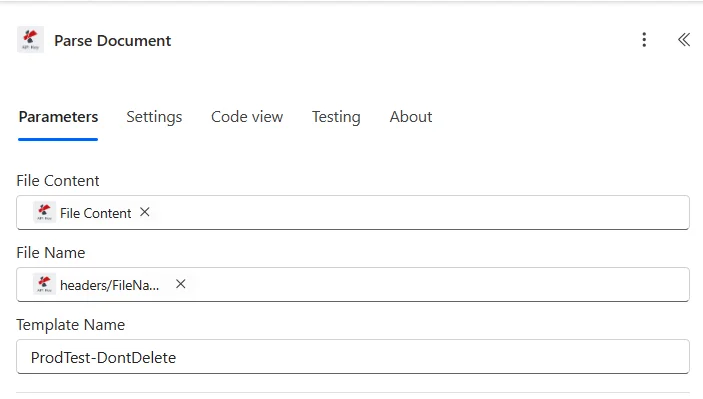
パラメータ
| パラメータ | 必須 | その機能 | 例 |
|---|---|---|---|
| File Content | Optional | Content of the document to parse. Map it from the file content returned by a previous action, such as SharePoint or OneDrive Get file content. | @{body('Get_file_content')?['$content']} |
| File Name | Optional | Name of the document, including its extension (for example `invoice.pdf`). | invoice.pdf |
| Template Name | Optional | Name of the parsing template to use, as set up in PDF4me. | your value |
解析テンプレート内の式タイプ
正規表現安定したパターンINV-\d{6,10})、日付(\d{2}/\d{2}/\d{4})、量($?\d{1,3}(?:,\d{3})*(?:.\d{2})?) 生産キャプチャキーの約80%。JavaScript 表現条件論理と分類器文章; 文字列を返します。マルチマーカー分類、フォールバックルール、日付正規化。参照 ドキュメントの解析情報を準備する 2つの作業サンプルについて。出力
このアクションは、トレースIDと解析されたフィールドデータを動的コンテンツとして返し、下流のすべてのアクションで利用できるようにします。
| 分野 | タイプ | 内容物 |
|---|---|---|
traceId | Text | Trace ID of the request, as returned by PDF4me. |
parseInfo | Object | Values read from the document. The connector defines no fields for this object; its contents depend on the parsing template. Use Parse JSON or expressions to read them. |
フローの例
Power Automateの一般的なワークフローパターンTypical ways to chain Parse Document into a Power Automate flow.
- Outlook 新しいメールが届くと、受信トレイ/APでトリガーが作動します。
- 添付ファイルフィルターにそれぞれ適用する PDFs のみ。
- Parse Documentは、添付ファイルに対して請求書テンプレートを実行します。
- Dataverseで新しい行を追加すると、invoiceNumber、totalAmount、vendorNameがInvoicesテーブルに書き込まれます。
- チームがチャットまたはチャンネルにメッセージを投稿すると、APチームに通知されます。
- SharePoint フォルダ内にファイルが作成されると、/Documents/Invoices でトリガーが起動します。
- SharePoint ファイルコンテンツを取得すると、 PDF バイナリ。
- Parse Documentは請求書のフィールドを抽出します。
- SharePoint アイテムの更新は、解析された値を同じアイテムのメタデータに書き戻します。
- フォームまたはPower Appsの送信により、 PDF。
- Parse Document はテンプレートを実行します JavaScript 文書タイプを返す式キー。
- タイプフィールド(請求書/注文書/契約書)に基づいてアクションの経路を切り替えます。
- 各ブランチは解析された値を適切な宛先 (Dynamics、 SharePoint、 Outlook 承認)。