Power AutomateでPDFをバーコードで分割する
PDF4me スプリット PDF バーコードによる アクションは複数のドキュメントを自動的に分離します PDFバーコード検出に基づく Power Automate インテリジェントなフィルタリング機能を備えています。この強力な分割機能は、 QR codes、 DataMatrix、または任意のバーコードタイプ、テキストフィルタ(で始まる、で終わる、含む、完全一致)を適用し、バーコードページの前後を分割/削除します。バッチスキャンワークフロー、請求書処理、および文書の自動分離に最適です。 Microsoft 365 ワークフロー。
APIリクエストの認証
アクセスするには PDF4me ウェブ API を通して Power Automateすべてのリクエストには適切な認証情報を含める必要があります。認証により安全な通信が保証され、承認されたユーザーとしての身元が検証され、シームレスな統合が可能になります。 Power Automate 流れと PDF4meの強力なバーコード分割サービス。
主な機能
- 自動バーコード検出: バーコードをスキャンして識別します PDF ページ
- 複数のバーコードタイプ: サポート QR Code、 DataMatrix、およびすべてのバーコードタイプ
- テキストフィルタリング: 開始、終了、含む、完全一致のフィルターを適用する
- 分割位置制御バーコードページの前後で分割、または削除する
- バッチ文書分離スキャンした文書のバッチを自動的に分割する
パラメータ
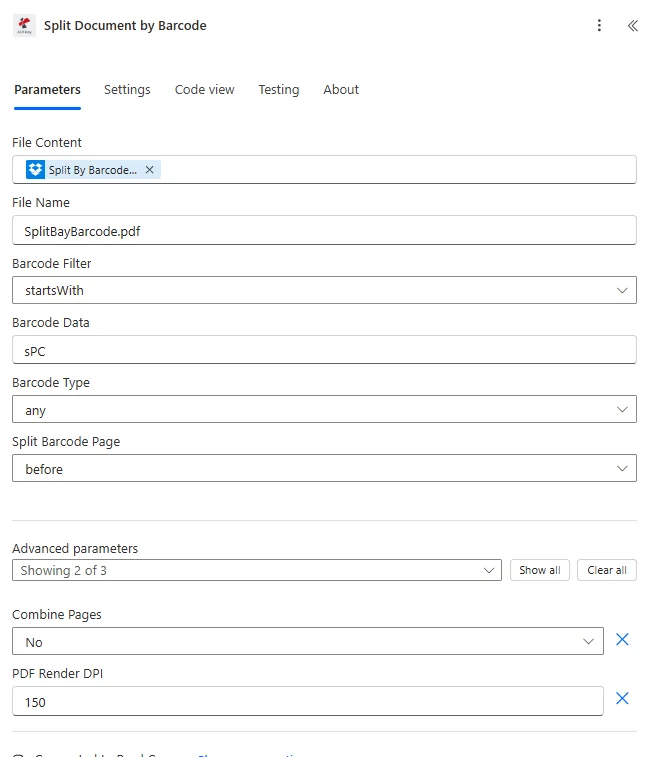
バーコードによるPDF分割アクションのパラメータ一覧です。これらのパラメータを設定することで、バーコード分割を制御できます。
| パラメータ | 必須 | その機能 | 例 |
|---|---|---|---|
| File Content | Required | Content of the PDF to split. Map it from the file content returned by a previous action, such as SharePoint or OneDrive Get file content. | @{body('Get_file_content')?['$content']} |
| File Name | Required | Name of the PDF to split, including its extension (for example `batch.pdf`). Map it from the file name returned by a previous action. | batch.pdf |
| Barcode Filter | Required | How the text of a barcode found in the PDF is compared with Barcode Data to decide where to split. Options: startsWith, endsWith, contains, exact. Defaults to `startsWith`. | startsWith |
| Barcode Data | Required | Text to look for in the barcodes of the PDF. Pages whose barcode matches it (according to Barcode Filter) are where the PDF is split. | your value |
| Barcode Type | Required | Type of barcode to look for. Options: any, datamatrix, qrcode. Defaults to `any`. | any |
| Split Barcode Page | Required | What happens to the page that contains the matching barcode. Options: before, after, remove. Defaults to `before`. | before |
| Combine Pages | Optional | Combine pages with same barcodes. Any pages having consecutively same barcode texts will be merged as a single document. Options: True, False. Defaults to `No`. | No |
| PDF Render DPI | Optional | Resolution (DPI) at which PDF pages are rendered to detect barcodes. Accepted values are 100, 150, 200 and 250. Defaults to `150`. | 150 |
| Is Async | Optional | Set to Yes for large files that take a long time to process, so that PDF4me processes the request as a background job. Defaults to `No`. | No |
出力
の PDF4me スプリット PDF バーコードによる アクションは、シームレスな包括的な出力データを返します Power Automate フロー統合:
- Table
- JSON
- Flow Integration
テーブルビュー
構造化された表形式の応答データ:
| 分野 | タイプ | 内容物 |
|---|---|---|
| splitedDocuments | Array | The documents created by the split. Each item contains the file name, file content and the barcode text of that document. |
| splitedDocuments[].File Name | Text | File name of this document. Use it as the file name when saving the file. |
| splitedDocuments[].Barcode Text | Text | Text of the barcode associated with this document. |
| splitedDocuments[].File Content | File content | Content of this document. Map it into the next action, for example the File Content field of SharePoint or OneDrive Create file. |
JSON 回答形式
{
  "Split Documents": [
    {
      "File Content": "[Binary Content 1]",
      "File Name": "Document_001.pdf"
    },
    {
      "File Content": "[Binary Content 2]",
      "File Name": "Document_002.pdf"
    }
  ]
}
Power Automate フロー使用状況
分割されたドキュメントを後続の操作で使用する:
- 各項目に適用: 分割された各ドキュメントを個別に処理します
- メール配信各文書を適切な受信者に送信する
- SharePoint 組織: ドキュメントをカテゴリ別のフォルダに保存する
- 個別処理文書固有のワークフローを適用する
- データベースのインポート: 分割された各ドキュメントからデータを抽出します。
- 別々にアーカイブする文書は適切な分類で保管する
ワークフローの例
の PDF4me スプリット PDF バーコードによる アクション Power Automate 実際のビジネスシナリオに合わせて設計された包括的なワークフローテンプレートを提供します。
- Invoice Batch Processing
- Mailroom Automation
- Application Processing
- Medical Records
請求書バッチ分割ワークフローの自動化
バーコードベースのバッチ分割で請求書処理を変革する:
ワークフローの手順を完了する:
- トリガーバッチスキャンされた請求書 PDF スキャナから受信した
- バッチを取得: 複数請求書の取得 PDF ファイル
- バーコードで分割: 分離して QR codes 各請求書に記載
- フィルター「INV-」「INV-」バーコードデータで始まる請求書を分割する
- バーコードで分割バーコードページは各請求書と一緒に保管してください。
- 各項目に適用分割請求書をそれぞれ処理する
- 請求書データの抽出各請求書からデータを解析する
- システムへのインポート各請求書を会計システムに読み込む
ビジネス上のメリット:
- 毎月、バッチスキャンから500件以上の請求書を分離する
- 請求書の分離ワークフロー全体を自動化します
- バッチ処理時間を8時間から30分に短縮します。
- 手作業による請求書の仕分けを不要にします
自動化された郵便室文書仕分けワークフロー
バーコードによる仕分けで郵便室業務を効率化:
ワークフローの手順を完了する:
- トリガー部門別バーコード区切り線でスキャンされた毎日の郵便物
- メールバッチの取得スキャンしたメールを取得する PDF
- バーコードで分割: 分離して DataMatrix 部門コード
- 分裂後追跡のためにバーコードを書類と一緒に保管してください。
- 各項目に適用各部署宛の郵便物を処理する
- 部門別ルート部門別ワークフローに送信する
- メール部門: 郵便物を配達する PDF適切なチームへ
- ログ配信: 追跡システムに郵便物の配達記録を記録する
ビジネス上のメリット:
- 毎日200通以上の郵便物を自動的に仕分けします
- 郵便物を15分以内に適切な部署に振り分ける
- 手作業による郵便物の仕分けと配送を不要にします
- 郵便配達時間を90%短縮
自動化されたアプリケーションバッチ分離ワークフロー
バーコード分割によるアプリケーション処理の最適化:
ワークフローの手順を完了する:
- トリガー: 区切りシート付きでスキャンされた申請書のバッチ
- バッチスキャンを取得: 複数のアプリケーションを取得する PDF
- QRコードで分割: 分離して QR 区切りシート上のコード
- セパレーターを取り外す: バーコード区切りページを分割して削除する
- 各項目に適用: 個々の申請を処理する
- 応募者データの抽出: アプリケーションフォームデータを解析する
- ATSにインポート応募書類を応募者追跡システムにアップロードする
- 採用担当者にメールを送る: 新規応募があったことを採用担当者に通知する
ビジネス上のメリット:
- 毎月150件以上の申請バッチを処理
- アプリケーションの分離とルーティングを自動化します
- 申請受付時間を80%短縮
- 手作業による応募書類の選別を不要にします
医療記録の自動バッチ分割
バーコードによる記録分離で医療の質を向上させる:
ワークフローの手順を完了する:
- トリガー患者IDバーコード付きでスキャンされた患者記録のバッチ
- レコードバッチを取得: 複数患者のデータを取得する PDF
- バーコードで分割患者IDバーコードを使用して分離する
- 患者IDをフィルタリングする「PT-」接頭辞を含むバーコードを照合する
- 分割前各患者バーコードの前に新しいドキュメントを開始してください。
- 各項目に適用各患者の記録を処理する
- EMRへのインポート: 電子カルテに記録をロードする
- アーカイブ記録各患者記録は個別に保管してください。
ビジネス上のメリット:
- バッチスキャンから毎週300件以上の患者記録を分離する
- 患者記録の正確な整理を保証する
- レコード処理時間を85%短縮します
- 患者記録の正確性とアクセス性を向上させる
業界におけるユースケースとアプリケーション
- Finance & Accounting
- Healthcare & Medical
- Legal & Professional Services
- Operations & Logistics
財務・会計におけるユースケース
- 請求書の一括分割スキャンした請求書のバッチをバーコードごとに分ける
- 領収書処理領収書のバーコードを使用して領収書のバッチを分割する
- 声明の分離口座バーコードごとに明細書のバッチを分割する
- 小切手処理小切手番号を使用して小切手バッチを分割する
ヘルスケアおよび医療分野における活用事例
- 患者記録の分割患者記録のバッチをIDバーコードで分離する
- 検査結果の分離検査バーコードに基づいてラボのバッチを分割する
- 処方箋処理処方箋のバッチをRxバーコードで分類する
- 保険金請求の分割請求番号バーコードに基づいて請求バッチを分割する
法律・専門サービスにおけるユースケース
- ケース文書の分割ケースファイルのバッチをケースバーコードごとに分割する
- クライアントファイルの分離クライアントコードごとにクライアント文書バッチを分割する
- 発見文書の分割: 文書IDごとに検出バッチを分割する
- 裁判所への別居届出: ファイリング番号ごとにファイリングバッチを分割する
運用・物流におけるユースケース
- 注文バッチ分割注文番号のバーコードで注文バッチを分ける
- 出荷書類の分離追跡バーコードで配送書類を分割する
- 在庫バッチ処理SKUバーコードごとに在庫書類を分ける
- 梱包明細書の分割注文バーコードごとに梱包伝票を分割する