データ文字列リストを使用したメールマージでドキュメントを Power Automate
PDF4me データ文字列を使用したドキュメントリストのメールマージ は Power Automate 1つの単語または PDF テンプレートプラス JSON データ配列を、1回の呼び出しでパーソナライズされたドキュメントのバッチに変換します。これを使用すると、マージテンプレートをフロー内でレコードごとにループさせることなく、受信者リスト全体に対してオファーレター、証明書、またはアカウント通知を生成できます。
このアクションが何をするか
PDF4me データ文字列を使用したドキュメントリストのメールマージ ワードをマッピングしますまたは PDF マージテンプレートプラス JSON データ配列を返し、データ行ごとに1つの生成されたドキュメントの配列を返します。配列の配列とオブジェクトの配列の両方のデータ文字列形状がサポートされています。
認証 API リクエスト
アクセスするには PDF4me ウェブ API を通して Power Automateすべてのリクエストには有効な API キー。認証はあなたの身元を検証し、コネクタがアクセスできるようにします。 PDF4meフローからメールマージサービスを実行します。
見逃してはならない重要な事実
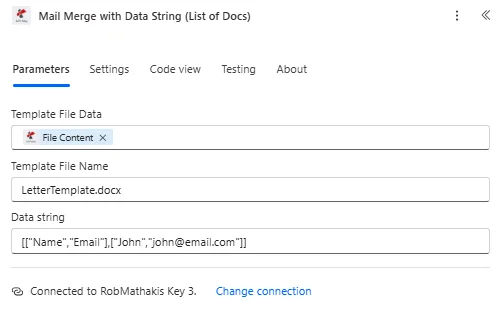
マップテンプレートファイルデータとテンプレートファイル名、次にデータ文字列を構築します JSON 生成するドキュメントごとに1つのエントリを持つ配列。
パラメータ
必須: アクションを実行するには、テンプレートファイルデータ、テンプレートファイル名、データ文字列の3つのフィールドすべてを指定する必要があります。
| パラメータ | 必須 | その機能 | 例 |
|---|---|---|---|
| Template File Data | Required | Content of the merge template, mapped from a prior action such as SharePoint or OneDrive Get File Content. Must be a .docx or .pdf file containing merge fields. | [Template Content] |
| Template File Name | Required | Name of the template file including its extension, used for processing identification. | LetterTemplate.docx |
| Data string | Required | JSON data to merge into the template. Accepts an array-of-arrays with a header row followed by value rows, or an array of field/value objects. Each row or object after the header generates one document. | [["Name","Email"],["John","[email protected]"]] |
データ文字列を使用したメールマージでは何が返されますか?
| 分野 | タイプ | 内容物 |
|---|---|---|
Output Documents | Array of Objects | One entry per generated document, directly iterable with Apply to each. |
File Content | Binary | Binary content of each generated document, nested inside each Output Documents entry. |
File Name | String | File name of each generated document, nested inside each Output Documents entry. |
{
  "Output Documents": [
    { "File Content": "[Binary Content]", "File Name": "Letter_001.pdf" },
    { "File Content": "[Binary Content]", "File Name": "Letter_002.pdf" }
  ]
}
データ文字列を使用したメールマージの設定方法 Power Automate?
- 追加 PDF4me → データ文字列を使用したドキュメントリストのメールマージ あなたの Power Automate 流れ。
- 地図 テンプレートファイルデータ そして テンプレートファイル名 テンプレートから保存されています SharePoint または、データ列と一致する差し込みフィールドを含むOneDrive。
- 建てる データ文字列 として JSON 配列。ヘッダー行の後に値行が続く形式、またはフィールド/値オブジェクトの配列のいずれかで、生成するドキュメントごとに1つのエントリを指定します。
- フローを実行する。 PDF4me リターン 出力文書データ行ごとに生成されたドキュメントが1つ含まれる配列。
- 追加する それぞれに適用する 出力ドキュメントに対して、生成された各ドキュメントを個別にメール送信、アップロード、またはアーカイブする操作を実行します。
どのデータ文字列形式を使用すべきですか?
使用する 配列の配列 ソースデータが既に出力されている場合、ヘッダー行の後に値行が続く形式です。 Excel または、行と列に直接マッピングされるため、テーブル形状のコネクタを並列配列として使用します。 オブジェクトの配列 ソースデータが次のようなシステムから来る場合のフォーマット CRM または、各オブジェクトのキーがテンプレートのマージフィールド名と既に一致しているため、レコードごとに名前付きフィールドを自然に返すフォームコネクタ。
典型的な構成
ワークフローの例Common Power Automate flow patterns using Mail Merge with Data String List of Docs.
- LMSでトレーニングコースが完了とマークされると、フローがトリガーされます。
- 参加者リストを取得すると、コースを修了したすべての参加者の名前と修了日が取得されます。
- Composeアクションは、名前/コース/日付オブジェクトの配列としてデータ文字列を構築します。
- データ文字列を使用したメールマージでは、1回の呼び出しで参加者ごとに1つの証明書が生成され、各証明書を「各参加者に適用」ループによって受信者にメールで送信されます。
- 採用担当者がATS(採用管理システム)で候補者の一括承認を行うと、選考プロセスが開始されます。
- 候補者データを取得すると、承認された各候補者の名前、役職、給与が取得されます。
- データ文字列を使用したメールマージ機能は、オファーレターのテンプレートをマッピングし、候補者ごとに1通のレターを生成します。
- 出力文書の配列は、個別に配布される前に人事部に送られ、レビューされます。
- 繰り返しトリガーは、毎月の請求通知フローを実行します。
- 顧客データを取得するには、その月に通知が必要なすべてのアカウントについて、請求システムに問い合わせてください。
- データ文字列を使用したメールマージ機能は、単一の通知テンプレートからアカウントごとにパーソナライズされた通知を生成します。
- 「各項目に適用」ループは、各通知を顧客のサイトにアップロードします。 SharePoint フォルダに保存し、概要メールを送信します。
実践的なヒント
チートシート
| 分野 | 価値 |
|---|---|
| Action | Mail Merge with Data String List of Docs |
| Template File Data | .docx or .pdf, mapped from a prior action |
| Template File Name | e.g. LetterTemplate.docx |
| Data string | Array-of-arrays (header + rows) or array-of-objects |
| Documents generated | One per data row/object |
| Output | Output Documents array, each with File Content + File Name |
| Next step | Apply to each over Output Documents |
よくある質問
業界におけるユースケースとアプリケーション
- Human Resources & Payroll
- Finance & Banking
- Education & Training
- Marketing & Communications
人事・給与計算の活用事例
- 内定通知書1回の通話で、採用候補者全員にパーソナライズされた雇用オファーを生成する
- 入社手続き書類新規採用者全員分の入社書類を一度に作成する
- 業績評価単一のレビューサイクルから全スタッフのレビュー文書を生成する
- 給付内容説明書:加入期間に合わせて、個々のニーズに合わせた福利厚生概要を作成する
金融・銀行業務におけるユースケース
- 口座明細書請求サイクル内の顧客ごとに明細書を作成する
- 税務書類:申告期限前にすべての顧客の税務概要を作成する
- 投資レポート: 登録されているすべての投資家のポートフォリオレポートを作成する
- 通知書顧客セグメントごとにアカウント通知を一度に作成する
教育・研修における活用事例
- 証明書: 同一学年のすべての学生に対して修了証明書を発行する
- 成績表学期末に全学習者の進捗状況レポートを作成する
- トランスクリプト卒業生全員分の成績証明書を一括で作成する
- 保護者への手紙クラス全体に向けた、保護者向けの個別連絡を作成する
マーケティングおよびコミュニケーションにおける活用事例
- 選挙運動の手紙ターゲット層向けにパーソナライズされたマーケティングレターを作成する
- お客様へのお知らせ影響を受ける顧客向けにサービス更新通知を作成する
- イベント招待状登録者リストからパーソナライズされたイベント招待状を作成する
- お礼状顧客グループ向けの感謝状を作成する