Power Automateでテンプレートを使用してドキュメントを生成する
テンプレートを使用してドキュメントを生成する これは、保存済みの PDF4me テンプレートと JSON、XML、または CSV データをマージして、生成されたドキュメントを返す Power Automate アクションです。テンプレートがファイルとしてマッピングされるのではなく、既に PDF4me リポジトリに存在する場合に使用します。名前でテンプレートを選択し、データを貼り付けるかアップロードして、出力を下流にマッピングします。
APIリクエストの認証
Power Automate のすべての PDF4me アクションには、有効な接続が必要です。PDF4me API キーを保持する接続を作成または選択してください。
見逃してはならない重要な事実
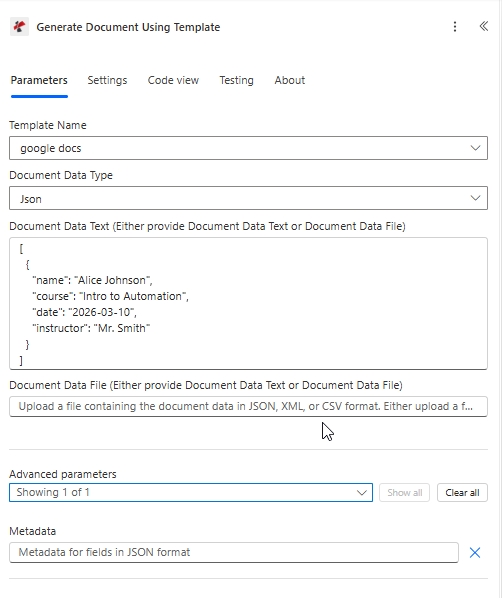
対象構成: 保存済みテンプレート テンプレート名、 文書データタイプ JSONに設定し、ペイロードを貼り付けました 文書データテキスト。
Power Automateにおける「テンプレートを使用したドキュメント生成」とは何ですか?
「テンプレートを使用してドキュメントを生成」は、PDF4me アカウントに既に存在するテンプレートとデータ ペイロードをマージするための Power Automate の PDF4me アクションです。テンプレート名と JSON、XML、または CSV を受け取り、生成されたドキュメントを動的コンテンツとして返します。「ドキュメントを単独で生成」とは異なり、このアクションではテンプレート ファイルのマッピングや出力タイプの選択は行いません。
パラメータ
| パラメータ | 必須 | その機能 | 例 |
|---|---|---|---|
| Template Name | Optional | Template to fill, chosen from the templates in your PDF4me repository. To create a new template, go to https://dev.pdf4me.com/dashboard/#/document-template/. | your value |
| Document Data Type | Optional | Format of the data you supply: Json for a JSON object or array, XML for an XML document. Options: Json, XML. Defaults to `Json`. | Json |
| Document Data Text (Either provide Document Data Text or Document Data File) | Optional | Data to fill the template with, as JSON or XML text matching Document Data Type, for example mapped from CRM or earlier steps. Provide either this field or Document Data File. | your value |
| Document Data File (Either provide Document Data Text or Document Data File) | Optional | Content of a file with the data to fill the template with. Provide either this field or Document Data Text. | @{body('Get_file_content')?['$content']} |
| Metadata | Optional | Metadata for fields in JSON format. | your value |
以下のサンプルペイロードは、プレースホルダーと一致します。 google-docs-template.docxそれをドキュメントデータテキストに貼り付けるか、一致するJSONをドキュメントデータファイルとしてアップロードしてください。
[
  {
    "name": "Alice Johnson",
    "course": "Intro to Automation",
    "date": "2026-03-10",
    "instructor": "Mr. Smith"
  }
]
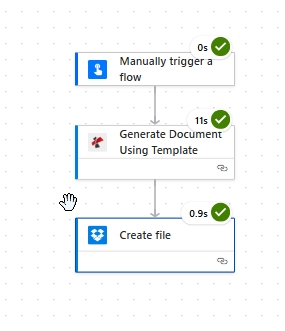
最小限の流れとしては、トリガーとなる「テンプレートを使用してドキュメントを生成」という処理があり、その後、生成されたファイルを保存するステップが続きます。
出力
このアクションは、生成されたドキュメントを動的コンテンツとして返します。ファイルコンテンツを受け入れる下流のステップにマッピングしてください。
| 分野 | タイプ | 内容物 |
|---|---|---|
| File Content | File content | Content of the generated document. Map it into the next action, for example the File Content field of SharePoint or OneDrive Create file. |
| File Name | Text | File name of the generated document, as returned by PDF4me. Use it as the file name when saving the file. |
| Page Count | Text | Page count reported by PDF4me for the processed document. Returned as text; wrap it in int() to use it as a number. |
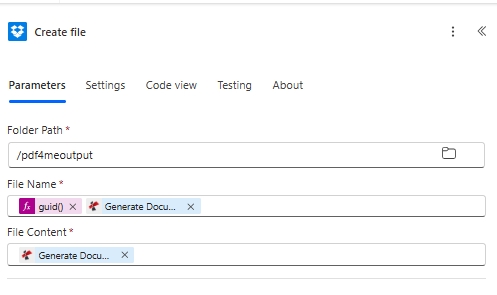
結果の保存: 生成されたドキュメントをマッピングします ファイルの内容、そして使用する guid() で ファイル名 一意の出力名を指定するため。
Power Automateで「テンプレートを使用してドキュメントを生成する」機能はどのように動作しますか?
Power Automate は、選択したテンプレート名とデータ ペイロードを PDF4me に送信します。PDF4me は保存されたテンプレートを読み込み、次のような口ひげスタイルのプレースホルダーをマージします。 {{name}} Word テンプレート エンジンを介して、生成されたファイルを動的コンテンツとして返します。 Power Automate 式のリファレンス出力ファイル名をラップすることができます guid() そのため、各実行で一意のファイルが書き込まれます。プレースホルダー構文については、 Aspose Words for .NET のドキュメント。