ワークシートを削除 Excel で Power Automate
PDF4me ワークシートを削除する は Power Automate 1枚以上のシートを Excel ワークブックを名前、インデックス、またはその両方で、一度の呼び出しで指定できます。テンプレートからサンプルシートを削除したり、レポートを配布する前に一時的な計算タブを削除したり、古いワークシートタブをスケジュールに基づいてクリーンアップしたりするのに使用できます。これらはすべて、ワークブックを開くことなく実行できます。 Excel。
このアクションが何をするか
PDF4me ワークシートを削除する 取る Excel ファイルとワークシート名、ワークシートインデックス、またはその両方のリストを指定すると、該当するシートが削除されたブックが返されます。有効なブックには必ず少なくとも1つのワークシートが残っている必要があるため、すべてのワークシートを削除しようとする要求は、組み込みの安全チェックによってブロックされます。
認証 API リクエスト
アクセスするには PDF4me ウェブ API を通して Power Automateすべてのリクエストには有効な API キー。認証はあなたの身元を検証し、コネクタがアクセスできるようにします。 PDF4meの Excel ワークフローからワークシートを削除するサービス。
見逃してはならない重要な事実
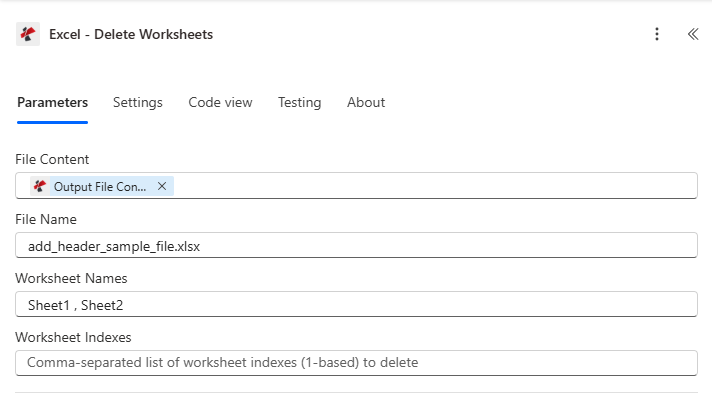
以前のアクションからファイルの内容とファイル名をマッピングし、ワークシート名やワークシートインデックスを設定して、削除するシートを選択します。
パラメータ
必須: ファイルの内容とファイル名は必ず指定する必要があります。ワークシート名またはワークシートインデックスの少なくとも1つは、削除対象のシートを特定するものでなければならず、削除後も少なくとも1つのワークシートが残っている必要があります。
| パラメータ | 必須 | その機能 | 例 |
|---|---|---|---|
| File Content | Optional | Content of the Excel file to process. Map it from the file content returned by a previous action, such as SharePoint or OneDrive Get file content. | @{body('Get_file_content')?['$content']} |
| File Name | Optional | Name of the Excel file, including its extension (for example `report.xlsx`). Map it from the file name returned by a previous action. Defaults to `DeleteWorksheets.xlsx`. | report.xlsx |
| Worksheet Names | Optional | Comma-separated list of worksheet names to delete ( e.g. Sheet1,Sheet3 ). | your value |
| Worksheet Indexes | Optional | Comma-separated list of worksheet indexes (1-based) to delete ( 1,2,3). | your value |
ワークシートを削除すると何が返されますか?
| 分野 | タイプ | 内容物 |
|---|---|---|
document | File content | Content of the Excel file with the worksheets deleted. Map it into the next action, for example the File Content field of SharePoint or OneDrive Create file. |
Success | Yes/No | Whether the operation completed successfully |
ErrorMessage | Text | Error message if operation failed |
Errors | Array | List of detailed error messages |
- JSON Response
- Delete-All Error
- Invalid Worksheet Error
{
  "document": "<file content>",
  "Success": true,
  "ErrorMessage": null,
  "Errors": []
}
{
  "document": null,
  "Success": false,
  "ErrorMessage": "Cannot delete all worksheets. At least one worksheet must remain. Total worksheets: 3, Attempting to delete: 3",
  "Errors": [
    {
      "Code": "WORKSHEET_DELETION_ERROR",
      "Message": "Cannot delete all worksheets. At least one worksheet must remain."
    }
  ]
}
{
  "document": null,
  "Success": false,
  "ErrorMessage": "Invalid worksheet selection",
  "Errors": [
    {
      "Code": "WORKSHEET_ERROR",
      "Message": "Worksheet 'NonExistent' not found. Available worksheets in workbook (5 total)"
    }
  ]
}
よくあるエラーメッセージ
| エラーメッセージ | 原因 | 解決 |
|---|---|---|
Request is empty | Request object is null. | Provide a valid request object. |
Document is empty | Document object is null. | Provide a valid Excel document. |
Invalid worksheet selection | Worksheet name doesn't exist or index is out of range. | Use valid worksheet names, or valid 1-based indexes. |
Available worksheets in workbook (X total) | Informational message appended when worksheet selection validation fails. | Review worksheet names or indexes and use valid values from the X available worksheets listed. |
Cannot delete all worksheets. At least one worksheet must remain. | The combined selection matches every worksheet in the workbook. | Remove at least one worksheet from the deletion list so one sheet remains. |
ワークシートの削除を設定する方法 Power Automate?
- 追加 PDF4me → ワークシートを削除する あなたの Power Automate 流れ。
- 地図 ファイルの内容 そして ファイル名 以前のアクションから、例えば SharePoint または OneDrive ファイルの内容を取得します。
- セット ワークシート名、 ワークシート索引または両方を使用して、取り外すシートを特定します。
- フローを実行する。 PDF4me 一致するワークシートを削除し、更新されたワークブックを返します。
documentすべてのシートを削除するような要求の場合は、その要求をブロックします。
ワークシートは名前で選択すべきですか、それともインデックスで選択すべきですか?
使用 ワークシート名 削除するシートに「Sample1」や「Draft」などの安定した既知の名前が付いている場合、後でシートの順序が変更されても選択が正しく維持されるため、この方法を使用します。 ワークシート索引 フローがシートの順序は予測可能だが名前が可変のワークブックを生成する場合、ここでのインデックスは 1ベース両方を設定すると、2 つの選択範囲の和集合が削除されるため、それらが重なってもエラーは発生せず、そのワークシートが一度だけ削除されます。
典型的な構成
ワークフローの例Common Power Automate flow patterns using Delete Worksheets from Excel.
- 人事システムに新しい従業員レコードが作成されると、フローがトリガーされます。
- 「ファイルの取得」は、ドキュメントライブラリからマスター経費報告書テンプレートを取得します。
- 「ワークシートを削除」は、「ワークシート名」を「Sample1,Sample2,Instructions」に設定して実行され、プレースホルダーシートを削除します。
- 整理されたテンプレートは、新入社員に必要な「経費」タブと「領収書」タブのみを残して、新入社員にメールで送信されます。
- 月次レポート生成フローが完了し、作業用レポートが生成されます。 Excel ファイル。
- Get File はレポートを取得します SharePoint。
- 「ワークシートの削除」を実行すると、内部の「計算」、「生データ」、「下書き」タブが名前で削除され、「概要」と「グラフ」のみが残ります。
- 最終版ファイルは、内部作業シートを公開することなく、経営陣にメールで送信される。
- 繰り返しトリガーは、過去12か月間のレポートに基づいて四半期ごとにアーカイブフローを実行します。
- Get Fileは、毎月1枚のワークシートを蓄積するローリングレポートを取得します。
- 「ワークシートの削除」では、最も古い四半期の月別タブが名前で識別され(例:「Jan2026,Feb2026,Mar2026」)、削除されます。
- トリミングされたワークブックは、 SharePointファイルサイズを管理しやすい範囲に抑える。
実践的なヒント
チートシート
| 分野 | 価値 |
|---|---|
| Action | Delete Worksheets |
| File Content | Mapped from a prior file-retrieval action |
| File Name | e.g. data.xlsx |
| Worksheet Names | Comma-separated, case-sensitive |
| Worksheet Indexes | 1-based, comma-separated |
| At least one required | Worksheet Names or Worksheet Indexes must be set |
| Both filled | Union of name matches and index matches |
| Safety check | Blocks deletion if it would remove every worksheet |
| Output | Processed File Content, Success, Error Message, Error Details |
よくある質問
業界におけるユースケースとアプリケーション
- Finance & Accounting
- Sales & Marketing
- Human Resources
- Operations & Manufacturing
- Project Management
- Education & Research
財務・会計におけるユースケース
- テンプレート配布: 新規ユーザーに送信する前に、会計テンプレートからサンプルワークシートを削除してください。
- レポートの最終化配布前に財務報告書から計算ワークシートを削除する
- 期間終了: 月次レポートから前期のワークシートを削除する
- 監査準備監査成果物から内部レビューワークシートを削除する
営業・マーケティングにおける活用事例
- 領土清掃: 営業報告書から非アクティブなテリトリーワークシートを削除する
- キャンペーンレポート最終的なキャンペーン結果を共有する前に、下書きワークシートを削除してください。
- 予測テンプレート配布前に予測テンプレートからサンプルワークシートを削除してください。
- 価格改定のお知らせ: 料金表から古い価格設定ワークシートを削除する
人事関連のユースケース
- テンプレートの準備: 人事テンプレートからサンプルデータワークシートを削除する
- 福利厚生の登録前年度のワークシートを登録ファイルから削除する
- 業績評価テンプレートから古いレビュー期間のワークシートを削除します。
- 給与処理確定済みの給与ファイルからバックアップワークシートを削除します。
運用・製造におけるユースケース
- 生産報告: 制作概要から下書きワークシートを削除する
- 在庫整理販売終了製品のワークシートを削除する
- 品質管理最終報告書から一時的な品質管理ワークシートを削除する
- メンテナンスログアーカイブされたメンテナンスワークシートを削除します。
プロジェクト管理のユースケース
- プロジェクトテンプレートプロジェクトテンプレートからサンプルワークシートを削除する
- 状況報告クライアントへの納品物から作業中のワークシートを削除する
- リソース計画リソースファイルから古い割り当てワークシートを削除します。
- 予算管理予算テンプレートから前年度のワークシートを削除する
教育・研究における活用事例
- 成績簿の整理成績簿から古い学期のワークシートを削除する
- コーステンプレートコーステンプレートからサンプルデータワークシートを削除します。
- 研究データ最終データファイルから予備分析ワークシートを削除する
- 学生名簿卒業クラスのワークシートをマスター名簿から削除する