デジタルサインイン Power Automate
PDF4me デジタルサイネージ アクションにより、暗号デジタル署名を適用できます PDF ドキュメント Power Automate 認証と否認防止に証明書ファイルを使用します。このエンタープライズグレードの署名機能は、カスタム証明書配置、可視性制御、署名者情報、署名理由、および場所の詳細をサポートし、契約、合意、および公式文書に対して改ざん防止シール付きの法的拘束力のある署名を提供します。 Microsoft 365 ワークフロー。
認証 API リクエスト
アクセスするには PDF4me ウェブ API を通して Power Automateすべてのリクエストには適切な認証情報を含める必要があります。認証により安全な通信が保証され、承認されたユーザーとしての身元が検証され、シームレスな統合が可能になります。 Power Automate 流れと PDF4meの強力なデジタル署名サービス。
主な機能
- 証明書ベースの署名暗号署名にはX.509証明書を使用する
- カスタムポジショニングX/Y座標で署名の位置を制御します
- 可視性制御: 目に見えるデジタル署名または目に見えないデジタル署名を作成する
- 署名者情報署名者の氏名、理由、場所の詳細を含めてください。
- 改ざん検知署名後に文書が変更された場合、自動的に無効化されます。
パラメータ
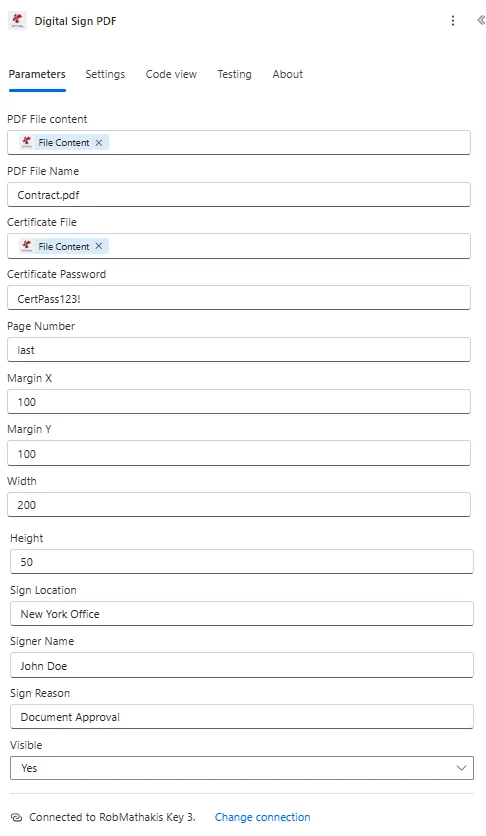
デジタル署名アクションのパラメータ一覧です。これらのパラメータを設定することで、デジタル署名の適用を制御できます。
| パラメータ | 必須 | その機能 | 例 |
|---|---|---|---|
| PDF File content | Required | Content of the PDF to sign. Map it from the file content returned by a previous action, such as SharePoint or OneDrive Get file content. | @{body('Get_file_content')?['$content']} |
| PDF File Name | Required | Name of the PDF to sign, including its extension (for example `invoice.pdf`). Map it from the file name returned by a previous action. | invoice.pdf |
| Certificate File | Required | Content of the certificate file to sign with. Map it from the file content returned by a previous action. | @{body('Get_file_content')?['$content']} |
| Certificate Password | Required | Password of the certificate file. The field is a plain text field, so the value is visible in the action card and in the run history; store it in Azure Key Vault or a secure environment variable and turn on Secure Inputs for the action. | your-password |
| Page Number | Optional | Page on which the signature is placed. Defaults to `1`. | 1 |
| Margin X | Optional | Position of the signature on the page. The connector describes it as the position from the bottom of the page, although the field is labelled Margin X. Defaults to `0`. | 0 |
| Margin Y | Optional | Position of the signature on the page. The connector describes it as the position from the left of the page, although the field is labelled Margin Y. Defaults to `0`. | 0 |
| Width | Optional | Width of the visible signature. Defaults to `100`. | 100 |
| Height | Optional | Height of the visible signature. Defaults to `100`. | 100 |
| Sign Location | Optional | Signing location recorded in the signature. | your value |
| Signer Name | Optional | Name of the signer recorded in the signature. | your value |
| Sign Reason | Optional | Reason for signing, recorded in the signature. | your value |
| Visible | Optional | If Yes, the signature is visible on the page. Defaults to `Yes`. | Yes |
出力
の PDF4me デジタルサイネージ アクションは、シームレスな包括的な出力データを返します Power Automate フロー統合:
- Table
- JSON
- Flow Integration
テーブルビュー
構造化された表形式の応答データ:
| 分野 | タイプ | 内容物 |
|---|---|---|
| File Content | File content | Content of the digitally signed PDF. Map it into the next action, for example the File Content field of SharePoint or OneDrive Create file. |
| File Name | Text | File name of the digitally signed PDF, as returned by PDF4me. Use it as the file name when saving the file. |
| Page Count | Text | Page count reported by PDF4me for the processed document. Returned as text; wrap it in int() to use it as a number. |
JSON 回答形式
{
  "File Content": "[Binary Content of Digitally Signed PDF]"
}
Power Automate フロー使用状況
デジタル署名を使用する PDF その後の行動において:
- メール配信法的効力のある署名済み書類を送付してください
- SharePoint アーカイブ署名済みの契約書をコンプライアンスライブラリに保存する
- OneDrive ストレージ署名済み文書を改ざん防止機能付きで保存する
- 外部配送署名済みの書類をパートナーに配布する
- 監査証跡法的遵守のため、署名済みの文書を保管する。
- 検証: 署名を検証する PDF 読者
ワークフローの例
の PDF4me デジタルサイネージ アクション Power Automate 実際のビジネスシナリオに合わせて設計された包括的なワークフローテンプレートを提供します。
- Contract Signing
- Document Approval
- Compliance Signing
- Batch Signing
契約書のデジタル署名自動化ワークフロー
自動化された電子署名で契約締結プロセスを変革しましょう。
ワークフローの手順を完了する:
- トリガー承認ワークフローにおいて、すべての関係者によって契約が承認されました。
- 契約書を入手する最終承認済みの契約書を取得する PDF
- 証明書を取得する: 会社証明書を取得する Azure Key Vault
- デジタル署名を適用する最終ページの下部にある契約書に署名してください。
- 署名者情報を追加するCEO名と「最終承認」を理由として含める
- 署名を確認する署名が正しく適用されていることを検証します
- メールパーティー: 電子署名された契約書をすべての関係者に送信する
- アーカイブ署名済み署名済みの契約書を法的コンプライアンスライブラリに保存する
ビジネス上のメリット:
- 毎月75件以上の契約書に会社の電子署名で署名する
- 法的拘束力のある自動署名を提供します
- ウェットサインによる遅延を解消し、サイクルを5日間短縮
- 暗号学的に証明された真正性と完全性を維持する
文書承認署名ワークフローの自動化
自動化された電子署名アプリケーションで承認プロセスを効率化:
ワークフローの手順を完了する:
- トリガーマネージャーが承認ワークフローで文書を承認します
- ドキュメントを取得する承認済み文書を取得する PDF
- マネージャー認定資格を取得する: 保管庫からマネージャーの証明書を取得します
- 署名を追加マネージャー名入りの署名を目に見える形で適用する
- 場所を設定署名メタデータにオフィス所在地を含める
- 理由を設定署名理由として「管理者の承認」を指定してください。
- メールリクエスト者: 署名済みの承認書を文書所有者に送信
- アップデートシステム: 文書を正式に承認済みとしてマークする
ビジネス上のメリット:
- 毎月150件以上の承認を電子署名で処理
- 否認不可能な承認記録を作成する
- 承認ワークフローの自動完了を可能にする
- 署名メタデータを含む完全な監査証跡を保持します
コンプライアンス文書の自動署名ワークフロー
公的文書への自動デジタル署名によるコンプライアンスの最適化:
ワークフローの手順を完了する:
- トリガーコンプライアンスレポートの生成が完了しました
- レポートを生成するコンプライアンスレポートを作成する PDF
- コンプライアンスオフィサー認定資格を取得する: 役員の証明書を取得する
- 署名を適用する: 署名がはっきりと見えるように報告書に署名してください
- 認定資格を追加する理由として「コンプライアンス認証」を含める
- 日付を設定メタデータに署名タイムスタンプをキャプチャする
- 規制当局に提出する署名済みの報告書を規制ポータルにアップロードする
- アーカイブ公式署名済みの報告書をコンプライアンスアーカイブに保存する
ビジネス上のメリット:
- 20件以上のコンプライアンスレポートを四半期ごとに自動的に署名します
- 公式認証の暗号学的証明を提供する
- 規制上のデジタル署名要件を満たしています
- 手作業による署名プロセスを排除し、四半期ごとに10時間の時間を節約します。
自動バッチ文書署名ワークフロー
一括デジタル署名アプリケーションで生産性を向上させましょう:
ワークフローの手順を完了する:
- トリガー: スケジュールされたトリガー - 一日の終わりの文書署名バッチ
- 書類を入手する署名待ちのすべての文書を取得する
- 各項目に適用各ドキュメントを反復処理する
- 証明書を取得する: 承認された署名者証明書を取得します
- 署名を適用する各文書にデジタル署名を追加する
- バッチ情報の設定バッチIDとタイムスタンプをメタデータに含める
- メール受信者署名済みの書類をすべて配布する
- アーカイブバッチ署名済みの文書は日付付きのバッチフォルダに保存してください。
ビジネス上のメリット:
- 1日に100件以上の文書に自動バッチ処理で署名する
- 個別の文書署名ワークフローを排除します
- 署名にかかる時間を毎日2時間から10分に短縮します。
- すべての文書において一貫した署名方法を維持する
業界におけるユースケースとアプリケーション
- Legal & Professional Services
- Finance & Banking
- Healthcare & Medical
- Corporate & Business
法律・専門サービスにおけるユースケース
- 契約履行最終契約書に電子署名を適用する
- 法的文書の認証法的意見書および訴訟準備書面に署名する
- 委任状: 委任状文書にデジタル署名する
- 和解契約和解書類に署名する
金融・銀行業務におけるユースケース
- ローン契約書の署名ローン契約書に電子署名する
- 口座関連書類口座開設書類に署名する
- 財務証明書監査報告書に署名を追加する
- コンプライアンス文書規制当局への提出書類や報告書に署名する
ヘルスケアおよび医療分野における活用事例
- 医療承認治療承認書類に署名する
- 研究承認研究プロトコルにデジタル署名する
- 処方箋への署名処方箋書類に署名する
- コンプライアンス認証HIPAA準拠文書に署名する
企業およびビジネスにおける活用事例
- 経営陣の承認: 文書にCEO/CFOの署名を追加する
- 政策承認: 会社の公式方針に署名する
- 財務書類: 財務諸表にデジタル署名する
- 承認フォーム承認および認可書類に署名する