SwissQR請求書を作成する Power Automate
PDF4me バーコード - SwissQRコード付き紙幣を作成 スイス決済基準に準拠したQRコード付き請求書を請求書に添付します。 PDF 内部 Power Automate フロー、または支払いデータのみからスタンドアロンのQR請求書を生成します。パイプファイルの内容 SharePoint、 OneDrive、 Dropbox、 データバース、 または Outlook 添付ファイル; 供給 IBAN + 債権者 + 債務者 + 参照フィールド。出力形式を選択します (PDF、 PNG、 JPEG、 ティフ); そして、このアクションは、下流の「ファイルの作成」、「電子メールの送信」、または「Teams メッセージ」アクションに使用できる、スイス銀行でスキャン可能なファイルを返します。 ISO 20022 準拠済み。2022年以降、すべてのスイスの銀行アプリで利用可能。
認証 API リクエスト
の PDF4me コネクタを接続します Power Automate 有効な 繋がり あなたの PDF4me API キー。フロー設計時に一度接続を作成し、その後は PDF4me テナント内のアクションがそれを再利用します。
見逃してはならない重要な事実
PDF (ハイブリッド形式、元の請求書に添付されます) PNG、 JPEG、 または ティフ ( QR (スリップ)。インラインメール埋め込みまたはウェブプレビューには画像形式を使用します。 PDF 完全な請求書を送付する際。カスタム + ページ番号を入力してランディングページへ QR-特定のページ(1ベース)に請求書を記載します。出力フォーマットタイプが PDF。パラメータ
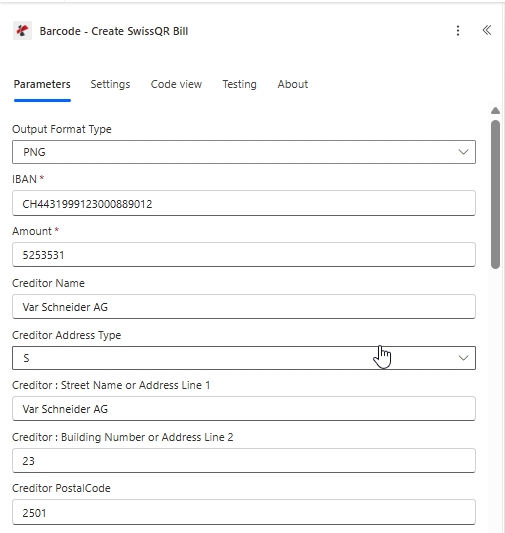
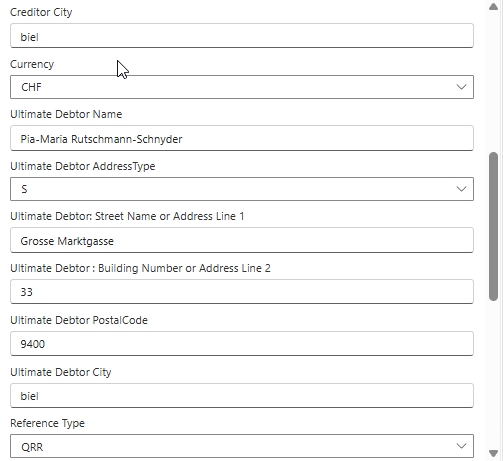
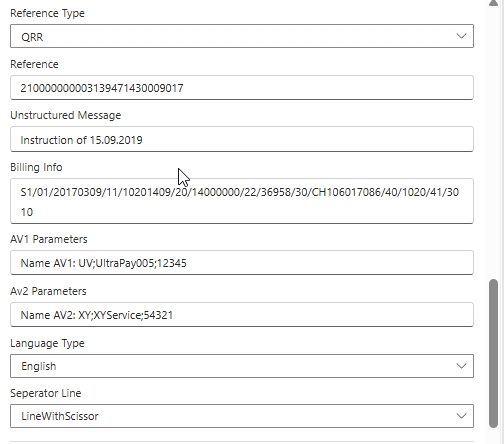
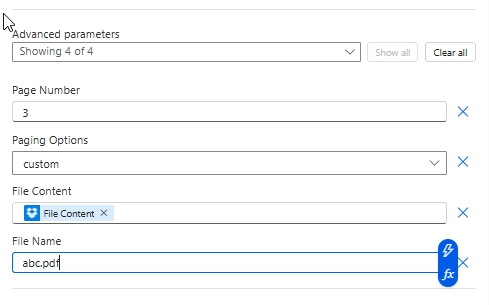
この行動は 支払い + 債権者 + 債務者 + 参照 メインパネルのフィールドと、その下の4つのフィールド 詳細パラメータ 入力ファイルとページの配置を制御する。以下のスクリーンショットは、フィールドの順序を正確に反映しています。 Power Automate UI。
必須(UI上の赤いアスタリスク): IBAN、 額。 SPS準拠の伝票には、以下の製品を強くお勧めします。 出力フォーマットタイプ、債権者名、債権者住所タイプ、住所行 + 郵便番号 + 都市、最終債務者ブロック、通貨、参照タイプ、言語タイプ、区切り線。 条件付き(詳細パラメーター): ページングオプションが カスタムファイルコンテンツ + ファイル名を追加する場合 QR 既存のものに滑り込む PDF (両方ともスキップして単独で使用) QR-スリップ)。
| パラメータ | 必須 | その機能 | 例 |
|---|---|---|---|
| Output Format Type | Optional | Format of the result - a PDF or a PNG, JPEG or TIFF image. After you choose it, the fields for that format are loaded into the action card. Options: PDF, PNG, JPEG, Tiff. Defaults to `PDF`. | PDF |
| IBAN | Required | IBAN or QR-IBAN of the creditor's account. Only Swiss (CH) and Liechtenstein (LI) IBANs are accepted, with a maximum of 21 characters. | your value |
| Creditor Name | Optional | The creditor's name or company according to the account name. | your value |
| Creditor Address Type | Optional | How the creditor's address is given: S (structured: street and building number in separate fields) or K (combined: two free address lines). Options: S, K. Defaults to `S`. | S |
| Creditor : Street Name or Address Line 1 | Optional | The creditor's address line 1 with max 70 characters length. | your value |
| Creditor : Building Number or Address Line 2 | Optional | The creditor's address line 2. For S type 16 characters, K type 70 characters length permitted. | your value |
| Creditor PostalCode | Optional | The creditor's PostalCode with max 16 characters length. | your value |
| Creditor City | Optional | The creditor's Town/City with max 35 characters length. | your value |
| Amount | Required | Amount to pay, without leading zeros and with two decimal places (for example `1250.00`). | 1250.00 |
| Currency | Optional | The payment currency, Only CHF and EUR are permitted. Options: CHF, EUR. Defaults to `CHF`. | CHF |
| Ultimate Debtor Name | Optional | The Ultimate Debtor's name or company according to the account name. | your value |
| Ultimate Debtor AddressType | Optional | How the ultimate debtor's address is given: S (structured: street and building number in separate fields) or K (combined: two free address lines). Options: S, K. Defaults to `S`. | S |
| Ultimate Debtor: Street Name or Address Line 1 | Optional | The Ultimate Debtor's address line 1 with max 70 characters length. | your value |
| Ultimate Debtor : Building Number or Address Line 2 | Optional | The Ultimate Debtor's address line 2. For S type 16 characters, K type 70 characters length permitted. | your value |
| Ultimate Debtor PostalCode | Optional | The Ultimate Debtor's PostalCode with max 16 characters length. | your value |
| Ultimate Debtor City | Optional | The Ultimate Debtor's Town/City with max 35 characters length. | your value |
| Reference Type | Optional | Type of the payment reference given in Reference. Options: QRR, SCOR, NON. Defaults to `QRR`. | QRR |
| Reference | Optional | Reference, Maximum 27 characters permitted. | your value |
| Unstructured Message | Optional | UnstructuredMessage, Maximum 140 characters permitted. | your value |
| Billing Info | Optional | BillingInfo, Maximum 140 characters permitted. | your value |
| AV1 Parameters | Optional | Alternative scheme parameter, Maximum 100 characters permitted. | your value |
| Av2 Parameters | Optional | Alternative scheme parameter, Maximum 100 characters permitted. | your value |
| Language Type | Optional | Choose the language type. Options: German, French, Italian, English. Defaults to `English`. | English |
| Seperator Line | Optional | Separator line type to be displayed in SwissQR Code. Options: LineWithScissor, Line, None. Defaults to `LineWithScissor`. | LineWithScissor |
| Page Number | Conditional | The page where SwissQR Bill is to be added, Only applicable paging option is custom. Shown when Output Format Type is PDF. | 1 |
| Paging Options | Conditional | Where the QR-bill page goes in the PDF: on the first page, on the last page, as a new page at the end, or on a specific page (set in Page Number). Page numbering starts at 1. Options: first, last, AddPageAtEnd, custom. Defaults to `first`. Shown when Output Format Type is PDF. | first |
| File Content | Conditional | Content of the PDF to add the QR-bill to. Map it from the file content returned by a previous action, such as SharePoint or OneDrive Get file content. Shown when Output Format Type is PDF. | @{body('Get_file_content')?['$content']} |
| File Name | Conditional | Name of the PDF to add the QR-bill to, including its extension (for example `invoice.pdf`). Map it from the file name returned by a previous action. Shown when Output Format Type is PDF. | invoice.pdf |
出力フォーマットタイプのオプション
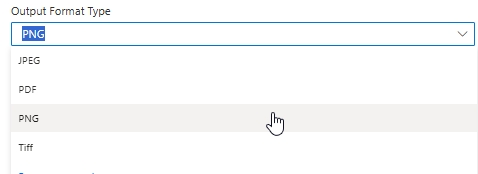
PDFPNGJPEGTiffページングオプションのリファレンス(詳細設定)
出力フォーマットタイプが PDF。 画像フォーマットタイプ(PNG、JPEG、Tiff)は、出力がスタンドアロンであるため、ページングオプションを無視します。 QR スリップ画像であり、複数ページの文書ではありません。
firstlastadd at endcustom出力
| 分野 | タイプ | 内容物 |
|---|---|---|
| File Content | File content | Content of the resulting QR-bill, in the chosen output format. Map it into the next action, for example the File Content field of SharePoint or OneDrive Create file. |
| File Name | Text | File name of the resulting QR-bill file, as returned by PDF4me. Use it as the file name when saving the file. |
| Page Count | Text | Page count reported by PDF4me for the processed document. Returned as text; wrap it in int() to use it as a number. |
サンプルファイル
クイックセットアップ
- 追加 PDF4me に バーコード - SwissQRコード付き紙幣を作成 あなたの Power Automate 流れ。
- サインイン PDF4me 接続する コネクタと API 鍵。
- セット 出力フォーマットタイプ に
PDF(またはPNG/JPEG/Tiff画像出力用)。 - 支払い欄に記入してください。 IBAN (CHまたはLI、最大21文字) 額、 通貨 (
CHFまたはEUR) 参照タイプ (QRR、SCOR、 またはNON) 言語タイプ、 分離ライン。 - 記入してください 債権者 ブロック(名前、住所タイプ、住所行、郵便番号、都市)および 最終債務者 ブロック。
- 任意で記入 参照、 非構造化メッセージ、 請求情報、 AV1 / Av2 パラメータ。
- クリック すべて表示 の上 詳細パラメータ地図 ファイルの内容 そして ファイル名 以前のアクションから(SharePoint、 OneDrive、Dropbox、 Outlook)。 セット ページングオプション に
first/last/add at end/custom。 もしcustom、 埋める ページ番号 スリップが配置されるべき 1 ベースのページインデックス (例:3) - 保存して実行します。アクションが戻ります。 ファイルの内容 人口の多い PDF または画像。パイプで SharePoint ファイルを作成し、 OneDrive ファイルを作成し、 Outlook メールを送信するか、Teamsでメッセージを投稿してください。
フローの例
Power Automateの一般的なワークフローパターンThree ways to chain Create SwissQR Bill into a flow.
- SharePoint ファイルが作成されると トリガーは /Documents/Invoices で発火します。
- SharePoint ファイルコンテンツを取得すると、 PDF バイナリ。
- SwissQR請求書を作成すると、支払い伝票が添付されます(出力フォーマットタイプ PDFページングオプションは最後)。
- Outlook 入力済みのファイルを添付したメールを送信します PDF お客様へ。
- フローを手動でトリガーします(またはDropboxでファイルが作成されたとき)。
- Dropbox パスを使用してファイルコンテンツを取得する
/pdf4metest/sample/10ページ.pdf。 - SwissQR請求書を作成すると、ページングオプション付きの伝票が追加されます。
カスタムページ番号3。 - Dropbox ファイルの作成書き込み先
/pdf4meoutput固有のファイル名で構築guid()+ ソース名。
- 再発の引き金は毎日引かれる。
- Dataverseリストの行から、支払期限を過ぎた請求書が取得されます。
- 各項目に適用: SwissQR請求書を作成する それなし ファイルコンテンツ(詳細ファイルフィールドはスキップ)行の支払いデータを使用します。出力フォーマットタイプ PNG。
- Outlook メール送信で埋め込む QR PNG 支払い催促と連動して。