変更の追跡を無効にする Word で n8n
変更の追跡を無効にする Word は PDF4me ノードアクション n8n 改訂記録をオフにする Word ドキュメント。これを使用して、レビュー サイクルを自動的に終了したり、それ以降の編集が追跡された変更として記録されないようにしたり、すべての設定を正規化したりできます。 .docx それは外部の寄稿者から提供されたものです。
このノードの機能
PDF4me変更の追跡を無効にする Word 取る .docx バイナリデータから、 Base64 Stringまたは URL そして、変更履歴の設定をオフにして返します。そのため、後続の編集は改訂として記録されなくなります。これは、 変更の追跡を有効にする Wordワークフローのステップとして実行されるため、ツールバーの切り替えを誰かが覚えておく必要がなく、通過するすべてのドキュメントに一貫して設定が適用されます。
関連ブログ記事
この機能に関するブログ記事はまだありません。近日公開予定です。
その間、PDF4me ブログを閲覧して、あらゆるプラットフォームのチュートリアルやワークフローをご覧ください。
ブログをご覧ください →
認証 API リクエスト
毎 PDF4me ノード n8n 有効な 接続するための認証情報. 作成または選択して、 PDF4me API ワークフローがドキュメント要求を安全に認証できるようにするためのキー。
見逃してはならない重要な事実
これで設定がオフになります
これは「変更履歴の追跡を有効にする」の対義語であり、すべての改訂を受け入れるボタンではありません。1 つのファイルをチェックすると、 Word 既存のマークアップが解決されることを期待する場合。
Async デフォルトで有効
この切り替え機能は有効になっているため、大きなドキュメントはリクエストを開いたままにするのではなく、バックグラウンドで処理されます。
.docx拡張子はそのままにしておいてください。
このノードはOffice Openで動作します XML Word ファイルと一致するワードプロセッシングmlを返します MIME タイプ。
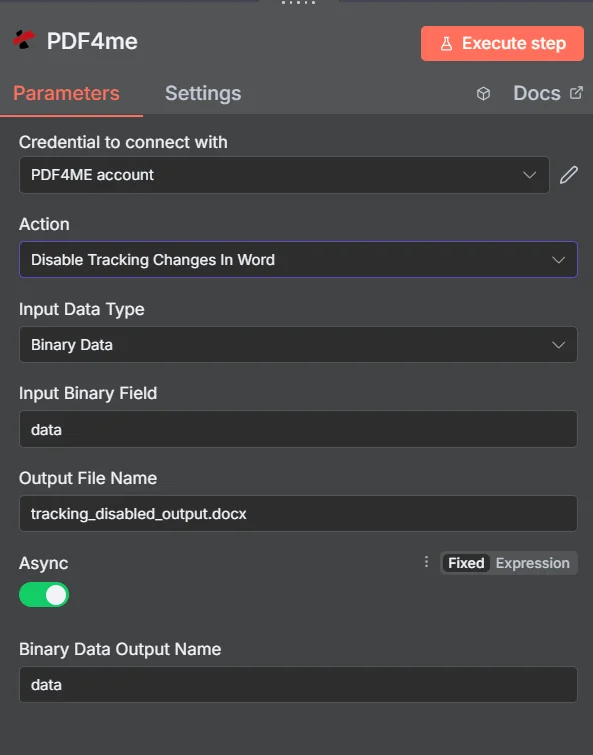
PDF4me 変更の追跡を無効にする Word パラメーターパネル n8n
3つのトラック変更アクションの比較
PDF4me 変更履歴の追跡は、3つのアクションの集合として表示されます。このタスクで最もよくある間違いは、どれか1つを間違えることです。
| アクション | その機能 | 使用する際は |
|---|---|---|
| Disable Tracking Changes In Word | Switches revision recording off | A review is finished and further edits should not be logged |
| Enable Tracking Changes In Word | Switches revision recording on | You are sending a document out for review and want edits captured |
| Get Tracking Changes In Word | Reads the revision information out | A workflow needs to inspect or report on what was changed |
トラッキング変更を無効にするパラメータは何ですか Word 必要?
必須: アクション、入力データタイプ、その入力タイプに一致するフィールド、および出力ファイル名。 Asyncバイナリデータ出力名、およびカスタムプロファイルには、動作するデフォルト値が含まれています。
| パラメータ | 必須 | その機能 | 例 |
|---|---|---|---|
| Action | Required | Selects the PDF4me node action to run. Choose Disable Tracking Changes In Word. | Disable Tracking Changes In Word |
| Input Data Type | Required | Format of the source Word input. Choose Binary Data (from a previous node), Base64 String, or URL. | Binary Data |
| Input Binary Field | Conditional | Name of the binary property on the incoming n8n item that holds the .docx. Required when Input Data Type is Binary Data. Defaults to data. | data |
| Base64 Document Content | Conditional | Base64-encoded content of the source Word document. Required when Input Data Type is Base64 String. | UEsDBBQABgAI... |
| File URL | Conditional | Publicly reachable HTTPS URL to the source Word document. Required when Input Data Type is URL. | https://example.com/contract.docx |
| Output File Name | Required | Filename for the Word document returned by the node. Include the .docx extension. | tracking_disabled_output.docx |
| Async | Optional | Toggle, enabled by default. Processes larger documents in the background instead of holding the request open, which reduces timeout risk. | enabled |
| Binary Data Output Name | Optional | Name of the binary property the output item exposes. Defaults to data. | data |
| Custom Profiles | Optional | Advanced Options field for extra processing settings, supplied in a JSON-like format. Leave blank unless you have a specific profile to apply. | { "preserveMetadata": true } |
出力フィールド
成功したランは1 n8n アイテム Word 追跡機能がオフになっている文書。
| 分野 | タイプ | 内容物 |
|---|---|---|
Binary (data) | Binary | The returned Word document, under Binary Data Output Name (default data). |
fileName | String | Generated filename, matching Output File Name. |
docName | String | Name of the processed document, for reference and tracking. |
mimeType | String | MIME type of the output, the wordprocessingml.document type used by .docx files. |
fileSize | Number | Size of the returned document in bytes. |
trackingDisabled | Boolean | Confirms the track changes setting was switched off. A useful assertion before distributing the file. |
success | Boolean | True when the operation completed, false on failure. Use it to branch error handling. |
message | String | Human-readable status message, carrying success confirmation or error detail. |
変更の追跡を無効にするにはどうすればよいですか Word で n8n?
- 追加 PDF4me あなたの n8n ワークフローを選択し、 変更の追跡を無効にする Word アクション。
- で 接続するための認証情報選択してください PDF4me 認証情報またはクリック 新しい認証情報を作成する そしてあなたの API 鍵。
- セット 入力データタイプ に バイナリデータ (デフォルト)、 Base64 String、 または URL 対応するソースを提供する Word 分野。
- セット 出力ファイル名で終わる
.docx。 - 離れる Async 下流工程で同期応答が必要な場合を除き、有効になっています。
- 離れる バイナリデータ出力名 として
data後続のノードが異なるプロパティを期待している場合を除きます。 - ノードを実行し、返されたドキュメントを変換、保存、配布などの次のステップにルーティングします。
典型的な構成
ワークフローの例Common n8n workflow patterns using Disable Tracking Changes In Word.
レビューサイクルを終了する
- 査読者が編集済みの契約書をメールで返送する。
- 変更履歴の取得機能は、監査記録に対して行われた変更内容を記録します。
- 変更履歴の記録を無効にすると、ファイルが移動する前に記録が停止します。
外部貢献者からのファイルを正規化する
- 複数の機関から、設定が統一されていない書類が届く。
- 変更履歴の追跡を無効にすると、すべてに同じ設定が適用されます。
- 住宅テンプレートのパイプラインは、予測可能な開始点から始まる。
出版用の文書を準備する
- 完成した文書は配布待ちの状態です。
- 変更履歴の記録を無効にすると、それ以降の編集が改訂履歴として記録されなくなります。
- ファイルは次のように変換されます PDF そして出版された。
レビュー周辺のトラッキングを切り替える
- 変更履歴の追跡を有効にする処理は、文書がコメント募集のために公開される前に実行されます。
- 査読者は、変更内容をすべて記録しながら編集作業を行います。
- 変更履歴の無効化は、レビューウィンドウが閉じられたときに実行されます。
実践的なヒント
Know which of the three actions you want
Disable turns recording off, Enable turns it on, and Get reads the revisions. Most mistakes on this task are picking the wrong one of the three.
Capture the revisions before you disable
Running Get Tracking Changes first preserves an audit record of what a reviewer altered, which is gone from view once the review closes.
Leave Async enabled for long documents
Background processing avoids holding the request open on large files, which is where timeouts show up.
Verify one file in Word before rolling out
Open a representative output and confirm it matches what you expect, especially if the documents still carry unresolved markup.
Branch on the success field
Test the returned success boolean so a failed run raises an alert instead of quietly forwarding an unmodified document.
Keep the extension consistent
Give Output File Name a .docx extension so downstream nodes and the recipient handle the file as a Word document.
チートシート
| 分野 | 価値 |
|---|---|
| Action | Disable Tracking Changes In Word |
| Input Data Type | Binary Data |
| Input Binary Field | data |
| Output File Name | tracking_disabled_output.docx |
| Async | enabled |
| Binary Data Output Name | data |
| Credentials | PDF4me API credential |
よくある質問
関連アクション
変更の追跡を有効にする Word
レビュー前に改訂記録を再び有効にするための逆の操作。
変更履歴を取得する Word
レビューを終了する前に、監査記録のために修正内容を読み上げてください。
比較する Word 文書
変更履歴が有効になっていない状態で、2つのバージョンを直接比較する。
安全な Word 書類
最終版の文書は配布前に保護してください。
他のプラットフォームでの同じタスク
変更履歴を無効にする Make
同じ動作で Make モジュールに配線され、 Make シナリオ。
変更履歴を無効にする Zapier
数千ものSaaSアプリやWebhookのいずれかから変更をトリガーできます。
変更履歴を無効にする Power Automate
Microsoft 365 流れ SharePoint、 OutlookTeams、およびDataverseとの連携。
変更の追跡を無効にする REST API
生 PDF4me エンドポイント。カスタムバックエンドコードやPostmanテスト用。