ロック解除 PDF で n8n
ロック解除 PDF は PDF4me ノードアクション n8n パスワード保護を解除する PDF 正しいパスワードを入力すると、保護されたファイルを後続のワークフロー手順で読み取り可能にしたり、所有するアーカイブから暗号化を解除したり、サプライヤーから送られてくるすべての明細書を個別に開くことなくロック解除したりできます。
このノードの機能
PDF4me: ロック解除 PDF 保護された PDF バイナリデータから、 Base64 Stringまたは URL指定したパスワードを適用し、プロンプトなしで開くコピーを返します。 パスワード このフィールドは必須項目であるため、紛失したパスワードを復元するのではなく、既にアクセス権限のあるドキュメントのロックを解除します。抽出および変換ステップでは暗号化されたファイルを読み取ることができないため、通常はパイプラインの先頭に配置されます。
関連ブログ記事
この機能に関するブログ記事はまだありません。近日公開予定です。
その間、PDF4me ブログを閲覧して、あらゆるプラットフォームのチュートリアルやワークフローをご覧ください。
ブログをご覧ください →
認証 API リクエスト
毎 PDF4me ノード n8n 有効な 接続するための認証情報. 作成または選択して、 PDF4me API ワークフローがロック解除要求を安全に認証できるようにするためのキー。
見逃してはならない重要な事実
パスワードが必要です
これはパスワード復旧ツールではありません。正しいパスワードがないと、この操作ではドキュメントのロックを解除できません。
抽出する前にロックを解除してください
テキスト、表、フォームの抽出では暗号化されたデータを読み取ることができません PDFそのため、このノードは通常、ワークフローの最初に配置されます。
ワークフローファイルにはパスワードを含めないでください
秘密情報を直接入力するのではなく、認証情報または環境変数を参照することで、エクスポートされたワークフローに秘密情報が含まれないようにします。 JSON。
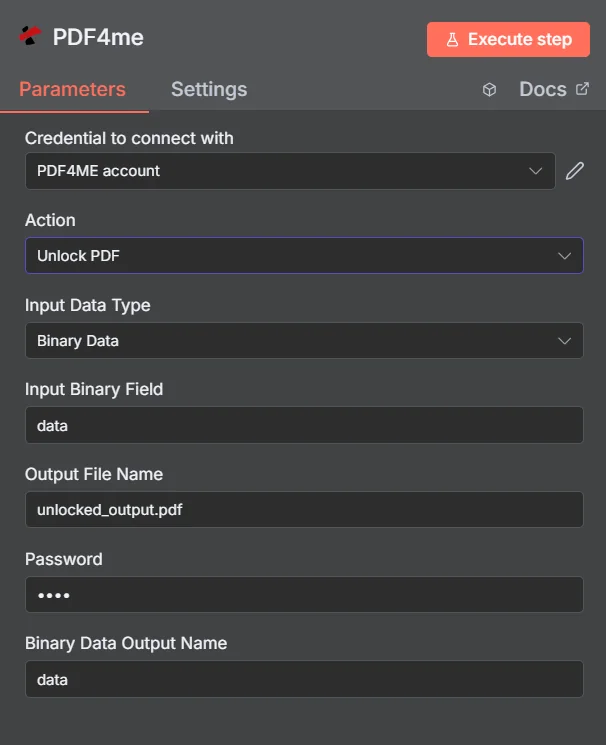
PDF4me ロック解除 PDF パラメーターパネル n8n
ロック解除 PDF ドキュメントの保護との比較
これら2つの動作は正反対であり、ワークフローでは両方がよく使われます。つまり、受信したファイルをロック解除して読み取り、その後、結果を再度保護してから送信するのです。
| 側面 | ロック解除 PDF | ドキュメントを保護する |
|---|---|---|
| What it does | Removes existing password protection | Applies password protection |
| Password you supply | The current password on the document | The new password you want to set |
| Typical position | First step, so later nodes can read the file | Last step, before the file is sent or stored |
| Prerequisite | You must already know the password | None beyond the source document |
ロック解除されるパラメータは何ですか PDF 必要?
必須: アクション、入力データタイプ、その入力タイプに一致するフィールド、出力ファイル名、およびパスワード。バイナリデータ出力名とカスタムプロファイルには、動作するデフォルト値が設定されています。
| パラメータ | 必須 | その機能 | 例 |
|---|---|---|---|
| Input Data Type | Required | Choose how to provide the PDF file to unlock. Options: Binary Data, Base64 String, URL. Default is `Binary Data`. | Binary Data |
| Input Binary Field | Conditional | Name of the binary property that contains the PDF file (usually "data" for file uploads). Shown when Input Data Type is Binary Data. Default is `data`. | data |
| Base64 PDF Content | Conditional | Base64 encoded PDF document content. Shown when Input Data Type is Base64 String. | JVBERi0xLjQK... |
| PDF URL | Conditional | URL to the PDF file to unlock. Shown when Input Data Type is URL. | |
| Output File Name | Optional | Name for the output unlocked PDF file. Default is `unlocked_output.pdf`. | unlocked_output.pdf |
| Password | Optional | Password for the protected PDF. Default is `1234`. | 1234 |
| Binary Data Output Name | Optional | Custom name for the binary data in n8n output. Default is `data`. | data |
出力フィールド
成功したランは1 n8n ロック解除されたアイテム PDF。
出力
ノードが返すフィールド。
| 分野 | タイプ | 内容物 |
|---|---|---|
data | Binary | The unlocked PDF. The item's JSON is empty: the node returns no fields. |
ロック解除の設定方法 PDF で n8n?
- 追加 PDF4me あなたの n8n ワークフローを選択し、 ロック解除 PDF アクション。
- で 接続するための認証情報選択してください PDF4me 認証情報またはクリック 新しい認証情報を作成する そしてあなたの API 鍵。
- セット 入力データタイプ に バイナリデータ (デフォルト)、 Base64 String、 または URL 対応するソースを提供する PDF 分野。
- セット 出力ファイル名 ロック解除されたファイルの場合、末尾は
.pdf。 - ドキュメントを入力してください パスワード理想的には、認証情報または環境変数を読み取る式として記述します。
- 離れる バイナリデータ出力名 として
data後続のノードが異なるプロパティを期待している場合を除きます。 - ノードを実行し、ロック解除された PDF 抽出、変換、保存などの次のステップへ。
典型的な構成
ワークフローの例Common n8n workflow patterns using Unlock PDF.
保護された銀行取引明細書を読む
- 明細書は既知のパスワードで保護された電子メールで届きます。
- ロック解除 PDF 保存された秘密情報を使用して保護を解除します。
- テーブル抽出ステップでは、トランザクションをシートに読み込みます。
所有するアーカイブからの暗号化を解除します。
- 共有ドライブにある古い文書はすべて、同じ古いパスワードを使用しています。
- ロック解除 PDF 移行バッチ処理中に各ファイルに対して実行されます。
- 保護されていないコピーは、検索可能な新しい文書システムに保存されます。
ロック解除、処理、そして再保護
- ロック解除 PDF 受信した保護された文書を開きます。
- ワークフローは、読み取り可能なファイルにスタンプを押したり、マージしたり、編集したりします。
- Protect Documentは、再送信する前に新しいパスワードを適用します。
パイプラインを保護する success チェック
- ロック解除 PDF 到着した各ファイルに対して、保存されているパスワードを試行します。
- IFノードは返された値をテストします success および isUnlocked フィールド。
- 障害が発生するとアラートが発信されるため、パスワードが変更された場合はすぐに通知されます。
実践的なヒント
Never hardcode the password
Use an expression that reads an n8n credential or environment variable, so the secret does not travel inside exported workflow JSON.
Put the unlock first
Extraction and conversion nodes cannot read an encrypted PDF, so unlocking early avoids confusing downstream failures.
Alert on a failed unlock
A rotated password will fail every run. Branch on success so it surfaces as an alert rather than a pile of stuck items.
Assert on isUnlocked before extracting
Checking the flag is cheaper than debugging an extraction node that received a file it could not open.
Only unlock what you are authorised to
The action needs the real password by design. Confirm you have the right to remove protection before automating it across an archive.
re-protect before sending outward
If the document leaves your systems again, add Protect Document at the end so the unlocked copy is not what gets distributed.
チートシート
| 分野 | 価値 |
|---|---|
| Action | Unlock PDF |
| Input Data Type | Binary Data |
| Input Binary Field | data |
| Output File Name | unlocked_output.pdf |
| Password | {{ $env.PDF_PASSWORD }} |
| Binary Data Output Name | data |
| Credentials | PDF4me API credential |
よくある質問
関連アクション
ドキュメントを保護する
逆の操作として、ファイルがシステムから削除される前にパスワードを再適用します。
テーブルを抽出する PDF
保護されたステートメントが読み取り可能になった後の、通常の次のステップ。
ロック解除 Excel
同じワークフローで届く保護されたスプレッドシートについても、同様の考え方が適用されます。
ページを抽出する PDF
引っ張るだけ pages 新しくロック解除された文書から必要なもの。
他のプラットフォームでの同じタスク
パスワードを削除する PDF で Make
同じロック解除エンジン Make モジュールに配線され、 Make シナリオ。
ロック解除 PDF で Zapier
数千ものSaaSアプリやWebhookからパスワード削除をトリガーできます。
ロック解除 PDF で Power Automate
Microsoft 365 流れ SharePoint、 OutlookTeams、およびDataverseとの連携。
ロック解除 PDF REST API
生 PDF4me エンドポイント。カスタムバックエンドコードやPostmanテスト用。