ドキュメントを取得する PDF4me で n8n
Pdf4meからドキュメントを取得する は PDF4me ノードアクション n8n 文書を取得する PDF4me 既に保持されている。これを使用して、以前の処理ステップの結果を収集したり、保存されたファイルを後続のワークフロー実行に取り込んだり、生成されたものを取得してコールバックベースのジョブを完了したりすることができる。
このノードの機能
PDF4me: Pdf4meからドキュメントを取得する は 検索ユーティリティであり、変換ではない入力は2つだけです。 ファイル名 そして 折り返し電話 URL、そして両方とも必須です。保存されたファイルは名前、サイズ、およびとともに変更されずに返されます。 MIME 型を指定すると、ドキュメントに対して必要な処理はすべて、その後に連鎖する別のアクションで実行されます。
関連ブログ記事
この機能に関するブログ記事はまだありません。近日公開予定です。
その間、PDF4me ブログを閲覧して、あらゆるプラットフォームのチュートリアルやワークフローをご覧ください。
ブログをご覧ください →
認証 API リクエスト
毎 PDF4me ノード n8n 有効な 接続するための認証情報. 作成または選択して、 PDF4me API ワークフローが取得要求を安全に認証できるようにするためのキー。
見逃してはならない重要な事実
どちらの分野も本当に必要です
ファイル名とコールバック URL それぞれが空のときに検証警告を表示します。 PDF4me ノードには代替となる入力がないため、両方が設定されるまでノードは実行されません。
取得するだけで、変換はしない
ファイルは元の状態で保存されたまま返されます MIME 報告されたデータタイプ。変換、圧縮、またはセキュリティ保護は、この処理の後に実行される別の処理です。
ファイル名は完全に一致する必要があります
生成ステップで使用した名前を式で引き継いでください。手動で再入力すると、検索結果が見つからないことが最もよくあります。
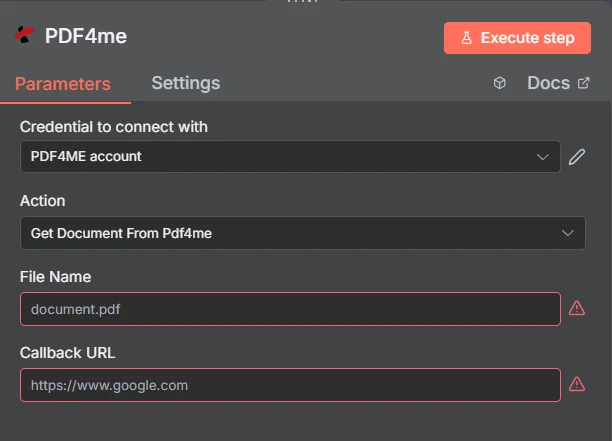
パネル全体は4つのフィールドで構成されています。ファイル名とコールバックの赤い枠線 URL ノードは、実行前に両方を入力する必要があると伝えています。
検索アクションと処理アクション
| 質問 | Pdf4meからドキュメントを取得する | 処理アクション |
|---|---|---|
| What it needs | A file name and a callback URL | A source file plus operation settings |
| What it changes | Nothing, the file is returned as stored | The document content or format |
| Where it sits | After the work, to collect the result | In the middle, doing the work |
| What comes back | The stored file plus its metadata | A newly produced document |
| Typical use | Finishing a callback-based job | Converting, securing, or editing |
Pdf4meからドキュメントを取得するには、どのようなパラメータが必要ですか?
| パラメータ | 必須 | その機能 | 例 |
|---|---|---|---|
| File Name | Required | Name sent to PDF4me with the webhook subscription. | document.pdf |
| Callback URL | Required | URL sent to PDF4me as the callback URL of the webhook subscription. The node itself does not use it. | https://example.com/callback |
このノードは、非常に小さな表面積しか持っていません。入力タイプセレクターも、出力名フィールドも、高度なオプションコレクションも存在しないため、上記のすべてのパラメーターは条件付きではなく必須項目としてマークされています。
出力
| 分野 | タイプ | 内容物 |
|---|---|---|
success | String | Always true. |
message | String | Always `Webhook subscription created successfully`. |
docName | String | File Name that was sent. |
callBackUrl | String | Callback URL that was sent. |
result | String | Raw response of the WebhookSubscribe call. The node reads it as binary data, so it is a byte buffer, not parsed JSON. |
ドキュメント自体はこれらのフィールドとともにバイナリデータとして返され、ストレージへの書き込み、電子メールへの添付、または別のデータへの転送に使用できます。 PDF4me アクション。
Pdf4me からドキュメントを取得する設定方法 n8n?
- 追加する PDF4me ノードをワークフローに追加して設定します アクション に Pdf4meからドキュメントを取得する。
- 選択してください PDF4me 認証情報を入力するか、作成して貼り付けてください。 API 鍵。
- セット ファイル名 理想的には、前のステップから引き継いだ式を通して、保存されている正確な名前を取得する。
- セット 折り返し電話 URL 到達可能なエンドポイントへ。ノードが空の場合、実行されません。
- ノードを実行します。
- チェック
successそしてretrievalCompleted応答にIFノードを含めます。 - 確認する
mimeTypeファイルをフォーマットを前提とするステップに渡す前に、期待どおりの形式になっているかを確認します。 - バイナリ文書をストレージ、電子メール、または次の場所にルーティングします PDF4me アクション。
典型的な構成
ワークフローの例Common n8n workflow patterns using Get Document From Pdf4me.
長時間の作業の結果を収集する
- 先行するアクションによって、大規模な文書に対する作業が開始されます。
- Pdf4meからドキュメントを取得する機能は、名前で完成したファイルを取得します。
- 接続を開いたままにすることなく、ワークフローは継続されます。
取得してから変換する
- 保存されたファイルは変更されずに取得されます。
- 2番目 PDF4me この動作は、それを圧縮または保護します。
- 検索と処理は明確に分離されている。
ご要望に応じて再送いたします
- 受信者が、以前に作成された文書を要求する。
- ワークフローは、保存されている名前でそれを取得します。
- 何も再生成することなく、再度メールで送信されます。
ハンドオフを守る
- IFノードはチェックします success 取得が完了しました。
- mimeType 次のステップで期待されるものと比較されます。
- 不一致が発生した場合は、チェーンのより深い段階でエラーが発生するのではなく、アラートが発せられます。
実践的なヒント
Pass the file name by expression
Carrying the name from the step that produced the document removes the single most common source of failed retrievals.
Check both success flags
success and retrievalCompleted are separate fields. Testing both is cheap and catches partial outcomes.
Use a reachable callback URL
The field is required and the value should be an endpoint that genuinely accepts requests, not a placeholder left in from testing.
Verify mimeType before assuming a format
A downstream PDF step that receives something else will fail confusingly. One comparison up front avoids that.
Do not expect transformation here
If the retrieved file needs changing, chain the relevant action after this one rather than looking for settings this node does not have.
Keep names unique and predictable
Retrieval is by exact name, so a naming convention set at generation time makes this node trivial to wire up later.
チートシート
| 分野 | 価値 |
|---|---|
| Action | Get Document From Pdf4me |
| File Name | document.pdf |
| Callback URL | https://example.com/callback |
| Credentials | PDF4ME account |
| Success check | success and retrievalCompleted |
| Format check | mimeType |
よくある質問
関連アクション
ハイパーリンク注釈の更新
同じユーティリティアクション PDF4me ノードグループ。
ドキュメントを保護する
取得したファイルを配布する段階になったら、次に取るべき自然なステップはこれだ。
フォームデータを抽出する PDF
先ほど取得したドキュメントからデータを読み取ります。
n8n はじめる
設定する PDF4me このノードおよび他のすべてのノードが依存する認証情報。
他のプラットフォームでの同じタスク
ドキュメントを取得する PDF4me で Power Automate
内部での同じ取得アクション Microsoft 365 流れます。
ドキュメントを取得する PDF4me REST API
生 PDF4me エンドポイント。カスタムバックエンドコードやPostmanテスト用。