画像透かしを追加する Word ドキュメント n8n
画像透かしを追加する Word は PDF4me ノードアクション n8n 画像を刻印する Word ドキュメント。これを使用して、送信レポートに会社のロゴを付けたり、レビュー前に下書きにマークを付けたり、ワークフローが生成するすべての契約に機密バッジを適用したりできます。 Word。
このノードの機能
PDF4me Word: 画像透かしを追加 Word 入力は1つではなく2つ必要です。 .docx スタンプを押すファイルと 画像 それにスタンプを押す。それぞれに独自の入力方法ドロップダウンがあるので、ドキュメントと透かしは、前のノードからのドキュメントと、からフェッチされたロゴなど、異なる経路で到着することができます。 URLサイズは 規模 明示的に設定しない限り 幅 または 身長 ポイントで。
関連ブログ記事
この機能に関するブログ記事はまだありません。近日公開予定です。
その間、PDF4me ブログを閲覧して、あらゆるプラットフォームのチュートリアルやワークフローをご覧ください。
ブログをご覧ください →
認証 API リクエスト
毎 PDF4me ノード n8n 有効な認証情報が必要です。 PDF4me API ワークフローがウォーターマーク要求を安全に認証できるようにするためのキー。
見逃してはならない重要な事実
入力欄2つ、ドロップダウンメニュー2つ
の Word ファイルと透かし画像は別々に設定され、それぞれに独自の入力メソッドセレクターがあります。片方を設定してもう片方を忘れてしまうことが、ノードの実行を拒否する最も一般的な原因です。
幅と高さが0の場合はスケールを使用することを意味します
どちらの寸法フィールドも初期値は0ですが、これはサイズがゼロであることを示すものではなく、拡大縮小率に基づいて画像のサイズを調整する指示です。正確なサイズが必要な場合にのみ、いずれかのフィールドにポイントを入力してください。
透明なものを使用する PNG
A JPEG アルファチャンネルがないため、白い背景が下のテキストを覆い隠します。 PNG 真の透明性こそが、透かしが貼り付けられた枠ではなく、透かしとして認識される理由です。
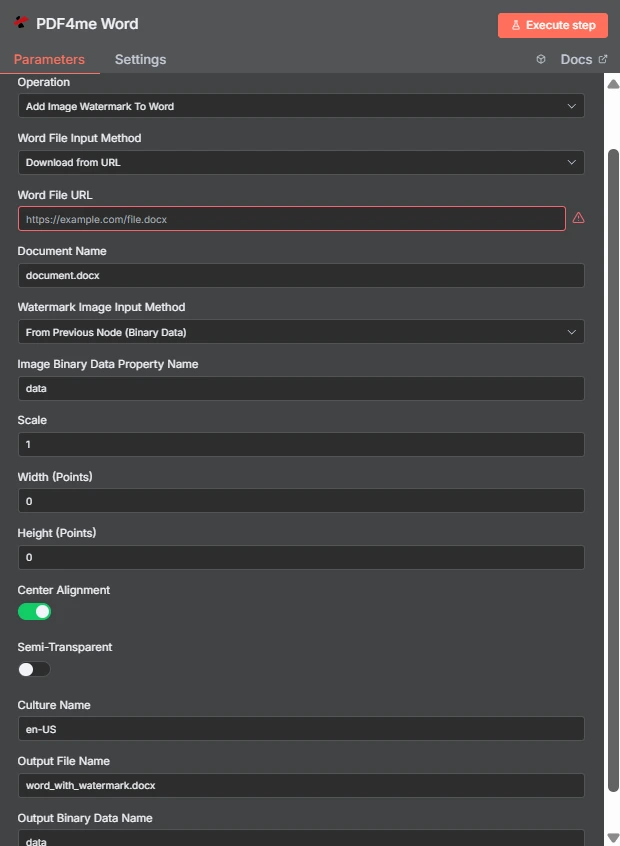
2 つの独立した入力方法に注目してください。 Word ファイルは到着します URL 透かし画像は前のノードから取得されます。幅と高さは0に設定されているため、スケール1でサイズを制御します。
画像透かしとテキスト透かしの違い Word
| 質問 | 画像透かしを追加する Word | テキスト透かしを追加する Word |
|---|---|---|
| What gets stamped | An image file such as a logo, seal, or badge | A word or phrase you type, such as DRAFT |
| Second input needed | Yes, the image file itself | No, only the text string |
| Changing it per run | Swap the image binary or URL | Change the text with an expression |
| Best for | Company branding and scanned marks | Status labels and per-document text |
| Transparency control | Semi-Transparent toggle plus PNG alpha | Handled through the text styling options |
画像透かしを追加するパラメータは何ですか? Word 必要?
の Word ファイルと透かし画像にはそれぞれ入力方法のドロップダウンメニューがあります。どの方法を選択しても、対応するソースフィールドがそのすぐ下に表示されるため、選択内容に応じて下の条件付き行が変化します。
| パラメータ | 必須 | その機能 | 例 |
|---|---|---|---|
| Credential to connect with | Required | The PDF4me API credential the node authenticates with. | PDF4me account |
| Operation | Required | The action this node performs. Select Add Image Watermark To Word. | Add Image Watermark To Word |
| Word File Input Method | Required | How the .docx reaches the node: from the previous node as binary data, as a Base64 string, or downloaded from a URL. | Download from URL |
| Word File URL | Conditional | Public URL of the .docx to stamp. Appears only when the Word file input method is set to download from a URL. | https://example.com/file.docx |
| Document Name | Required | Filename of the input document including the extension. Used for format detection, so keep the .docx suffix accurate. | document.docx |
| Watermark Image Input Method | Required | How the image reaches the node. Independent of the Word file input method, so the two can differ. | From Previous Node (Binary Data) |
| Image Binary Data Property Name | Conditional | Name of the binary property holding the watermark image. Appears when the image comes from the previous node. | data |
| Scale | Optional | Size multiplier applied to the image at its natural size. Ignored when a non-zero Width or Height is supplied. | 1 |
| Width (Points) | Optional | Exact watermark width in points. Leave at 0 to size by Scale. Setting only Width keeps the aspect ratio. | 0 |
| Height (Points) | Optional | Exact watermark height in points. Leave at 0 to size by Scale. Setting only Height keeps the aspect ratio. | 0 |
| Center Alignment | Optional | Toggle that centres the watermark on the page. Ships enabled; turn it off to align to the top left within the margins. | enabled |
| Semi-Transparent | Optional | Toggle that reduces watermark opacity so page text stays readable underneath. Ships disabled. | disabled |
| Culture Name | Optional | Culture code recorded for document processing, such as en-US or de-DE. | en-US |
| Output File Name | Optional | Filename of the returned document. Keep the .docx extension so downstream steps handle it correctly. | word_with_watermark.docx |
| Output Binary Data Name | Optional | Binary property the stamped document is written to. Leave as data unless a later node expects another name. | data |
出力
| 分野 | タイプ | 内容物 |
|---|---|---|
| fileName | String | Name of the returned watermarked document, taken from Output File Name. |
| fileSize | Number | Size of the returned document in bytes. A useful sanity check that the image was embedded. |
| success | Boolean | Whether the watermark was applied. Branch on this so failures surface as alerts. |
| originalFileName | String | Name of the input document as supplied in Document Name. |
| scale | Number | The scale factor actually applied, echoed back for verification. |
| alignImage | Boolean | Whether centre alignment was used, reflecting the Center Alignment toggle. |
| semiTransparent | Boolean | Whether reduced opacity was applied, reflecting the Semi-Transparent toggle. |
| cultureName | String | The culture code recorded for the operation. |
| message | String | Human-readable status text describing the result of the operation. |
スタンプされた文書自体は、指定されたプロパティにバイナリとして返されます。 出力バイナリデータ名ストレージに書き込んだり、メールに添付したり、フィードしたりする準備ができています。 PDF 変換ステップ。
画像透かしを追加するにはどうすればいいですか? Word で n8n?
- 追加する PDF4me Word ノードをワークフローに追加して設定します 手術 に 画像透かしを追加する Word。
- 選択してください PDF4me 認証情報を入力するか、作成して貼り付けてください。 API 鍵。
- 選ぶ Word ファイル入力方法 そして供給する
.docxその下に現れるフィールドを通して。 - セット 文書名 だから
.docx拡張子は正しく存在します。 - 選ぶ 透かし画像の入力方法すると、指差す 画像バイナリデータプロパティ名 画像が保管されている施設では、通常
data。 - 離れる 幅(ポイント) そして 高さ(ポイント) で
0調整する 規模または、サイズが正確でなければならない場合は、明示的なポイント値を設定します。 - オンにする 半透明 透かしが本文テキストの上に重なっている場合は、 センターアライメント 左上にマークを付けたい場合を除いては、オンにしてください。
- セット 出力ファイル名 で終わる
.docxノードを実行し、結果を次のノードにルーティングします。
典型的な構成
ワークフローの例Common n8n workflow patterns using Add Image Watermark To Word.
すべての送信レポートにブランドを付ける
- レポート作成ステップでは、 Word スケジュールに基づいて文書を作成する。
- 画像透かしを追加する Word 会社のロゴを刻印する。
- ブランドロゴ入りのファイルは、配信リストにメールで送信されます。
承認されるまで文書を下書きとしてマークする
- 契約書はレビュー用フォルダに振り分けられる。
- 「下書き」バッジ画像には、半透明が有効になっていることを示すスタンプが押されます。
- 批評家は、作業中の原稿と最終版を間違えることは決してない。
透かしを変換して PDF
- ロゴは、ファイルがまだ編集可能な状態のうちに適用されます。 Word。
- 変換ステップにより、スタンプされた文書が PDF。
- の PDF 後から重ねるのではなく、最初から刻印された状態で公開される。
アーカイブに一括スタンプを押す
- フォルダ一覧表示では、従来の.docxファイルごとに1つの項目が生成されます。
- このノードは、同じ透かし画像を使用してアイテムごとに一度実行されます。
- スタンプが押されたコピーは、新しいファイル名で書き戻されます。
実践的なヒント
Start with a transparent PNG
Alpha transparency is what separates a watermark from a pasted rectangle. Export the logo with a transparent background before wiring it in.
Tune Scale before touching Width
Scale keeps the aspect ratio automatically. Reach for explicit point values only when a brand guideline demands an exact size.
Enable Semi-Transparent over body text
A full-opacity mark in the centre of a text page hides content. The toggle exists precisely for documents that are meant to stay readable.
Check the two input methods separately
The document and the image are configured independently, so a run can fail because the image source is unset while the Word source looks fine.
Verify one file before a batch
Open a single stamped document in Word and confirm placement and opacity, then run the workflow across the rest.
Keep the .docx extension
Both Document Name and Output File Name drive format handling. A missing or wrong extension causes confusing downstream failures.
チートシート
| 分野 | 価値 |
|---|---|
| Operation | Add Image Watermark To Word |
| Word File Input Method | Download from URL |
| Word File URL | https://example.com/file.docx |
| Document Name | document.docx |
| Watermark Image Input Method | From Previous Node (Binary Data) |
| Image Binary Data Property Name | data |
| Scale | 1 |
| Width (Points) / Height (Points) | 0 / 0 |
| Center Alignment | enabled |
| Semi-Transparent | disabled |
| Culture Name | en-US |
| Output File Name | word_with_watermark.docx |
| Output Binary Data Name | data |
よくある質問
関連アクション
テキスト透かしを追加する Word 書類
画像ファイルが不要な「DRAFT」および「CONFIDENTIAL」ラベルの場合、テキスト形式で記述します。
安全な Word 書類
ファイルの配布前に、ブランディング処理後にパスワード保護を追加してください。
画像に透かしを入れる
同じ考え方は写真やグラフィックにも適用され、 Word ファイル。
ヘッダーとフッターを更新 Word 書類
文書にブランドイメージを反映させるもう一つの方法として、今回はヘッダーとフッターの領域を利用する方法があります。
他のプラットフォームでの同じタスク
透かしを追加する Make
同じ画像透かしエンジンが Make モジュール内部 Make シナリオ。
透かしを追加する Zapier
トリガー Word 数千ものSaaSアプリとWebhookからのウォーターマーク。
透かしを追加する Power Automate
Microsoft 365 流れ SharePoint、 Outlook、およびTeamsとの連携。
透かしを追加 REST API
生 PDF4me エンドポイント。カスタムバックエンドコードやPostmanテスト用。