ロック解除 Excel ファイルと保護の削除 n8n
ロック解除ファイル は PDF4me Excel オペレーション n8n これは、ファイル暗号化、ワークブック構造、ワークシート保護という 3 つの独立したレベルで .xlsx ワークブックからパスワード保護を解除します。保護されたテンプレートを開いたり、自動データ書き込み用にファイルを準備したり、アーカイブ前にパスワードをクリアしたりするのに使用できます。 Excel。
このノードの機能
PDF4me Excel: ファイルのロックを解除 削除する Excel 一度の処理で保護が完了します。ファイルを開くためのパスワード(ファイル暗号化)、シートの追加、削除、名前変更を防止するワークブック構造ロック、そしてオプションでセルや数式の編集を防止するワークシート保護を解除します。指定したパスワードは複数のレイヤーでフォールバックとして再利用されるため、単一のパスワードで保護されたワークブックの場合は、通常1つのフィールドに入力するだけで済みます。
認証 API リクエスト
毎 PDF4me ノード n8n 有効な 接続するための認証情報作成または選択して、 PDF4me API ワークフローがロック解除要求を安全に認証できるようにするためのキー。
見逃してはならない重要な事実
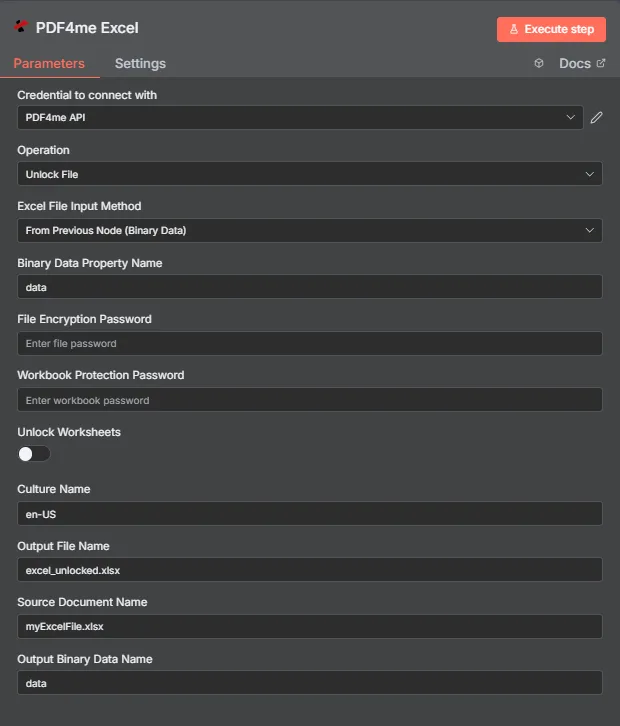
PDF4me Excel ファイルパラメータパネルのロックを解除 n8n
どれの Excel 保護機能は各フィールドから削除されますか?
Excel は3つの異なるレベルで保護を適用しますが、これらは混同しやすいです。この表は、それぞれのレベルが何をブロックし、どのフィールドでブロックを解除するかを示しています。
| 保護レベル | ブロックするもの | それをクリアするフィールド |
|---|---|---|
| File encryption | The workbook cannot be opened at all without a password. Excel prompts before any content is visible. | File Encryption Password |
| Workbook structure | Sheets cannot be added, deleted, renamed, moved, hidden, or unhidden, though existing cells stay editable. | Workbook Protection Password |
| Worksheet protection | Cells, formulas, and objects on a sheet cannot be edited, though the file opens and the structure is intact. | Unlock Worksheets toggle |
ファイルのロック解除にはどのようなパラメータが必要ですか?
必須: 手術、 Excel ファイル入力方法、その方法に対応する入力フィールド、および出力ファイル名を指定します。パスワードフィールドは条件付きであり、ワークブックに実際に設定されている保護レベルに応じてのみ必要となります。ワークシートのロック解除、カルチャ名、ソースドキュメント名、および出力バイナリデータ名はオプションです。
| パラメータ | 必須 | その機能 | 例 |
|---|---|---|---|
| Operation | Required | Selects the PDF4me Excel action to run. Choose Unlock File. | Unlock File |
| Excel File Input Method | Required | How the workbook reaches the node. From Previous Node (Binary Data) reads it from an upstream item; the dropdown also offers base64 and file URL alternatives. | From Previous Node (Binary Data) |
| Binary Data Property Name | Conditional | Name of the binary property on the incoming n8n item holding the .xlsx workbook. Applies when the input method is binary data. Defaults to data. | data |
| File Encryption Password | Conditional | The password required to open the workbook. Supply it when the file is encrypted; it is also reused as a fallback against the other protection levels. | FilePass123 |
| Workbook Protection Password | Conditional | The password guarding workbook structure, which prevents sheets being added, deleted, renamed, or moved. Supply it when structure protection is set. | StructurePass |
| Unlock Worksheets | Optional | Toggle that extends the run to worksheet-level protection so cells, formulas, and objects become editable. Off by default. | true |
| Culture Name | Optional | Locale used while processing the workbook, relevant for locale-sensitive number and date formatting. | en-US |
| Output File Name | Required | Filename for the unlocked workbook the node returns. Include the .xlsx extension. | excel_unlocked.xlsx |
| Source Document Name | Optional | Reference label for the incoming workbook. Echoed back as originalFileName for tracking; it does not change the output. | myExcelFile.xlsx |
| Output Binary Data Name | Optional | Name of the binary property the output item exposes. Defaults to data. | data |
出力フィールド
成功したランは1 n8n 持ち運んでいるアイテム JSON メタデータと、ロック解除されたワークブックをバイナリデータとして含む。
| 分野 | タイプ | 内容物 |
|---|---|---|
success | Boolean | True when protection was removed successfully. Use it to route error-handling branches. |
fileName | String | Filename of the unlocked workbook, matching Output File Name. |
fileSize | Number | Size of the returned workbook in bytes. |
originalFileName | String | The value supplied in Source Document Name, echoed back for tracking. |
message | String | Human-readable result message for the unlock operation. |
Binary (data) | Binary | The unlocked .xlsx under Output Binary Data Name (default data). Pass into Write Binary File, Email, or a cloud-storage upload. |
N8N 行動対応
- JSON
- Schema
- Binary
JSON 回答形式
[
  {
    "fileName": "excel_unlocked.xlsx",
    "fileSize": 14234,
    "success": true,
    "originalFileName": "myExcelFile.xlsx",
    "message": "Excel document unlocked successfully"
  }
]
スキーマビュー
1 item
fileName: T excel_unlocked.xlsx
fileSize: # 14234
success: true
originalFileName: T myExcelFile.xlsx
message: T Excel document unlocked successfully
タイプ指標: T = String、 # = Number。
バイナリデータビュー
data
File Name: excel_unlocked.xlsx
File Extension: xlsx
Mime Type: application/vnd.openxmlformats-officedocument.spreadsheetml.sheet
File Size: 14.2 kB
バイナリデータアクセス: ワークブックにアクセスするには $binary.data.dataダウンロード、メール送信、または保存の準備ができています。
ロック解除ファイルの設定方法 n8n?
- 追加する PDF4me Excel ノードをワークフローに追加して設定します 手術 に ロック解除ファイル。
- で 接続するための認証情報選択してください PDF4me API 認証情報を使用するか、またはあなたの API 鍵。
- セット Excel ファイル入力方法 に 前のノードから(バイナリデータ) そして設定する バイナリデータプロパティ名 ワークブックを保管している物件へ、通常
data。 - 入力 ファイル暗号化パスワード ワークブックを開くのにパスワードが必要な場合。
- 入力 ワークブック保護パスワード シート構造がロックされている場合。
- スイッチオン ワークシートのロックを解除する セルや数式も編集可能にする必要がある場合。
- オプションで設定可能 文化名 地域設定に依存するワークブックの場合。
- セット 出力ファイル名 で終わる
.xlsxノードを実行し、ロック解除されたワークブックを次の処理にルーティングします。
典型的な構成
ワークフローの例Common n8n workflow patterns using Unlock File for Excel.
- ワークフローはロックされたレポートテンプレートを SharePoint。
- ファイルロックを解除すると、構造ロックが解除され、新しいシートを追加できるようになります。
- PDF4me Excel 「行の追加」機能は、期間ごとの数値をワークブックに書き込みます。
- スケジュールトリガーは、長期保存が必要なワークブックを収集します。
- ファイルロック解除機能は、ファイルを開くためのパスワードを削除するため、アーカイブは後で読み取り可能な状態になります。
- 削除されたファイルはアーカイブバケットに書き込まれます。
- メールトリガーは、サプライヤーから保護された価格表を受信します。
- ファイルのロック解除は、ワークシートのロック解除が有効になっている状態で実行されるため、セルの値を解析できます。
- 抽出された行は内部データベースに同期されます。
- 「ファイルのロック解除」は、承認済みのワークブックの保護を解除します。
- 下流ノードは数値を更新し、概要シートをリフレッシュします。
- PDF4me Excel 安全な Excel 再配布前にパスワードを再適用します。
実践的なヒント
チートシート
| 分野 | 価値 |
|---|---|
| Operation | Unlock File |
| Excel File Input Method | From Previous Node (Binary Data) |
| Binary Data Property Name | data |
| File Encryption Password | (only if the file needs a password to open) |
| Workbook Protection Password | (only if the sheet structure is locked) |
| Unlock Worksheets | off (on to make cells editable) |
| Culture Name | en-US |
| Output File Name | excel_unlocked.xlsx |
| Source Document Name | myExcelFile.xlsx |
| Output Binary Data Name | data |
| Credentials | PDF4me API credential |