ヘッダーとフッターを削除する Excel で n8n
ヘッダー/フッターを削除する は PDF4me Excel オペレーション n8n 左、中央、右のセクションをクリアする Excel ヘッダーとフッターを個別に、1つのワークシートまたはワークブック全体で設定できます。リブランディング前に古いブランド要素を削除したり、再利用のためにテンプレートを整理したり、クライアントにワークブックを送信する前に内部のマーキングを削除したりするのに使用できます。
このノードの機能
PDF4me Excelヘッダー/フッターを削除 クリア Excel ページヘッダーとフッターをセクションごとに設定できます。6つの独立したトグルで、ヘッダーとフッターの左、中央、右の位置をそれぞれ設定できるため、片隅のロゴを削除しながら、もう片隅のページ番号はそのまま残しておくことができます。「対象ワークシート名」を指定すると、削除対象は1つのシートのみに適用されます。空白のままにすると、すべてのシートに適用されます。
認証 API リクエスト
毎 PDF4me ノード n8n 有効な 接続するための認証情報作成または選択して、 PDF4me API ワークフローがクリーンアップ要求を安全に認証できるようにするためのキー。
見逃してはならない重要な事実
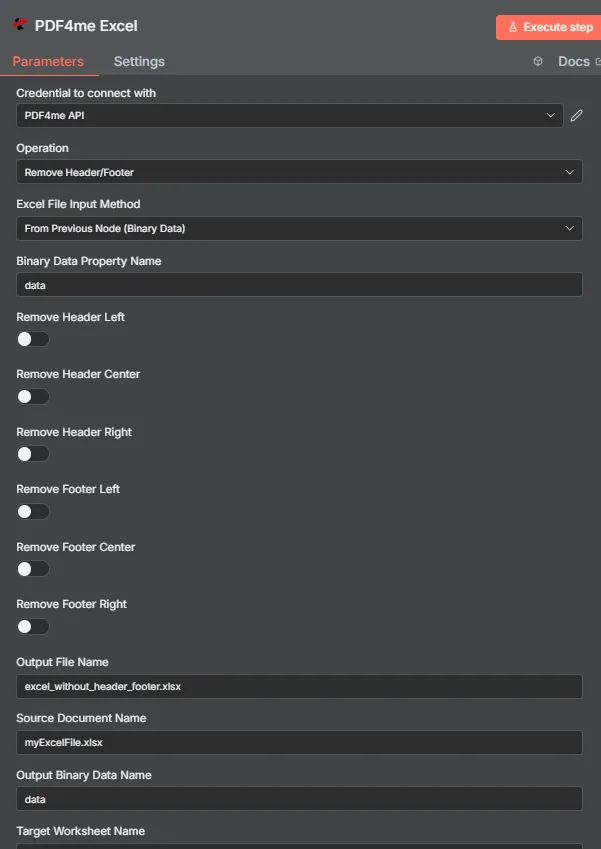
PDF4me Excel ヘッダー/フッターパラメータパネルを削除します n8n
ヘッダー/フッターを削除するには、どのようなパラメータが必要ですか?
必須: 手術、 Excel ファイル入力方法、その方法に一致する入力フィールド、および出力ファイル名を指定します。セクション削除の6つのトグルはすべてデフォルトでfalseに設定されており、ターゲットワークシート名、カルチャ名、ソースドキュメント名、および出力バイナリデータ名はオプションです。
| パラメータ | 必須 | その機能 | 例 |
|---|---|---|---|
| Operation | Required | Selects the PDF4me Excel action to run. Choose Remove Header/Footer. | Remove Header/Footer |
| Excel File Input Method | Required | How the workbook reaches the node. From Previous Node (Binary Data) reads it from an upstream item; the dropdown also offers base64 and file URL alternatives. | From Previous Node (Binary Data) |
| Binary Data Property Name | Conditional | Name of the binary property on the incoming n8n item holding the .xlsx workbook. Applies when the input method is binary data. Defaults to data. | data |
| Remove Header Left | Optional | Clears the left section of the page header. Default false. | true |
| Remove Header Center | Optional | Clears the center section of the page header. Default false. | true |
| Remove Header Right | Optional | Clears the right section of the page header. Default false. | false |
| Remove Footer Left | Optional | Clears the left section of the page footer. Default false. | true |
| Remove Footer Center | Optional | Clears the center section of the page footer. Default false. | true |
| Remove Footer Right | Optional | Clears the right section of the page footer. Default false. | false |
| Output File Name | Required | Filename for the cleaned workbook the node returns. Include the .xlsx extension. | excel_without_header_footer.xlsx |
| Source Document Name | Optional | Reference label for the incoming workbook. Echoed back as originalFileName for tracking; it does not change the output. | myExcelFile.xlsx |
| Output Binary Data Name | Optional | Name of the binary property the output item exposes. Defaults to data. | data |
| Target Worksheet Name | Optional | Name of the single worksheet to process. Leave blank to apply the removal to every worksheet. | Sheet1 |
| Culture Name | Optional | Locale used while processing the workbook, relevant when header or footer text includes locale-sensitive placeholders. | en-US |
出力フィールド
成功したランは1 n8n 持ち運んでいるアイテム JSON メタデータと、クリーニング済みのワークブックをバイナリデータとして含む。
| 分野 | タイプ | 内容物 |
|---|---|---|
success | Boolean | True when the removal ran successfully. Use it to route error-handling branches. |
fileName | String | Filename of the cleaned workbook, matching Output File Name. |
fileSize | Number | Size of the returned workbook in bytes. |
originalFileName | String | The value supplied in Source Document Name, echoed back for tracking. |
removeHeaderLeft | Boolean | Whether the left header section was removed. |
removeHeaderCenter | Boolean | Whether the center header section was removed. |
removeHeaderRight | Boolean | Whether the right header section was removed. |
removeFooterLeft | Boolean | Whether the left footer section was removed. |
removeFooterCenter | Boolean | Whether the center footer section was removed. |
removeFooterRight | Boolean | Whether the right footer section was removed. |
worksheetName | String | The worksheet the removal targeted, matching Target Worksheet Name. |
applyToAllWorksheets | Boolean | True when the removal applied to every worksheet, false when only the named worksheet was processed. |
message | String | Human-readable result message for the operation. |
Binary (data) | Binary | The cleaned .xlsx under Output Binary Data Name (default data). Pass into Write Binary File, Email, or a cloud-storage upload. |
N8N 行動対応
- JSON
- Schema
- Binary
JSON 回答形式
[
  {
    "fileName": "excel_without_header_footer.xlsx",
    "fileSize": 212810,
    "success": true,
    "originalFileName": "myExcelFile.xlsx",
    "removeHeaderLeft": false,
    "removeHeaderCenter": false,
    "removeHeaderRight": false,
    "removeFooterLeft": false,
    "removeFooterCenter": false,
    "removeFooterRight": false,
    "worksheetName": "Sheet1",
    "applyToAllWorksheets": false,
    "message": "Header and footer removed from Excel file successfully"
  }
]
スキーマビュー
1 item
fileName: T excel_without_header_footer.xlsx
fileSize: # 212810
success: true
originalFileName: T myExcelFile.xlsx
removeHeaderLeft: false
removeHeaderCenter: false
removeHeaderRight: false
removeFooterLeft: false
removeFooterCenter: false
removeFooterRight: false
worksheetName: T Sheet1
applyToAllWorksheets: false
message: T Header and footer removed from Excel file successfully
タイプ指標: T = String、 # = Number。
バイナリデータビュー
data
File Name: excel_without_header_footer.xlsx
File Extension: xlsx
Mime Type: application/vnd.openxmlformats-officedocument.spreadsheetml.sheet
File Size: 212.8 kB
バイナリデータアクセス: ワークブックにアクセスするには $binary.data.dataダウンロード、メール送信、または保存の準備ができています。
ヘッダー/フッターを削除するにはどうすればいいですか? n8n?
- 追加する PDF4me Excel ノードをワークフローに追加して設定します 手術 に ヘッダー/フッターを削除する。
- で 接続するための認証情報選択してください PDF4me API 認証情報を使用するか、またはあなたの API 鍵。
- セット Excel ファイル入力方法 に 前のノードから(バイナリデータ) そして設定する バイナリデータプロパティ名 ワークブックを保管している物件へ、通常
data。 - 必要なセクションの切り替えスイッチをオンにしてください。 ヘッダー左側を削除、 中心、 右 そして フッターを左に削除、 中心、 右。
- セット 対象ワークシート名 特定のシートを指定するか、ワークブック全体を空白のままにしてください。
- オプションで設定可能 文化名 地域設定に依存するヘッダーまたはフッターのテキスト用。
- セット 出力ファイル名 で終わる
.xlsxノードを実行し、クリーンアップされたワークブックを次の処理にルーティングします。
典型的な構成
ワークフローの例Common n8n workflow patterns using Remove Header/Footer for Excel.
- バッチジョブは、共有ドライブから従来のレポートテンプレートを取得します。
- 「ヘッダー/フッターの削除」は、「ヘッダー中央の削除」と「フッター中央の削除」をオンにした状態で実行され、古いロゴテキストを消去します。
- PDF4me Excel 「テキストヘッダー/フッターを追加」機能は、その後新しいブランディングを適用します。
- レポートが外部配信準備完了とマークされたときに、Webhookが起動します。
- ヘッダー/フッターを削除すると、内部レビュー担当者のイニシャルが配置されていた左側のヘッダーが削除されます。
- 内容が修正されたワークブックはクライアントにメールで送信されます。
- 完成したプロジェクトワークブックは、テンプレートフォルダにコピーされます。
- 6つのセクション切り替えボタンはすべて正常に動作し、すべてのヘッダーとフッターセクションが消去されます。
- 空白ヘッダーのテンプレートは、次のプロジェクトのために保存されます。
- 複数シートのワークブックには、生データタブと要約シートが含まれています。
- ターゲットワークシート名は「概要」に設定されているため、生データタブにはヘッダーが保持されます。
- クリーンアップされた要約シートは、 PDF 配布用。
実践的なヒント
チートシート
| 分野 | 価値 |
|---|---|
| Operation | Remove Header/Footer |
| Excel File Input Method | From Previous Node (Binary Data) |
| Binary Data Property Name | data |
| Remove Header Left / Center / Right | true / true / false (example) |
| Remove Footer Left / Center / Right | true / true / false (example) |
| Target Worksheet Name | (blank for all worksheets) |
| Culture Name | en-US |
| Output File Name | excel_without_header_footer.xlsx |
| Source Document Name | myExcelFile.xlsx |
| Output Binary Data Name | data |
| Credentials | PDF4me API credential |