行を削除する Excel ワークシート n8n
行を削除する は n8n モジュール PDF4me 不要な行を削除する Excel 1 つのワークフロー ステップでワークシートを実行します。ワークブックと、単一の行、範囲、または混合リストをカバーする行範囲文字列を送信し、 PDF4me それらを下から上に順に削除し、クリーンアップされたファイルを返します。
このノードの機能
PDF4me行を削除する ヘッダー行、空白行、または古いセクションを削除します Excel ワークシートに直接 n8nワークブックを バイナリデータ、 Base64または URL特定のワークシートを対象とするか、最初のシートを空白のままにして、 1 ベースの行範囲文字列 (単一行、範囲、またはそれらの組み合わせ)。指定された行が削除されたクリーンなワークブックを返します。共有前のエクスポートのクリーンアップ、テンプレートのトリミング、保持期間超過レコードの削除に最適です。
認証 API リクエスト
毎 PDF4me ノード n8n 有効な 接続するための認証情報. 作成または選択して、 PDF4me API ワークフローが行削除要求を安全に認証できるようにするためのキー。
見逃してはならない重要な事実
1-3、10、25-30単一のノード実行で、連続していない複数のセクションを削除する。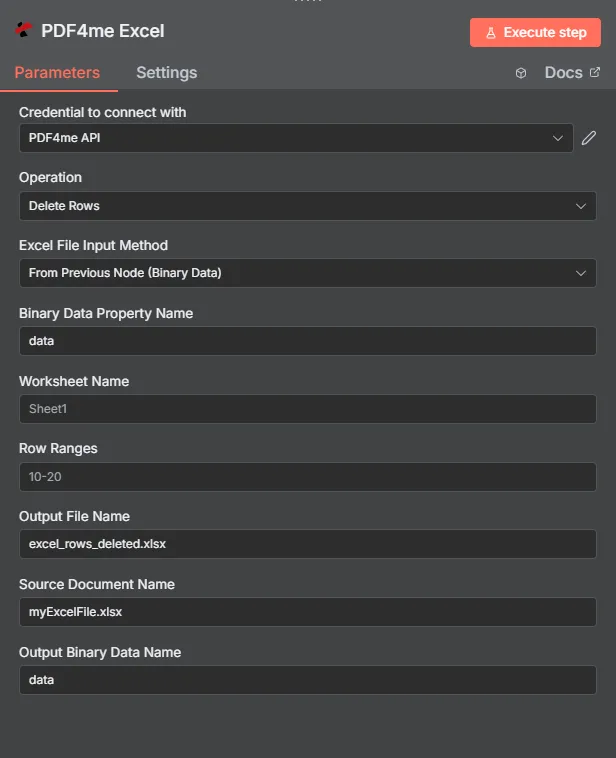
フルノードパネル:ワークブック(バイナリデータ経由)、Sheet1の行範囲10-20
パラメータ
必須 n8n UI: Excel ファイル入力方法、ソースドキュメント名、行範囲。ワークシート名(デフォルトは最初のシート)、出力ファイル名(デフォルト) excel_rows_deleted.xlsx出力バイナリデータ名(デフォルト) データ) はオプションです。条件付きワークブックソースフィールド (バイナリデータプロパティ名、 Base64 文書コンテンツ、文書 URL一致する場合にのみ表示されます Excel ファイル入力方法が選択されました。
| パラメータ | 必須 | その機能 | 例 |
|---|---|---|---|
| Excel File Input Method | Required | How the workbook enters the node. From Previous Node (Binary Data) reads from a prior node (default). Base64 String accepts an encoded workbook. URL downloads it from a public link. | From Previous Node (Binary Data) |
| Binary Data Property Name | Conditional | Name of the binary property on the incoming n8n item that holds the workbook. Required when Excel File Input Method is Binary Data. Defaults to data. | data |
| Base64 Document Content | Conditional | Base64-encoded workbook content. Required when Excel File Input Method is Base64 String. | UEsDBBQAAAA... |
| Document URL | Conditional | Publicly reachable HTTPS link to the workbook. Required when Excel File Input Method is URL. | https://files.example.com/report.xlsx |
| Worksheet Name | Optional | Worksheet to clean. Leave blank to target the first sheet in the workbook. | Summary |
| Row Ranges | Required | Row range string with 1-based row numbers. Accepts single rows, ranges, or a mixed comma-separated list. Rows are deleted bottom-to-top. | 1-3,10,25-30 |
| Output File Name | Optional | Filename of the cleaned workbook returned by the node. Default is excel_rows_deleted.xlsx. | excel_rows_deleted.xlsx |
| Source Document Name | Required | Logical filename of the source workbook, used for reference and tracking in the response. | myExcelFile.xlsx |
| Output Binary Data Name | Optional | Name of the binary property the output item exposes. Default is data. Use a different name when a downstream node expects it. | data |
出力にはどのようなフィールドが含まれますか?
| 分野 | タイプ | 内容物 |
|---|---|---|
fileName | String | Name of the output workbook after row deletion, set from Output File Name (default excel_rows_deleted.xlsx). |
fileSize | Number | Size of the output workbook in bytes. |
success | Boolean | True when the row deletion completed successfully. Use to route error-handling branches. |
originalFileName | String | The Source Document Name that was processed, kept for audit trails. |
worksheetName | String | Name of the worksheet where rows were deleted. |
rowRanges | String | The Row Ranges string that was used for this deletion. |
message | String | Descriptive status message including the row ranges and worksheet name. |
Binary (data) | Binary | The cleaned workbook under Output Binary Data Name (default data). Pass into Write Binary File, Email, or any storage upload. |
行の削除を設定するにはどうすればいいですか n8n?
- 追加する PDF4me Excel あなたのノードへ n8n ワークフローと設定 手術 に 行を削除する。
- で 接続するための認証情報選択してください PDF4me 認証情報またはクリック 新しい認証情報を作成する そしてあなたの API 鍵。
- セット Excel ファイル入力方法 に 前のノードから(バイナリデータ) (デフォルト)、 Base64 String、 または URL そして、該当する欄に記入してください。
- 入力 ソースドキュメント名参照および追跡用のワークブックの論理ファイル名。
- 入力 列範囲 1 から始まる行番号、範囲、または次のような混合リストを含む文字列
1-3,10,25-30。 - オプションで設定可能 ワークシート名 特定のシートを指定する場合。最初のシートを指定する場合は空欄のままにしてください。
- 任意で変更 出力ファイル名 デフォルトから
excel_rows_deleted.xlsxそして 出力バイナリデータ名 デフォルトからdata。 - ノードを実行し、クリーンアップされたワークブックをバイナリファイル書き込み、電子メール、またはクラウドストレージにルーティングします。
典型的な構成
ワークフローの例Common n8n workflow patterns using Delete Rows.
- Google Drive Download ノードは内部レポートワークブック (バイナリデータ、プロパティ) を取得します
データ) - PDF4me 「行の削除」処理は、内部メモ行と空白の区切り行を対象とする行範囲を指定して実行されます。
- Write Binary Fileノードは、クライアント準備完了のワークブックを以下の方法で保存します。
$json。fileName。
- Read Binary Fileノードはマスターをロードします Excel テンプレート。
- PDF4me 「行の削除」機能は、テンプレートが配布される前にサンプルデータ行を削除します。「ワークシート名」には、サンプル行を含むシート名が設定されます。
- クリーンアップされたテンプレートは、共有のオンボーディングフォルダにアップロードされます。
- Cronノードは、固定された場所に保存されているレコードワークブックに対して毎週トリガーされます。 URL。
- 前のステップでは、保持期間を超過したレコードの行範囲文字列を計算し、それを渡します。 PDF4me 行を削除する Excel ファイル入力方法の設定 URL。
- クリーンアップされたワークブックは、クラウドストレージ内の元のファイルを上書きします。
実践的なヒント
チートシート
| 分野 | 価値 |
|---|---|
| Operation | Delete Rows |
| Excel File Input Method | From Previous Node (Binary Data) |
| Binary Data Property Name | data |
| Worksheet Name | Sheet1 |
| Row Ranges | 10-20 |
| Output File Name | excel_rows_deleted.xlsx |
| Source Document Name | myExcelFile.xlsx |
| Output Binary Data Name | data |
| Credentials | PDF4me API credential |
よくある質問
関連アクション
他のプラットフォームでの同じタスク
POST office/ApiV2Excel/ExcelDeleteRows エンドポイント。カスタムバックエンドコードやPostmanテスト用。ユースケース
- レポートのクリーンアップ顧客に送信する前に、内部のメモ、合計、または空白の区切り文字を削除してください。
- テンプレートの準備: サンプル行を削除 Excel 新規ユーザーのオンボーディング前にテンプレートを用意する。
- コンプライアンスワークフロー有効期限切れのレコードや保持期間を超過した行を自動的に削除します。