テキスト透かしを追加する Excel で n8n
テキスト透かしを追加 は PDF4me Excel オペレーション n8n .xlsx ワークブックのワークシート全体に「機密」や「下書き」などのカスタムテキストラベルをスタンプします。これを使用して、機密性の高いスプレッドシートをマークしたり、レビュー前に下書きにフラグを付けたり、手動で編集することなく自動的に会社のブランディングを適用したりできます。 Excel。
このノードの機能
PDF4me Excelテキスト透かしを追加 WordArt スタイルのテキスト透かしをレンダリングします Excel ワークシートごとに、フォントの種類、ポイント単位の文字サイズ、文字色、太字・斜体スタイル、透明度、回転角度、9段階の配置グリッドを制御できます。ワークシート選択機能では、透かしをすべてのシートに表示するか、指定したシートのみに表示するかを選択できます。機密ラベル、下書きマーカー、著作権表示、スプレッドシートの自動ブランディングに最適です。
認証 API リクエスト
毎 PDF4me ノード n8n 有効な 接続するための認証情報. 作成または選択して、 PDF4me API ワークフローがウォーターマーク要求を安全に認証できるようにするためのキー。
見逃してはならない重要な事実
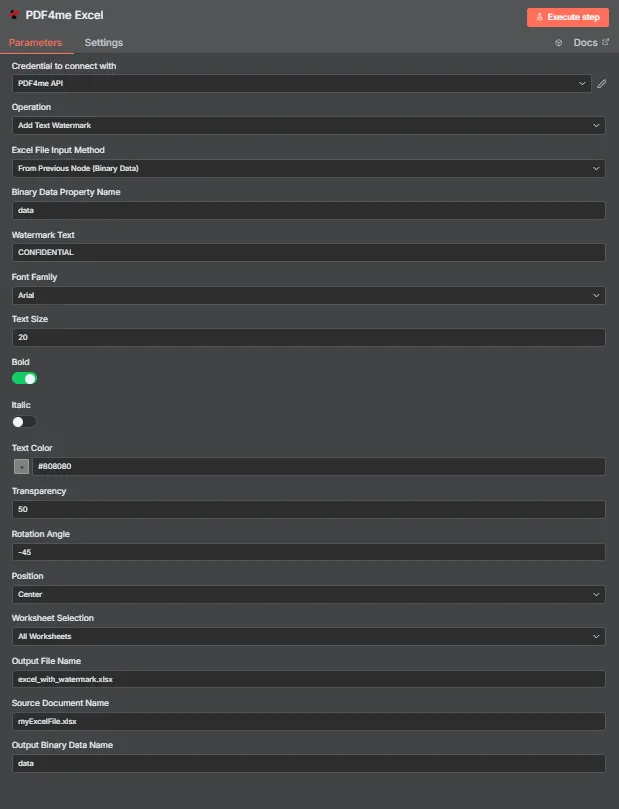
PDF4me Excel テキスト透かしパラメータパネルを追加する n8n
テキスト透かしを追加するために必要なパラメータは何ですか?
必須: 手術、 Excel ファイル入力方法、その方法に対応する入力フィールド、透かしテキスト、および出力ファイル名。スタイル設定フィールド(フォントファミリー、テキストサイズ、テキストカラー、太字、斜体、透明度、回転角度、位置)はすべてデフォルト値が設定されており、ソースドキュメント名と出力バイナリデータ名はオプションのラベルです。
| パラメータ | 必須 | その機能 | 例 |
|---|---|---|---|
| Operation | Required | Selects the PDF4me Excel action to run. Choose Add Text Watermark. | Add Text Watermark |
| Excel File Input Method | Required | How the workbook reaches the node. From Previous Node (Binary Data) reads it from an upstream item; the dropdown also offers base64 and file URL alternatives. | From Previous Node (Binary Data) |
| Binary Data Property Name | Conditional | Name of the binary property on the incoming n8n item that holds the .xlsx workbook. Applies when the input method is binary data. Defaults to data. | data |
| Watermark Text | Required | The text stamped across the worksheet. Accepts any string, including expressions mapped from earlier nodes. | CONFIDENTIAL |
| Font Family | Optional | Font used to render the watermark, chosen from the dropdown of available families. | Arial |
| Text Size | Optional | Watermark size in points, entered directly. The response echoes the same number back as textSize. | 20 |
| Bold | Optional | Toggle that applies bold weight to the watermark text. Off by default. | true |
| Italic | Optional | Toggle that applies italic styling to the watermark text. Off by default. | false |
| Text Color | Optional | Watermark colour, set through the colour picker or as a hex code. | #808080 |
| Transparency | Optional | Transparency from 0 (fully opaque) to 100 (fully invisible). Default 0. | 50 |
| Rotation Angle | Optional | Rotation in degrees. 0 is horizontal, negative values tilt anticlockwise for the classic diagonal watermark. | -45 |
| Position | Optional | Placement on the sheet, picked from a nine-cell grid running Top Left through Bottom Right. Returned as a numeric code in the response. | Center |
| Worksheet Selection | Optional | All Worksheets watermarks every sheet. Switching to a specific selection lets you target sheets by name or zero-based index. | All Worksheets |
| Output File Name | Required | Filename for the watermarked workbook the node returns. Include the .xlsx extension. | excel_with_watermark.xlsx |
| Source Document Name | Optional | Reference label for the incoming workbook. Echoed back as originalFileName for tracking; it does not change the output. | myExcelFile.xlsx |
| Output Binary Data Name | Optional | Name of the binary property the output item exposes. Defaults to data. | data |
出力フィールド
成功したランは1 n8n 持ち運んでいるアイテム JSON メタデータと透かし入りのワークブックをバイナリデータとして含む。
| 分野 | タイプ | 内容物 |
|---|---|---|
success | Boolean | True when the watermark was applied successfully. Use it to route error-handling branches. |
fileName | String | Filename of the watermarked workbook, matching Output File Name. |
fileSize | Number | Size of the returned workbook in bytes. |
originalFileName | String | The value supplied in Source Document Name, echoed back for tracking. |
watermarkText | String | The text that was stamped onto the worksheets. |
fontFamily | String | Font family used to render the watermark. |
textSize | Number | Watermark size in points, matching the Text Size input. |
isBold | Boolean | Whether bold weight was applied. |
isItalic | Boolean | Whether italic styling was applied. |
textColor | String | Watermark colour as a hex value. |
transparency | Number | Transparency level applied, from 0 to 100. |
rotationAngle | Number | Rotation in degrees applied to the watermark. |
position | Number | Numeric code for the placement cell used on the nine-position grid. |
worksheetSelection | Number | 0 when every worksheet was watermarked, 1 when a specific selection was targeted. |
selectedWorksheetNames | Array | Worksheet names targeted, empty when all worksheets were processed. |
selectedWorksheetIndexes | Array | Zero-based worksheet indexes targeted, empty when all worksheets were processed. |
message | String | Human-readable result message for the operation. |
Binary (data) | Binary | The watermarked .xlsx under Output Binary Data Name (default data). Pass into Write Binary File, Email, or a cloud-storage upload. |
N8N 行動対応
の PDF4me テキスト透かしを追加 操作は、内部で検査できる複数の形式のレスポンスを返します。 n8n:
- JSON
- Schema
- Binary
JSON 回答形式
[
  {
    "fileName": "excel_with_watermark.xlsx",
    "fileSize": 219605,
    "success": true,
    "originalFileName": "myExcelFile.xlsx",
    "watermarkText": "CONFIDENTIAL",
    "fontFamily": "Arial",
    "textSize": 20,
    "isBold": true,
    "isItalic": false,
    "textColor": "#808080",
    "transparency": 50,
    "rotationAngle": -45,
    "position": 1,
    "worksheetSelection": 1,
    "selectedWorksheetNames": [],
    "selectedWorksheetIndexes": [],
    "message": "Text watermark added to Excel file successfully"
  }
]
スキーマビュー
1 item
fileName: T excel_with_watermark.xlsx
fileSize: # 219605
success: true
originalFileName: T myExcelFile.xlsx
watermarkText: T CONFIDENTIAL
fontFamily: T Arial
textSize: # 20
isBold: true
isItalic: false
textColor: T #808080
transparency: # 50
rotationAngle: # -45
position: # 1
worksheetSelection: # 1
selectedWorksheetNames: [] Array
selectedWorksheetIndexes: [] Array
message: T Text watermark added to Excel file successfully
タイプ指標: T = String、 # = Number、 [] = Array。
バイナリデータビュー
data
File Name: excel_with_watermark.xlsx
File Extension: xlsx
Mime Type: application/vnd.openxmlformats-officedocument.spreadsheetml.sheet
File Size: 219.6 kB
バイナリデータアクセス: ワークブックにアクセスするには $binary.data.dataダウンロード、メール送信、または保存の準備ができています。
テキスト透かしを追加するにはどうすればいいですか? n8n?
- 追加する PDF4me Excel あなたのノードへ n8n ワークフローと設定 手術 に テキスト透かしを追加。
- で 接続するための認証情報選択してください PDF4me API 認証情報または認証情報を作成して貼り付けます API 鍵。
- セット Excel ファイル入力方法 に 前のノードから(バイナリデータ) そして設定する バイナリデータプロパティ名 ワークブックを保管している物件へ、通常
data。 - 入力 透かし文字、 例えば
CONFIDENTIAL。 - 透かしをスタイル設定して フォントファミリー、 テキストサイズ (箇条書きで) テキストの色、 大胆な、 そして イタリック。
- 視認性と配置を調整 透明性、 回転角度、 そして 位置。
- セット ワークシートの選択 に すべてのワークシート または特定のシートを対象とする。
- セット 出力ファイル名 で終わる
.xlsx次に、ノードを実行し、透かし入りのワークブックを転送します。
典型的な構成
ワークフローの例Common n8n workflow patterns using Add Text Watermark for Excel.
- Googleドライブのトリガーは、ワークブックが送信フォルダに移動されたときに作動します。
- PDF4me Excel テキスト透かしを追加し、透かしテキスト「CONFIDENTIAL」、テキストカラー「赤」、透明度50を実行します。
- 透かし入りのワークブックは受信者にメールで送信され、Googleドライブにアーカイブされます。
- スケジュールトリガーは、データベースのエクスポートデータから週次数値ワークブックを作成します。
- テキスト透かしを追加すると、透かしテキストが「下書き」、回転角度が-45、透明度が50、位置が中央で実行されます。
- 承認前に、草稿はSlackのレビューチャンネルに投稿されます。
- Loop Over Itemsノードは、クライアント行を反復処理します。 CRM 輸出。
- 透かしテキストは式からマッピングされるため、各ワークブックにそのクライアント名が反映されます。
- 各出力は、クライアントIDをファイル名として使用してクラウドストレージに書き込まれます。
- ウェブフックは、内部ツールから完成したレポートワークブックを受信します。
- ワークシートの選択ではサマリーシートが対象となり、生データタブは選択されません。
- 結果はアップロードされます SharePoint 配布用。
実践的なヒント
チートシート
| 分野 | 価値 |
|---|---|
| Operation | Add Text Watermark |
| Excel File Input Method | From Previous Node (Binary Data) |
| Binary Data Property Name | data |
| Watermark Text | CONFIDENTIAL |
| Font Family | Arial |
| Text Size | 20 (points) |
| Text Color | #808080 |
| Transparency | 50 |
| Rotation Angle | -45 |
| Position | Center |
| Worksheet Selection | All Worksheets |
| Output File Name | excel_with_watermark.xlsx |
| Output Binary Data Name | data |
| Credentials | PDF4me API credential |