AI-結婚証明書の手続き n8n
AI結婚証明書の手続き は n8n モジュール PDF4me 使用する AI 結婚証明書から構造化データを抽出する PDF または画像。証明書をバイナリデータとして送信します。 Base64または URL配偶者の名前、日付、司式者の詳細、証人、オプションの真正性チェックを受け取ります。 JSON。
このノードの機能
PDF4me: AI結婚証明書の手続き 結婚証明書を読む PDF または画像と抽出証明書の詳細、両配偶者の名前と重要データ、執行者と証人の情報、および公式印鑑の状態。オプションで有効化 真正性を確認する 不正の兆候と真正性の推奨事項を取得します。バイナリデータによる入力を受け付けます。 Base64 String、 または URL重要記録のデジタル化、本人確認、および法的文書のワークフローに最適です。
認証 API リクエスト
毎 PDF4me ノード n8n 有効な 接続するための認証情報. 作成または選択して、 PDF4me API ワークフローが認証できるようにするためのキー AI 抽出要求を安全に処理します。
見逃してはならない重要な事実
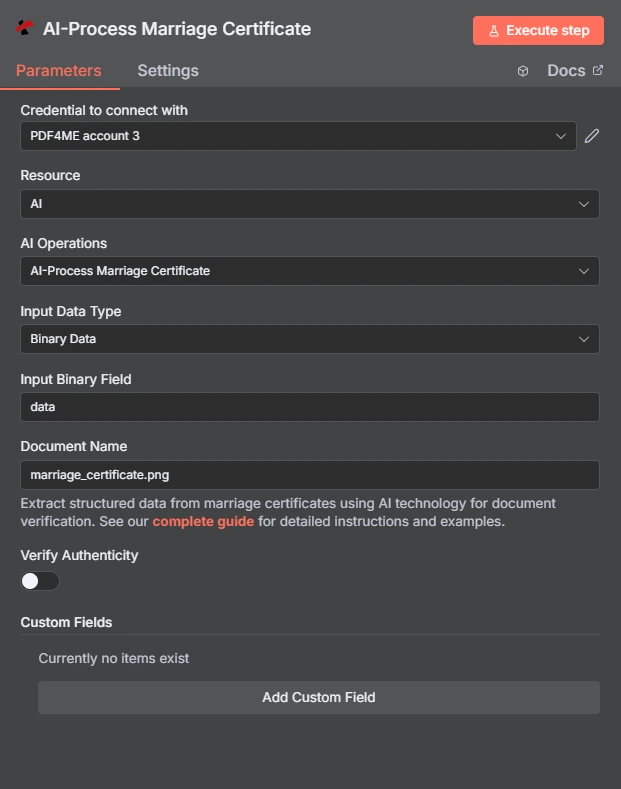
フルノードパネル:バイナリデータによる証明書、認証検証はデフォルトで無効
パラメータ
必須 n8n UI: 入力データタイプとドキュメント名、および選択した入力タイプに一致するフィールド(入力バイナリフィールド、 Base64 文書コンテンツ、または文書 URL) 認証とカスタムフィールドはオプションです。ワークフローに必要なものだけを有効にしてください。
| パラメータ | 必須 | その機能 | 例 |
|---|---|---|---|
| Input Data Type | Required | Choose how to provide the marriage certificate document to process. Options: Binary Data, Base64 String, URL. Default is `Binary Data`. | Binary Data |
| Input Binary Field | Conditional | Name of the binary property that contains the marriage certificate file. Shown when Input Data Type is Binary Data. Default is `data`. | data |
| Base64 Marriage Certificate Content | Conditional | Base64 encoded marriage certificate document content. Shown when Input Data Type is Base64 String. | |
| Marriage Certificate URL | Conditional | URL to the marriage certificate file to process. Shown when Input Data Type is URL. | |
| Document Name | Optional | Name of the source marriage certificate file for reference. Default is `marriage_certificate.pdf`. | marriage_certificate.pdf |
| Verify Authenticity | Optional | Whether to verify the authenticity of the marriage certificate. Default is `No`. | No |
| Custom Fields | Optional | Add custom field keys to extract from the marriage certificate using AI. | None by default |
出力にはどのようなフィールドが含まれますか?
正常に実行されると、構造化された証明書データと、オプションの真正性分析結果が返されます。
| 分野 | タイプ | 内容物 |
|---|---|---|
_metadata | String | Object added by the node: success (always true), message (`Marriage certificate processed successfully using AI`), processingTimestamp (time the node received the result, ISO 8601), sourceFileName (the Document Name field) and operation (`aiProcessMarriageCertificate`), plus verifyAuthenticity (true) when Verify Authenticity is on, and customFieldsUsed (the custom field keys sent) and customFieldsCount when custom fields are set. |
すべての分野 PDF4me 応答はアイテムにコピーされます: 証明書の詳細が読み取られます AI証明書番号、結婚の日付と場所、両配偶者、司式者、証人、真正性チェック、カスタムフィールドの値など。正確なフィールドは、 PDF4me 応答。
すべての分野の PDF4meの応答はアイテムにコピーされます: によって読み取られた証明書の詳細 AI証明書番号、結婚の日付と場所、両配偶者、司式者、証人、真正性チェック、カスタムフィールドの値など。正確なフィールドは、 PDF4meの返答。
設定方法は? AI-結婚証明書の手続き n8n?
- 追加 PDF4me あなたの n8n ワークフローを設定します。 リソース に AI そして AI 業務 に AI結婚証明書の手続き。
- で 接続するための認証情報選択してください PDF4me 認証情報またはクリック 新しい認証情報を作成する そしてあなたの API 鍵。
- セット 入力データタイプ に バイナリデータ (デフォルト)、 Base64 String、 または URL そして、対応するソースフィールドを指定します。
- セット 文書名 証明書のファイル名に正しい拡張子を付けてください。
- 切り替え 真正性を確認する 出力に不正検知指標と真正性に関する推奨事項が必要な場合は、オンにしてください。
- 必要に応じてクリック カスタムフィールドを追加する 標準の証明書フィールド以外のデータポイントについては、「カスタムフィールド」で設定してください。
- ノードを実行し、構造化された JSON データベースへの書き込み、スプレッドシートの行、または下流の検証ステップに渡されます。
典型的な構成
ワークフローの例Common n8n workflow patterns using AI-Process Marriage Certificate.
- スキャナー統合ノードは、スキャンされた結婚証明書のバッチ(バイナリデータ、プロパティ)をアップロードします。
データ) - PDF4me AI-結婚証明書の処理では、各ファイルから配偶者の名前、日付、証明書番号を抽出します。
- データベースノードは、構造化されたレコードを重要記録インデックスに書き込みます。
- ウェブフックは、氏名変更や給付金申請の一環としてアップロードされた結婚証明書を受信します。
- PDF4me AI-結婚証明書の処理は、データの抽出と改ざんの可能性の検出のために、真正性の確認を有効にして実行されます。
- Ifノードは、不正指標が存在する申請を手動審査キューにルーティングします。
- 文書管理システムは、事件ファイルに関連付けられた新しい婚姻証明書のアップロードをトリガーとして作動する。
- PDF4me AI-結婚証明書の処理では、配偶者データに加えて、挙式執行者と証人の詳細が抽出されます。
- 構造化された出力は、法的審査のために事件ファイル記録に添付される。
実践的なヒント
チートシート
| 分野 | 価値 |
|---|---|
| Resource | AI |
| AI Operations | AI-Process Marriage Certificate |
| Input Data Type | Binary Data |
| Input Binary Field | data |
| Document Name | marriage_certificate.png |
| Verify Authenticity | Off |
| Custom Fields | None by default |
| Credentials | PDF4me API credential |
よくある質問
関連アクション
他のプラットフォームでの同じタスク
ユースケース
エンタープライズ法務自動化
- 重要記録管理: 戸籍記録システムにおける婚姻証明書の処理を自動化する
- 本人確認: 抽出した結婚証明書データを使用して本人確認を行う
- 文書認証結婚証明書の真正性を確認する
- 不正検出法的手続きのために、偽造された結婚証明書を検出する。
AI- 文書処理
- マルチフォーマット対応: プロセス PDF、 PNG、 JPG、 そして JPEG 結婚証明書の書式
- 多言語処理: さまざまな言語の結婚証明書からデータを抽出する
- インテリジェントフィールド認識関連する証明書フィールドを自動的に識別して抽出します。
ビジネスインテリジェンスとアナリティクス
- コンプライアンス追跡抽出した証明書データを使用して、法的要件への準拠状況を追跡する。
- 監査証跡証明書処理に関する包括的な監査証跡を維持する
- パフォーマンス指標処理精度と効率を追跡する