AI-健康保険証の処理 n8n
AI-ヘルスカードの処理 は PDF4me ノードアクション n8n 健康保険証を読み取り、その詳細を構造化された形式で返す JSONこの機能を使えば、会員ID、グループ番号、プランの種類、処方箋ルーティングコードをカードから手書きで入力する代わりに、スキャン画像や写真から取得できます。
このノードの機能
PDF4me: AI-ヘルスカードの処理 カード画像または PDF そして返します 健康データ ファイルではなくオブジェクトです。メンバーID、プランの詳細、および rxBin、 rxPcn、 そして rxGroup 処方箋ルーティングコード、およびレポート フィールドごとの信頼度スコア そのため、不確実な読み取り結果は人間が確認することができます。データは抽出されますが、そのデータの保存方法や処理方法については、引き続きお客様の判断に委ねられます。
認証 API リクエスト
毎 PDF4me ノード n8n 有効な 接続するための認証情報. 作成または選択して、 PDF4me API ワークフローが抽出要求を安全に認証できるようにするためのキー。
見逃してはならない重要な事実
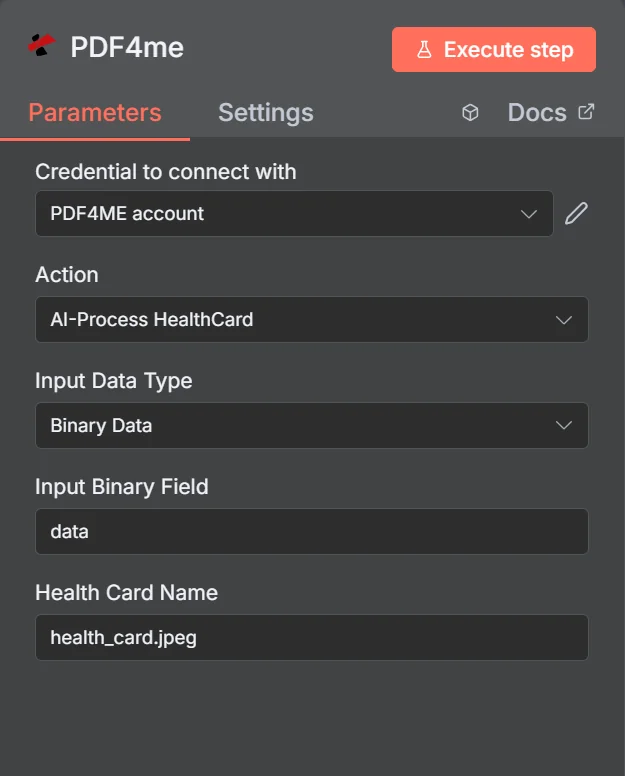
アクションは次のように記載されています AI-ヘルスカードの処理。バイナリデータを選択した場合、パネルには入力バイナリフィールドとヘルスカード名のみが必要となるため、ファイル名の拡張子がフォーマット検出の基準となります。
ヘルスカード解析 vs ジェネリック OCR
| 質問 | AI-ヘルスカードの処理 | 一般的なテキスト抽出 |
|---|---|---|
| What you get back | Named fields such as memberId and rxBin | A block of unstructured text |
| Layout differences | Handled, fields are identified by meaning | Not handled, position shifts break parsing |
| Quality signal | Per-field confidence scores | None beyond whether text was found |
| Work needed after | Map fields and check confidence | Write and maintain regex per insurer |
| Best for | Cards from many different insurers | One fixed, unchanging document layout |
パラメータは AI-健康保険証の手続きが必要ですか?
3 つのソース フィールドは相互に排他的です。一致するのは 1 つだけです。 入力データタイプ パネルに表示されるため、必須ではなく条件付きとしてマークされています。
| パラメータ | 必須 | その機能 | 例 |
|---|---|---|---|
| Input Data Type | Required | Choose how to provide the health card document to process. Options: Binary Data, Base64 String, URL. Default is `Binary Data`. | Binary Data |
| Input Binary Field | Conditional | Name of the binary property that contains the health card file. Shown when Input Data Type is Binary Data. Default is `data`. | data |
| Base64 Health Card Content | Conditional | Base64 encoded health card content. Shown when Input Data Type is Base64 String. | JVBERi0xLjQKJ... |
| Health Card URL | Conditional | URL to the health card file to process. Shown when Input Data Type is URL. | https://example.com/card.jpeg |
| Health Card Name | Optional | Name of the source health card file for reference. Default is `health_card.jpeg`. | health_card.jpeg |
出力
このアクションはファイルではなくデータを返します。最上位の応答フィールド:
| 分野 | タイプ | 内容物 |
|---|---|---|
_metadata | String | Object added by the node: success (always true), message (`Health card processed successfully using AI`), processingTimestamp (time the node received the result, ISO 8601), sourceFileName (the Document Name field) and operation (`aiProcessHealthCard`). |
すべての分野 PDF4me 応答はアイテムにコピーされます: 健康カードの詳細が読み取られます AI例えばメンバー ID 氏名、グループ番号、プランの種類、保険会社、日付、薬局(処方箋)データ、自己負担額情報。正確な項目は、 PDF4me 応答。
すべての分野の PDF4meの応答はアイテムにコピーされます: によって読み取られた健康保険証の詳細 AI例えばメンバー ID 氏名、グループ番号、プランの種類、保険会社、日付、薬局(処方箋)データ、自己負担額情報。正確な項目は、 PDF4meの返答。
内部 processedData.healthData:
| 分野 | タイプ | 内容物 |
|---|---|---|
| memberId | String | The member identification number printed on the card. |
| memberName | String | Full name of the insured member. |
| dateOfBirthStr | String | Member date of birth as read from the card. |
| insuranceProvider | String | Name of the insurer that issued the card. |
| groupNumber | String | Group or policy number for the plan. |
| planType | String | Plan category such as PPO, HMO, or EPO. |
| effectiveDateStr | String | Date the coverage takes effect. |
| rxBin | String | Prescription BIN routing code, usually printed on the reverse. |
| rxPcn | String | Prescription processor control number, usually on the reverse. |
| rxGroup | String | Prescription group identifier, usually on the reverse. |
| copayInfo | Array | Copay amounts per service type where the card lists them. |
| confidence | Object | Per-field confidence scores. Use these to gate automatic acceptance. |
設定方法は? AI-ヘルスカードの処理 n8n?
- 追加する PDF4me ノードをワークフローに追加して設定します アクション に AI-ヘルスカードの処理。
- 選択してください PDF4me 認証情報を入力するか、作成して貼り付けてください。 API 鍵。
- セット 入力データタイプ そして、該当する欄にカード情報を入力してください。
- セット 健康保険証名 正しい拡張子で、例えば
health_card.jpeg。 - ノードを実行して検査する
processedData.healthData出力において。 - IFノードを追加してチェックします
successおよび関連するconfidenceスコア。 - 確実な抽出結果は次の段階に進め、残りは人間のレビュー待ちのキューに送ります。
- 下流に保存するデータを慎重に決定し、プロセスが実際に必要とするフィールドのみを保持してください。
典型的な構成
ワークフローの例Common n8n workflow patterns using AI-Process HealthCard.
- 新規患者は、フォームを通じてカードの写真をアップロードします。
- AI-Process HealthCardは、会員とプランの詳細を読み取ります。
- これらの項目は、スタッフが確認するための受付記録を事前に入力するものです。
- カードの裏面がノードに送信されます。
- rxBin、rxPcn、およびrxGroupは、それぞれ別のフィールドとして返されます。
- 請求は、誰もコードを転記することなく処理される。
- 抽出ごとに、フィールドごとの信頼度スコアが返されます。
- IFノードは、それらを許容しきい値と比較します。
- 判断が難しいカードのみが担当者の手元に届くため、審査の手間は最小限に抑えられます。
- プラン更新時に交換用カードが届きます。
- このノードはeffectiveDateStrとプランフィールドを読み取ります。
- 古い情報が原因で申請が却下される前に、記録は更新されます。
実践的なヒント
チートシート
| 分野 | 価値 |
|---|---|
| Action | AI-Process HealthCard |
| Input Data Type | Binary Data |
| Input Binary Field | data |
| Health Card Name | health_card.jpeg |
| Credentials | PDF4ME account |
| Key output path | processedData.healthData |
| Quality gate | processedData.healthData.confidence |