AI-クレジットカードの処理 n8n
AIクレジットカード決済処理 は PDF4me ノードアクション n8n クレジットカードの画像を読み取る、または PDF そして、構造化されたカード詳細を返します。 JSON この機能を使えば、カード名義人、カード番号、有効期限、発行銀行などの情報を、手入力ではなくスキャン画像や写真から取得できます。
このノードの機能
PDF4me: AIクレジットカード決済処理 バイナリデータからカードファイルを受け取ります。 Base64 Stringまたは URL ビジョンを適用 AI 返す クレジットカードデータ 個々のカードフィールドを保持するオブジェクト。 PDF、 PNG、 JPG、 そして JPEGテキストの塊ではなく個別の値が返されるため、次のワークフロー手順では単一のフィールドに対して操作を行うことができ、それらの値のうちどれを保持する価値があるかを意図的に選択できます。
認証 API リクエスト
毎 PDF4me ノード n8n 有効な 接続するための認証情報. 作成または選択して、 PDF4me API ワークフローが抽出要求を安全に認証できるようにするためのキー。
見逃してはならない重要な事実
「」 存在しないのではなく、空の値かどうかをテストします。つまり、キーが存在するかどうかを確認する代わりに、空の値をテストします。警告 配列と フォールバック使用済み 疑わしい結果を審査に回す。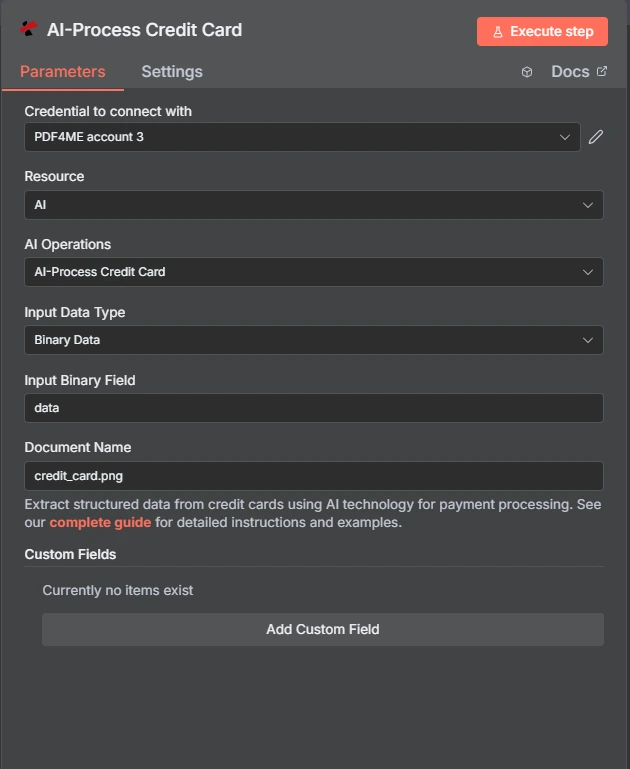
PDF4me AI-クレジットカードの処理アクション n8n
カード OCR 汎用ドキュメントパーサーとの比較
PDF4me カード固有のアクションと汎用パーサーの両方が同梱されています。カードアクションはカードの形状を認識し、汎用パーサーは検索対象を指定します。
| 側面 | AIクレジットカード決済処理 | AI ドキュメントパーサー |
|---|---|---|
| Field set | A fixed card schema returned as creditCardData | Whatever fields you define for the document |
| Setup effort | None, the card fields are already known | You describe the fields you want extracted |
| Best fit | Payment cards specifically | Any document shape the card action does not cover |
| Extending it | Custom Field Keys for extras beyond the card schema | Fully defined by you from the start |
パラメータは AIクレジットカード決済が必要ですか?
必須: アクション、入力データタイプ、その入力タイプに一致するフィールド、およびクレジットカード名。カスタムフィールドキーはオプションです。
| パラメータ | 必須 | その機能 | 例 |
|---|---|---|---|
| Input Data Type | Required | Choose how to provide the credit card document to process. Options: Binary Data, Base64 String, URL. Default is `Binary Data`. | Binary Data |
| Input Binary Field | Conditional | Name of the binary property that contains the credit card file. Shown when Input Data Type is Binary Data. Default is `data`. | data |
| Base64 Credit Card Content | Conditional | Base64 encoded credit card document content. Shown when Input Data Type is Base64 String. | JVBERi0xLjQKJ... |
| Credit Card URL | Conditional | URL to the credit card file to process. Shown when Input Data Type is URL. | https://example.com/card.jpg |
| Document Name | Optional | Name of the source credit card file for reference. Default is `credit_card.png`. | credit_card.png |
| Custom Fields | Optional | Add custom field keys to extract from the credit card using AI. | |
出力フィールド
ノードは返します JSON ファイルではなく、カードの値は creditCardData 物体。
creditCardData内のフィールド
モデルが特定の画像上で読み取れないフィールドは、空の文字列として返されます。
出力
ノードが返すフィールド。
| 分野 | タイプ | 内容物 |
|---|---|---|
_metadata | String | Object added by the node: success (always true), message (`Credit card processed successfully using AI`), processingTimestamp (time the node received the result, ISO 8601), sourceFileName (the Document Name field) and operation (`aiProcessCreditCard`), plus customFieldsUsed (the custom field keys sent) and customFieldsCount when custom fields are set. |
すべての分野 PDF4me 応答はアイテムにコピーされます: カードの詳細が読み取られます AI銀行、カード番号、有効期限、カード所有者名、カードの種類とブランド、カスタムフィールドの値など。正確なフィールドは、 PDF4me 応答。
すべての分野の PDF4meの応答はアイテムにコピーされます: カードの詳細が読み取られます AI銀行、カード番号、有効期限、カード名義人、カードの種類とブランド、カスタムフィールドの値など。正確なフィールドは、 PDF4meの返答。
設定方法は? AI-クレジットカードの処理 n8n?
- 追加 PDF4me あなたの n8n ワークフローを選択し、 AIクレジットカード決済処理 アクション。
- で 接続するための認証情報選択してください PDF4me 認証情報またはクリック 新しい認証情報を作成する そしてあなたの API 鍵。
- セット 入力データタイプ に バイナリデータ (デフォルト)、 Base64 String、 または URL そして、対応するカードファイルフィールドを指定します。
- セット クレジットカード名義 正しい拡張子で、例えば
card.jpgまたはstatement.pdf。 - オプションで追加 カスタムフィールドキー 標準カードスキーマを超える値の場合。
- ノードを実行して、
creditCardDataレスポンスからオブジェクトを取得します。 - 何かを保存する前に、実際に必要なフィールドだけを選択し、それ以外は削除してください。
典型的な構成
ワークフローの例Common n8n workflow patterns using AI-Process Credit Card.
- 顧客は登録時にカードの写真をアップロードする。
- AI-クレジットカード処理では、カード所有者名と有効期限を読み取ります。
- 確認フォームへの事前入力には、機密性の低い項目のみが使用されます。
- ノードはアップロードされたカード画像を処理する。
- IFノードは、warnings配列とfallbackUsedフラグをチェックします。
- 疑わしいものはすべて、そのまま処理されるのではなく、審査待ちの列に回されます。
- カード画像は、キャプチャ時に一度だけ処理されます。
- 有効期限とカード所有者名のみが保持されます。
- スケジュールされたワークフローにより、有効期限が近づいているカードに更新連絡の対象となるフラグが立てられます。
- カードの明細書 PDF 共有メールボックスに届きます。
- このノードは銀行名と口座番号を抽出します。
- この明細書は、該当する口座記録に紐づけて提出されます。
実践的なヒント
チートシート
| 分野 | 価値 |
|---|---|
| Action | AI-Process Credit Card |
| Input Data Type | Binary Data |
| Input Binary Field | data |
| Credit Card Name | card.jpg |
| Custom Field Keys | (empty) |
| Accepted formats | PDF, PNG, JPG, JPEG |
| Returns | JSON with a creditCardData object |
| Credentials | PDF4me API credential |