ZUGFeRD請求書を作成する n8n
このノードの機能
PDF4me ツークフェルト請求書を作成する 完全に準拠した ZUGFeRDハイブリッド電子請求書 (構造化されたPDF/A-3文書) XML 請求書データは、 n8n ワークフローを変換します。 XML、 JSON、 または CSV 請求書データを単一のハイブリッドファイルにまとめ、 ドイツにおける企業間電子請求書発行義務化EU全域のEN 16931規格への準拠、またはドイツの公共部門向けプロファイルXRECHNUNGに対応しています。ZUGFeRDバージョン1.0から2.4まで、および6つの適合レベルすべてを1つのノードでサポートします。
認証 API リクエスト
毎 PDF4me ノード n8n 有効な 接続するための認証情報. 作成または選択して、 PDF4me API ワークフローがZUGFeRDの請求書生成リクエストを安全に認証できるようにするためのキー。
見逃してはならない重要な事実
パラメータ
必須 n8n UI: 接続に使用する認証情報、入力データタイプ、ドキュメント名(入力データタイプが「なし」の場合でも常に必須で、ドキュメント名のフォールバックとして使用されます)、出力モード、Zugferdバージョン、PDFへの請求書レンダリング、言語、入力フォーマット、および請求書データ入力タイプ。 適合レベル Zugferd バージョンブランチに基づいて表示され、必須となります。1.0、2.0/2.1/2.2/2.4、カスタムではフィールド名とオプション設定が異なります。一致する請求書データフィールド (請求書 XML/JSON/CSV データ、バイナリプロパティ、 Base64 請求書データ入力タイプに応じて、コンテンツ(またはデータURL)が必要です。実行時検証では、選択されたパスに空でないコンテンツが存在することを強制し、「請求書…データは必須です」または「請求書のbase64コンテンツは必須です」などのエラーが表示されます。
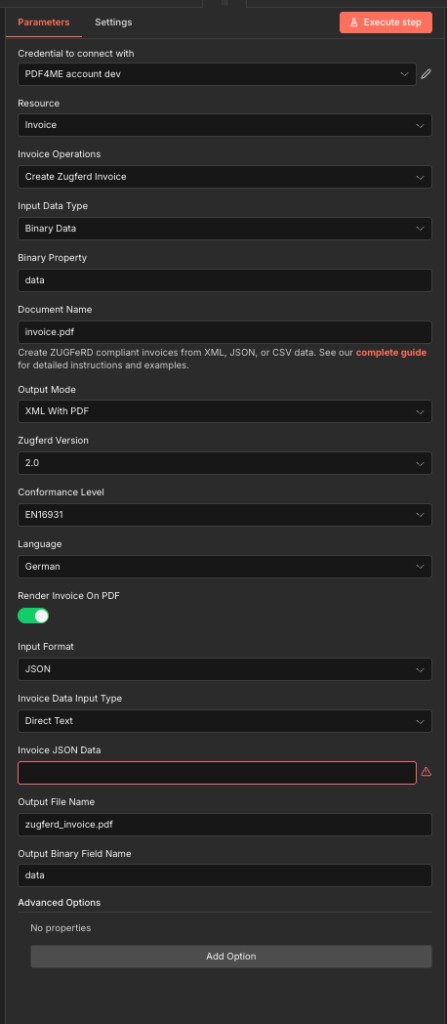
満杯 パラメータ 表示; 下記の表と併用して、ノード内の各フィールドを特定します。
| パラメータ | 必須 | その機能 | 例 |
|---|---|---|---|
| Input Data Type | Required | How to provide the input document (optional - only needed if rendering invoice on PDF). Options: Base64 String, Binary Data, None, URL. Default is `None`. | None |
| Base64 Content | Conditional | Base64 encoded content of the file to process. Shown when Input Data Type is Base64 String. | JVBERi0xLjQK... |
| Binary Property | Conditional | Name of the binary property containing the file to process. Shown when Input Data Type is Binary Data. Default is `data`. | data |
| File URL | Conditional | URL to the file to process. Shown when Input Data Type is URL. | https://example.com/invoice.pdf |
| Document Name | Required | Name of the input document sent to PDF4me. With Binary Data the file name of the binary data is used instead, with URL the last part of the URL. Default is `invoice.pdf`. | invoice.pdf |
| Output Mode | Required | Output format for the Zugferd invoice. Options: XML Only, XML With PDF. Default is `XML With PDF`. | XML With PDF |
| Zugferd Version | Required | Zugferd version sent as ZugferdVersion in the API payload. Options: 1.0, 2.0, 2.1, 2.2, 2.4, Custom. Default is `2.0`. | 2.0 |
| Conformance Level | Conditional | For ZUGFeRD 1.0 only (sent as ConformanceLevel). Shown when Zugferd Version is 1.0. Options: BASIC, COMFORT, EXTENDED. Default is `BASIC`. | BASIC |
| Conformance Level | Conditional | For ZUGFeRD 2.0 and later: 2.0, 2.1, 2.2, 2.4 (sent as ConformanceLevel). MINIMUM: minimal machine-readable core. BASICWL: basic without line items. BASIC: line items, broader CII subset. EN16931: EU e-invoice baseline. EXTENDED: EN 16931 plus extensions. XRECHNUNG: German CIUS on EN 16931. Shown when Zugferd Version is 2.0. Options: MINIMUM, BASICWL, BASIC, EN16931, EXTENDED, XRECHNUNG. Default is `EN16931`. | EN16931 |
| Conformance Level | Conditional | For ZUGFeRD 2.0 and later: 2.0, 2.1, 2.2, 2.4 (sent as ConformanceLevel). MINIMUM: minimal machine-readable core. BASICWL: basic without line items. BASIC: line items, broader CII subset. EN16931: EU e-invoice baseline. EXTENDED: EN 16931 plus extensions. XRECHNUNG: German CIUS on EN 16931. Shown when Zugferd Version is 2.1. Options: MINIMUM, BASICWL, BASIC, EN16931, EXTENDED, XRECHNUNG. Default is `EN16931`. | EN16931 |
| Conformance Level | Conditional | For ZUGFeRD 2.0 and later: 2.0, 2.1, 2.2, 2.4 (sent as ConformanceLevel). MINIMUM: minimal machine-readable core. BASICWL: basic without line items. BASIC: line items, broader CII subset. EN16931: EU e-invoice baseline. EXTENDED: EN 16931 plus extensions. XRECHNUNG: German CIUS on EN 16931. Shown when Zugferd Version is 2.2. Options: MINIMUM, BASICWL, BASIC, EN16931, EXTENDED, XRECHNUNG. Default is `EN16931`. | EN16931 |
| Conformance Level | Conditional | For ZUGFeRD 2.0 and later: 2.0, 2.1, 2.2, 2.4 (sent as ConformanceLevel). MINIMUM: minimal machine-readable core. BASICWL: basic without line items. BASIC: line items, broader CII subset. EN16931: EU e-invoice baseline. EXTENDED: EN 16931 plus extensions. XRECHNUNG: German CIUS on EN 16931. Shown when Zugferd Version is 2.4. Options: MINIMUM, BASICWL, BASIC, EN16931, EXTENDED, XRECHNUNG. Default is `EN16931`. | EN16931 |
| Zugferd Version (Custom) | Conditional | Custom version string for ZugferdVersion when Zugferd Version is Custom. Shown when Zugferd Version is Custom. | 2.3.1 |
| Conformance (Custom Version) | Conditional | Which conformance levels apply to the custom version: the ZUGFeRD 1.0 levels (BASIC, COMFORT, EXTENDED) or the 2.0 and later levels (MINIMUM, BASICWL, BASIC, EN16931, EXTENDED, XRECHNUNG). Shown when Zugferd Version is Custom. Options: ZUGFeRD 1.0 only (BASIC, COMFORT, EXTENDED), ZUGFeRD 2.0 and Newer (MINIMUM, BASICWL, EN16931, …). Default is `ZUGFeRD 2.0 and Newer (MINIMUM, BASICWL, EN16931, …)`. | ZUGFeRD 2.0 and Newer (MINIMUM, BASICWL, EN16931, …) |
| Conformance Level | Conditional | For custom ZUGFeRD 1.0-style version only (sent as ConformanceLevel). Shown when Conformance (Custom Version) is ZUGFeRD 1.0 only (BASIC, COMFORT, EXTENDED). Options: BASIC, COMFORT, EXTENDED. Default is `BASIC`. | BASIC |
| Conformance Level | Conditional | For custom ZUGFeRD 2.0+ version (sent as ConformanceLevel). MINIMUM: minimal machine-readable core. BASICWL: basic without line items. BASIC: line items, broader CII subset. EN16931: EU e-invoice baseline. EXTENDED: EN 16931 plus extensions. XRECHNUNG: German CIUS on EN 16931. Shown when Conformance (Custom Version) is ZUGFeRD 2.0 and Newer (MINIMUM, BASICWL, EN16931, …). Options: MINIMUM, BASICWL, BASIC, EN16931, EXTENDED, XRECHNUNG. Default is `EN16931`. | EN16931 |
| Language | Required | Language for the Zugferd invoice. Options: Czech, Dutch, English, French, German, Italian, Polish, Portuguese, Spanish. Default is `German`. | German |
| Render Invoice On PDF | Required | Whether to render the invoice visually on the PDF. Default is `Yes`. | Yes |
| Input Format | Required | Format of the invoice data input. Options: CSV, JSON, XML. Default is `XML`. | XML |
| Invoice Data Input Type | Required | How to provide the invoice data (XML/JSON/CSV). Options: Base64 String, Binary Data, Direct Text, URL. Default is `Direct Text`. | Direct Text |
| Invoice Base64 Content | Conditional | Base64 encoded invoice data content. Shown when Invoice Data Input Type is Base64 String. | PGludm9pY2U+... |
| Invoice Binary Property | Conditional | Name of the binary property containing the invoice data file. Shown when Invoice Data Input Type is Binary Data. Default is `data`. | data |
| Invoice XML Data | Conditional | XML invoice data (paste directly). Shown when Invoice Data Input Type is Direct Text. | __INVOICE_PAYLOAD_SAMPLES__ |
| Invoice JSON Data | Conditional | JSON invoice data (paste directly). Shown when Invoice Data Input Type is Direct Text. | __INVOICE_PAYLOAD_SAMPLES__ |
| Invoice CSV Data | Conditional | CSV invoice data (paste directly). Shown when Invoice Data Input Type is Direct Text. | __INVOICE_PAYLOAD_SAMPLES__ |
| Invoice Data URL | Conditional | URL to the invoice data file (XML, JSON or CSV, matching Input Format). The node downloads the file and sends its content to PDF4me. Shown when Invoice Data Input Type is URL. | https://example.com/invoice.json |
| Invoice Data URL | Conditional | URL to the invoice data file (XML, JSON or CSV, matching Input Format). The node downloads the file and sends its content to PDF4me. Shown when Invoice Data Input Type is URL. | https://example.com/invoice.json |
| Invoice Data URL | Conditional | URL to the invoice data file (XML, JSON or CSV, matching Input Format). The node downloads the file and sends its content to PDF4me. Shown when Invoice Data Input Type is URL. | https://example.com/invoice.json |
| Output File Name | Optional | Name for the output file. If empty, `zugferd_invoice.pdf` (or `zugferd_invoice.xml`) is used; with Output Mode XML Only the extension is changed to `.xml`. Default is `zugferd_invoice.pdf`. | zugferd_invoice.pdf |
| Output Binary Field Name | Optional | Name of the binary property to store the output file. Default is `data`. | data |
| Advanced Options | Optional | Optional settings, collapsed behind Add Option. | Add Option |
| Custom Profiles | Optional | Use "JSON" to adjust custom properties. Review Profiles at https://dev.pdf4me.com/apiv2/documentation/ to set extra options for API calls. | |
出力
ノードが返すフィールド。
| 分野 | タイプ | 内容物 |
|---|---|---|
fileName | String | Output file name that was used (see Output File Name). |
data | Binary | The ZUGFeRD invoice: a PDF with the invoice XML embedded (XML With PDF) or the XML file alone (XML Only). |
サンプル請求書ファイル
実際のデータソースを接続する前に、これらのサンプルファイルを使用して、各入力フォーマットでノードをテストしてください。ドイツのB2B生産ワークフローの場合は、まず以下から始めます。 sample-invoice-zugferd-2.0-en16931.json (ZUGFeRD 2.0、 EN16931 適合性)。
ZUGFeRD-invoice-sample.xmlZUGFeRD-invoice-sample-2.0.xmlsample-invoice-zugferd-2.0-en16931.jsonsample-invoice.jsontest-invoice.csvzugferd-invoice-2.0.csv詳細オプション
すべてのフィールド 詳細オプション コレクションはオプションです。 オプションを追加 ノードのUIで。
プロフィール入力データタイプのオプション
制御方法 背景 PDF 書類 (ハイブリッド請求書の視覚レイヤー)がノードに供給されます。
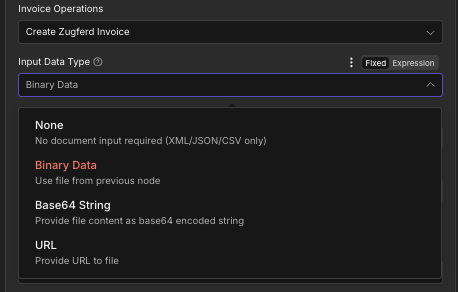
入力データタイプのドロップダウン:背景の表示方法を制御します PDF ノードに到達する
なしXML/JSON/CSV形式のみ、背景PDFは不可バイナリデータ前のノードからのファイル(最も一般的)データ)Base64文字列Base64エンコードされたファイルコンテンツURL公開リンクからダウンロード出力モードオプション
ノードが純粋な XML ファイルまたは ZUGFeRD ハイブリッド全体 (PDF/A-3 + 埋め込みファイル) XML)
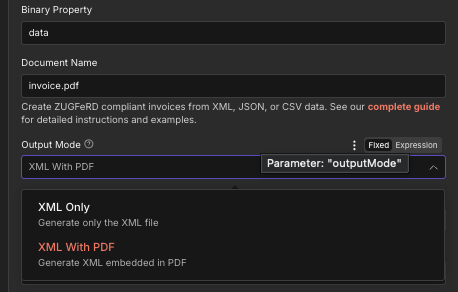
出力モードのドロップダウンには、次の 2 つのオプションがあります: pure XML またはハイブリッドPDF/A-3 XML 組み込み
XMLのみ純粋な XML、 いいえ PDF ラッパー.xml。XMLとPDFデフォルト: 完全な ZUGFeRD ハイブリッドファイルZUGFeRD バージョンオプション
生成された請求書に埋め込まれているZUGFeRD仕様のバージョン。
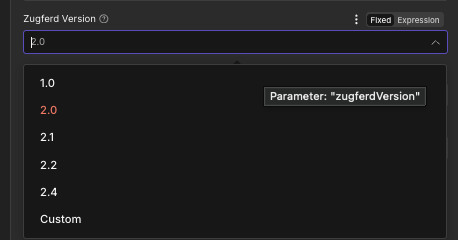
ZUGFeRD バージョン選択ドロップダウンには、旧バージョン 1.0 と最新バージョン 2.4 を含む 6 つのバージョンオプションがあります。
1.0レガシー:2025年の義務を満たしていない2.0デフォルト: 幅広い互換性2.1細かな改良2.2XRECHNUNGのプロフィールを更新しました2.4最新情報:最新のXRECHNUNGサポートカスタム高度なバージョン管理適合レベルオプション
適合性プロファイルは、請求書のどの項目が必須で検証されるかを制御するものであり、コンプライアンスにおいて最も重要な選択です。
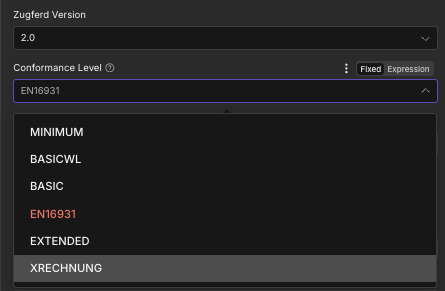
適合レベルのドロップダウンメニューには、MINIMUMからXRECHNUNGまでの6つのプロファイルがあり、現場の要件と適合範囲を制御します。
最小ヘッダーのみで、有効な請求書ではありません。ベーシックWL基本料金(ラインなし):消費税のみベーシック法定最低請求書金額EN16931デフォルト: 欧州規格拡張版業界特有の特典XRECHARGEドイツの公共部門は義務的言語オプション
レンダリングされた請求書ラベルの表示言語 PDF 層。 XML データ自体は言語に依存しない。
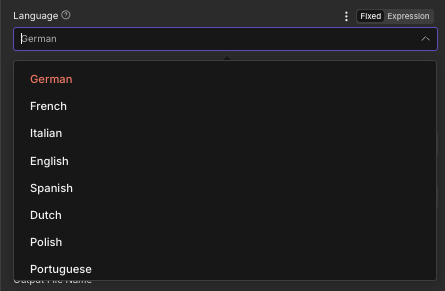
言語: レンダリングされたローカライズされたラベル PDF (ドイツ語は、ドイツのB2BおよびB2Gにおいて典型的な例です。)
ドイツ語デフォルト、ドイツ語 B2B/B2G英語国際請求書フランス語Factur-Xのワークフローイタリア語イタリアのB2Bスペイン語スペイン語圏のB2Bオランダ語オランダ/ベルギー研磨ポーランドのB2Bポルトガル語ポルトガル/ブラジル入力フォーマットオプション
ノードに提供する請求書データのフォーマット。
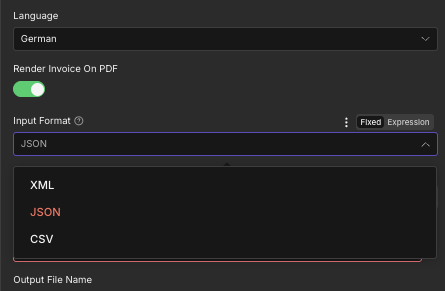
入力形式: 選ぶ XML、 JSON、 または CSV 請求書のペイロードに合わせるため。
XML組み立て済み XML 請求書JSONデフォルト: モダン API ソースCSV表形式のバッチ請求書データ請求書データ入力タイプのオプション
請求書データ( XML、 JSON、 または CSV コンテンツ)がノードに到達します。
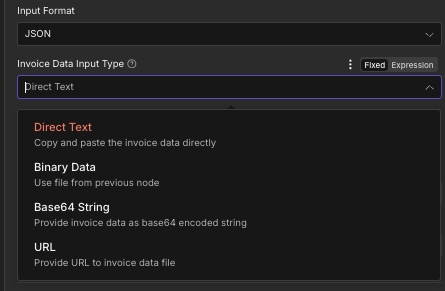
請求書データ入力タイプ: どのように XML、 JSON、 または CSV ペイロードが提供されます(インライン、前のノードからのバイナリ、base64、または URL)
直接テキストデフォルト: インラインで貼り付けまたはマップバイナリデータ前のノードからのファイルBase64文字列Base64エンコードされたデータURL公開リンクからダウンロード出力フィールド
| 分野 | タイプ | 内容物 |
|---|---|---|
fileName | String | Filename of the generated ZUGFeRD invoice, for example zugferd_invoice.pdf for XML With PDF output or zugferd_invoice.xml for XML Only output. |
mimeType | String | MIME type of the output file: application/pdf for hybrid output, application/xml for XML Only. Useful for content type validation in downstream HTTP or storage nodes. |
fileSize | Number | Size of the generated ZUGFeRD file in bytes. Useful for storage planning, bandwidth monitoring, and conditional routing in the workflow. |
success | Boolean | True when the ZUGFeRD invoice was generated successfully. False if validation failed or input data was malformed. Use this field to route error handling branches. |
message | String | Human-readable status message confirming success or describing the validation/parsing error encountered. Useful for logging and error notification steps. |
クイックセットアップ
- 追加 PDF4me あなたの n8n ワークフローを設定します。 リソース に 請求書 そして 請求書処理 に ツークフェルト請求書を作成する。
- で 接続するための認証情報選択してください PDF4me 認証情報またはクリック 新しい認証情報を作成する そしてあなたの API 鍵。
- セット 入力データタイプ: 前のノード (バイナリ データ) に接続し、 Base64 文字列または URL 背景 PDFまたは、None を選択してください。 PDF4me レンダリングするべき PDF 請求書データのみから。
- 入力 文書名 (例えば
invoice.pdf) - セット 出力モード: XMLとPDF 標準ハイブリッドZUGFeRD出力の場合、または XMLのみ 純粋な XML。
- 選ぶ ツークフェルト版 (使用 2.0 安全なデフォルト設定として。 2.4 最新のXRECHNUNGプロファイルについてはこちらをご覧ください。
- 選ぶ 適合レベル: EN16931 一般的なB2B向け、 XRECHARGE ドイツの公共部門の請求書作成の場合、 拡張版 業界特有の分野向け。
- セット 言語 レンダリングされたもの PDF ラベル(デフォルトはドイツ語)。
- 有効にする 請求書をPDF形式でレンダリングする あなたが望むなら PDF4me 請求書の内容を視覚的に表示する。あらかじめデザインされた背景を指定する場合は無効にする。 PDF。
- 選ぶ 入力形式 (JSON、 XML、 または CSV) そして 請求書データ入力タイプ (テキスト、バイナリデータ、Base64文字列、またはURL)請求書データを「請求書データ」フィールドに貼り付けるか、マッピングしてください。
- セット 出力ファイル名 に
zugferd_invoice.pdfそして 出力バイナリフィールド名 にdata。 - 出力先を次のノード(メール送信者、クラウドストレージへのアップロード、政府ポータル)に接続します。 HTTP POST)を実行し、ワークフローを実行します。
ワークフローの例
ワークフローの例Common n8n workflow patterns using Create Zugferd Invoice.
- Webhookトリガーは、会計プラットフォーム(DATEV、sevDesk、lexoffice)で請求書が確定されたときに発火します。
- ウェブフックのペイロードには、構造化された請求書データが含まれています。 JSON 物体。
- PDF4me Create Zugferd Invoice はハイブリッド請求書を生成します。入力データタイプは None (PDF4me レンダリングする PDF から JSON) 出力モードは XML with PDF、Zugferd バージョンは 2.0、適合レベルは EN16931、言語はドイツ語、入力フォーマットは JSON請求書データの入力タイプは、Webhookペイロードからマッピングされた直接テキストです。
- GmailノードがZUGFeRDにメールを送信する PDF 顧客の支払先住所宛てに送付し、ドイツのB2B受領委任要件を満たす。
- PostgreSQLノードは、監査およびコンプライアンス報告のために、請求書番号、ZUGFeRDバージョン、および適合レベルをログに記録します。
- スケジュールトリガーは、公共部門の請求書を処理するために、平日の毎日16:00に起動します。
- SFTPノードは新しく生成された ERP XML エクスポートフォルダから請求書ファイルを取得します。
- PDF4me Create Zugferd Invoice は、準拠した XRECHNUNG 請求書を生成します。入力データタイプは None、出力モードは XML With PDF、Zugferd バージョンは 2.4 (最新の XRECHNUNG プロファイル)、適合レベルは XRECHNUNG、言語はドイツ語、入力フォーマットは XML請求書データの入力タイプは、SFTPファイルの内容からマッピングされたバイナリデータです。
- 1 HTTP リクエストノードは、XRECHNUNG請求書を連邦政府のZRE(連邦政府中央請求書受領プラットフォーム)または関連する州のポータルにアップロードします。
- マイクロソフト Outlook ノードは調達チームに確認を送信し、PostgreSQLノードは提出参照をログに記録します。
- スケジュールトリガーは毎月1日に起動し、月次請求処理を実行します。
- Google Driveノードが統合されたデータをダウンロードします CSV 請求書のエクスポート、顧客請求書ごとに1行。
- Split In Batches ノードは各バッチを反復処理します CSV 行。 PDF4me Create Zugferd Invoice は、顧客ごとに 1 つの ZUGFeRD 請求書を生成します。入力データタイプは None、出力モードは XML with PDF、Zugferd バージョンは 2.0、適合レベルは EN16931、言語は顧客のロケールによって異なります、入力フォーマットは CSV請求書データの入力タイプは、行ごとのCSVコンテンツを含む直接テキストです。
- マイクロソフト SharePoint ノードは各ZUGFeRDをアップロードします PDF 顧客の請求書アーカイブフォルダへ。
- Gmailノードは各顧客にハイブリッド請求書を送信し、最終的なPostgreSQLのサマリー行には、請求書の件数と合計金額を含むバッチ実行結果が記録されます。